PRTG Network Monitor is the flagship offering from German software company Paessler, for monitoring local and wide area networks (LANs & WANs), servers, websites, apps, and more.
$1,750
perpetual license
SolarWinds Web Help Desk (WHD)
Score 7.9 out of 10
N/A
SolarWinds
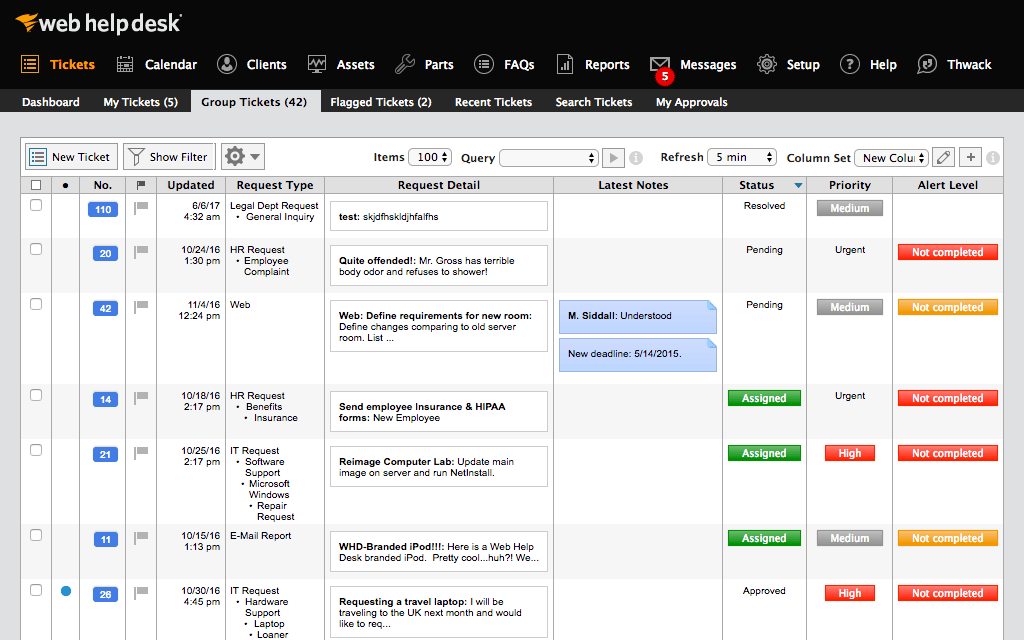
Web Help Desk is ticketing and IT asset management software. It is designed to
simplify help desk management. This solution includes built-in ticketing
management, asset management, change management, and knowledge base
capabilities.
If there are a number of different protocols and devices to monitor PRTG is really an all in one solution. There are network specific solutions, telephony solutions, server solutions, etc - but this tool can do anything. Even if you don't use this tool as your main "monitoring solutions" every IT professional should have access to this tool for at least troubleshooting purposes. If you are looking for something specific built for a task you may be able to find [a] more direct and easy tool to use that would be easier and quicker to setup as customization is not needed.
SolarWinds WHD is well suited if you have a limited budget, as it costs less than many help desk software packages that are more full featured and modern in their design. It is not well suited to an environment where you want to manage inventory, users, purchases and tickets all in one package. It has an asset feature that we don't use but that looks quite limited. We track our assets and users separately from this.
Very, very configurable. You can create all kinds of monitors for all kinds of things. Plus it has loads of suggestions out of the box. It can get complicated but monitoring is complicated. Pretty decent interface and good support - active community.
I really liked how easy it was to add alerts by SMS. So easy to setup.
I like their sizing models (for purchase). We're actually small enough that we are free. But it's not free as in stripped down - it's free because we don't use many "sensors" and don't honestly have the need.
Customized reporting allows us to track our service and support better, and find where we need improvements. This allows us to constantly upgrade our service levels and keep the customers happy.
Detailed tracking and response to the end users have led to quicker remediation of tickets. We are able to see where we need a better response or where to add additional resources for support.
Overall metrics allow us to staff properly for our tickets by location and remote users.
The probe service can be quite resource-intensive. This can cause false-positive readings from some sensors sometimes.
The software gets updated very regularly. Whilst this is usually a good thing to fix bugs etc, it does meantime downtime of the monitoring quite often while they are installed.
The ability to create Maps from Libraries. Very specific issue but a lot of people have been asking for it for years and it is still not available.
Because of AD integration, users sometimes try logging in with their email address and not AD credentials. The user then calls stating they can't put a ticket in, it would be nice if there was a method of matching the AD Email field with a login.
Setting up new techs with the building they are responsible for can be a little messy
We are definitely going to be sticking with Web Help Desk for the foreseeable future since the product is very inexpensive for the features that it provides, the integration that it has with our existing systems, and the ease for managing users, assets, locations, and tickets. Web Help Desk is a great product that is backed by even better support, which is well worth looking into if you are considering moving to a new ticketing system.
The tool is very intuitive to use and it is Windows-based (everybody knows how to use Windows) so it's easy to get into. Every time is setup in a hierarchy so if you have a good initial hierarchy design, it will really reduce administrative effort down the road.
The system has time and time again proven to be much easier to use and setup for both technicians and end users. It is simple enough to enter a ticket for end users, and even easier to communicate with logging back and forth because you can reply to the ticket emails to enter comments on the tickets. The technician side is a little clunky at first, but after looking at it for a few minutes it's very clear to see what you need to do to accomplish the goals. The mobile interface is snappy and responsive. It's a great product overall.
I am giving this a 6 simply because I have never had to contact support. The online documentation is adequate for most things, and the user-maintained knowledgebase is excellent. The few times I have run into issues that were not easily resolvable with intuitive UI, I was able to find the answers that I needed either in the PRTG-provided documentation, the knowledgebase, or with a quick online web search.
SolarWinds is a great customizable and affordable ticketing system. We use SolarWinds Web Help Desk for IT and Software Development trouble ticket tracking and resolution. The reporting that SolarWinds provides is great since it helps us discover problem areas and fix those areas so they don't keep reoccurring
Take the time to roll out a test VM to configure and make changes to before doing a live deployment, this way you don't end up with a VM that has been tweaked and re-tweaked until it's perfect and instead end up with a final, polished product. I would also recommend taking the time to read through the support forums for figuring out minor issues that may pop up, chances are that you aren't going to be the first one to encounter them. When all is said and done, SolarWinds Support is VERY responsive and you shouldn't hesitate to contact them.
I have deployed and tested three products for evaluation I found [PRTG Network Monitor] very easy to deploy, the deployment literally took not more than one hour including basic configuration and network discovery. After deployment few configuration changes and creation of maps, reports and little tweaking is required. [Then] it would go through its process of recommendation that took some time to complete, while [on] other hand other software's took lot of time to install and configure. And features were also missing, which resulted in decision in favor of [PRTG Network Monitor].
Web Help Desk is definitely lacking in the UI/UX department compared to most other ticketing systems I have used int he past. It's very utilitarian; however, what it lacks in UI it makes up for in extensibility and customization. The main issue that the developers need to address is the use of a Web Objects back-end.
The ability to analyze multiple pieces of information in one place, especially with historical data, has saved our IT department time and headaches. It would be so much more difficult to trace an issue without PRTG, just relying on event logs and an open task manager window.
The cost is not cheap, so it's an expense that hits the bottom line like everything else. Figure in hardware costs as well, ideally a server outside of your main environment.
I keep saying this, but the historical data piece is worth so much. There's really no good way to collect all of that information in one place without something like PRTG. And that definitely saves time and money in the long run.