Filter Ratings and Reviews
Filter 210 vetted AT Internet reviews and ratings
Reviews (1-25 of 113)
It enables analysts to understand key drivers of consumption patterns through big data analysis and support stakeholders across the organisation with dashboard views
- A very strong, supportive team who are keen to develop the relationship and deliver business value
- Excellent 'real-time' data availability through rapid data processing
- Powerful tools for analysing content consumption and usage patterns
- A range of API options to deliver data in the format required
- A process of continuous evolution in the data tools provided
- A lack of custom labels on video and audio, but this is being addressed with an imminent release
- A somewhat complicated tagging system and event tagging due to legacy systems
- Some limitations with the API
- Web Analytics visualization
- Web Analytics discovery
- Web Analytics analysis
- Intuitive surfacing of capabilities
- Overly simple UI (features hidden)
- Dashboard.
- Traffic analysis.
- Visual dashboard.
- Real time analysis.
- Interface.
- The breakdown by Platform/Website category is a very powerful tool to compare big chunks of data. M of the other players lack this seamlessness in analyzing the performance of different platforms under one company
- Landing page breakdown is something that I can only find on AT Internet and Google Analytics. It's great for funnel analysis.
- It would be great to add easy to use dashboards to track performance by event/attribute.
- Demonstrative sunburn
- Easy tool to create reporting board
- Customer support is reactive
- GDPR compliance
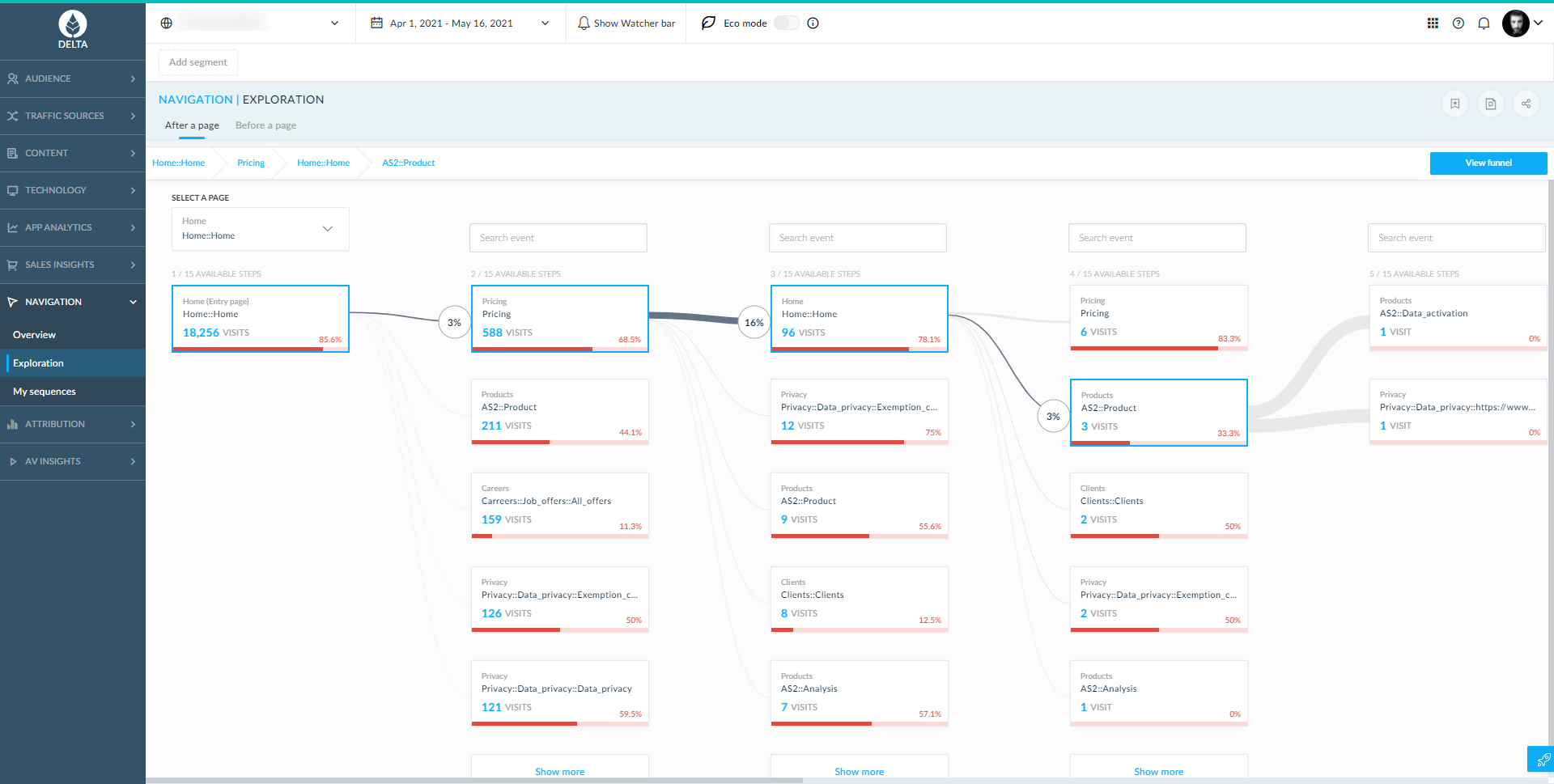
- The chronological order of events in a user journey is missing (but I saw that it appears in segments for the order of two events ). We need it to understand our user journeys
- To analyze our users' journeys, clicks and pages should be combined and both visible on "nav overview"
- Administration tools are not really ergonomic
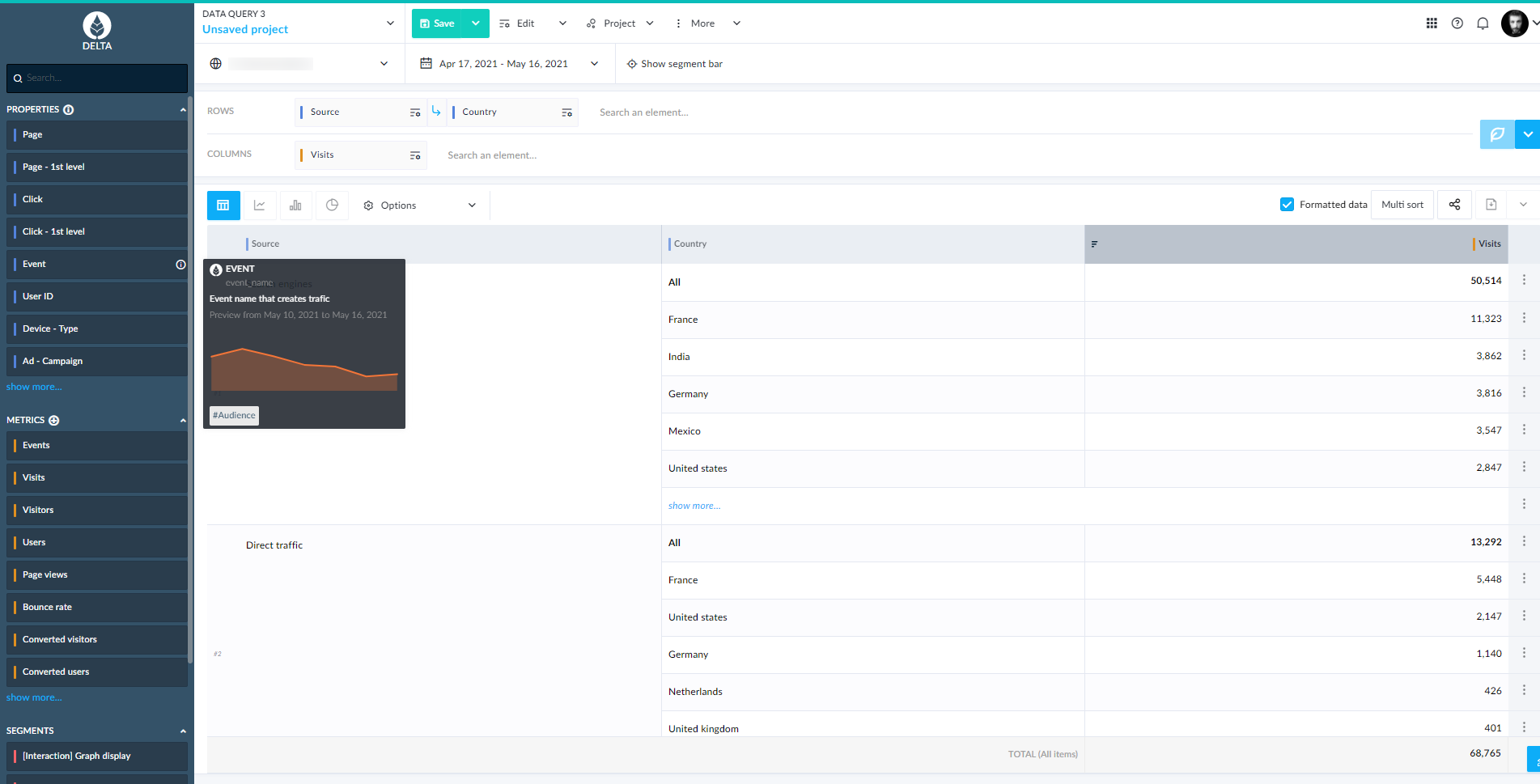
- The Data Query tool, to extract information
- The Customer Support Team, who always answers quicky and efficiently
- The Dashboard tool - once you have created a dashboard, it is very easy to get up-to-date information. You just need to change the date, and you have the data straight away
- The Dataquery tool is sometimes slow for some complex requests. But the new version is announced to be very quick

- AT Internet allows to create personalised dashboards.
- There is an expert team which can help us through a hotline, they are available, it is not only an analytics tool (such as Google, you can use their tool but you are alone when you have issues!).
- High security of the software that guarantees data protection.
- Be more user-centric for the dashboard. It is quite hard to use the tool without training. The interface is not user friendly.
- Create template of dashboards that we could use directly.
- Using Search activity and especially SEA, a simple plug between Google Analytics and AT Internet to create clusters of audiences to better manage the PPC campaigns. Maybe it is possible but I tried to set up with AT Internet and never had feedback.

- Qualified tagging
- Precise data thanks to page names & click names
- Real-time dashboard that requires no further effort to always do data extraction
- Cool new feature of AXON contribution thanks to machine learning
- Continuous improvement with the new generation of Data Query 3
- Limitation of 100 sites when it comes to multi-site analysis
- Sometimes I might face an instance of generating yesterday's data
- Period limit when it comes to customer journey analysis
- Limit of maximum number of metrics & dimensions to put in Explorer
- When I want to check message history in AT Internet support center, it always get me back to Explorer without showing my support message history

- Consulting services, fast support, & "Help" functionality for users
- Intuitive and easy-to- use web interface
- Price management (i.e., not comparable to Google)
- Innovative solutions (make use of AI in some analyses, which is getting better and better)
- Possibility of segmentation for analysis (i.e., segment users based on their IP address or their type of device)
- Possibility of "templates" (i.e., when setting up new domains in the tool or for example when creating dashboards)
- User management / user concept -- setup of the organization and user structure

- The data is always very easy to understand even when you don't know the analytics.
- Data Query allows us to export to meet our needs.
- Explorer saves us a lot of time.
- Not enough customization of dashboards.
- "Multi Sites" or "Multi Device" on Data Query.
- It has wide range of useful analytics options.
- It feels transparent, what we set up, we'll get of the data—no tricks.
- Consultant's help is very useful, makes it much easier to join the at internet team.
- It ads value to the data analysis, there is always more to explore.
- Sometimes it's overwhelming to know what dimensions are worth using for our advantage.
- Easy integrated.
- Works without worries under Symfony.
- Easy access for the client.
- He must settle certain rather technical concerns on the global variables which are in conflict with the minimization.

- Privacy of user data (especially compared to Google Analytics), everything stays in Europe.
- Easy to use, intuitive interface.
- Amazing support.
- More respect of their own timeline (DQY v3 has been in beta for a long time).
- Multi site analysis is difficult (but this is improving).
- Some functionalities still have horrible UI (especially things in configurations).
- Could have more user freedom. I have to contact the support for some things which I should be able to do myself (even if support is amazing and very quick).

- Stats reports
- GDPR advices
- Customer support
- Incorrectly marketed CDDC
- Full customization.
- Highly detailed info.
- Speed loading content.

- Number of unique visitors.
- Number of page views.
- Split desktop and mobile traffic.
- Still not experiencing with my publishers.
- Tracking
- Structure
- User-friendly
- API improvement
- Event tracking
- Better Documentation

- Short response times
- Feedback of support not always clear and reproduceable
- Naming of metrics, elements, dimensions not always stringent
- For Campaigns the parameter and naming in ATI differ
- Dashboard design is not very flexible and buggy
- Centrally maintainable datasets would be helpful when dealing with similar country website dashboards.
- The applicability of the SDK on almost all platforms.
- The versatile evaluation options.
- The number of available fields in the measurement.
- The granularity of rich media measurement, but this is currently being implemented :)
- In Explorer, I miss the metric Visit rate, which still exists in Analyzer.
- The availability of the previous day's data, but also here optimizations are already carried out.
- Xtor campaign link auto builder. Super easy to build an Xtor campaign link for each acquisition channel for us and our customers.
- AT Internet user interface. Intuitive and simple to analyze the ecosystem in the macro view.
- The data export on Excel is super easy through data query!
- The style customization possibilities on AT dashboards are less important compared to DataStudio (ex: managing the size of columns within a tab).
- The segmentation use within a dash is more complicated than other tools (ex: Data Studio/Adobe)
- Some media campaign parameters must be declared in the AT Interface (like the ID number for channel sources). It's not completely automatic (compare to GA for instance).
- Extensive performance data about our content, very easy to interrogate through bespoke dashboards.
- Realtime performance - particularly useful.
- More intelligence around assets.
- More detail around video and audio consumption.
- Xtag widget is a very useful complement especially to speed up your work on a specific analytic you might need.
- It compiles heavy loads of data and organizes it very well.
- When extracting website analytics some sections and titles can be misleading inside the tool.
- For new comers it might be challenging.
It allows us to monitor the overall performances of our digital products (websites and applications), such as traffic, page views, or other relevant KPIs, for editorial, marketing, or product issues. We use it for both reporting and in-depth analysis on a large range of topics, including traffic acquisition, conversion, and retention.
AT Internet is an essential pillar for our operational and strategic decision making.
- Measure precisely from where your visitors come from.
- Follow the conversion rates by traffic sources.
- Computing power for complex requests.
We have a good relationship with AT Internet Team and the support, who answer our problems quickly.
The anlytics suite is complete. Every (working) day we check results on Explorer and analyze details with Dataquery. The responsetime is correct for the majority of our "strong" queries.
- User-friendly solution.
- Easy to use.
- We've experienced a few difficulties when trying to parameter specific rights (configuration).
- Limit of results in the standard version of data query.
- Real-time data.
- Good visualizations.
- Underestimated due to Adobe and Google by degree of awareness.
- Easy to learn, hard to master.
AT Internet Scorecard Summary
What is AT Internet?
AT Internet is a European leader in digital
analytics. Active for over 20 years, AT Internet's goal is helping customers measure their
audience, optimise their digital performance and create value.
From
data collection to exploration, activation and the sharing of actionable
insights, AT Internet's Analytics Suite is designed to provide reliable
high-quality data to enhance decision-making company wide. Adapted to
e-commerce, media, finance/banking, and corporate websites
& mobile apps, the vendor promises an easy-to-use solution accessible to everyone,
whether they’re business users, analysts or data scientists.
Used on more than
20,000 sites and mobile applications worldwide, the Analytics Suite enables the company to qualify its audience and target ads, and gives a greater understanding of the audience and how
to better serve them.
With more than 200 employees, the group is present
globally via its customers, subsidiaries and partners.
AT Internet won Best Analytics Platform at the 2019 Martech Awards and was named a web analytics “Leader” in the “The Forrester Wave™: Web Analytics, Q4 2017” report from Forrester Research, Inc.
AT Internet Screenshots
AT Internet Video
AT Internet Integrations
AT Internet Competitors
AT Internet Pricing
- Has featureFree Trial Available?Yes
- Does not have featureFree or Freemium Version Available?No
- Has featurePremium Consulting/Integration Services Available?Yes
- Entry-level set up fee?Optional
Our different options are designed to scale and adapt to your needs : BUSINESS : Starting at 355€/MONTH No obligation Try for 1 month, for free! PREMIUM : Contact us for pricing details Free Trial: Available. Pricing model: Subscription.
AT Internet Customer Size Distribution
| Consumers | 0% | |
| Small Businesses (1-50 employees) | 35% | |
| Mid-Size Companies (51-500 employees) | 45% | |
| Enterprises (> 500 employees) | 20% |
AT Internet Support Options
| Free Version | |
|---|---|
| Phone | |
| FAQ/Knowledgebase | |
| Video Tutorials / Webinar |
AT Internet Technical Details
| Deployment Types: | SaaS |
|---|---|
| Operating Systems: | Unspecified |
| Mobile Application: | Apple iOS, Android |
| Supported Languages: | French, English, German, Spanish. |


