TrustRadius: an HG Insights company

Nuclino

Score7.1 out of 10

23 Reviews and Ratings

What is Nuclino?

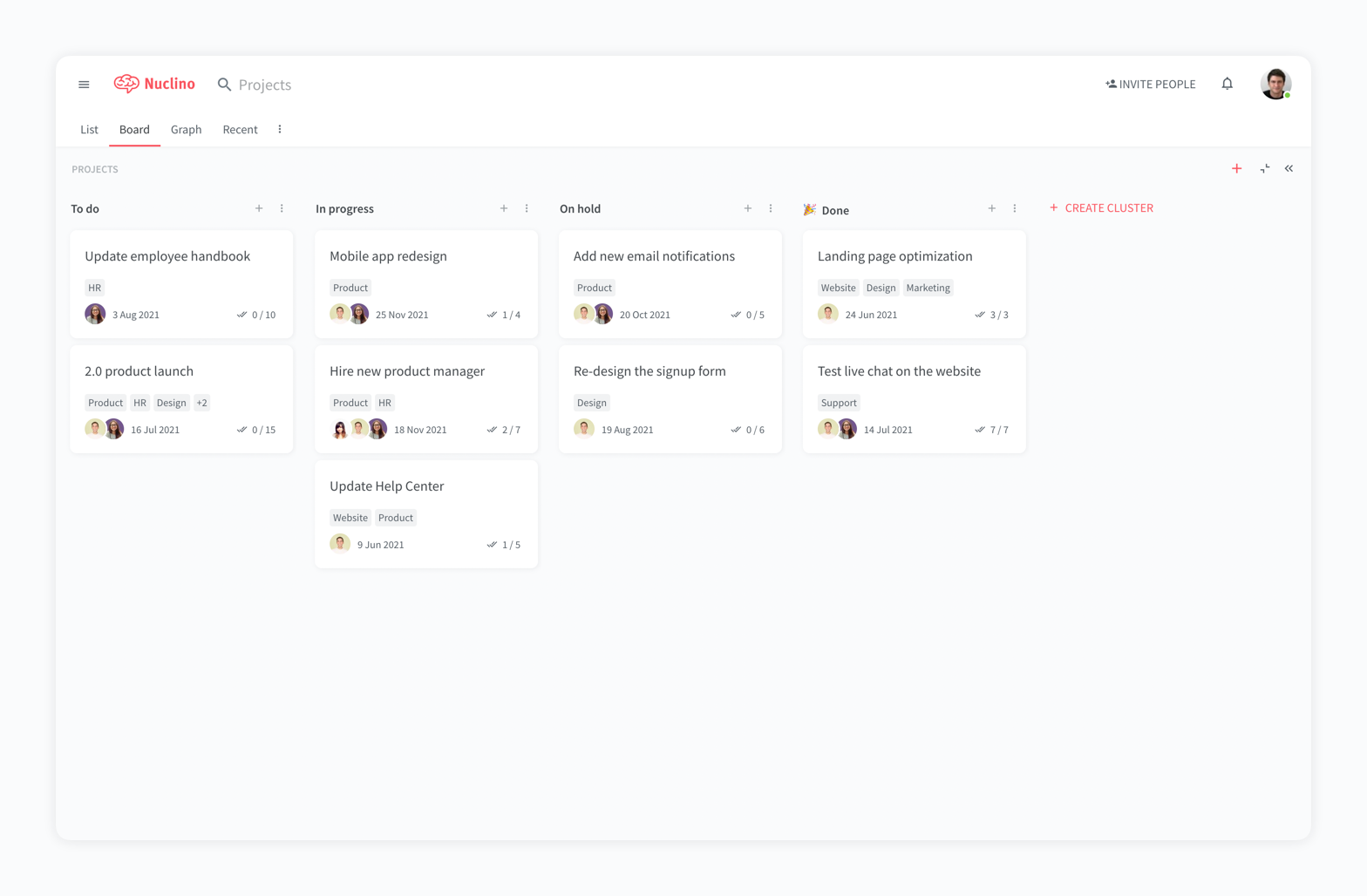
Nuclino is a unified workspace where teams can organize knowledge, manage projects, and share ideas. Progress can be tracked in a Kanban board, work structured in a hierarchical list, or data organized in a visual graph — Nuclino adapts to a team's workflow.

Presented as simple and lightweight by design, Nuclino focuses on the essentials, doing away with clunky menus and rarely-used settings, to minimize the learning curve for new users.

Teams from across the globe can use Nuclino to work on all kinds of projects, from designing video games to building space supercomputers for NASA.

Media

Screenshot of a company wiki created in Nuclino
Screenshot of the interface to manage projects and plan sprints
Screenshot of a knowledge graph

1 / 3

Screenshot of a company wiki created in Nuclino

Top Performing Features

  • Workflow Automation

    Workflow automation is the ability to route work requests along an approval process automatically.

    Category average: 7.8

  • Document collaboration

    Users can edit files and attach comments to files.

    Category average: 8.4

  • Scheduling

    Scheduling capabilities allow users to set schedules on tasks, and create timelines and milestones.

    Category average: 8.1

Areas for Improvement

  • Video files

    Supports video file types

    Category average: 8

  • Versioning

    Users can access the most up-to-date version of a document, track changes, and revert to older versions if needed.

    Category average: 8.1

  • Access control

    Users can control access to (shared) files, including different levels of access such as view-only or permission to edit.

    Category average: 8.3

Must have.

Use Cases and Deployment Scope

I'm an indie game developer. My project is a unique game that combines many mechanics. And because I'm working alone on this project in my free time, I need a tool that simplifies my workflow in the most effective and elegant way. That's the point where Nuclino helps me. Nuclino offers powerful features for organizing and managing game design documentation. Especially, this is useful when crafting a non-standard game on your own. UI features are great, AI integration is perfect (content generation is a pretty common task), and pricing is good. So looks like it's a perfect match. There are plenty of templates (and for game design too), but I chose to do it myself from scratch, and it's easy enough. Strongly recommend this tool! Will use it for my future projects.

Pros

  • UI
  • Content editing.
  • AI generation.

Cons

  • It would be nice to have more customization for AI (for example, providing some project context to use in prompts).
  • It would be nice to have custom fields not on the workspace level but on the sub-collection level. For example, we have a collection of entities that have some fields. It would be great to display them in a table with these custom fields and edit them at the item level. It would provide a nice list-details view.

Return on Investment

  • Greatly improved my mood. This is good impact.

Usability

Other Software Used

Anthropic Claude, Todoist, Sublime Merge, Microsoft Visual Studio Code

Clear and safe

Use Cases and Deployment Scope

We are a growing association dedicated to establishing innovative schools. We use Nuclino to make the wealth of knowledge and associated documents from a locally stored MindMap available to all our colleagues. In doing so, we have learnt an important lesson: the knowledge that was previously scattered across individual files is now brought to life and becomes part of our organic development.

Pros

  • Easy setup of the Wiki
  • Clear and easy to understand structure
  • No unnecessary tools

Cons

  • The ability to filter comments so that new team members can find them easily.
  • Possibility to import MindMaps and convert them into a Wiki

Return on Investment

  • Costs are comparable to other products.
  • Data-Security is priceless

Usability

A perfect app to avoid productivity paralysis for startup teams

Use Cases and Deployment Scope

Well in our company we had an idea to make a database for our knowledge base, as we previously use notion but its a little bit complicated, and Nuclino simplified it for us, its very easy to maintain and good for both beginners and expert to create a company wiki. It helped us to avoid cluttered documents in various websites, instead we had one platform to share it all for updates and all.

Pros

  • There's a clean and intuitive way of building wikis
  • I love the real-time editing features
  • I also love the flexible option for different views, like graph and tables
  • I also like how fast I can search within wiki
  • It's pretty simple and beginner-friendly rather than the majority.

Cons

  • I would love to see in future for them to add the gantt charts
  • Probably more UI customization options in future
  • Please add more drag and drop options

Return on Investment

  • Because of it, time is saved, thus giving us chance to focus on business and profitable ideas
  • It reduced our information overload or fragmentation, thus giving us more chance to look at the more priority projects that earns well
  • Fewer mistakes because less lost documents

Usability

Alternatives Considered

Notion and Trello

Other Software Used

Notion, Trello

Clean all-in-one platform

Use Cases and Deployment Scope

I've been using Nuclino to reach one goal and that is to have all in once place knowledgebase and Doc collboration system. What I love most about Nuclino is that it keeps it simple and clean. It's not clogged and crowded with too many features, options, settings, etc. Clean, all in one place. Highly recommended especially for startups trying to manage their costs and get started with the least amount of hassle.

Pros

  • Doc collaboration
  • knowledgebased
  • Getting rid of Google Docs and Google Sheets

Cons

  • More integations are always welcome
  • API integration to external apps
  • Email marketing features down the road, A CRM Maybe

Return on Investment

  • Havne't used it for a long time so too early to judge that.

Usability

Other Software Used

ClickUp, Atlassian Confluence, monday CRM

A Fast and Intuitive Tool for Efficient Documentation Production

Use Cases and Deployment Scope

We use Nuclino as a knowledge base and collaboration platform. It addresses business problems such as documentation of projects, business processes and works well as a sharing and collaboration tool. We mainly use it for project management, but also in some cases to document business processes.
So far, we have only used it for internal documentation only. Other systems seem to have more advanced functionality for sharing information and collaborating with external partners, operators and suppliers.

Pros

  • The system is extremely fast. The application loads and displays data in milliseconds. This makes the system easy to work with.
  • It's also easy to edit documentation and information, as information can be editing directly without the use of an "edit" button.
  • Pricing: Loading speed, ease of use and quick editing are its main advantage that makes it stand out from competitors. Having said that, the pricing is very good as well.

Cons

  • While editing is easy and quick, some accidental changes may happen. Maybe some AI functionality for detecting obvious mistakes should be added.
  • Improved functionality for collaborating and sharing data with external partners would be an improvement.
  • The application seems to favor the writers, which in many cases is refreshing and makes work easier and quicker. In some cases, other systems are a better match, especially when many users should be allowed to make changes, but are mainly using the application for gathering knowledge and hardly want to do any editing themselves.

Return on Investment

  • We have seen noticeably higher satisfaction among employees who have been less happy with overly complex systems in the past (particularly system developers and employees who need to produce documentation as fast as possible without getting annoyed or distracted).
  • Some of our teams now spend less time on documentation and more time delivering actual results. The teams/employees who need less speed and a more "rigid" systematic approach prefer solutions that are more suited for that purpose instead.

Usability

Alternatives Considered

Atlassian Confluence, Google Workspace, Microsoft Teams, Microsoft SharePoint and Notion

Other Software Used

Visma.net ERP, Fiken, ClickUp, Google Drive, Google Forms, Microsoft 365 Business Premium, ChatGPT, Google Gemini, Microsoft Copilot, Google Chrome, Slack, Miro, Mural, draw.io, Microsoft SharePoint, Microsoft Intune