TrustRadius: an HG Insights company

SecureDocs, An Onit Product

Score8.4 out of 10

8 Reviews and Ratings

What is SecureDocs, An Onit Product?

SecureDocs in Goleta, California offers their Virtual Data Room as a deal room and secure corporate document vault, offering permission-based user roles, dynamic watermarking, drag-and-drop uploads, and other ease of use features that also maintain security.

Media

Corporate Repository - Get your data room set-up in minutes with easy drag and drop uploads or your Fujitsu ScanSnap Scanner.
Customizable Dashboards - Fully customizable dashboards and real-time user statistics allow you to analyze the activity of individuals or groups to gauge buyer or investor interest.
Electronic Signature - Quickly execute corporate agreements and transaction documents using our built-in electronic signature feature.
Customizable Watermarks - Remind users that information in your secure data room is confidential and track leaks, should they occur, with personally-identifiable watermarks.
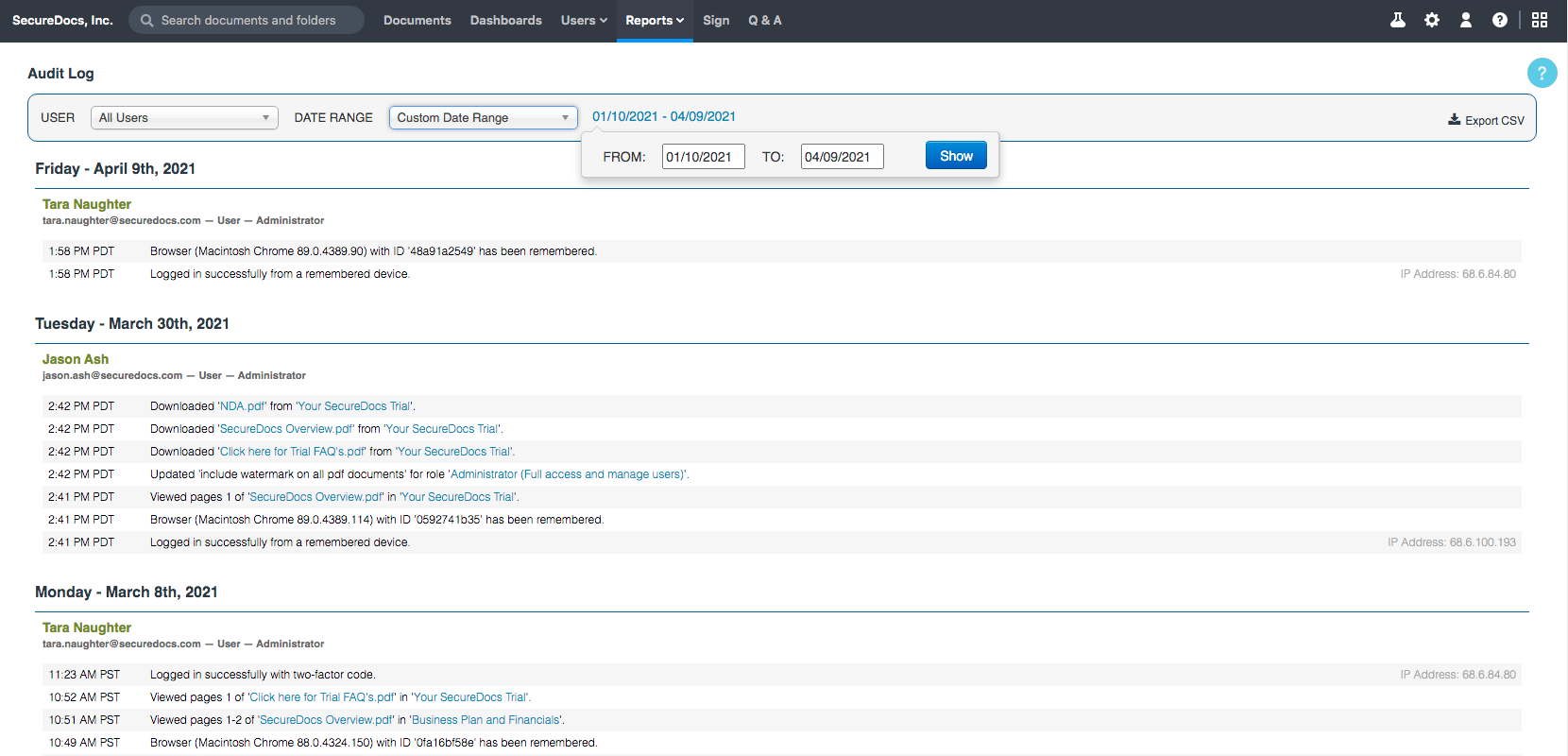
Audit Log Reporting - Detailed audit logs keeps administrators informed of all data room activity. Includes date and time stamps and optional daily reporting.
Permission-Based Roles - Control access to confidential company information with permission-based user roles to define full access, no access, view only, or download.

1 / 6

Get Document Management Tool

Use Cases and Deployment Scope

Great platform to manage documents in a secure fashion. It is also user-friendly and easy to work in. It allows for around-the-clock access to any document loaded in the library and has good integration. I like the ease of use and robust interface. Customer service has been great as well.

Pros

  • Security
  • Features
  • Integration

Cons

  • Added Chat feature
  • Integration with Google Docs

Most Important Features

  • Data Importing
  • Email Integration

Return on Investment

  • Good ROI
  • Improved productivity

Alternatives Considered

DocSend and from Dropbox

Other Software Used

DocSend, from Dropbox

Easy Multiple Document Management and Excellent on Document Viewing.

Use Cases and Deployment Scope

The ease of files editing using SecureDocs Virtual Data Room is amazing and the effective access to multiple files and other project documents through the tool. I still like easy data analytics production and the sharing of data across various members. Easy to integrate this software with other third-party systems and easy interface for any user to use.

Pros

  • Perfect platform on easy documentation and file accessibility.
  • Highly capable document editing tool.
  • Sharing of data is effective.

Cons

  • Everything is cool after a long term training.
  • Help to be there 24/7
  • Handling of multiple group of files is hard.

Most Important Features

  • The notification functions are very responsive.
  • Functional and easy file editing features.
  • Effective integration and scheduling functions.

Return on Investment

  • Excellent team coordination and reports sharing package.
  • Flexible multiple document management system.
  • Highly capable data analytics platform.

Other Software Used

Dokmee ECM, DocuSign, Google Ad Manager

SecureDocs Honest Review

Use Cases and Deployment Scope

Sending/Receiving electronic copies of employee handbooks makes my job easier. I despise using paper, so SecureDocs makes everything convenient. I can edit PDFs which allow me to alter where information can be input and filled.

Pros

  • E-signatures.
  • Date stamps.
  • Acknowledgements.
  • Documentation history.

Cons

  • User interface.
  • Layout.
  • How-to guide.
  • Easy to email documents to others for filling out needed information.

Most Important Features

  • Employee acknowledgements.
  • Date stamps.
  • E-signatures.
  • Documentation history.

Return on Investment

  • Helps limit company liability.
  • Record keeping.
  • Track record.
  • Employee management.
  • Employee engagement.

Alternatives Considered

PandaDoc

Other Software Used

Nitro Productivity Suite, PandaDoc, Adobe Acrobat Sign

SecureDocs for your Documents

Use Cases and Deployment Scope

When we need to store our documents online and are available round the clock then we choose SecureDocs. Very simple setup and we are done with uploading our files. Customization for organizing documents is a big plus over other available options. It's very economical and flat rated so suits very well most organizations. Watermarking and security is the big feature we choose.

Pros

  • Easy setup.
  • Cheap and flat rate.
  • Secure.
  • Documents organization.
  • User authentication.

Cons

  • Customer service.
  • User permission management.
  • Improve UI while viewing files.

Most Important Features

  • Security
  • Setup
  • Organization
  • Easy to access
  • User roles

Return on Investment

  • Saving documents is really secure and easy.
  • User roles for accessing documents.
  • Round the clock availability.

SecureDocs Virtual Data Room is great resource!

Use Cases and Deployment Scope

In our organization we've been able to use SecureDocs Virtual Data Room to help us control and customize our data storage in one place. This has helped us to stay more organized, to feel that we're not putting any sensitive data and risk and to get the job done!

Pros

  • Very user friendly.
  • Good customer service.
  • Available to access anywhere!

Cons

  • The cost is high.
  • Customizing upload date would be helpful.
  • A user can only be assigned to one "role."

Most Important Features

  • Ability to Store documents on the site
  • Share documents securely
  • Track users

Return on Investment

  • Allows for quick deal closings.
  • Keeps our company organized.
  • Our clients feel secure.