TrustRadius: an HG Insights company

Retrace (legacy)

Score8 out of 10

6 Reviews and Ratings

What is Retrace (legacy)?

Stackify Retrace provides application performance management across the entire stack. Coupled with aggregated logs from common logging frameworks, find every exception in code. Retrace code with lightweight code profiling and track and monitor all key application and server metrics. The vendor states that with coverage for full lifecycle development, the Stackify Retrace software offering is tailored to be inclusive for multiple role types, and presents everything your team needs to know about your applications, performance, and diagnostics is all in one place. Retrace and Stackify were acquired by BMC Helix, and Retrace is nearing its EOL date, which is currently listed as March 31, 2027.

Read more details.

Media

Screenshot of Detailed stack trace with inline error and logs
Screenshot of Web Apps Dashboard:
The Apps Page gives you a high-level overview of all applications found and monitored across all servers in each environment. Click on any app to take you to the App Dashboard to view more information for a particular app.
Screenshot of Apps Dashboard:
The App Dashboard is a powerful monitoring and troubleshooting perspective that gives you a view of application health across one or more environments.
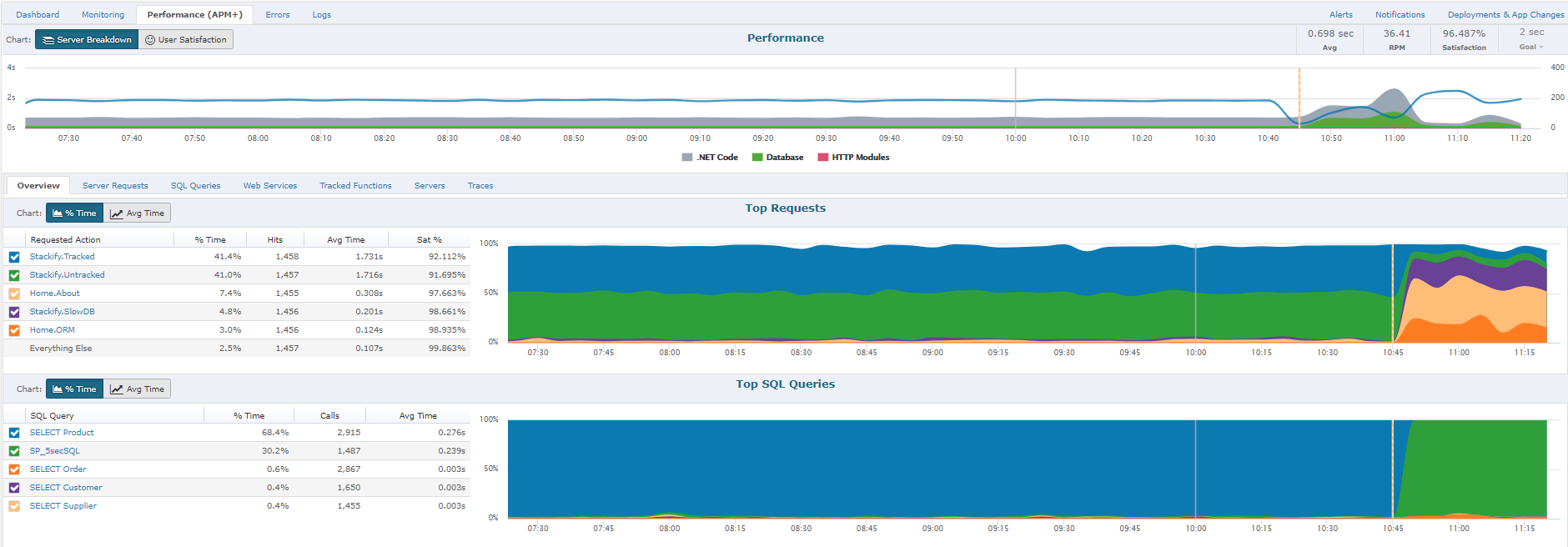
Screenshot of Performance (APM+) Dashboard:
The Performance section will give you a report of how well the application is performing overall, as perceived by your users.  A graph will allow you to view all requests by Satisfaction by viewing "Fast", "Sluggish", "Too Slow", or "Failed" types of requests.  Another report includes graphs of HTTP Error%, Satisfaction Score%, and Page Load Time.  Lastly, you will have the ability to sort each page request of your App by different categories: Satisfaction, Slowest page, Failed pages, pages hit, and total load time.  By clicking on an individual page a Performance Details page with further information about that specific page's health, performance, and errors will be displayed.
Screenshot of Performance Traces:
One of the ways we strive to deliver relevant insights is to only collect traces around interesting requests. Some examples of these request types that are interesting would be faster than normal, slower than normal, new web requests, requests introducing new SQL, requests introducing new exceptions, or abnormal satisfaction scores. Under performing requests will be profiled more often than fast requests. As long as the app is getting steady traffic Retrace should be saving a trace every 5 to 15 minutes.
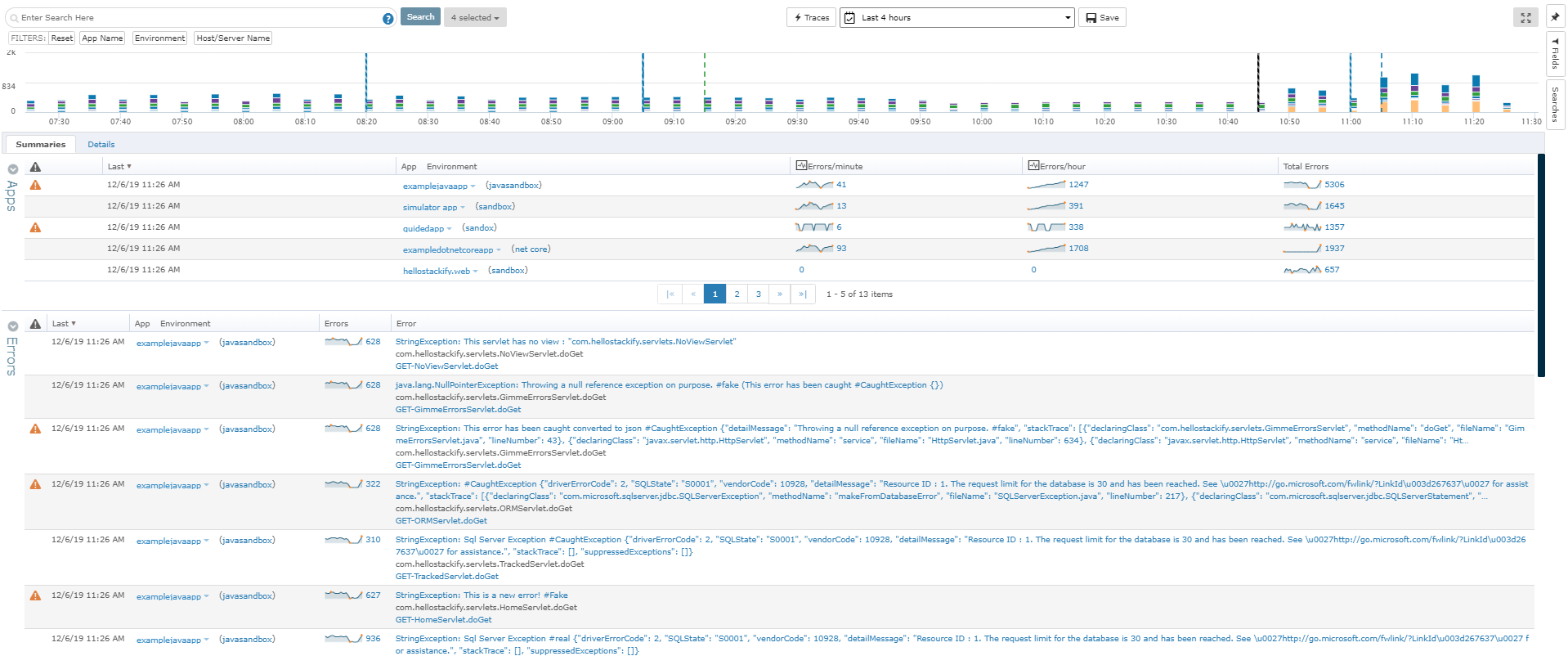
Screenshot of Errors Dashboard:
From the Errors Dashboard, you can get an overview of all the exceptions of all your applications across different environments. It gives you a central location to view details about your errors.
Screenshot of Logs Dashboard:
Find contextual insights about your apps that can assist you in solving any error you might face. View all logging messages in an inline view across all apps, on all servers, and in all environments. Along with this comes the ability to tail log files in real time and search through all the logs of a given app.

1 / 7

Screenshot of Detailed stack trace with inline error and logs

Top Performing Features

  • Application monitoring

    Application monitoring involves tracking response times and resource usage for applications, including highly-distributed applications

    Category average: 7.6

  • Application dependency mapping and thresholding

    Mapping relationships between the application and its underlying infrastructure

    Category average: 6.3

  • Database monitoring

    Database monitoring means looking for database bottlenecks liable to slow response times

    Category average: 7.9

Areas for Improvement

  • Out-of-the box templates to monitor applications

    Built-in templates for specific applications

    Category average: 7

  • Server availability and performance monitoring

    Ability to monitor server availability

    Category average: 7.9

Who Buys & Uses Retrace (legacy)

Most Frequent Users

Top 2 industries using Retrace (legacy).

Based on HG Insights installation data
Powered by
View all Reviews

APM Plus - Ready to archive, email and more!

Pros

  • APM Plus has a searchable archive that makes it easy to find a previously sent document.
  • APM plus can automatically decide if the email address isn't present on a document, send it by fax. If no fax number exists the document is sent back to sender for evaluation.
  • Sending to APM Plus is as simple as sending a document to a Printer! APM Plus does the rest!

Cons

  • To set up the fields that APM Plus monitors, you need to map each field area on each document.
  • APM Plus could use a way to link the documents back into the finance or business software so you can find the document under the PO, Sales Order, Invoice, etc.
  • APM Plus setup is only for the professionals. There are many areas that need tweaking on setup, having a better default setup would lessen the learning curve to set it up for use.

Return on Investment

  • APM Plus has freed up users from having to manually attach documents to each place they are sending it. APM Plus will do it automatically.
  • APM Plus provides a searchable archive to re-visit sent documents with customers and vendors. Having to reprint a document you risk the potential that something has changed since it was last printed.
  • APM Plus does need IT staff for adjustments and to review sending problems. Not for an average user.

Alternatives Considered

DocSend

Other Software Used

Epicor ERP, Microsoft SQL Server, ServiceDesk Plus

One tool that combines performance and log management. Highly recommend it.

Pros

  • Integration of performance management with log management so you get the parameters sent
  • In-line log and error data in trace
  • Integration of error and log data, so in one click you can see all the logs recorded when an error was thrown
  • Very reasonably priced

Cons

  • Need to improve their mobile support
  • Documentation improvment

Return on Investment

  • We shorten the time we fix app issues
  • We spend a lot less time digging through data
  • We can be proactive and see issues as they are trending before the completely explode
  • I have APM on all production servers so I can catch issues as they happen
  • I no longer get 2000 email on an issue but rather one full of data