Adaptive Security vs. Phished

Overview
ProductRatingMost Used ByProduct SummaryStarting Price
Adaptive Security
Score 10.0 out of 10
N/A
Adaptive Security is a cybersecurity platform designed to protect organizations from modern cyberattacks. The solution addresses emerging threat vectors associated with unauthorized AI Tool usage. The system is designed to detect and block threats such as Deepfakes, Vishing calls, and Spear Phishing emails that bypass standard security filters. Adaptive Security consolidates these capabilities into a single platform: managing AI Tool usage, training personnel on active…N/A
Phished
Score 10.0 out of 10
N/A
Phished is a cybersecurity platform that combines interactive security awareness training with zero-trust email and browser protection. Its Phished Assistant analyses risky emails, links, attachments, and web content in an isolated digital silo, giving employees personalised guidance in their daily workflow while reducing human cyber risk and eliminating phishing-related workload for security teams at enterprise scale.N/A
Pricing
Adaptive SecurityPhished
Editions & Modules
No answers on this topic
Offerings
Pricing Offerings
Adaptive SecurityPhished
Free Trial
NoNo
Free/Freemium Version
NoNo
Premium Consulting/Integration Services
NoNo
Entry-level Setup FeeNo setup feeNo setup fee
Additional Details
More Pricing Information
Features
Adaptive SecurityPhished
Security
Comparison of Security features of Product A and Product B
Adaptive Security
10.0
1 Ratings
14% above category average
Phished
10.0
1 Ratings
14% above category average
Single sign-on capability10.01 Ratings10.01 Ratings
Role-based user permissions10.01 Ratings10.01 Ratings
Security Awareness Training
Comparison of Security Awareness Training features of Product A and Product B
Adaptive Security
10.0
1 Ratings
15% above category average
Phished
10.0
1 Ratings
15% above category average
Training Content Library10.01 Ratings10.01 Ratings
Multilingual Training Content10.01 Ratings10.01 Ratings
Training Gamification10.01 Ratings10.01 Ratings
Industry-Specific Security Training10.01 Ratings10.01 Ratings
Individualized Security Training Plans10.01 Ratings10.01 Ratings
Phishing Simulations10.01 Ratings10.01 Ratings
Security Reporting10.01 Ratings10.01 Ratings
Integration with Security Tech Stack10.01 Ratings10.01 Ratings
Best Alternatives
Adaptive SecurityPhished
Small Businesses
Barracuda Email Protection
Score 8.7 out of 10
Barracuda Email Protection
Score 8.7 out of 10
Medium-sized Companies
Hoxhunt
Hoxhunt
Score 8.9 out of 10
Hoxhunt
Hoxhunt
Score 8.9 out of 10
Enterprises
Hoxhunt
Hoxhunt
Score 8.9 out of 10
Hoxhunt
Hoxhunt
Score 8.9 out of 10
All AlternativesView all alternativesView all alternatives
User Ratings
Adaptive SecurityPhished
Likelihood to Recommend
10.0
(1 ratings)
10.0
(1 ratings)
Usability
10.0
(1 ratings)
-
(0 ratings)
User Testimonials
Adaptive SecurityPhished
Likelihood to Recommend
Adaptive Security
Well suited for any company that wants to train and keep it's users up to date with IT and Data security best practices. They are constantly updating to provide info on current trends and topics as well. If you don't deal with any IT (internet, email, phones) then maybe you wouldn't need their services.
Read full review
Phished
Phished was very easy to implement at my organization. We have had no issues with my team navigating this software. The platform is extremely user friendly. I would recommend Phished to any company looking to protect themself against cyber attacks. This software is an asset that definitely pays for itself in the long run. You can never be too safe!
Read full review
Pros
Adaptive Security
No answers on this topic
Phished
  • Provides simulations to help increase cyber threat awareness
  • Provides continual active reporting to lock out cyber attacks
  • Provides their "Behavioral Risk Score" to monitor the organization's security status at all times
Read full review
Cons
Adaptive Security
No answers on this topic
Phished
  • I would like more testing and personalized simulations added
  • It would be great to have job role specific training so each different department knows better of the cyber threats that might come their particular way
  • More detailed status reports would certainly be beneficial
Read full review
Usability
Adaptive Security
The admin UI is very intuitive and easy to use. My favorite part is in the phishing triage where you can actually see the email a user reported instead of a breakdown of the contents. Makes it much easier to investigate. Everything flows well.
Read full review
Phished
No answers on this topic
Alternatives Considered
Adaptive Security
We were not able to find anyone else that offered as much quality content and capabilities as Adaptive Security at a better price. They also regularly reach out for feedback to proactively improve their products.
Read full review
Phished
Phished seemed like the better alternative for my organization. I have used Barracuda in the past with another employer. That software doesn't provide the status reports that Phished does. Barracuda filters company wide emails which seems like a good feature, but can be detrimental when "safe" emails aren't making their way through. Phished has a better monitoring system overall
Read full review
Return on Investment
Adaptive Security
No answers on this topic
Phished
  • Phished has helped us protect against data breaches which in return protects our profits and maintain client retention
  • Phished has freed up project management tasks for our IT department since the software is always monitoring cyber attacks
  • Phished has allowed my organization to meet its annual cyber protection goals
Read full review
ScreenShots

Adaptive Security Screenshots

Screenshot of Adaptive’s dashboard, which offers a clear, real-time view of employee training progress and organizational risk.Screenshot of where users can access interactive, scenario-based security awareness training modules tailored to today’s most sophisticated security threats.

Phished Screenshots

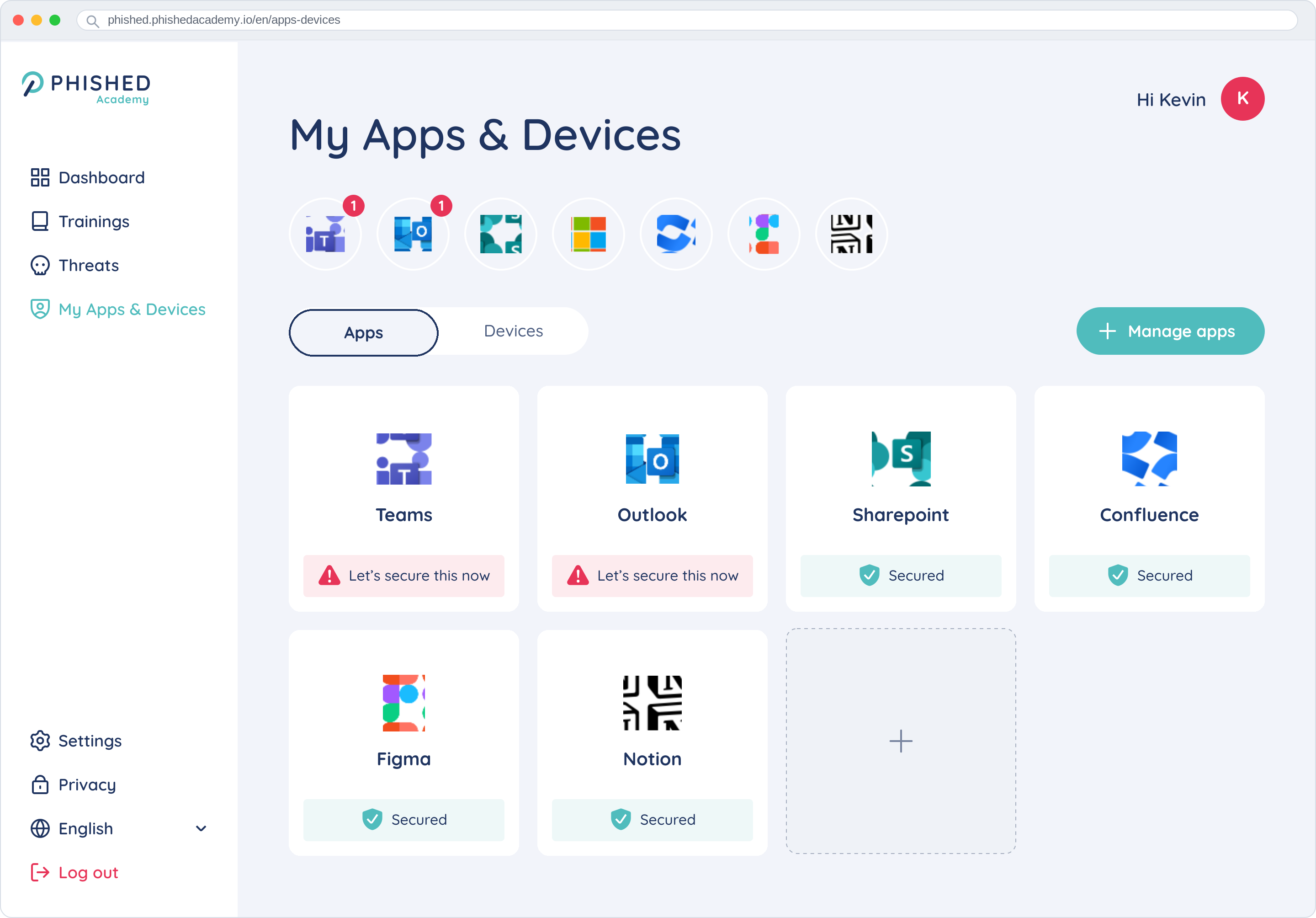
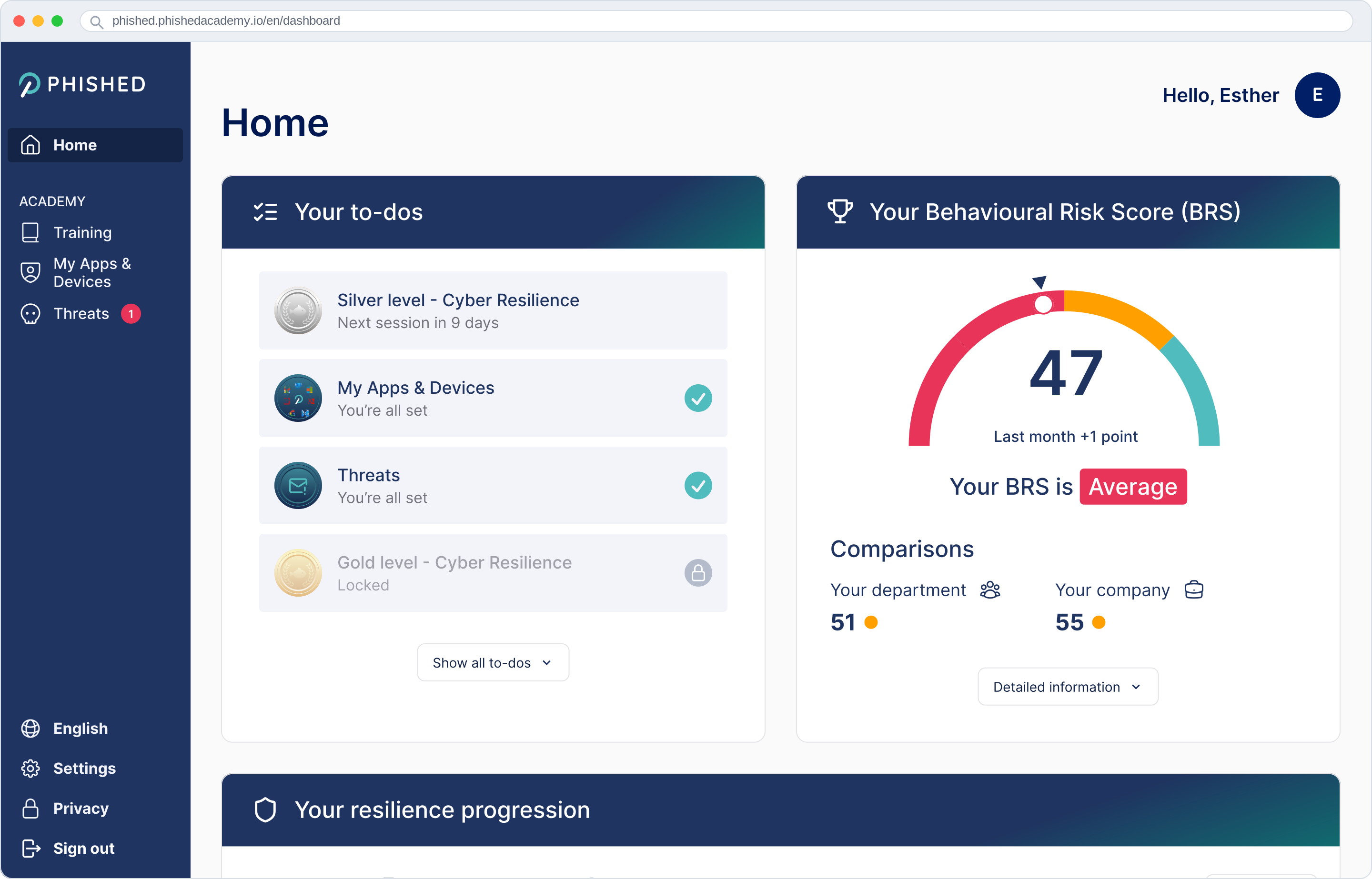
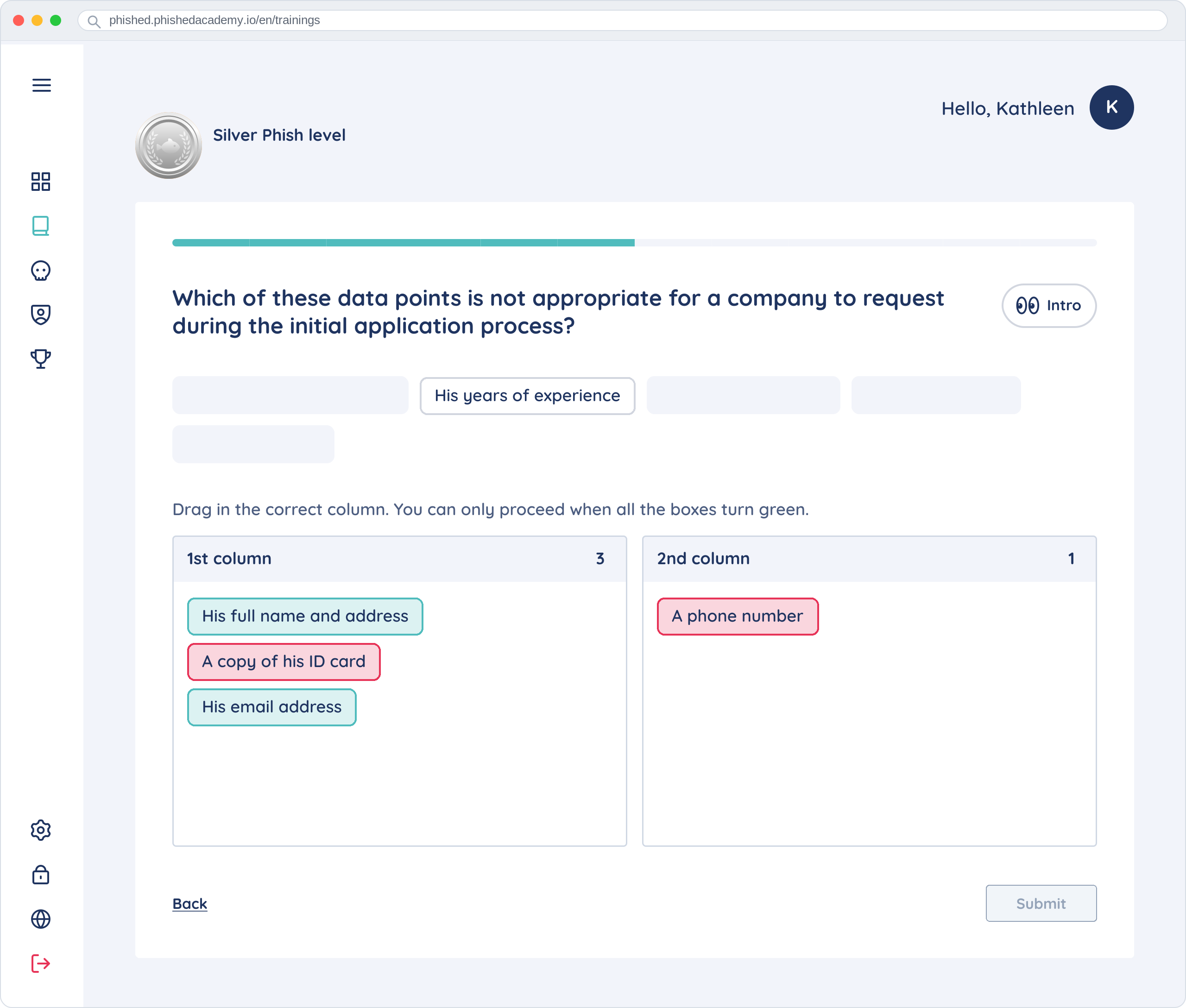
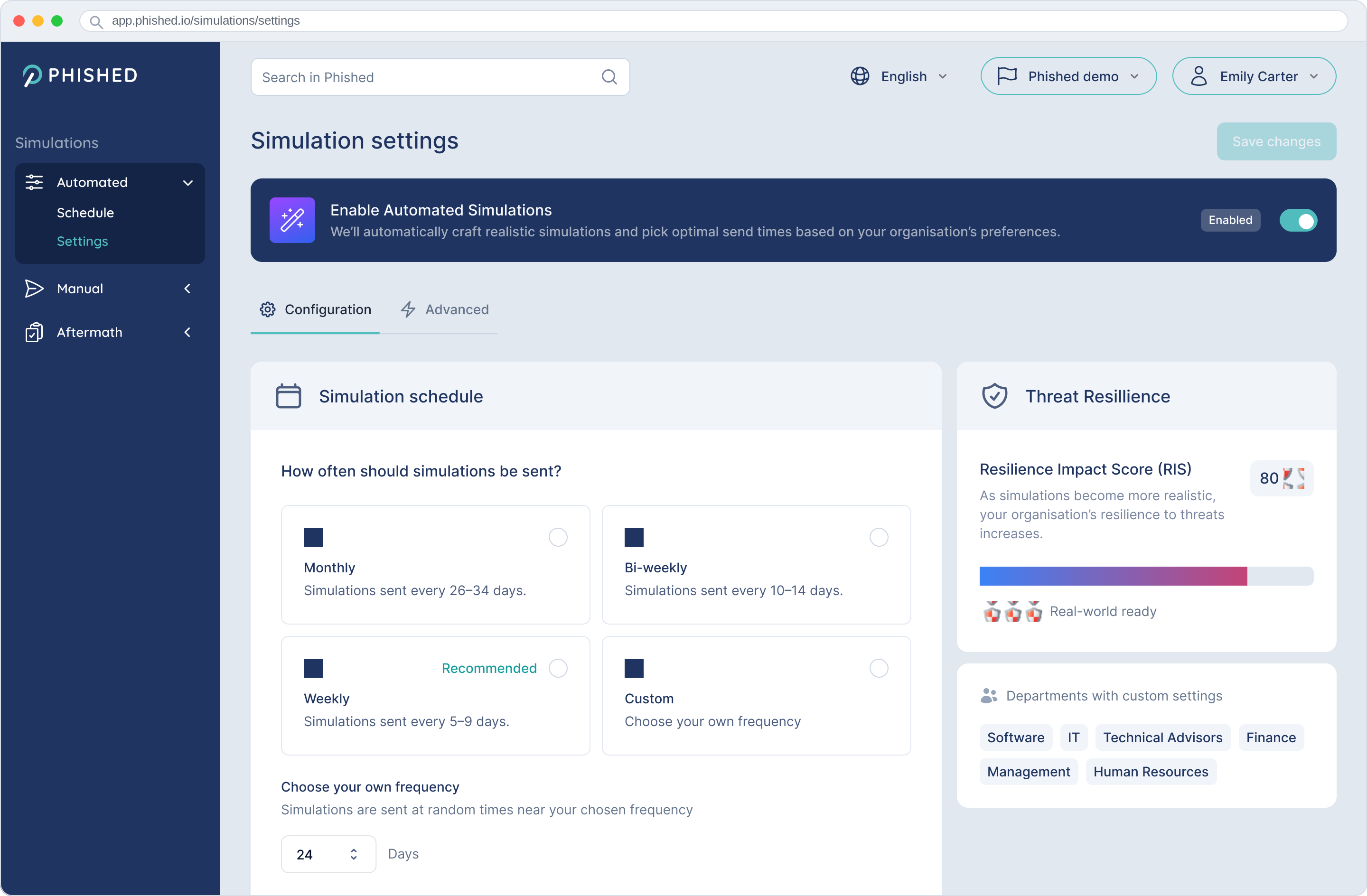
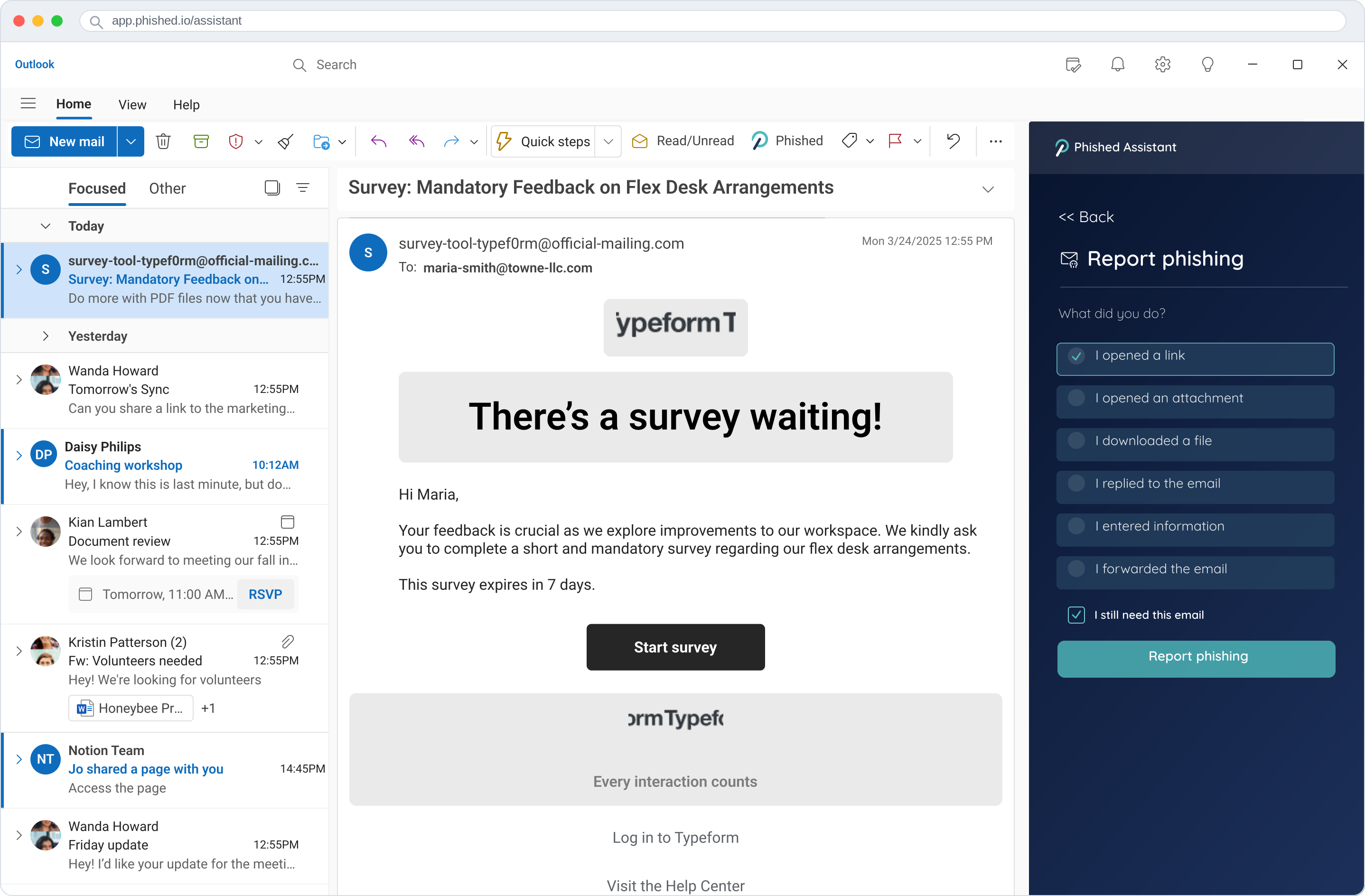
Screenshot of My Apps & Devices screen listing connected tools such, each marked secured or flagged to secure.Screenshot of Phished Academy dashboard showing an employee home screen with a personal to-do list of training and security tasks, a risk-score gauge, department and company comparisons, and a resilience progression chart.Screenshot of Part of a Phished training session: a drag-and-drop task sorting which data points a company should and should not request during onboarding into two columns.Screenshot of Admin panel for automated phishing simulations: enable automation, choose monthly to weekly frequency or custom scheduling, and review a Threat Resilience panel with per-department settings.Screenshot of Phished Assistant panel open in Outlook beside a suspicious survey email, with a report-phishing form letting the employee select what they did, such as opened a link or downloaded a file.