Barracuda Managed Vulnerability Security vs. Kaspersky Cybersecurity Services

Overview
ProductRatingMost Used ByProduct SummaryStarting Price
Barracuda Managed Vulnerability Security
Score 0.0 out of 10
N/A
Barracuda Managed Vulnerability Security is a fully managed service delivered by Barracuda’s Security Operations Center (SOC) and powered by the company's vulnerability scanner. Barracuda performs recurring vulnerability scans on customer-selected IP-addressable assets across on-premises and cloud environments. Each scan produces four detailed reports with actionable insights to prioritize remediation, improve cyber resilience, and meet compliance requirements. By proactively identifying…N/A
Kaspersky Cybersecurity Services
Score 6.8 out of 10
N/A
Kaspersky Labs' managed cybersecurity services include vulnerability asessment, threat hunting and threat intelligence services, and managed incident response.N/A
Pricing
Barracuda Managed Vulnerability SecurityKaspersky Cybersecurity Services
Editions & Modules
No answers on this topic
Offerings
Pricing Offerings
Barracuda Managed Vulnerability SecurityKaspersky Cybersecurity Services
Free Trial
NoNo
Free/Freemium Version
NoNo
Premium Consulting/Integration Services
NoNo
Entry-level Setup FeeNo setup feeNo setup fee
Additional Details
More Pricing Information
User Ratings
Barracuda Managed Vulnerability SecurityKaspersky Cybersecurity Services
Likelihood to Recommend
-
(0 ratings)
10.0
(1 ratings)
User Testimonials
Barracuda Managed Vulnerability SecurityKaspersky Cybersecurity Services
Likelihood to Recommend
Barracuda Networks Inc.
No answers on this topic
Kaspersky Lab
Kaspersky Cybersecurity Services also provides free trial period to users so that user can try that and after feeling that is best can make purchase of it. Kaspersky Cybersecurity Services detects almost all malware and malicious files from system, so it is good in protecting important data of organization from a cycber security attacks. Also in our organization we used Kaspersky Cybersecurity Services to recover our corrupted/virus infected file data.
Read full review
Pros
Barracuda Networks Inc.
No answers on this topic
Kaspersky Lab
  • Kaspersky provides a high level security from viruses and malware
  • Easy to install
  • Scan data and detect viruses faster and after that we can take action
  • Provides data protection for use of external devices such as USB, CD etc..
Read full review
Cons
Barracuda Networks Inc.
No answers on this topic
Kaspersky Lab
  • Too aggressive some times which made it very difficult to get programs to passthrough, that were authorized for use.
  • sometimes it feels like slow down of system as Kaspersky occupies much running memory
  • yearly subscription needed
  • In terms of installation package size, data space and memory kaspersky occupies large space in the server version.
Read full review
Alternatives Considered
Barracuda Networks Inc.
No answers on this topic
Kaspersky Lab
Kaspersky provides good user interface for virus detection log and removal of malicious files from our system that impresses our organization and team a lot. Sometimes it is a case that Kaspersky Cybersecurity Services secured our important files from being corrupted, as in daily routines each data files doesn't have a backup so having antivirus service like Kaspersky is just blessing. It is risk free to use CD, USB etc secondary storage device with our system after installing Kaspersky
Read full review
Return on Investment
Barracuda Networks Inc.
No answers on this topic
Kaspersky Lab
  • Kaspersky Cybersecurity Services antivirus installation package size is large
  • Prevents cyber attacks and malware removal
  • it's uses more RAM to perform
  • Feel relaxed after using Kaspersky Cybersecurity Services, as no need to worry about viruses or malware
  • our employees feel easy to use kaspersky as it is having much friendly interface
Read full review
ScreenShots

Barracuda Managed Vulnerability Security Screenshots
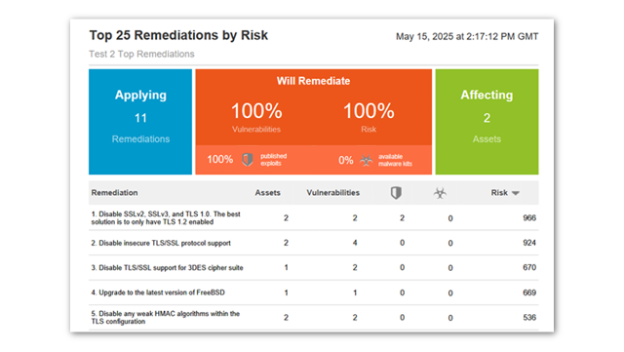
Screenshot of Top Remediations by Risk:
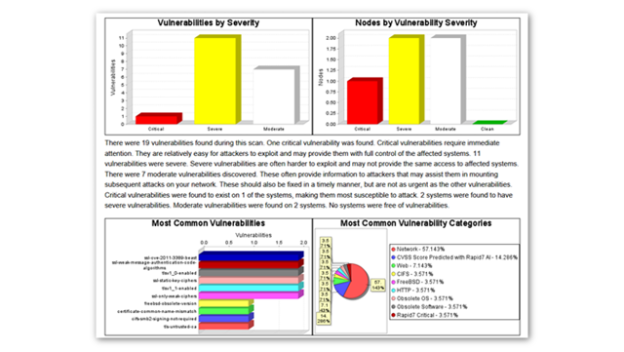
This report ranks recommended fixes by their overall risk reduction impact. It shows how remediated a small number of prioritized vulnerabilities can significantly reduce total risk across the environment.Screenshot of Vulnerabilities by Severity Overview:
This report visualizes discovered vulnerabilities grouped by severity level, such as critical, severe, and moderate. It helps users quickly understand their overall risk posture and prioritize remediation efforts based on urgency.Screenshot of Detailed Remediation Plan:
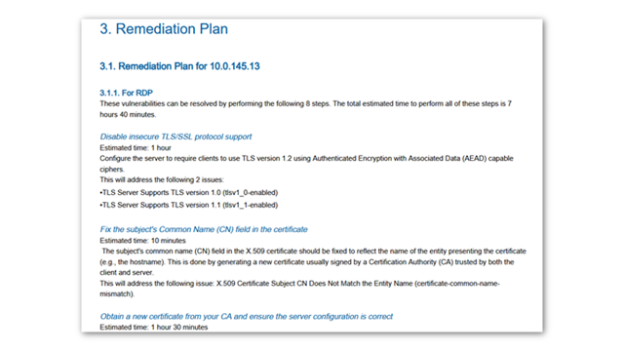
This report provides a step‑by‑step remediation breakdown for each identified vulnerability, including root cause, recommended actions, and estimated effort. It serves as a practical guide for IT teams to plan and execute fixes efficiently.Screenshot of Risk Scorecard:
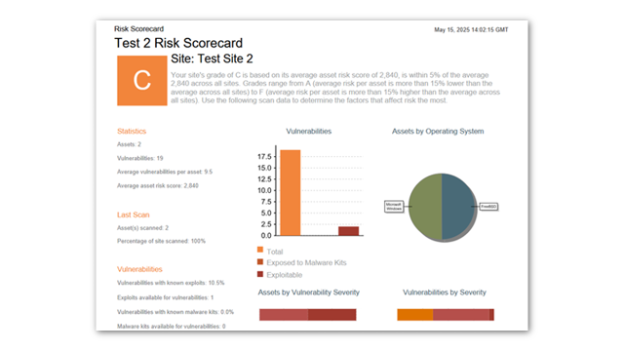
This report presents an easy‑to‑understand, color‑coded risk score for each site or environment. Appealing for managment and useful for both tracking progress and supporting compliance reporting, it summarizes vulnerability counts, exploitability, and malware‑related risks.Screenshot of Deployment (Standard Configuration):
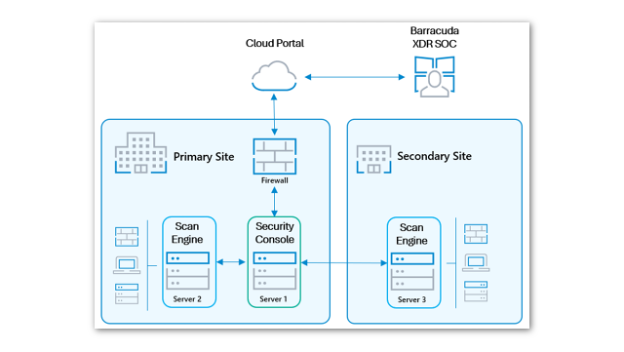
This diagram depicts the standard deployment model for Managed Vulnerability Security, consisting of a single Security Console and one Scan Engine per site. The product also supports additional deployment options, including agent‑based, hybrid, and small‑site configurations.