CloudBolt vs. Hyperglance

Overview
ProductRatingMost Used ByProduct SummaryStarting Price
CloudBolt
Score 6.2 out of 10
N/A
The CloudBolt Enterprise Hybrid Cloud Platform, from CloudBolt Software headquartered in Rockville, helps enterprise IT build, deploy, and manage access to multiple private and public clouds for effective hybrid cloud orchestration.N/A
Hyperglance
Score 0.0 out of 10
Enterprise companies (1,001+ employees)
Hyperglance is an enterprise cloud architecture software solution designed to enable users to take control of the enterprise's cloud documentation, cost, security & compliance. Automatic diagrams, cost analysis, security, and compliance across AWS, Azure, and K8s.
$899
per month
Pricing
CloudBoltHyperglance
Editions & Modules
No answers on this topic
Up to 500 resources
$899
per month
Up to 1,000 resources
$1,459
per month
Up to 3,000 resources
$3,144
per month
Up to 5,000 resources
$4,492
per month
More than 5,000 resources
POA
per year
Offerings
Pricing Offerings
CloudBoltHyperglance
Free Trial
YesYes
Free/Freemium Version
NoNo
Premium Consulting/Integration Services
NoNo
Entry-level Setup FeeNo setup feeNo setup fee
Additional DetailsHyperglance pricing is based on the number of cloud resources ingested and inventoried, not a percentage of the overall cloud bill, so that costs stay predictable, even as spend changes. The license includes unlimited users and works across single or multi-cloud environments.
More Pricing Information
Community Pulse
CloudBoltHyperglance
Considered Both Products
CloudBolt
Chose CloudBolt
We honestly haven't looked into much. We've been using CloudBolt [Software] for a long, long time. I think we briefly looked into Morpheus but figured it was too much effort to lift everything, communicate it, etc. We selected CloudBolt [Software] because, at the time (and …
Chose CloudBolt
We selected SovLabs Microsoft Active Directory because is one of the best automation tools for Active Directory. The tool offers a lot of features that we use. Good support from the vendor and a good community. I strongly recommend SovLabs Microsoft Active Directory for …
Hyperglance

No answer on this topic

Features
CloudBoltHyperglance
Cloud Management
Comparison of Cloud Management features of Product A and Product B
CloudBolt
8.7
Ratings
1% below category average
Hyperglance
-
Ratings
Automation and Orchestration9.00 Ratings00 Ratings
Cost Management8.00 Ratings00 Ratings
Systems Integration9.00 Ratings00 Ratings
Best Alternatives
CloudBoltHyperglance
Small Businesses
VMware Cloud Director
Score 9.4 out of 10

No answers on this topic

Medium-sized Companies
IBM Turbonomic
IBM Turbonomic
Score 8.7 out of 10
IBM Turbonomic
IBM Turbonomic
Score 8.7 out of 10
Enterprises
vRealize Operations (discontinued)
Score 8.9 out of 10
vRealize Operations (discontinued)
Score 8.9 out of 10
All AlternativesView all alternativesView all alternatives
User Ratings
CloudBoltHyperglance
Likelihood to Recommend
7.0
(0 ratings)
-
(0 ratings)
User Testimonials
CloudBoltHyperglance
Likelihood to Recommend
Creates dynamic groups and flexible Active Directory configurations. Improves our automation capabilities. Helps us to automate a part of our Active Directory administration process. Helps us to automate the process of registration and cleaning the computer accounts with Active Directory. Helps us to improve the reliability of registration to mitigate failures like retry logic and post validation checks.
Read full review
No answers on this topic
Pros
  • Create configuration with Microsoft endpoints.
  • Support complex globally distributed multi-domains.
  • Create and remove dynamic OU.
  • Allows for static text in combination with dynamic content.
Read full review
No answers on this topic
Cons
  • Support could be improved on a >tier 1 level
  • Logging could be more descriptive/specific
  • Stability of the actual server
Read full review
No answers on this topic
Alternatives Considered
We honestly haven't looked into much. We've been using CloudBolt [Software] for a long, long time. I think we briefly looked into Morpheus but figured it was too much effort to lift everything, communicate it, etc. We selected CloudBolt [Software] because, at the time (and still do), they served our very specific case. We also liked the ability to customize certain aspects of the deployments - that enabled our "power users" to really tweak things just right for their departmental tasks.
Read full review
No answers on this topic
Return on Investment
  • We have invested countless man hours to troubleshooting and being support's QA.
  • Most of our teams have saved an invaluable amount of time by being able to automate their deployments.
  • After the initial time you spend [understanding] all the nuances, the configuring of groups, permissions, etc., does make administering it easier.
Read full review
No answers on this topic
ScreenShots

Hyperglance Screenshots

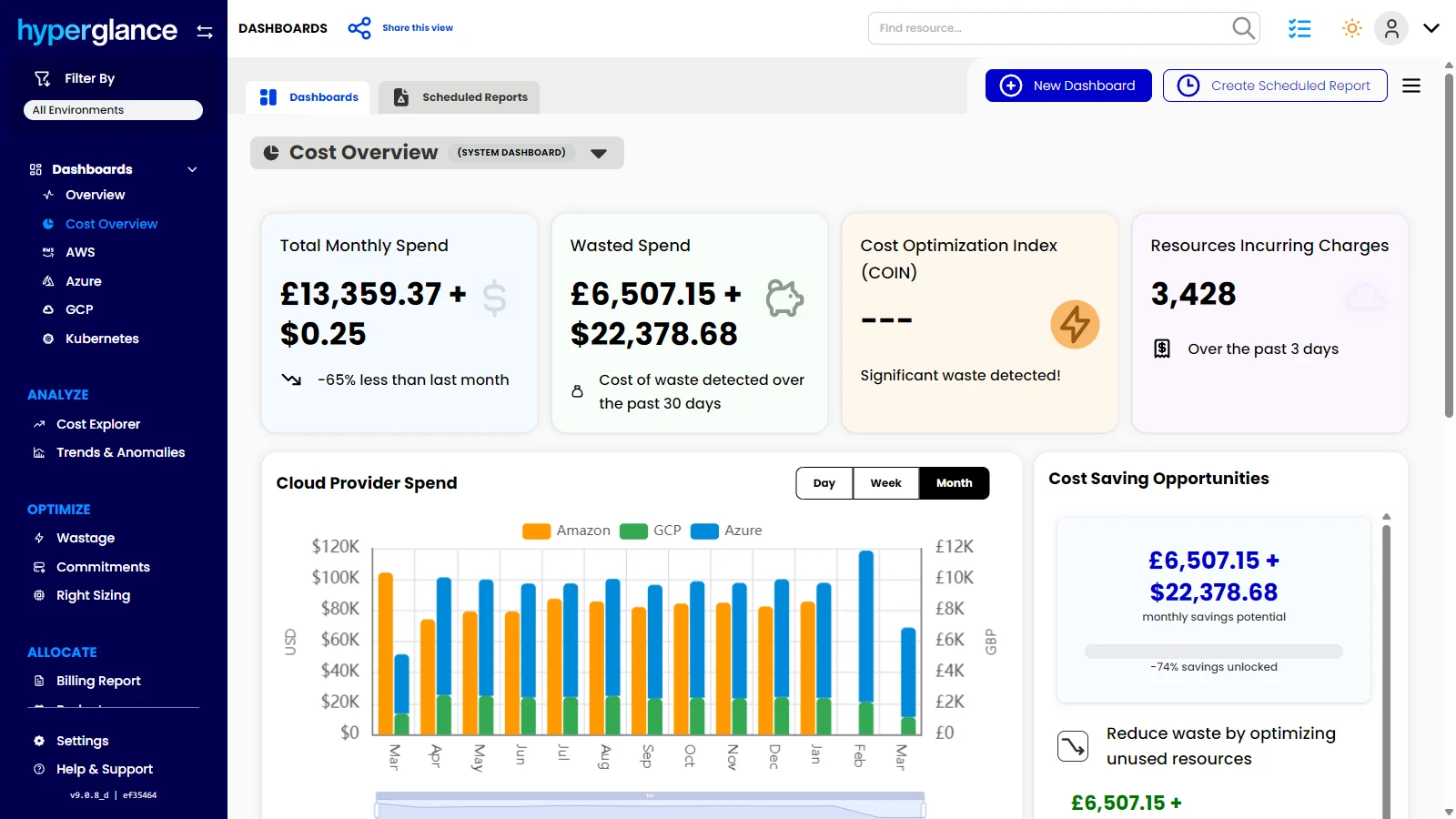
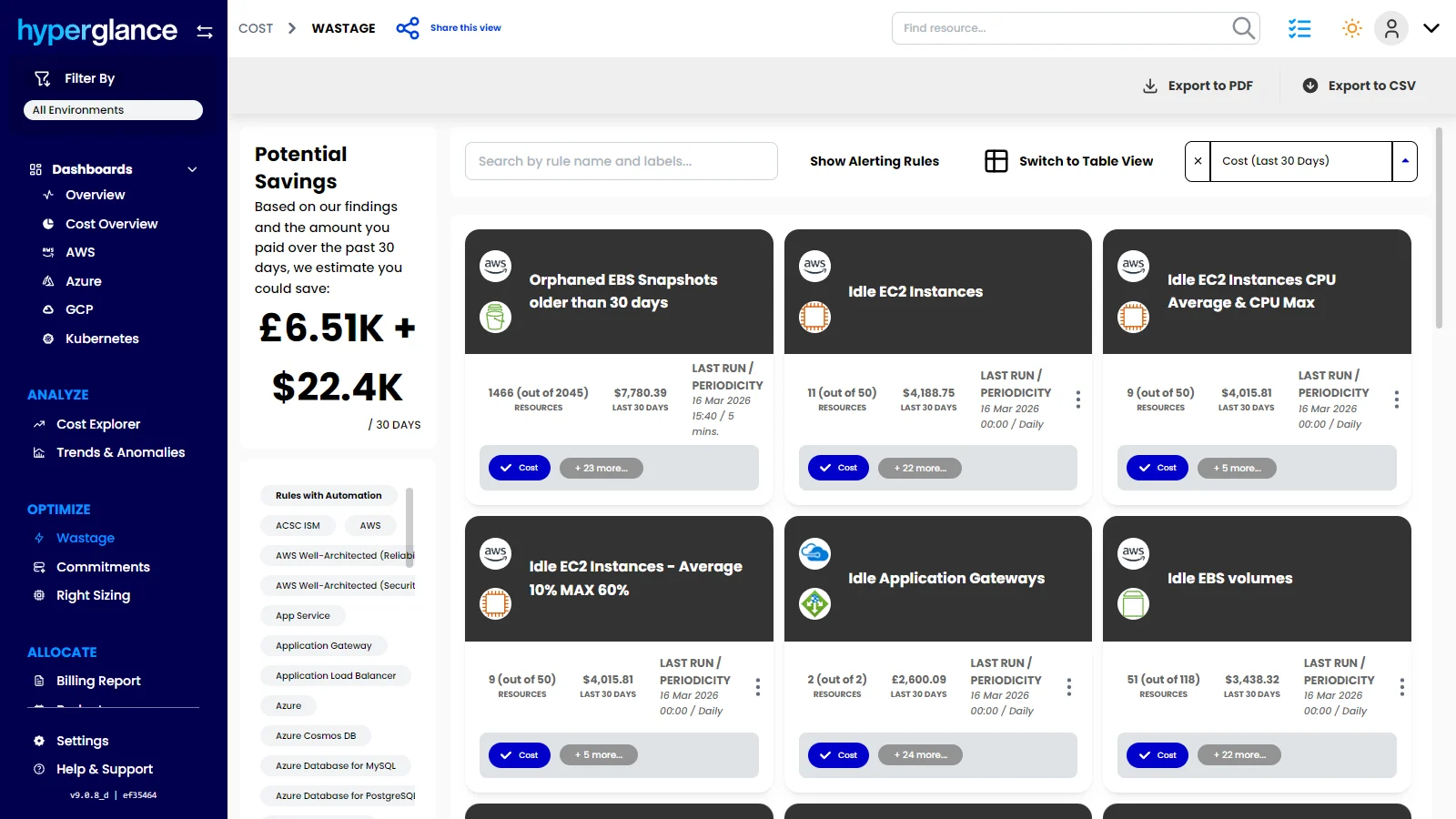
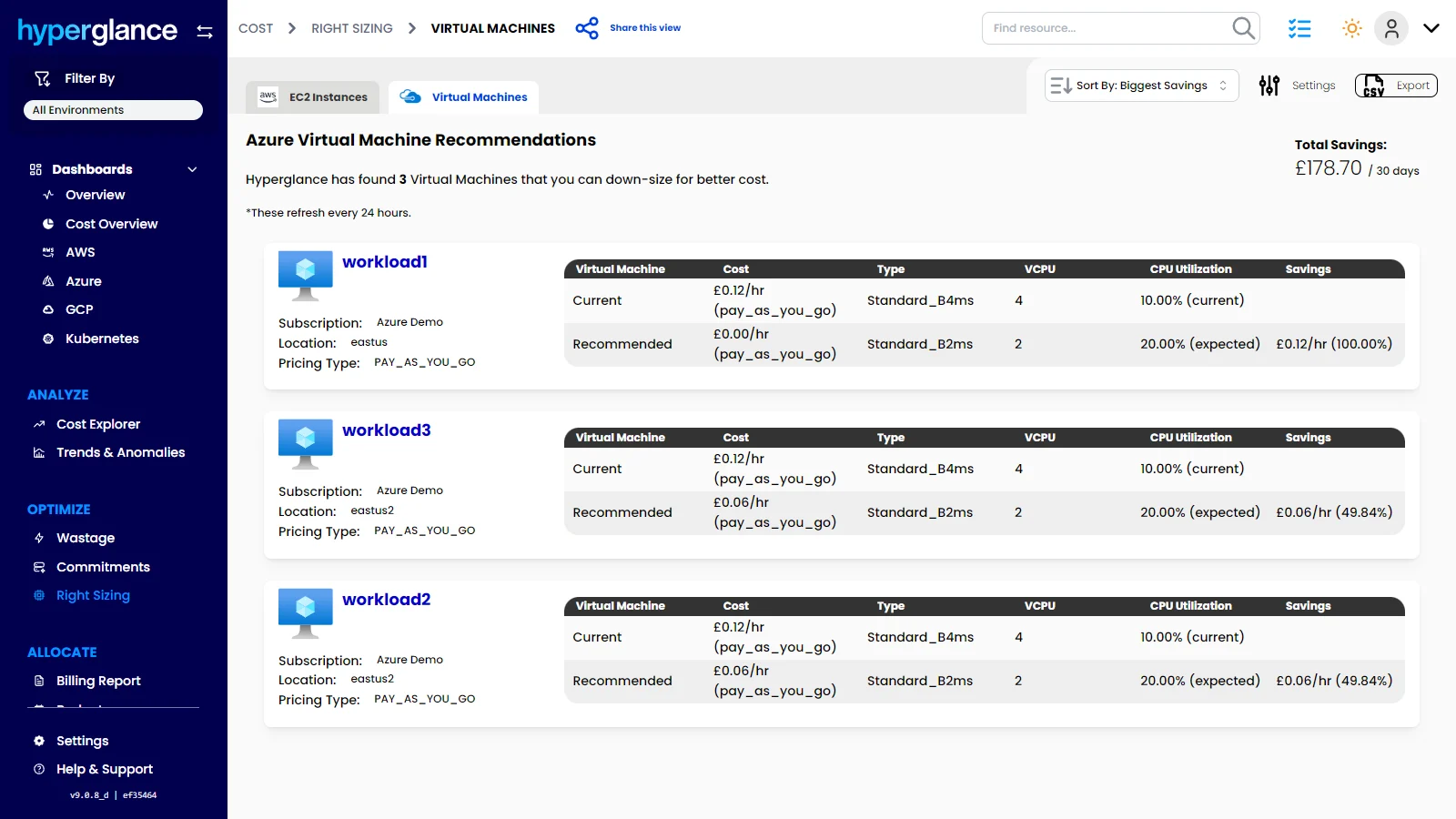
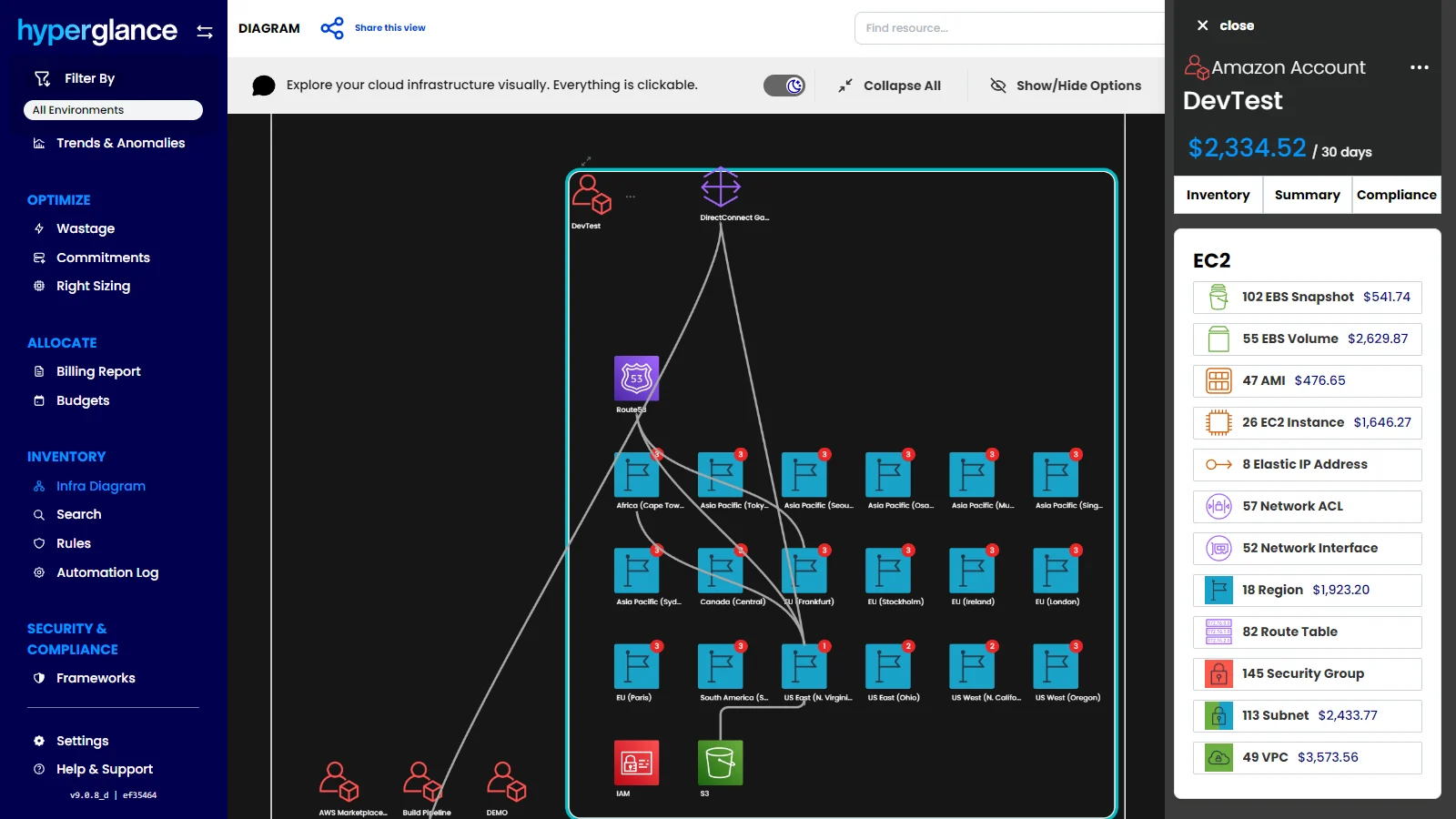
Screenshot of the dashboard that offers a clear view of total cloud spend, wasted spend, savings opportunities, and provider trends. Hyperglance helps teams spot cost issues faster, prioritize optimization work, and turn cloud visibility into measurable savings.Screenshot of where to surface idle, orphaned, and underused resources across AWS, Azure, GCP, and Kubernetes. Hyperglance helps teams uncover waste quickly, quantify savings potential, and focus optimization efforts where they will have the biggest impact.Screenshot of the dashboard to monitor cloud spend over time, break costs down by service or dimension, and catch unusual changes before they turn into bigger budget problems. Hyperglance helps teams understand spend patterns, improve forecasting, and stay ahead of unexpected cloud costs.Screenshot of where to identify oversized cloud resources, as well as compare current and recommended configurations. Hyperglance helps teams make smarter sizing decisions, cut unnecessary spend, and improve cloud efficiency across AWS, Azure & GCP.Screenshot of the dashboard to drill into cloud costs by platform, account, region, service, and resource, then compare actual spend against budget in one place. Hyperglance helps teams understand where money is going, investigate changes faster, and stay in control of cloud budgets before overspend becomes a bigger issue.Screenshot of where to see how any cloud environment is connected, explore resources visually, and understand spend in context. Hyperglance combines interactive infrastructure diagrams with cost and inventory data, helping teams spot issues that are easy to miss in static lists.