TrustRadius: an HG Insights company

Save this comparison

Save this comparison

Add Product

Recommended Comparisons

    Overview
    ProductRatingMost Used ByProduct SummaryStarting Price

    ConceptDraw MINDMAP

    Score4.1 out of 10
    N/AConceptDraw MINDMAP is l mind mapping software application that can also resolve tasks for project management. According to the vendor, multiple shortcuts help users create new topics, re-arrange them and highlight important points, and export to various file formats. Enrich your mind map with in-built visual…N/A

    Excalidraw+

    Score8.6 out of 10
    N/AAn online virtual whiteboard for sketching hand-drawn diagrams, with features supporting visual collaboration. A basic version of Excalidraw can be used free, but team and collaboration features are offered in Excalidraw+.

    $7

    per month per user

    Pricing
    ConceptDraw MINDMAPExcalidraw+
    Editions & Modules
    No answers on this topic
    No answers on this topic
    Offerings
    Pricing Offerings
    ConceptDraw MINDMAPExcalidraw+
    Free Trial
    YesYes
    Free/Freemium Version
    NoYes
    Premium Consulting/Integration Services
    NoNo
    Entry-level Setup Fee$199 per seatNo setup fee
    Additional DetailsPrice varies for Individual, Commercial, Academic, Nonprofit and Government—
    More Pricing Information
    Best Alternatives
    ConceptDraw MINDMAPExcalidraw+
    Small Businesses
    OmniGraffle
    Score9.8 out of 10
    OmniGraffle
    Score9.8 out of 10
    Medium-sized Companies
    OmniGraffle
    Score9.8 out of 10
    OmniGraffle
    Score9.8 out of 10
    Enterprises
    OmniGraffle
    Score9.8 out of 10
    OmniGraffle
    Score9.8 out of 10
    All AlternativesView all alternativesView all alternatives
    User Ratings
    ConceptDraw MINDMAPExcalidraw+
    Likelihood to Recommend
    8.7
    (4 ratings)
    8.8
    (5 ratings)
    Usability
    -
    (0 ratings)
    8.4
    (5 ratings)
    Support Rating
    8.6
    (2 ratings)
    -
    (0 ratings)
    User Testimonials
    ConceptDraw MINDMAPExcalidraw+
    Likelihood to Recommend
    CS Odessa LLC
    Organising results of brainstorming session for threat and error management solutions is how we mostly use ConceptDraw MINDMAP. Another common use is for dynamic note taking while attending conferences or classes. It can also be used to prepare notes when giving classes. We also used it sometimes for accident investigation analysis, building diagrams of probable causes leading to the event.
    Incentivized
    Read full review
    Excalidraw
    In scenarios like creating a quick mind map, flow diagram, explaining code with a diagram, or wanting to show how a specific scenario in code works to the team. In scenarios like there is a draft which I created in some other place and I want to continue here, I can't as upload option is missing. Other scenario is like I have downloaded a draft and want to import and continue, can't do that as well. Creating wireframes from the initial stage is hard, as everything should be hand drawn which is hard when the screens are already decided.
    Incentivized
    Read full review
    Pros
    CS Odessa LLC
    • Brainstorming
    • Documenting hierarchies
    Incentivized
    Read full review
    Excalidraw
    • Sketches
    • Diagrams
    • Fun displays of information.
    Incentivized
    Read full review
    Cons
    CS Odessa LLC
    • Limited drawing tools with the free version
    • initially seemed a bit fiddly to navigate
    • the interface was a bit 'busy'
    Read full review
    Excalidraw
    • Board management, it's not always easy to navigate.
    • Limited tools.
    Incentivized
    Read full review
    Usability
    CS Odessa LLC
    No answers on this topic
    Excalidraw
    Excalidraw+ is very simple to use, navigate, and collaborate. You can quickly generate objects, text, lines, arrows, etc. to clearly explain an idea without spending too much time making it look pretty. It's great for initial ideation without getting bogged down in details. A quick user interface can be sketched in 30 seconds rather than spending time generating near-complete mockups that could be rejected
    Incentivized
    Read full review
    Support Rating
    CS Odessa LLC
    Support team is one of the best in ConceptDraw MINDMAP, the response was quick and solution for the problem is clear with best ticketing management. The right customer approach gives you hassle free interaction with support team.
    Read full review
    Excalidraw
    No answers on this topic
    Alternatives Considered
    CS Odessa LLC
    As we were already using PROJECT, it became obvious that ConceptDraw MINDMAP was the product to use. The integration between those two products is very convenient and useful. The fact that ConceptDraw MINDMAP solutions was usable on Mac OS was also a pre requisite for us. We did not use any other Mind Map software.
    Incentivized
    Read full review
    Excalidraw
    It's cheaper than Miro, although it doesn't provide as much functionality.
    It's less complex and easier to use than draw.io, although a bit more limited in terms of available options.
    It offers a more solid user experience when compared to Confluence Whiteboard, although it lacks the integration options that this tool has.
    For the situations where its limitations aren't an issue, it's a solid option.
    Incentivized
    Read full review
    Return on Investment
    CS Odessa LLC
    • More efficient brainstorming
    Incentivized
    Read full review
    Excalidraw
    • For the price it's really worth for the tools it's providing and feature with Excalidraw+
    • This is good but we still had to buy competitors like miro at organization level to support multiple collaborations and users at large scale
    • Tools provided for the price are good but expected a little more set of tools to create mindmaps, wireframes
    Incentivized
    Read full review
    ScreenShots

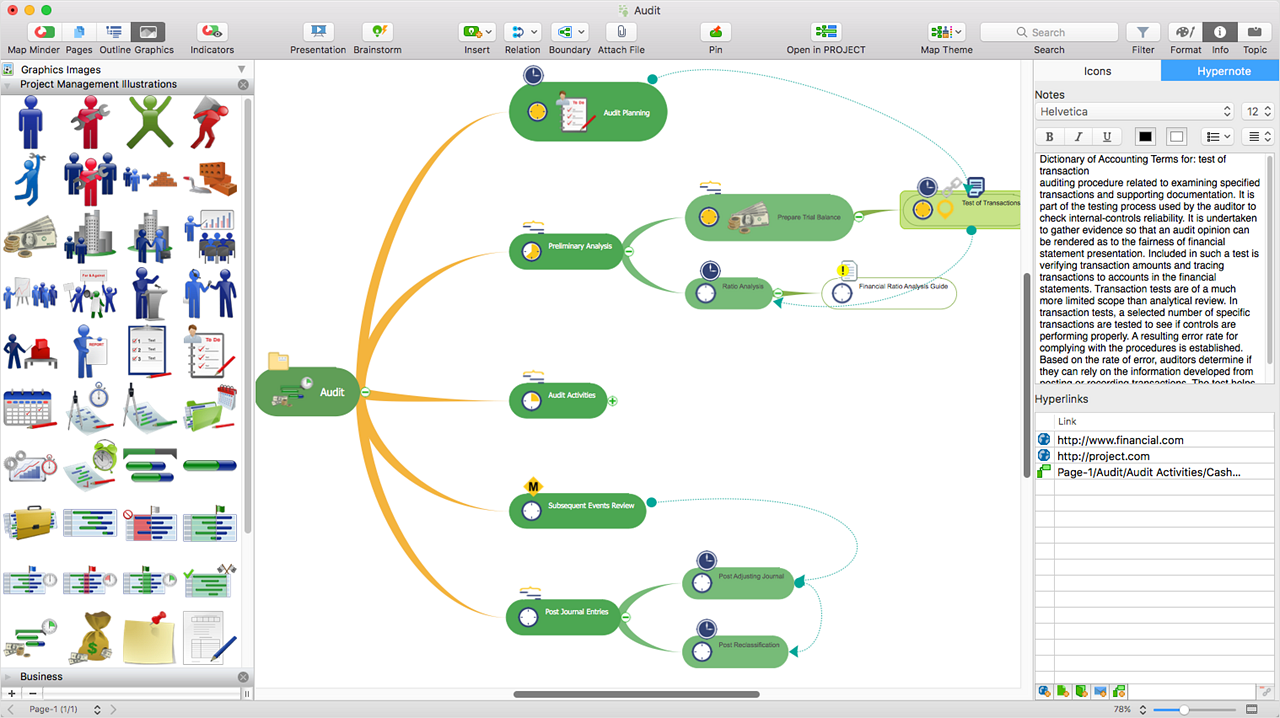
    ConceptDraw MINDMAP Screenshots

    Screenshot of ConceptDraw MIDMAP v10 is perfect for brainstorming, project planning, meeting management, note taking, and much more.Screenshot of Data ExchangeScreenshot of Presentation ModeScreenshot of ConceptDraw OFFICE IntegrationScreenshot of In-built GraphicsScreenshot of Hypernotes