TrustRadius: an HG Insights company

east-tec SafeBit vs. Trellix Complete Data Protection

Save this comparison

Save this comparison

Add Product

Recommended Comparisons

    Overview
    ProductRatingMost Used ByProduct SummaryStarting Price

    east-tec SafeBit

    N/AN/AEast-tec SafeBit is an on-the-fly disk encryption software designed to protect confidential data by creating secure, password-protected virtual drives. These encrypted "safes" appear and function just like regular drives in Windows, allowing you to work with files normally while ensuring they remain completely secure. The software works transparently in the background, automatically encrypting every file as it is saved to the safe and decrypting it only when accessed. This…

    $29.95

    per year

    Trellix Complete Data Protection

    Score8.7 out of 10
    N/ATrellix Complete Data Protection (formerly McAfee Complete Data Protection) is an endpoint encryption and data loss protection option, available in basic and advanced versions.N/A
    Pricing
    east-tec SafeBitTrellix Complete Data Protection
    Editions & Modules
    No answers on this topic
    No answers on this topic
    Offerings
    Pricing Offerings
    east-tec SafeBitTrellix Complete Data Protection
    Free Trial
    YesNo
    Free/Freemium Version
    NoNo
    Premium Consulting/Integration Services
    NoNo
    Entry-level Setup FeeNo setup feeNo setup fee
    Additional Details
    More Pricing Information
    Best Alternatives
    east-tec SafeBitTrellix Complete Data Protection
    Small Businesses
    No answers on this topic
    No answers on this topic
    Medium-sized Companies
    Symantec Encryption
    Score9.9 out of 10
    Symantec Encryption
    Score9.9 out of 10
    Enterprises
    Trellix Complete Data Protection
    Score8.7 out of 10
    BitLocker
    Score9.2 out of 10
    All AlternativesView all alternativesView all alternatives
    User Ratings
    east-tec SafeBitTrellix Complete Data Protection
    Likelihood to Recommend
    -
    (0 ratings)
    10.0
    (1 ratings)
    User Testimonials
    east-tec SafeBitTrellix Complete Data Protection
    Likelihood to Recommend
    East-Tec
    No answers on this topic
    Trellix (Musarubra US LLC)
    I would recommend this program ideally more for larger organizations, but that is not to say you couldn't use it for personal use. I think it's ideal for an organization because of all the features it has in one program. It provides all the protection you'd need in a corporation, especially for ones dealing with sensitive company/personal/financial information. Administrators are also able to set specific settings for users so the company can tailor security restrictions as needed
    Incentivized
    Read full review
    Pros
    East-Tec
    No answers on this topic
    Trellix (Musarubra US LLC)
    • Restricts harmful websites
    • Non-intrusive
    • Easy to scan computer for threats
    • User friendly
    • Protects from harmful downloads
    • All-in-one tool for your organization or personal use
    Incentivized
    Read full review
    Cons
    East-Tec
    No answers on this topic
    Trellix (Musarubra US LLC)
    • I wish it would give better reasoning why some sites or downloads are blocked, this can be frustrating to have happen if what you are trying to download is from someone/thing you know is a trusted source
    • Sometimes the program messes up the formatting of some webpages I'm trying to visit
    • Drive encryption can be a bit slow to load at times
    Incentivized
    Read full review
    Return on Investment
    East-Tec
    No answers on this topic
    Trellix (Musarubra US LLC)
    • Keeps viruses off computer , which keeps my computer running well
    • Prevents me from downloading harmful programs
    • Encrypts computer for data protection
    • The all-in-one program saves money since one program does the job you need.
    Incentivized
    Read full review
    ScreenShots

    east-tec SafeBit Screenshots

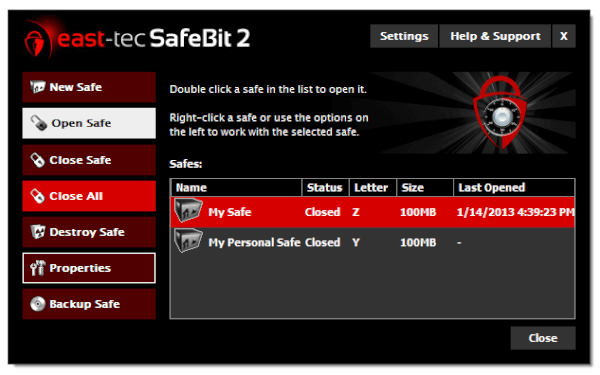
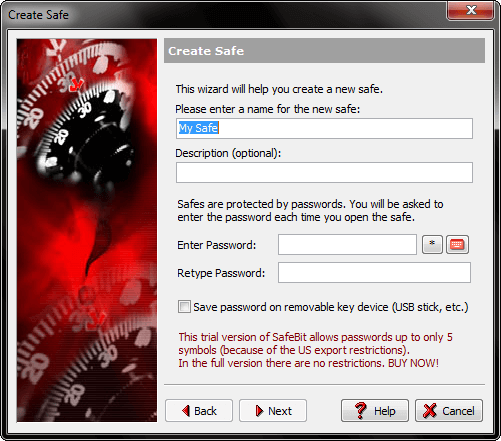
    Screenshot of Quick Start - an overview of options available in the program, such as Open Safe, Close Safe, Destroy Safe, etc.Screenshot of Creating a safe - this feature is used create Safes (virtual drives) by setting properties, such as name, password, size, location, etc, in a few simple steps.Screenshot of Change Safe Properties - this feature is used to modify the properties of Safes. The Safe’s name, size, password, or drive letter can be changed.