Google Cloud CLI vs. VMware Tanzu CloudHealth

Overview
ProductRatingMost Used ByProduct SummaryStarting Price
gcloud CLI
Score 8.9 out of 10
N/A
The Google Cloud CLI is a set of tools to create and manage Google Cloud resources. Its tools can be used to perform many common platform tasks from the command line or through scripts and other automation.N/A
VMware Tanzu CloudHealth
Score 7.9 out of 10
N/A
Tanzu CloudHealth (formerly VMware Aria Cost Powered by CloudHealth) simplifies financial management, streamlines operations, and improves organizational collaboration across your multi-cloud environment.N/A
Pricing
Google Cloud CLIVMware Tanzu CloudHealth
Editions & Modules
No answers on this topic
Offerings
Pricing Offerings
gcloud CLIVMware Tanzu CloudHealth
Free Trial
NoYes
Free/Freemium Version
NoYes
Premium Consulting/Integration Services
NoYes
Entry-level Setup FeeNo setup feeNo setup fee
Additional Details
More Pricing Information
Community Pulse
Google Cloud CLIVMware Tanzu CloudHealth
Features
Google Cloud CLIVMware Tanzu CloudHealth
Cloud Management
Comparison of Cloud Management features of Product A and Product B
Google Cloud CLI
8.6
1 Ratings
2% below category average
VMware Tanzu CloudHealth
-
Ratings
Cloud Management Security7.01 Ratings00 Ratings
Automation and Orchestration9.01 Ratings00 Ratings
Cost Management7.01 Ratings00 Ratings
Cloud Management Performance Monitoring10.01 Ratings00 Ratings
Governance and Compliance8.01 Ratings00 Ratings
Resource Management9.01 Ratings00 Ratings
Systems Integration10.01 Ratings00 Ratings
Best Alternatives
Google Cloud CLIVMware Tanzu CloudHealth
Small Businesses
VMware Cloud Director
Score 8.6 out of 10
VMware Cloud Director
Score 8.6 out of 10
Medium-sized Companies
IBM Turbonomic
IBM Turbonomic
Score 9.0 out of 10
IBM Turbonomic
IBM Turbonomic
Score 9.0 out of 10
Enterprises
VMware Cloud Director
Score 8.6 out of 10
VMware Cloud Director
Score 8.6 out of 10
All AlternativesView all alternativesView all alternatives
User Ratings
Google Cloud CLIVMware Tanzu CloudHealth
Likelihood to Recommend
8.0
(1 ratings)
-
(0 ratings)
Usability
7.0
(1 ratings)
-
(0 ratings)
User Testimonials
Google Cloud CLIVMware Tanzu CloudHealth
Likelihood to Recommend
Google
it is great for automating tasks like deploying VMs, running BigQuery and managing cloud resources at scale. It is much faster than the UI for repetitive actions and allows you to easily script and scale progress. However it is not ideal for beginners
Read full review
VMware by Broadcom
No answers on this topic
Usability
Google
While it offers powerful features and streamlines many cloud management tasks, its learning curve can be steep for beginners. The complexity of commands and flags may be intimidating, especially for users who are not familiar with command-line tools. However, once you get past the initial hurdle, it becomes a very efficient and flexible tool for managing Google Cloud resources.
Read full review
VMware by Broadcom
No answers on this topic
ScreenShots

VMware Tanzu CloudHealth Screenshots

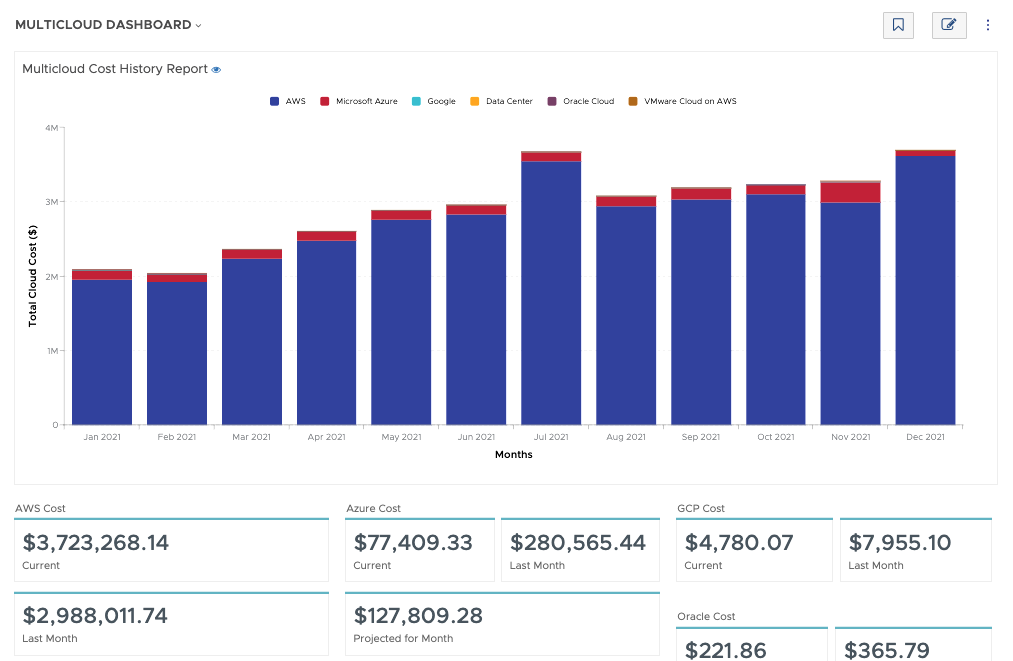
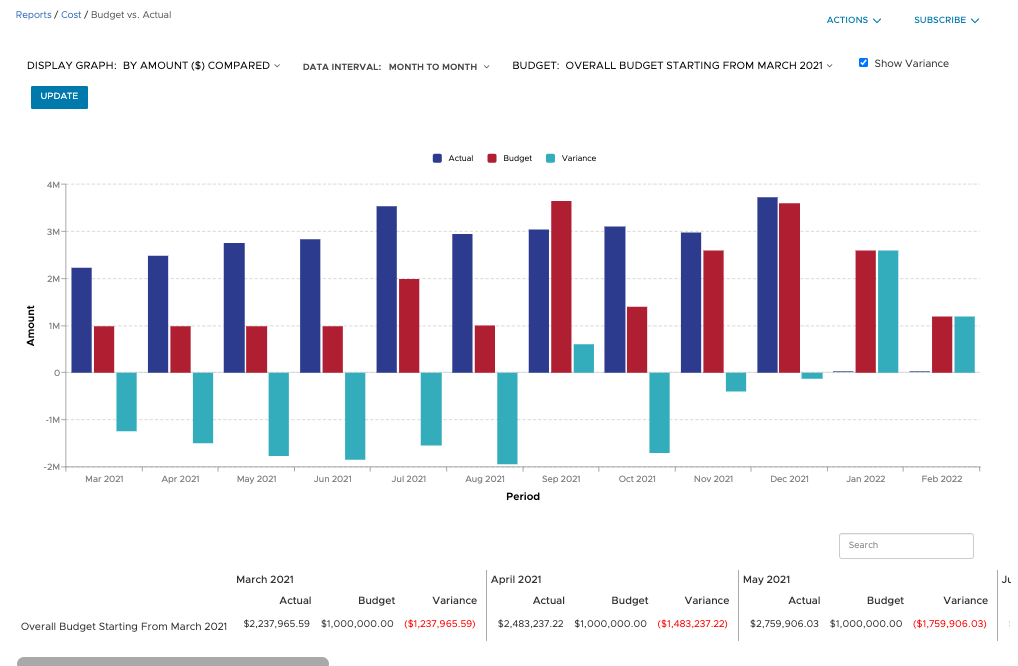
Screenshot of Filter and refine out-of-the-box graphical and tabular reports to correlate datasets for analysis against your business objectives. Create custom dashboards across clouds and easily build detailed reports from scratch, known as CloudHealth FlexReports, across various dimensions to perform more granular analysis on cost, usage, and asset data.Screenshot of Configure budgets to visualize your expected costs for the year in advance and compare it with actual spend as the year progresses. Create as many overall and categorized budgets as you need to run your business, aligned to your company’s fiscal year. Proactively alert stakeholders when costs are forecasted to exceed pre-defined budgets. Toggle on forecasting for reports to predict future values based on historical data for the interval you define.Screenshot of Use CloudHealth’s dynamic policy engine to drive consistent operations and continuously monitor your environment. Quickly identify opportunities to proactively reduce spend, remediate risks, and streamline configuration. Get alerted when conditions deviate from your desired state and enable automated actions to execute changes in your environment—stop, start, resize, or terminate infrastructure—all at the frequency you define.Screenshot of Align cloud data to your business with CloudHealth FlexOrgs and benefit from greater control over user access, sharing, and delegation across multiple levels of organizational hierarchy. Further fine tune the platform by dynamically allocating assets to business groups known as CloudHealth Perspectives. View and analyze your cloud environment by project, application, line of business, cost center, and more, to drive accountability for cost and usage.