Identity Rules vs. Microsoft Defender for Identity

Overview
ProductRatingMost Used ByProduct SummaryStarting Price
Identity Rules
Score 0.0 out of 10
N/A
Identity Rules is a unified Identity Threat Detection and Response (ITDR) and Identity Visibility and Intelligence Platform (IVIP) developed for security teams at regulated enterprises. The platform combines real-time detection of identity-based threats with continuous visibility and intelligence across human and non-human identities, spanning Active Directory, Okta, Microsoft Entra ID, AWS IAM, Google Workspace, Oracle Database, and Linux environments. Key…N/A
Microsoft Defender for Identity
Score 8.9 out of 10
N/A
Microsoft Defender for Identity (formerly Azure Advanced Threat Protection, also known as Azure ATP) is a cloud-based security solution that leverages on-premises Active Directory signals to identify, detect, and investigate advanced threats, compromised identities, and malicious insider actions directed at the organization.N/A
Pricing
Identity RulesMicrosoft Defender for Identity
Editions & Modules
No answers on this topic
Offerings
Pricing Offerings
Identity RulesMicrosoft Defender for Identity
Free Trial
NoNo
Free/Freemium Version
NoNo
Premium Consulting/Integration Services
NoNo
Entry-level Setup FeeNo setup feeNo setup fee
Additional Details
More Pricing Information
Best Alternatives
Identity RulesMicrosoft Defender for Identity
Small Businesses

No answers on this topic

No answers on this topic

Medium-sized Companies
ManageEngine ADAudit Plus
Score 9.0 out of 10
ManageEngine ADAudit Plus
Score 9.0 out of 10
Enterprises
ManageEngine ADAudit Plus
Score 9.0 out of 10
ManageEngine ADAudit Plus
Score 9.0 out of 10
All AlternativesView all alternativesView all alternatives
User Ratings
Identity RulesMicrosoft Defender for Identity
Likelihood to Recommend
-
(0 ratings)
7.0
(1 ratings)
User Testimonials
Identity RulesMicrosoft Defender for Identity
Likelihood to Recommend
Identity Rules
No answers on this topic
Microsoft
Microsoft Defender for Identity is a great solution for each company that has an Active Directory. It fills in the blanks for Identity related incidents that are being missed in the XDR platform. To get a full view on identity risks it is an essential component
Read full review
Pros
Identity Rules
No answers on this topic
Microsoft
  • detect threats and suspicious activities
  • pro-active measurements on possible breaches
  • identity security posture
Read full review
Cons
Identity Rules
No answers on this topic
Microsoft
  • setup can be complicated, with AD complexity
  • Sometimes the load on DCs is pretty high, leading to performance issues
  • Better tuning options for preventing false-positive/bening alerts
Read full review
Alternatives Considered
Identity Rules
No answers on this topic
Microsoft
Microsoft Defender for Identity is more specialized on the Identity platform, it is a single solution compared to a multi-solution. The integration is better when using the XDR suite in combination with Sentinel. Microsoft Defender for Identity gives a better overview of the security posture
Read full review
Return on Investment
Identity Rules
No answers on this topic
Microsoft
  • Cost impact was pretty high
  • Learning curve, needed time (money) for training
  • Greatly improved detections and gives more insights
Read full review
ScreenShots

Identity Rules Screenshots

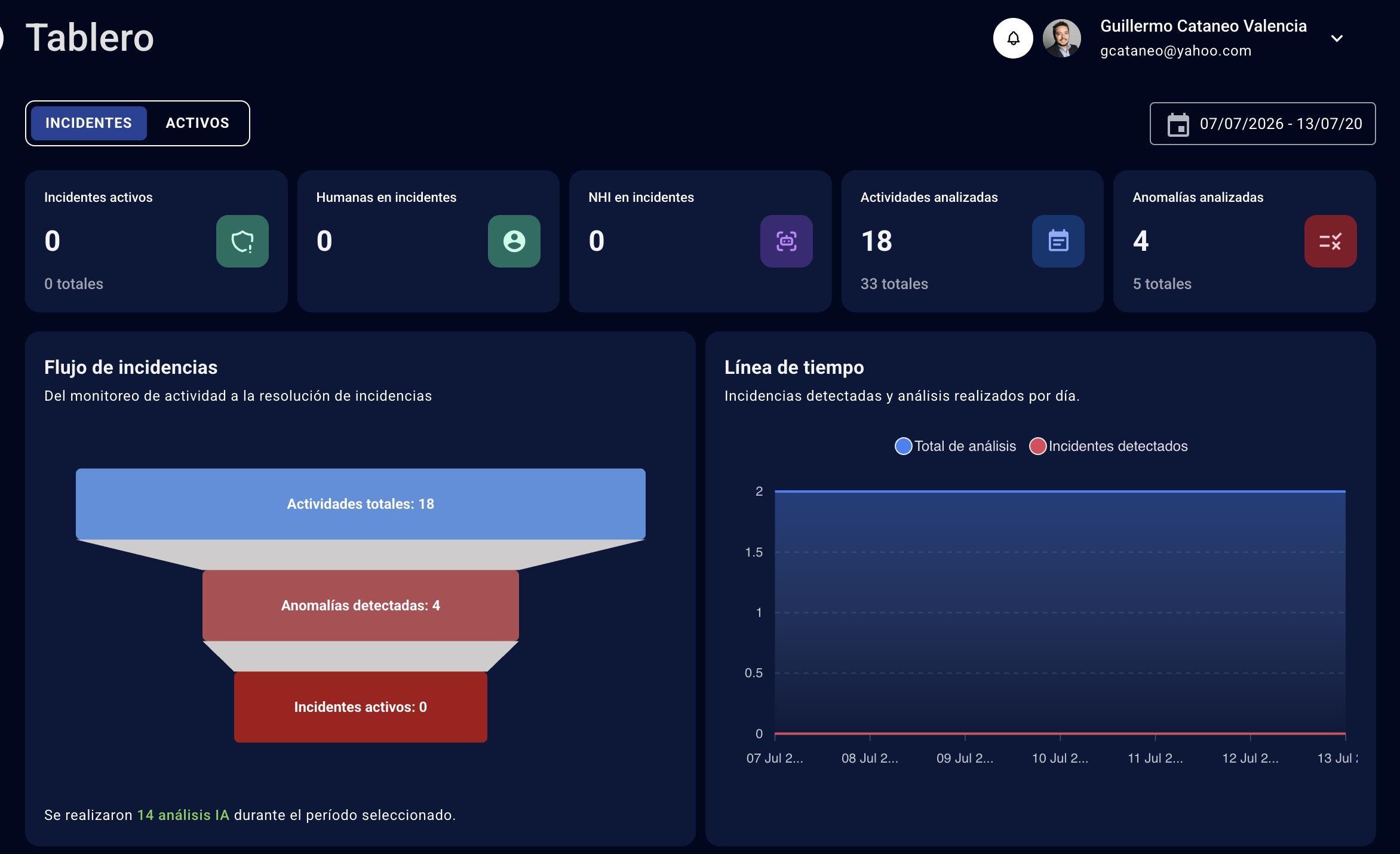
Screenshot of Executive dashboard showing the identity activity funnel — from monitored activities (18) to anomalies detected (4) to active incidents (0) — for a selected date range. Adjacent timeline visualizes incident detection and total AI-driven  analysis events per day, with headline KPIs for active incidents, human vs. non-human identities involved, activities analyzed, and anomalies analyzed.Screenshot of Assets tab of the executive dashboard, delivering a unified inventory of 17 identities, 116 human accounts, 170 non-human identities (NHI), 599 entitlements, and 728 anomalies. Account risk distribution (Critical, High, Medium, Low) sits alongside behavioral anomaly indicators such as "NHI credential never expires" (169) and "NHI credential not rotated" (164), plus account state breakdown between active, locked, deleted, privileged, and shared accounts.Screenshot of Security incident management workspace where SOC and IAM teams triage identity threats across all connected systems. Each incident is displayed with source application (Google Workspace shown here), severity (Critical / High / Medium / Low), lifecycle state (New, In Triage, Closed), 
AI-calculated confidence score, and final verdict — including labels like Token Theft, Lateral Movement, Password Spraying, Legitimate Activity, Business Exception, and Insufficient Evidence.Screenshot of Detailed incident view for a high-severity case: "NHI account without owner and insecure credentials in Google Workspace". The AI Analysis tab maps the finding to MITRE ATT&CK tactic TA0006 (Credential Access) and technique T1556 (Modify Authentication Process) at 80% confidence, showing affected accounts, related activities, and correlated anomalies. An AI-generated Quality Assessment panel surfaces assumptions, evidence gaps, and cross-incident correlations so analysts can act with full context.Screenshot of Analytics view organizing every identity anomaly by MITRE ATT&CK tactic and technique. isplayed here: TA0006 (Credential Access) with 7 detections across 2 techniques, and TA0003 (Persistence) with 2 detections across 2 techniques. The right-hand panel drills into T1556 (Modify uthentication 
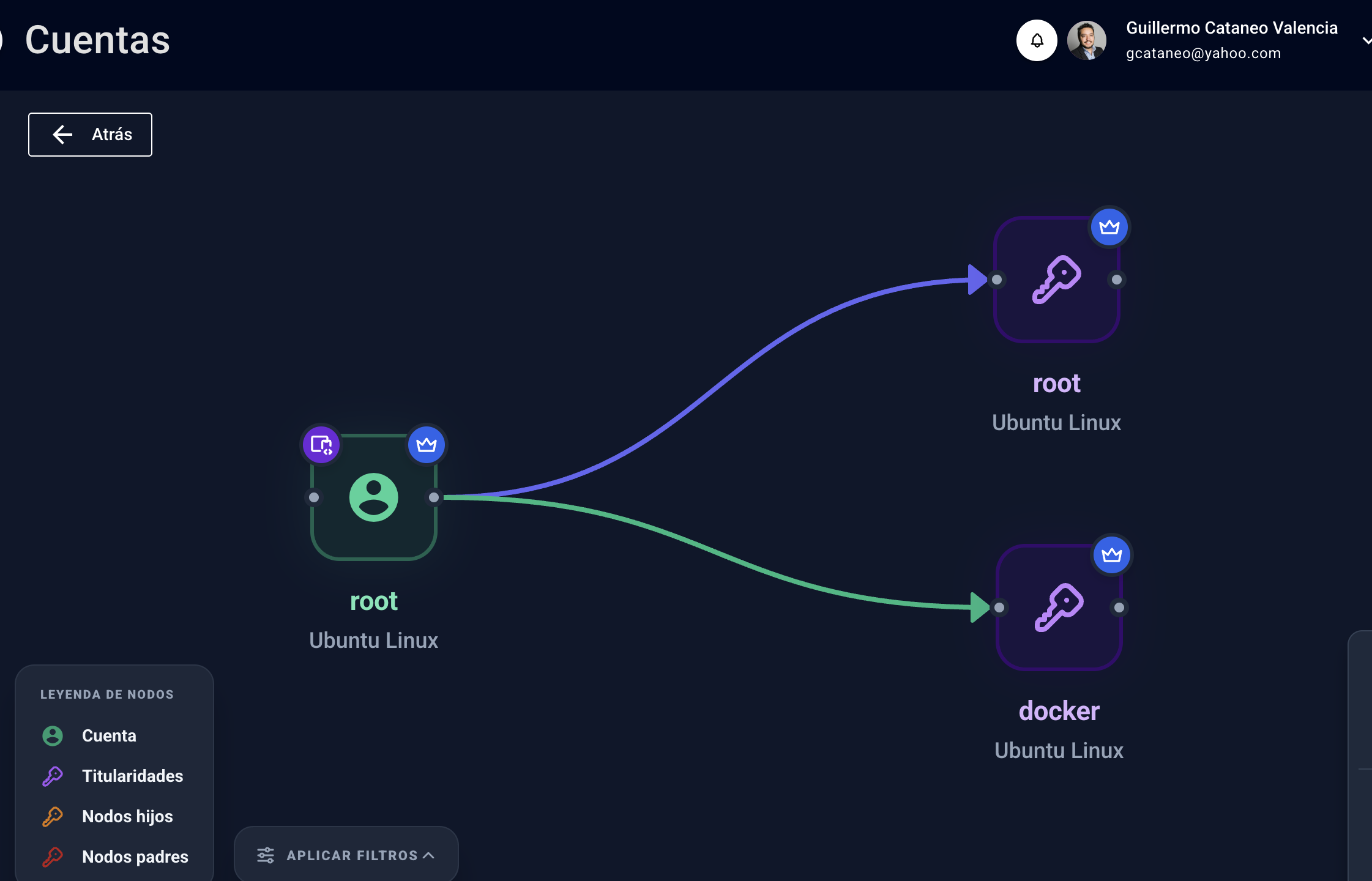
Process) showing each individual detection with application, stage, verdict (Legitimate Activity, Business Exception), severity, and affected accounts — giving SOC teams a native ATT&CK-aligned view of their identity attack surface.Screenshot of Interactive graph visualization of account relationships. Central node shows a Linux "root" account on Ubuntu, connected via directional edges to its two entitlements — "root" and "docker" privileged access on Ubuntu Linux. The legend explains node types (accounts, entitlements, child nodes, parent nodes), giving IAM and security teams a visual map of how privileges are structured across systems.