Iperius Backup vs. NovaBACKUP

Overview
ProductRatingMost Used ByProduct SummaryStarting Price
Iperius Backup
Score 5.1 out of 10
N/A
Iperius Backup is a backup software designed for IT resellers and IT consultants. It is presented as versatile backup software that also provides enterprise-level functionality. Its professional features like VM Backup, database backup, tape backup, drive imaging and much more don't impact the price. Iperius provides a cloud-based management platform (Iperius Console) that gives a central view of all installations to IT resellers, and a centralized view across all their customers.…
$32
per installation
NovaBACKUP
Score 3.0 out of 10
N/A
NovaBACKUP is a backup and restore solution for businesses and service providers backed by decades of in-house data protection and backup expertise to help users simplify and securely back up their critical data. NovaBACKUP offers the following local and cloud backup and recovery software solutions for businesses: NovaBACKUP PC Agent with 1,000 GB of Cloud Storage for PCs NovaBACKUP Server Agent starts with 250 GB of Cloud Storage for…
$149.95
per year
Pricing
Iperius BackupNovaBACKUP
Editions & Modules
Iperius Backup Desktop
32$
per installation
Iperius Backup Essential
72$
per installation
Iperius Backup Advanced Database
166$
per installation
Iperius Backup Advanced tape
166$
per installation
Iperius Backup Advanced VM
244$
per installation
Iperius Backup Full
299$
per installation
NovaBACKUP PC Agent (with 1,000 GB Cloud)
149.95 /year
per year
NovaBACKUP Server (with 250 GB Cloud)
399.95 /year
per year
NovaBACKUP Managed Backup
Call for Pricing
SaaS Service, Usage-based
Offerings
Pricing Offerings
Iperius BackupNovaBACKUP
Free Trial
YesYes
Free/Freemium Version
YesNo
Premium Consulting/Integration Services
NoYes
Entry-level Setup FeeNo setup feeOptional
Additional DetailsAll server backup products include setup assistance plus, one year of NovaCare for local technical phone support, remote recovery assistance, and upgrade protection.
More Pricing Information
Features
Iperius BackupNovaBACKUP
Data Center Backup
Comparison of Data Center Backup features of Product A and Product B
Iperius Backup
6.1
1 Ratings
32% below category average
NovaBACKUP
-
Ratings
Instant recovery7.01 Ratings00 Ratings
Multiple backup destinations9.01 Ratings00 Ratings
Incremental backup identification5.01 Ratings00 Ratings
Backup to the cloud9.01 Ratings00 Ratings
Management dashboard1.01 Ratings00 Ratings
Platform support3.01 Ratings00 Ratings
Encryption9.01 Ratings00 Ratings
Best Alternatives
Iperius BackupNovaBACKUP
Small Businesses
Cove Data Protection
Score 9.2 out of 10
Acronis True Image
Acronis True Image
Score 8.6 out of 10
Medium-sized Companies
Bacula Enterprise
Bacula Enterprise
Score 9.6 out of 10
Bacula Enterprise
Bacula Enterprise
Score 9.6 out of 10
Enterprises
Bacula Enterprise
Bacula Enterprise
Score 9.6 out of 10
Bacula Enterprise
Bacula Enterprise
Score 9.6 out of 10
All AlternativesView all alternativesView all alternatives
User Ratings
Iperius BackupNovaBACKUP
Likelihood to Recommend
8.0
(1 ratings)
9.0
(1 ratings)
User Testimonials
Iperius BackupNovaBACKUP
Likelihood to Recommend
Enter s.r.l.
Iperius Backup is a very simple and cheap but absolutely effective solution for small infrastructures. You can use it both on Windows clients and servers, it can integrate with ESXi, MySQL, MSSQL, etc. I think the best way to use it is with their cloud space (Iperius Cloud Storage) that allows you to take care effortlessly of your small customers' data. When it comes to more complex infrastructures, I prefer relying on something different (Nakivo Backup and Replication, Promox Backup Server).
Read full review
NovaBACKUP
Provide data protection for small to media size clients. Sends comprehensive email reports upon job completion. Physical to Virtual Migrations. Backing up physical and virtual machines. Alerting on backup job success or failure. Support is could be a little better, but it is adequate. The application is frequently updated and supports the latest operating systems from Microsoft and VMware.
Read full review
Pros
Enter s.r.l.
  • Less than 15' to set up
  • It has its own cloud storage solution
  • It has a monitoring console
  • It's very cost effective
Read full review
NovaBACKUP
  • Backup data to removable media
  • Restore data
  • Report on data protection.
  • Physical to Virtual Machine Migrations
Read full review
Cons
Enter s.r.l.
  • Lack of clear documentation
  • Rsync not supported
  • Apparently NFS shares are supported but it's not clear how to use them
  • Iperius Console should be improved (it's almost a read-only dashboard and you need too many clicks to get where you want to go)
Read full review
NovaBACKUP
  • None, it provides all the functionality we require.
  • Improve licensing costs.
Read full review
Alternatives Considered
Enter s.r.l.
The company used several free solutions (e.g. Cobian Backup et al.) but they were outdated and there was no standardization, nor a simple way to monitor all the backup jobs. Iperius had all the key features needed for the task and the project is very much alive (regular new releases).
Read full review
NovaBACKUP
Not as polished as Veeam, but a lot cheaper when backing up data from over 10 servers. Otherwise, if you are backing up just one server, and don't need much in the way of support, the Veeam Community edition is a very cost-effective backup solution. When comparing the support and cost of Novabackup for a small to mid-size business, it is a very reliable solution.
Read full review
Return on Investment
Enter s.r.l.
  • One standard solution for small customers
  • One console to monitor backup jobs
Read full review
NovaBACKUP
  • Provides confidence that we can recover from data loss or corruption.
  • Enabled easy P2V for our servers.
Read full review
ScreenShots

Iperius Backup Screenshots

Screenshot of HomeScreenshot of ToolsScreenshot of Add edit destination folderScreenshot of New Backup JobScreenshot of VMware EXSi Backup solution

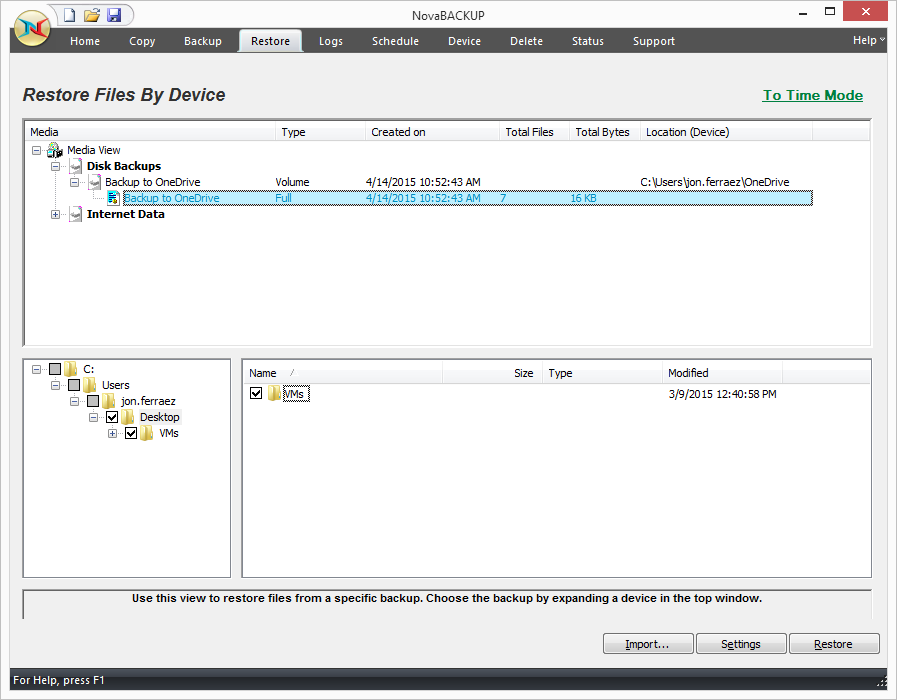
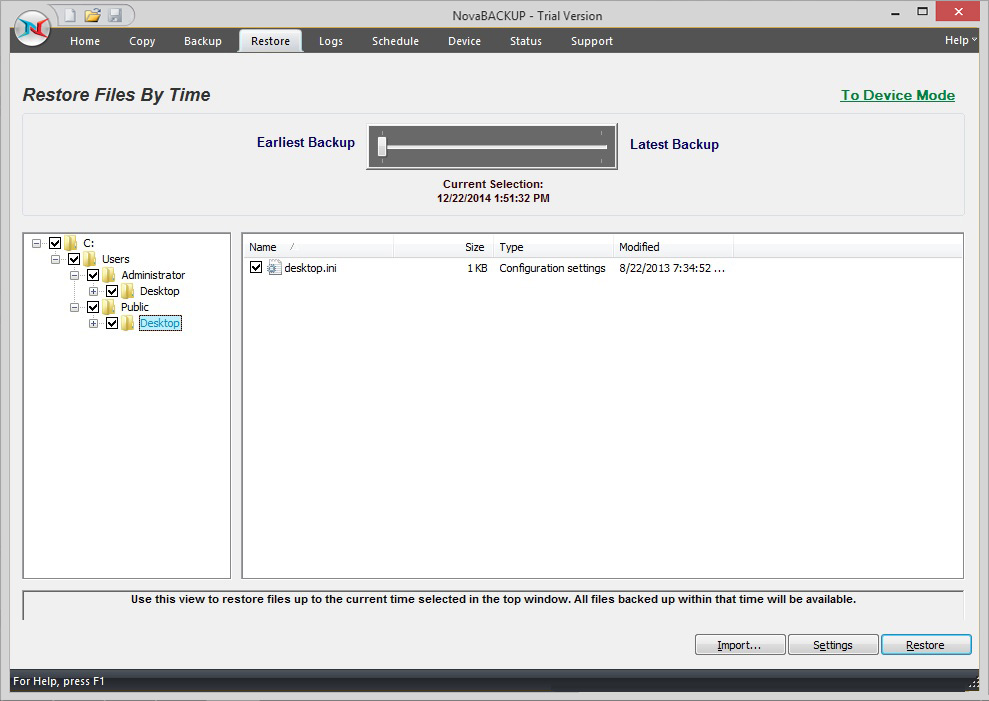
NovaBACKUP Screenshots

Screenshot of NovaBACKUP Home ScreenScreenshot of VMware ReplicationScreenshot of NovaBACKUP Backup TabScreenshot of Restore Files by DeviceScreenshot of NovaBACKUP Central Management ConsoleScreenshot of Restore Files by Time