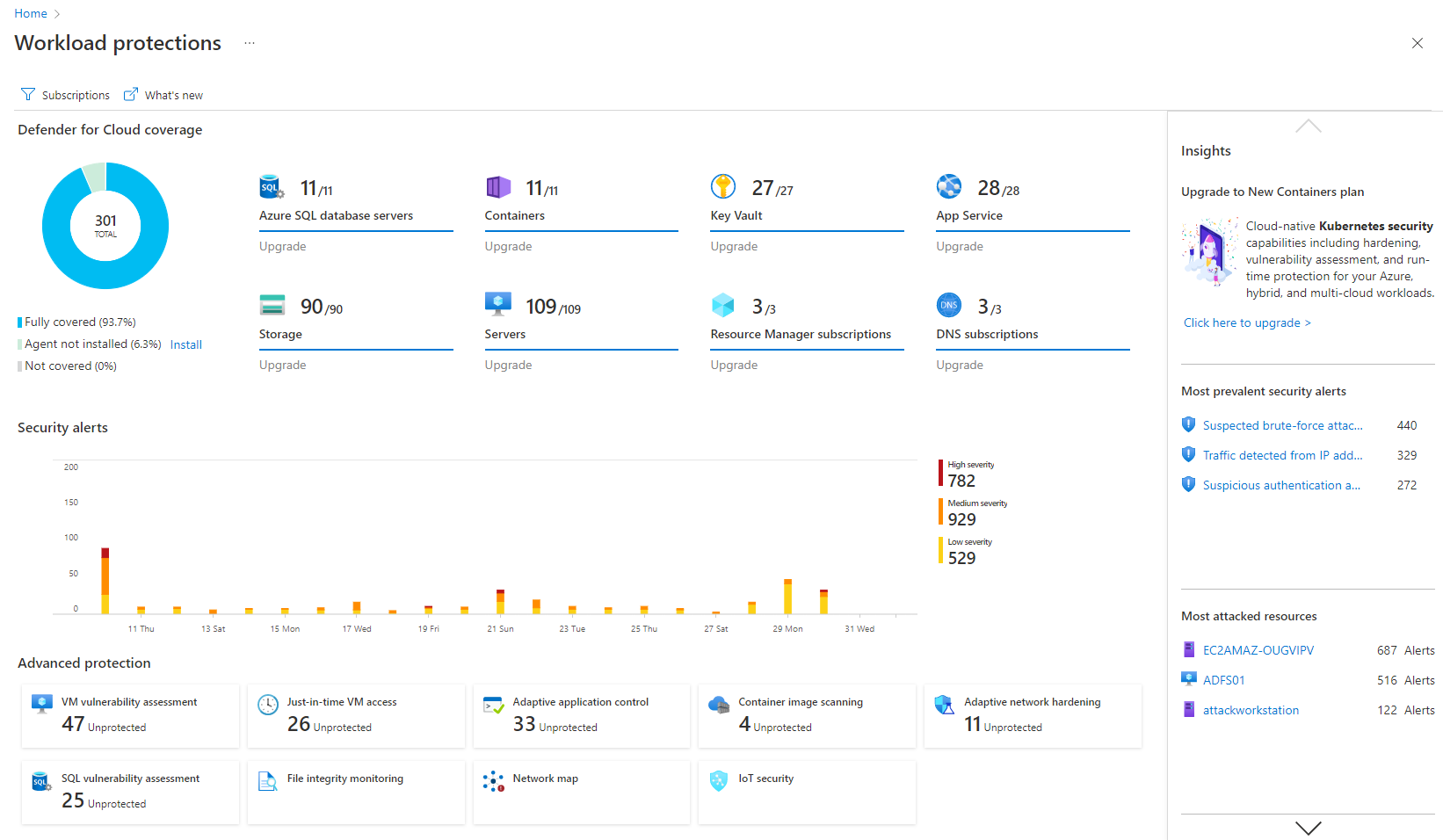
Microsoft Defender for Cloud is a Cloud Security Posture Management (CSPM) and Cloud Workload Protection Platform (CWPP) for Azure, on-premises, and multicloud (Amazon AWS and Google GCP) resources.
N/A
Rapid7 InsightVM
Score7.8 out of 10
N/A
InsightVM is presented as the next evolution of Nexpose, by Rapid7. This Insight cloud-based solution features everything included in Nexpose, such as Adaptive Security and the proprietary Real Risk score, and extends visibility into cloud and containerized infrastructure. InsightVM also offers advanced remediation, tracking, and reporting capabilities not included in Nexpose.
Rapid7 InsightVM is more cost effective than the other solution on the market. It is easy to deploy and the user interface is easy to use and intuative. We select Rapid7 InsightVM mainly because it integrates well with ServiceNow compared to the other solution that were …
A de minimis incentive was given to thank the reviewer for their time. The incentive was not used to bias or drive a particular response, nor was the incentive contingent on a positive endorsement. More Info
I think it's good for cloud-native companies. A company that, from day zero, they're like, "We're going cloud, and this is how we're going to do it." They get it. It works well for them. Smaller organizations that are under X amount of resources- I don't know what that X might mean- but I feel like it plays well in smaller, more nimble organizations. If you're an older organization or if you're extremely large, it starts becoming a little difficult to manage at scale. And you have to sometimes throw bodies at the problem. Maybe not the most eloquent way of saying it, but that's what it feels like.
A de minimis incentive was given to thank the reviewer for their time. The incentive was not used to bias or drive a particular response, nor was the incentive contingent on a positive endorsement. More Info
InsightVM is great for finding all devices on your network and where the misconfigurations exist. We all have to patch our systems and applications, but it can be difficult to keep track of which systems are up to date. This tool is very helpful in filling in this gap and helping you organize that information. It is easy to get a big picture view of how your organization is doing from a vulnerability perspective, and it is equally as easy to drill down and get specific details that you need. Prioritization is crucial when it comes to this space, because you can never address every vulnerability, so you need to make sure the highest priority items are being remediated. R7's tool excels in this area and highlights items you weren't even aware of.
A de minimis incentive was given to thank the reviewer for their time. The incentive was not used to bias or drive a particular response, nor was the incentive contingent on a positive endorsement. More Info
It's really well laid out, with an easy-to-use, accessible UI.
With Microsoft Defender for Cloud, it has everything you need with the Safelink attachment, the Safelink emails for URL, the way it scans those URLs and attachments within the product, and you're seeing the results. And that adds an extra layer of security for the user, so you feel comfortable knowing the product monitors those. That's something I really like about that product.
A de minimis incentive was given to thank the reviewer for their time. The incentive was not used to bias or drive a particular response, nor was the incentive contingent on a positive endorsement. More Info
A de minimis incentive was given to thank the reviewer for their time. The incentive was not used to bias or drive a particular response, nor was the incentive contingent on a positive endorsement. More Info
Integrations with on-premise workloads can sometimes be challenging. Needs improvement and well standardised integration points
Vulnerability categories can be difficult to understand. It should allow teams to focus on critical findings and help them keep aside low-severity or suppressed vulnerabilities
Pricing can be improved as it can be over-priced for smaller businesses and would potentially affect their ROI due to the small scale
A de minimis incentive was given to thank the reviewer for their time. The incentive was not used to bias or drive a particular response, nor was the incentive contingent on a positive endorsement. More Info
From my experience of using this tool, sometimes it gives more false positives. A few times I had performed the scan on the same IP address using QualysGuard and Nexpose, but after comparing the scan results I had found that QualysGuard had provided more accurate vulnerability information.
A de minimis incentive was given to thank the reviewer for their time. The incentive was not used to bias or drive a particular response, nor was the incentive contingent on a positive endorsement. More Info
It is a great product that integrates nicely when running an Azure platform and even multi-cloud environment. Not looking for point-solutions but a suite that answers most requirements. It is very comfortable being able to use KQL, workbooks and automation that is native to the azure platform
My visibility is limited because I'm only doing very small pieces of what the overall org does. And also, we have limitations on what we're allowed to use. It's not like we get a new product as users or leadership level users, and everything is on, and we can just do whatever we want. We're very restricted in what we can use any tooling within the org because of the different levels of regulatory constraints we have, because of just the nature of who we are inherently. So that's why. I don't think it's necessarily the product. I think it's more or less of what we're able to do with the product.
A de minimis incentive was given to thank the reviewer for their time. The incentive was not used to bias or drive a particular response, nor was the incentive contingent on a positive endorsement. More Info
While I think it is a great tool and platform, I believe it (like all tools and solutions) is always evolving and the needs for clients are changing as the industry evolves and threats are upgraded. Cost is good, and support is helpful. Some things could be more granular and others could be easier to understand
A de minimis incentive was given to thank the reviewer for their time. The incentive was not used to bias or drive a particular response, nor was the incentive contingent on a positive endorsement. More Info
I gave it a seven due to the functionality and general ease of use after the initial setup headaches, but compared to Qualys, Rapid7 Nexpose falls short on features and ease of use. Their support drags this rating down a point as well. I have gone weeks with no update on semi-critical issues and typically have to make call after call to get a semi-coherent response.
A de minimis incentive was given to thank the reviewer for their time. The incentive was not used to bias or drive a particular response, nor was the incentive contingent on a positive endorsement. More Info
I believe Microsoft Defender for Cloud stacks up well against the other tools we looked at. It is native to the Azure platform and provides the same insights as the other tools. We selected Microsoft Defender for Cloud because it integrates well with the Azure resources and gives the needed insight, security alerts and recommendations.
A de minimis incentive was given to thank the reviewer for their time. The incentive was not used to bias or drive a particular response, nor was the incentive contingent on a positive endorsement. TR verified that a representative sample of customers was invited. More Info
Rapid7 InsightVM is a more professional tool than Nessus because historically, it was based on metasploit which is a powerful pentesting and exploiting tool. InsightVM covers more attacking scenarios and vulnerabilities than competitors and still a leader in this domain.cloud capability is also not available forNesuus and some other products. Rapid7 InsightVM is a way better as a pentesting tool in my opinion
A de minimis incentive was given to thank the reviewer for their time. The incentive was not used to bias or drive a particular response, nor was the incentive contingent on a positive endorsement. More Info
A de minimis incentive was given to thank the reviewer for their time. The incentive was not used to bias or drive a particular response, nor was the incentive contingent on a positive endorsement. More Info
After spending 2 years configuring, tuning, troubleshooting, and ultimately having nothing but regrets, we migrated away from the tool and accepted the loss.
Support had a variety of opinions, none of them consistent. No best practices. Lots of secret tricks known by support, none documented or shared until after problems are found.
Consulting services are available to come out and do a health check of your deployment, for a fee.
A de minimis incentive was given to thank the reviewer for their time. The incentive was not used to bias or drive a particular response, nor was the incentive contingent on a positive endorsement. More Info