TrustRadius: an HG Insights company

Save this comparison

Save this comparison

Add Product

Recommended Comparisons

    Overview
    ProductRatingMost Used ByProduct SummaryStarting Price

    NovaBACKUP

    Score3 out of 10
    N/ANovaBACKUP is a backup and restore solution for businesses and service providers backed by decades of in-house data protection and backup expertise to help users simplify and securely back up their critical data. NovaBACKUP offers the following local and cloud backup and recovery software solutions for businesses: NovaBACKUP PC Agent with 1,000 GB of Cloud Storage for PCs NovaBACKUP Server Agent starts with 250 GB of Cloud Storage for…

    $149.95

    per year

    PowerProtect DD Series

    Score9 out of 10
    N/APowerProtect DD (a next-generation appliance replacing Dell EMC Data Domain) is a suite of hardware appliances used for data protection, backup, storage and deduplication. PowerProtect appliance offerings are cloud-enabled and vary by organization size, capable of supporting small business and enterprises. PowerProtect appliances are separated into two categories: entry-level to midrange, and enterprise. Entry-Level to Midrange Backup Appliances PowerProtect…N/A
    Pricing
    NovaBACKUPPowerProtect DD Series
    Editions & Modules
    NovaBACKUP PC Agent (with 1,000 GB Cloud)
    149.95 /year
    per year
    NovaBACKUP Server (with 250 GB Cloud)
    399.95 /year
    per year
    NovaBACKUP Managed Backup
    Call for Pricing
    SaaS Service, Usage-based
    No answers on this topic
    Offerings
    Pricing Offerings
    NovaBACKUPPowerProtect DD Series
    Free Trial
    YesNo
    Free/Freemium Version
    NoNo
    Premium Consulting/Integration Services
    YesNo
    Entry-level Setup FeeOptionalNo setup fee
    Additional DetailsAll server backup products include setup assistance plus, one year of NovaCare for local technical phone support, remote recovery assistance, and upgrade protection.—
    More Pricing Information
    Features
    NovaBACKUPPowerProtect DD Series
    Data Center Backup
    Comparison of Data Center Backup features of NovaBACKUP and PowerProtect DD Series
    Feature
    NovaBACKUP
    -
    Ratings
    PowerProtect DD Series
    9.4
    10 Ratings
    11% above category average
    Universal recovery00 Ratings9.09 Ratings
    Instant recovery00 Ratings9.08 Ratings
    Recovery verification00 Ratings9.58 Ratings
    Business application protection00 Ratings9.510 Ratings
    Multiple backup destinations00 Ratings9.510 Ratings
    Incremental backup identification00 Ratings9.59 Ratings
    Backup to the cloud00 Ratings9.56 Ratings
    Deduplication and file compression00 Ratings10.09 Ratings
    Snapshots00 Ratings10.09 Ratings
    Flexible deployment00 Ratings9.08 Ratings
    Management dashboard00 Ratings9.58 Ratings
    Platform support00 Ratings9.08 Ratings
    Retention options00 Ratings9.07 Ratings
    Encryption00 Ratings9.57 Ratings
    Best Alternatives
    NovaBACKUPPowerProtect DD Series
    Small Businesses
    Acronis True Image
    Score8.3 out of 10
    BDRShield
    Score6.5 out of 10
    Medium-sized Companies
    Acronis True Image
    Score8.3 out of 10
    Bacula Enterprise
    Score8.6 out of 10
    Enterprises
    NetBackup Flex Appliances
    Score10 out of 10
    Bacula Enterprise
    Score8.6 out of 10
    All AlternativesView all alternativesView all alternatives
    User Ratings
    NovaBACKUPPowerProtect DD Series
    Likelihood to Recommend
    9.0
    (1 ratings)
    9.0
    (10 ratings)
    Likelihood to Renew
    -
    (0 ratings)
    10.0
    (1 ratings)
    Support Rating
    -
    (0 ratings)
    7.0
    (2 ratings)
    User Testimonials
    NovaBACKUPPowerProtect DD Series
    Likelihood to Recommend
    NovaBACKUP
    Provide data protection for small to media size clients. Sends comprehensive email reports upon job completion. Physical to Virtual Migrations. Backing up physical and virtual machines. Alerting on backup job success or failure. Support is could be a little better, but it is adequate. The application is frequently updated and supports the latest operating systems from Microsoft and VMware.
    Incentivized
    Read full review
    Dell Technologies
    We have huge data coming in from different sources and also from multiple organizations in our Data centres. This data had multiple copies of the same data and was huge in size therefore, we wanted to have a solution in place which can help us with a good amount of deduplication at the deepest possible level to make sure that our ecosystem does not have multiple copies of the same data and is also efficient at the same time. Having said this, we wanted this solution to be secure and reliable since it had to be exposed to a huge critical set of data in the market. To add, backup and restoration was something that we were also keen on evaluating so that once we have efficient data within our system, the time it takes to backup and restoration also reduces. And all this was justified by this solution when we signed up with them. From the pricing perspective and the implementation side, the solution needs improvement to make it more efficient and user-friendly.
    Incentivized
    Read full review
    Pros
    NovaBACKUP
    • Backup data to removable media
    • Restore data
    • Report on data protection.
    • Physical to Virtual Machine Migrations
    Incentivized
    Read full review
    Dell Technologies
    • It writes backups quickly. DDBoost add-on is very useful as well for improving backup speeds.
    • DD is very efficient in its use of capacity. It dedupes and compresses very well.
    • It spans to large capacity amounts.
    Incentivized
    Read full review
    Cons
    NovaBACKUP
    • None, it provides all the functionality we require.
    • Improve licensing costs.
    Incentivized
    Read full review
    Dell Technologies
    • It can be expensive to implement, especially when used in conjunction with other applications/hardware such as Avamar.
    • The TCO can be high, especially when it needs its storage expanded.
    • Recovery speeds can be slow (compared to other solutions) for when recovery is time sensitive.
    Incentivized
    Read full review
    Likelihood to Renew
    NovaBACKUP
    No answers on this topic
    Dell Technologies
    DD has performed flawlessly for almost 10 years as our backup/recovery storage with offsite replication. Given its track record and great support from EMC, we're unlikely to look elsewhere any time soon.
    Incentivized
    Read full review
    Support Rating
    NovaBACKUP
    No answers on this topic
    Dell Technologies
    Customer support has had some ups and downs here. We've had several issues with EMC support before and during the acquisition by Dell, but in the last 18 months support has been top notch. Quick and knowledgeable help is but a chat away, or they will call you back so you don't have to wait on hold. The team supporting us is responsive and is quick to assist with any request or issue.
    Incentivized
    Read full review
    Alternatives Considered
    NovaBACKUP
    Not as polished as Veeam, but a lot cheaper when backing up data from over 10 servers. Otherwise, if you are backing up just one server, and don't need much in the way of support, the Veeam Community edition is a very cost-effective backup solution. When comparing the support and cost of Novabackup for a small to mid-size business, it is a very reliable solution.
    Incentivized
    Read full review
    Dell Technologies
    We selected Data Domain due to its integration with our backup software. The Data Domain works well for what we need it to do.
    Incentivized
    Read full review
    Return on Investment
    NovaBACKUP
    • Provides confidence that we can recover from data loss or corruption.
    • Enabled easy P2V for our servers.
    Incentivized
    Read full review
    Dell Technologies
    • We were able to immediately discontinue our remote tape storage and TBU maintenance.
    • Reduced backup footprint in the data center.
    • It is costly to expand so buy it with a purpose.
    Incentivized
    Read full review
    ScreenShots

    NovaBACKUP Screenshots

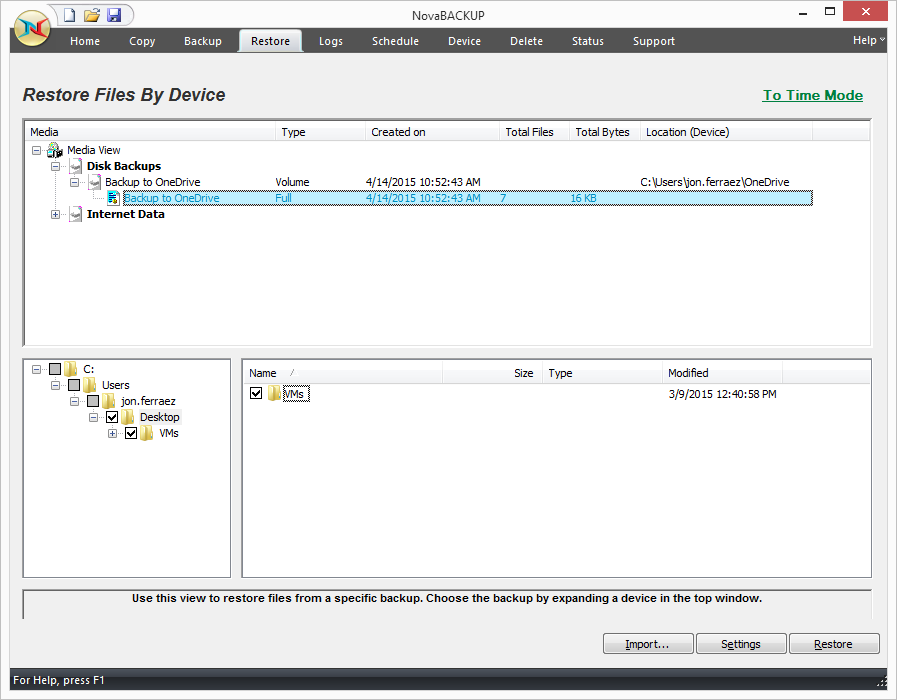
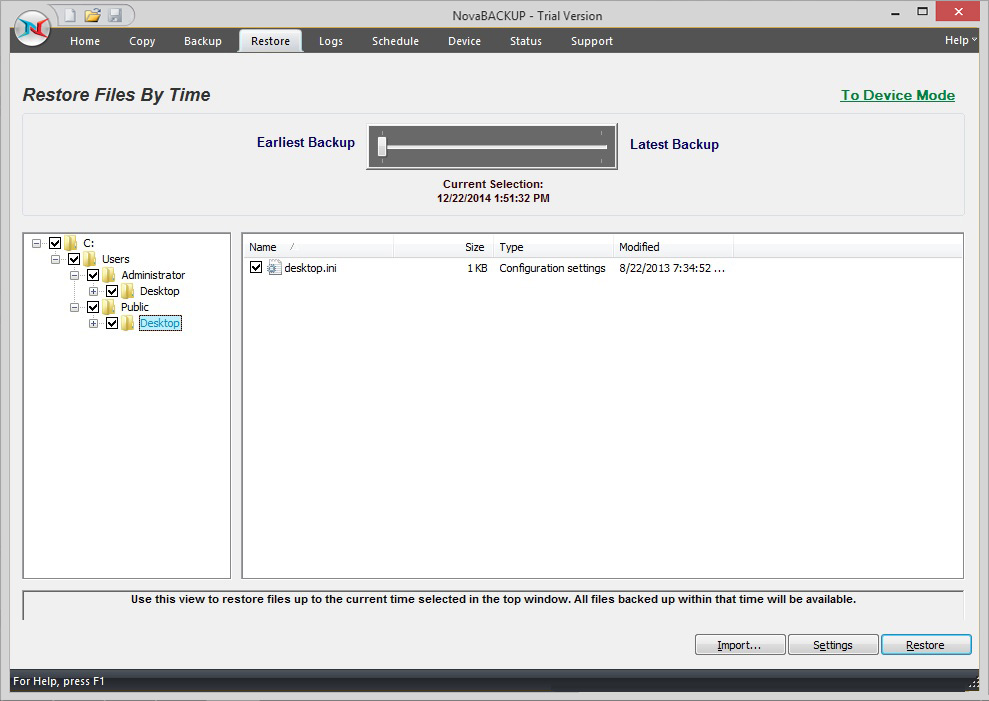
    Screenshot of NovaBACKUP Home ScreenScreenshot of VMware ReplicationScreenshot of NovaBACKUP Backup TabScreenshot of Restore Files by DeviceScreenshot of NovaBACKUP Central Management ConsoleScreenshot of Restore Files by Time