Scifeon ELN & LIMS vs. Thermo Fisher SampleManager LIMS

Overview
ProductRatingMost Used ByProduct SummaryStarting Price
Scifeon ELN & LIMS
Score 0.0 out of 10
N/A
Scifeon ELN & LIMS is a modular, low-code digital platform designed to manage research and quality-control data across biotech, pharma, and CDMO/CRO environments. It combines Electronic Lab Notebook (ELN) and Laboratory Information Management System (LIMS) capabilities in a single environment, enabling scientists to capture, analyze, and share data. Key Features Integrated ELN & LIMS: Unified data capture, sample management, and process…
$180
per month per user
Thermo Fisher SampleManager LIMS
Score 10.0 out of 10
N/A
Thermo Fisher Scientific supports laboratory research with supplies and equipment but also software; the Thermo Fisher SampleManager LIMS is a widely used laboratory information management system dedicated to data and resource management, as well as automation and operational support.N/A
Pricing
Scifeon ELN & LIMSThermo Fisher SampleManager LIMS
Editions & Modules
No answers on this topic
Offerings
Pricing Offerings
Scifeon ELN & LIMSThermo Fisher SampleManager LIMS
Free Trial
YesNo
Free/Freemium Version
NoNo
Premium Consulting/Integration Services
YesNo
Entry-level Setup FeeOptionalNo setup fee
Additional Details
More Pricing Information
Community Pulse
Scifeon ELN & LIMSThermo Fisher SampleManager LIMS
User Ratings
Scifeon ELN & LIMSThermo Fisher SampleManager LIMS
Likelihood to Recommend
-
(0 ratings)
8.4
(2 ratings)
User Testimonials
Scifeon ELN & LIMSThermo Fisher SampleManager LIMS
Likelihood to Recommend
Scifeon
No answers on this topic
Thermo Fisher Scientific
While being an active user at MTF, LIMS was great in being able to complete testing and other daily tasks that would have taken much longer without this system. It enabled a great overall satisfaction to be able to pinpoint who performed each task based on time stamping and avoided many errors regarding lot numbers, expiration dates, and equipment IDs. Thus, being able to validate and report data out to other departments was ALOT faster, which is highly important being that much of our testing was heavily time sensitive and crucial to sustaining life. However, although LIMS improved the companies overall effectiveness and efficiency, it had some minor issues that created more than one problem. Being that I am no longer employed at MTF, time studies performed utilizing LIMS while testing resulted in the loss of five positions within the laboratory. It's great that it's so fast, but caused controversy by eliminating employees who were highly proficient while using the LIMS software. Also during usage, it would crash numerous times, which would either delay the input of data or completely wipe it out. On several occasions, we risked having to declare deviations on the fact that data was permanently deleted and never to be able to be retained again. This also resulted in a loss of millions of dollars due to tissue and bone samples being thrown away because there was no data to support they were able to be used in surgeries.
Read full review
Pros
Scifeon
No answers on this topic
Thermo Fisher Scientific
  • Cloud
  • Storing information
  • Transferring data from one to another
  • No Flash Drives
  • Easy use
  • BEST SOFTWARE
  • MUST NEED for large companies
Read full review
Cons
Scifeon
No answers on this topic
Thermo Fisher Scientific
  • LIMS can be an extremely slow system if not updated to the most current version, which can also cause the system to crash in the midst of recording/testing.
  • Disables certain features to be accessible depending on user status.
  • Does not always adhere to set protocols or standards made for specific data input.
Read full review
Alternatives Considered
Scifeon
No answers on this topic
Thermo Fisher Scientific
Thermo Fisher Scientific LIMS is fantastic in that it has a wide range to store and change data regarding instrumentation, reagents, equipment, materials, and testing layouts. Information can be backed up for quite some time, which is great in the instance that data needs to be pulled immediately, regardless when it was last accessed. It also enables testing to follow a better flow through following the way in which the set up is displayed within the LIMS system.
Read full review
Return on Investment
Scifeon
No answers on this topic
Thermo Fisher Scientific
  • Converting to the program
  • Learning a newer software
Read full review
ScreenShots

Scifeon ELN & LIMS Screenshots

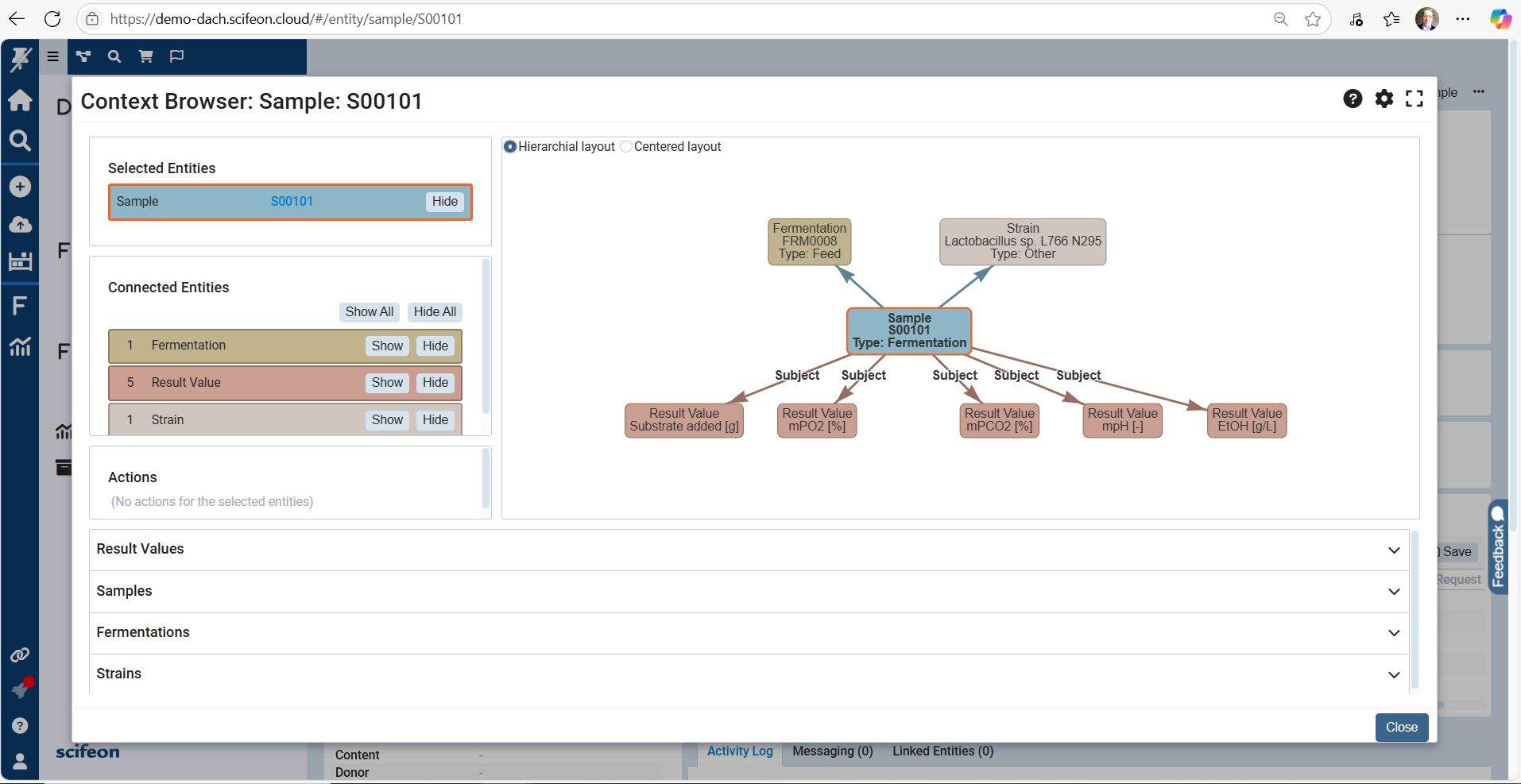
Screenshot of the Context Browser, which gives scientists and QC teams a clear, structured view of all laboratory data. Projects, experiments, samples, and results are organized in a single, connected interface, making it easy to navigate across workflows without losing context.

From a top-level project, users can drill down into experiments, linked samples, and raw measurements. Metadata, attached files, and audit trails are displayed side by side, ensuring that all relevant information is accessible at a glance. Integrated search and filtering functions make it simple to find specific datasets, compare results, or trace dependencies between workflows.

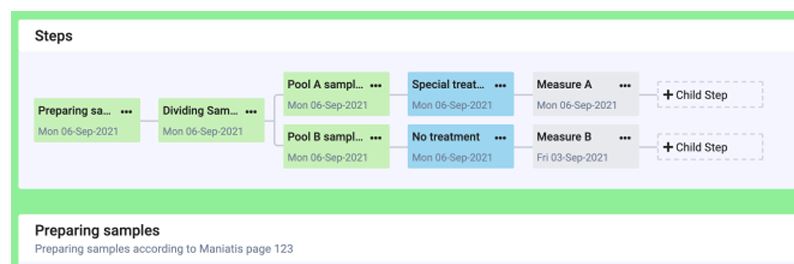
With the Context Browser, labs gain a transparent, FAIR-aligned data environment where relationships between experiments, samples, and results are visible and reusable — enabling faster decisions, smoother collaboration, and easier compliance.Screenshot of the Workflow Builder, a visual, drag-and-drop interface designed to configure laboratory workflows inside Scifeon without coding.Screenshot of the Fermentation Visualization Dashboard

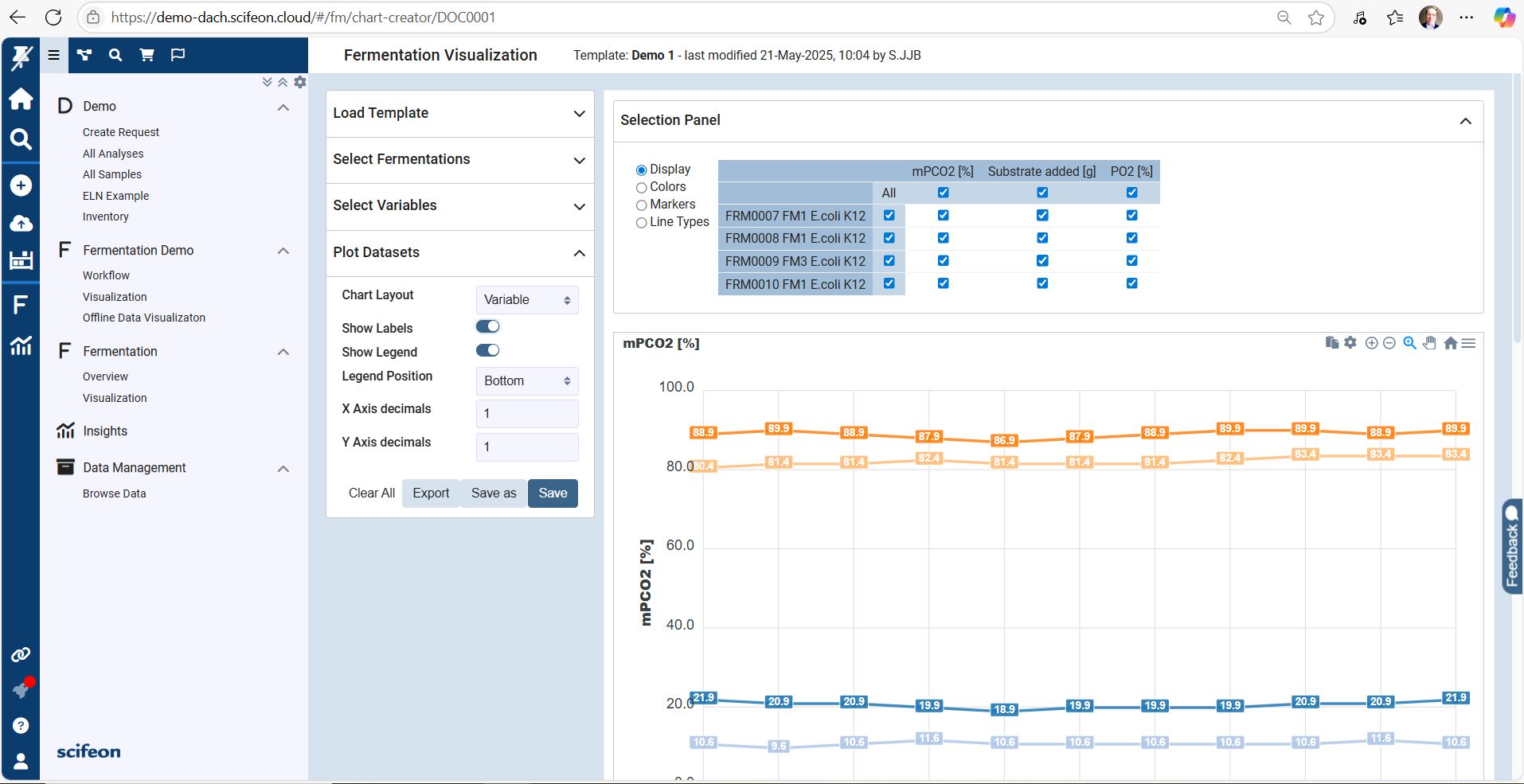
The Fermentation Visualization Dashboard provides a real-time overview of upstream and downstream fermentation data in a single, interactive interface. Scientists and process engineers can monitor critical parameters such as temperature, pH, dissolved oxygen, agitation speed, and feed rates directly as the process runs.

Key features visible in the dashboard screenshot:

Dynamic Time-Series Charts
Multiple parameters are plotted in synchronized graphs, enabling users to spot trends, deviations, and correlations across batches instantly.

Batch Comparison Mode
Overlay data from multiple fermentation runs to compare yields, stability, and process performance at a glance.

Live Instrument Integration
Data streams directly from connected bioreactors, ensuring the dashboard reflects the latest in-process values without manual uploads.

Interactive Data Exploration
Zoom, filter, and highlight specific segments of the fermentation process to investigate anomalies or optimization opportunities.

Compliance & Traceability
Linked audit trails and sample metadata support GMP, GCLP, and 21 CFR Part 11 compliance requirements.

Functional Impression

The dashboard turns complex fermentation datasets into intuitive, actionable insights. It supports faster decision-making, improves process reproducibility, and enables data-driven optimization — without leaving Scifeon’s platform.Screenshot of the Scifeon Workflow Builder – Adding Steps to a Workflow

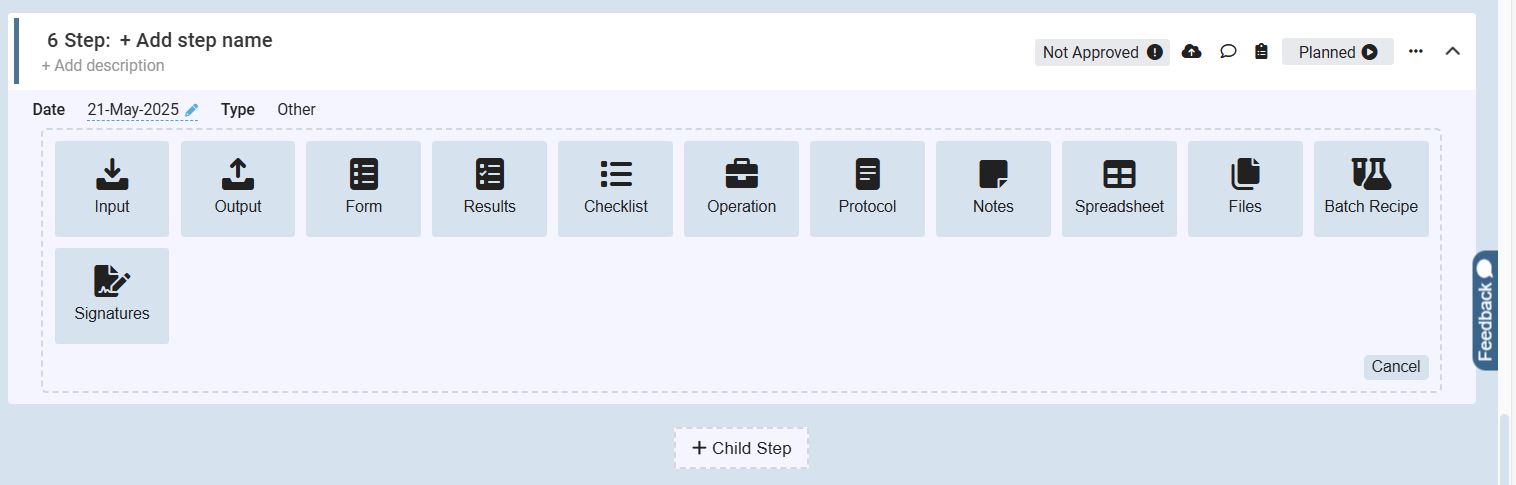
The screenshot shows the step configuration interface within Scifeon’s Workflow Builder, where users define and customize individual steps in a laboratory process.

At the top, the user can name the step and add an optional description. Below, a wide range of predefined step types is available to choose from, making workflows flexible and modular. The visible options include:

Input – Add incoming data, parameters, or metadata

Output – Define resulting data, files, or reports

Form – Include structured data-entry forms for users

Results – Capture and manage experiment results

Checklist – Enforce step-by-step task confirmation

Operation – Represent a laboratory or process operation

Protocol – Attach or link standard operating procedures (SOPs)

Notes – Add contextual annotations or explanations

Spreadsheet – Integrate structured tabular data directly

Files – Upload or attach supporting documents

Batch Recipe – Define recipe parameters for batch processes

Signatures – Insert digital approval and sign-off steps

At the bottom, a “+ Child Step” button allows users to create nested steps within a larger workflow, making complex laboratory processes easy to structure.

The interface also displays controls for status tracking (“Planned” vs. “Not Approved”), adding comments, and attaching files, ensuring each workflow step stays traceable and compliant.