TrustRadius: an HG Insights company

Save this comparison

Save this comparison

Add Product

Recommended Comparisons

    Overview
    ProductRatingMost Used ByProduct SummaryStarting Price

    Adobe Acrobat Reader

    Score8.6 out of 10
    N/AAcrobat Reader is a PDF viewer and converter, available as a free download from Adobe. Users can view, sign, collaborate on and annotate PDF files, or edit and convert PDFs into file formats like Excel and Word.N/A

    DocuXplorer

    N/AN/ADocuXplorer is a document management solution for any file belonging to any business, from the company of the same name in Charleston, South Carolina. WIth it, users can control their data with its methods of locating, accessing, and sharing any type of document, whether scanned or electronic. DocuXplorer’s Microsoft's File Explorer-style interface is designed to require little training and virtually no technology expertise to operate, and it is available in 8 languages and suits businesses of…N/A
    Pricing
    Adobe Acrobat ReaderDocuXplorer
    Editions & Modules
    No answers on this topic
    No answers on this topic
    Offerings
    Pricing Offerings
    Adobe Acrobat ReaderDocuXplorer
    Free Trial
    NoNo
    Free/Freemium Version
    NoNo
    Premium Consulting/Integration Services
    NoYes
    Entry-level Setup FeeNo setup feeNo setup fee
    Additional Details
    More Pricing Information
    Community Pulse
    Adobe Acrobat ReaderDocuXplorer
    Considered Both Products
    Adobe
    No answer on this topic
    DocuXplorer
    No answer on this topic
    Key User Insights
    Would buy again
    95%
    Would buy again
    71 Answers
    No answers on this topic
    Delivers good value for the price
    97%
    Delivers good value for the price
    67 Answers
    No answers on this topic
    Happy with the feature set
    97%
    Happy with the feature set
    73 Answers
    No answers on this topic
    Lived up to sales and marketing promises
    98%
    Lived up to sales and marketing promises
    45 Answers
    No answers on this topic
    Implementation went as expected
    96%
    Implementation went as expected
    49 Answers
    No answers on this topic
    Features
    Adobe Acrobat ReaderDocuXplorer
    PDF Editors
    Comparison of PDF Editors features of Adobe Acrobat Reader and DocuXplorer
    Feature
    Adobe Acrobat Reader
    9.1
    2 Ratings
    6% above category average
    DocuXplorer
    -
    Ratings
    Edit Text and Images9.02 Ratings00 Ratings
    Merge or Split PDFs9.52 Ratings00 Ratings
    Add Annotations9.02 Ratings00 Ratings
    Text Recognition (OCR)8.02 Ratings00 Ratings
    Page Management8.52 Ratings00 Ratings
    Form Creation and Editing10.01 Ratings00 Ratings
    Secure PDFs10.01 Ratings00 Ratings
    Convert to Different Formats9.02 Ratings00 Ratings
    Comment and Review Tools9.02 Ratings00 Ratings
    Undo and Redo Actions8.52 Ratings00 Ratings
    Best Alternatives
    Adobe Acrobat ReaderDocuXplorer
    Small Businesses
    Tungsten Power PDF
    Score9.8 out of 10
    M‑Files
    Score8.9 out of 10
    Medium-sized Companies
    PDF Xchange Viewer and Editor
    Score9.3 out of 10
    Esker
    Score7.4 out of 10
    Enterprises
    Email to PDF for Outlook
    Score8 out of 10
    Tungsten Capture
    Score9.5 out of 10
    All AlternativesView all alternativesView all alternatives
    User Ratings
    Adobe Acrobat ReaderDocuXplorer
    Likelihood to Recommend
    9.5
    (75 ratings)
    -
    (0 ratings)
    Likelihood to Renew
    7.2
    (2 ratings)
    -
    (0 ratings)
    Usability
    9.5
    (3 ratings)
    -
    (0 ratings)
    Implementation Rating
    10.0
    (1 ratings)
    -
    (0 ratings)
    User Testimonials
    Adobe Acrobat ReaderDocuXplorer
    Likelihood to Recommend
    Adobe
    After creating a document, converting it into Adobe Acrobat Reader is usually very easy for storage in my computer, sending/sharing via emails, etc. This also saves a significant amount of unnecessary printing and paper waste, which is great for reducing waste. I don't have to worry about not having the right software/app to view, edit, and share with anyone.
    Incentivized
    Read full review
    DocuXplorer
    No answers on this topic
    Pros
    Adobe
    • It has all the tools that individuals need for reading/doing light editing of PDF files.
    • It is the most secure PDF reader on the market, and it tends to get patched with timely updates on a regular basis.
    • It usually works very well, as far as the software itself. It doesn't crash a lot, or is particularly an error prone software platform.
    Incentivized
    Read full review
    DocuXplorer
    No answers on this topic
    Cons
    Adobe
    • Being able to add image "stamps" to a document is a little tricky as the stamp has to already be in PDF format (at least on Mac) to work. This mean you have to convert the image to PDF before you can use it as a stamp.
    • Being only able to save one signature and one set of initials is a bit of a pain but you can actually use stamps if you need different versions frequently used scribbles for various reasons. The stamp won't secure the document and prevent future changes the same way the signature would though.
    • All of the other features you might want to use are only included with Acrobat Pro but the options are all displayed in the Reader app. When clicked they will offer the free trial that leads to a paid subscription. This is more of an annoyance but you can't fault Adobe for trying to make a sale.
    Incentivized
    Read full review
    DocuXplorer
    No answers on this topic
    Likelihood to Renew
    Adobe
    To be honest, I do not have any say in the renewal of Adobe Acrobat Reader DC. It is managed at an enterprise level, and the decision to renew or not renew is handled well above my pay grade as an external consultant.
    Incentivized
    Read full review
    DocuXplorer
    No answers on this topic
    Usability
    Adobe
    Again, Adobe Creative Suite is widely used and backed by an industry leader, making the experience very familiar and common for anyone who has used a PDF and wants more features to interact with it. It also makes copy text a lot easier than just previewing the file.
    Read full review
    DocuXplorer
    No answers on this topic
    Implementation Rating
    Adobe
    The application is pretty much "plug and play"
    Incentivized
    Read full review
    DocuXplorer
    No answers on this topic
    Alternatives Considered
    Adobe
    We have reviewed DocuSign in comparison to [Adobe] Acrobat Reader [DC's] e-sign capabilities. We found that DocuSign has more robust options when creating contracts and consent capabilities. DocuSign's online UI is much more suited to this type of task as well. However, we decided to stick with [Adobe] Acrobat Reader DC because of the price (DocuSign is more expensive) and we felt we didn't need all of the bells and whistles for contract signature and consent.
    Read full review
    DocuXplorer
    No answers on this topic
    Return on Investment
    Adobe
    • It's available for free, so there is no excuse to not install
    • Contains features that you would normally have to pay for in competitor software, so it has a positive impact on ROI
    • Reduces the amount of printing
    • Decreases the amount of time spent on regulatory and governance documentation
    Incentivized
    Read full review
    DocuXplorer
    No answers on this topic
    ScreenShots

    DocuXplorer Screenshots

    Screenshot of the AI Insights that automate analysis securely as a localized large language model (LLM). It operates entirely within the DocuXplorer interface, protecting proprietary company data.

Key benefits of AI Insights include:
- Full text search. Whether or not the information within a document is indexed, Insights can search and retrieve the information, including links or references to documents, when prompted.
- Conversational queries. Quickly locate and summarize company reports, policies, contracts, or financial statements without the research.
- Data privacy. Data remains in a secure storage container within a dedicated LLM model, ensuring security.
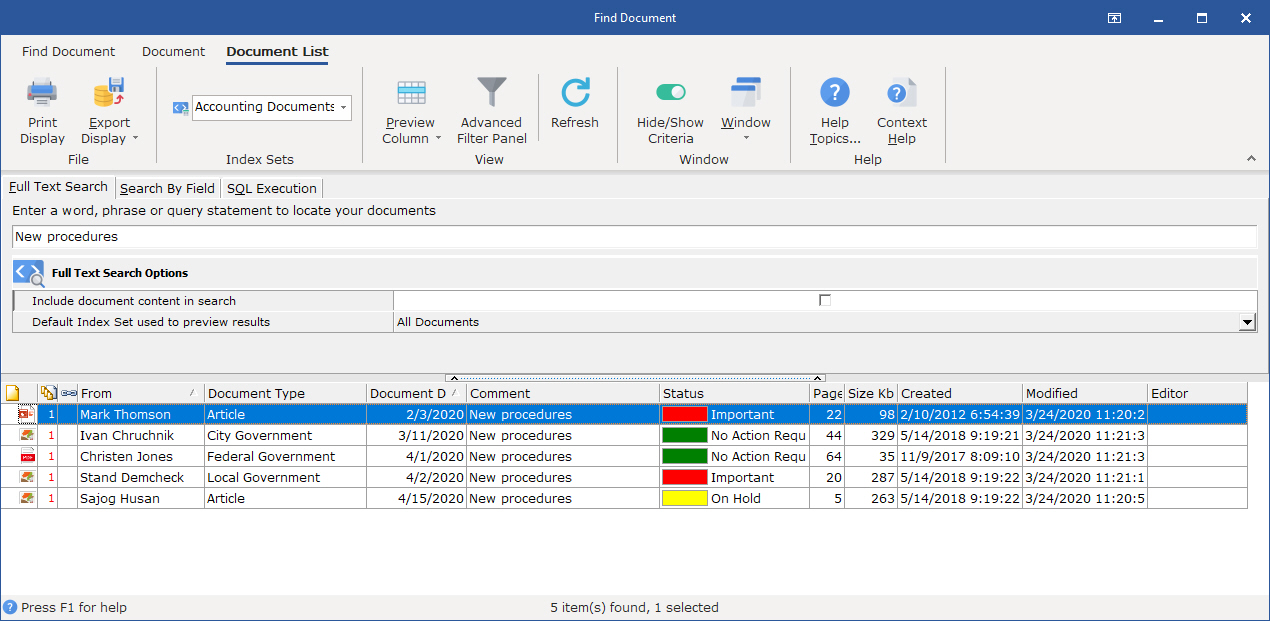
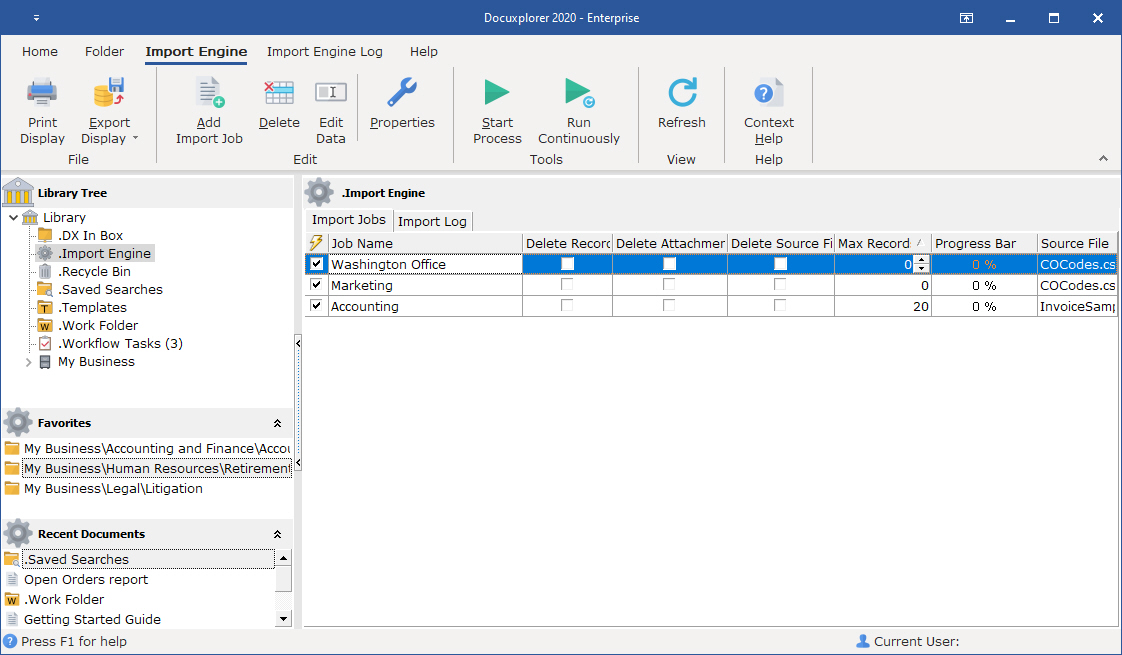
- Permission adherence. Teams only gets answers based on the files they have access to.Screenshot of DocuXplorer's full-text search, which lets users search by key fields (metadata) like date, document type, invoice number, customer/vendor name, or even unstructured data within the document.Screenshot of the Import Engine, used to automate document import from email, local drives, third-party software, and industry systems. It can:
- Handle one-time imports for bulk data migrations—useful when digitizing cabinets of paper records or moving from another system.
- Run ongoing imports by monitoring external folders, email inboxes, or third-party platforms for new files and pulling them into DocuXplorer automatically.
- Create new cabinets, drawers, and folders as needed, so there is no need to build the infrastructure manually.
- Populate index fields with key data during import, so every file is organized and searchable from day one.
- Run in the background—no need to tie up a specific workstation. Imports and organization happen everywhere, all the time, without any user effort.

Everything from PDFs and Word documents to PowerPoint presentations, Excel sheets, and QuickBooks transactions can be automatically pulled into DocuXplorer and organized.