AltonaLab vs. ConceptDraw MINDMAP

Overview
ProductRatingMost Used ByProduct SummaryStarting Price
AltonaLab
Score 0.0 out of 10
N/A
N/AN/A
ConceptDraw MINDMAP
Score 4.1 out of 10
N/A
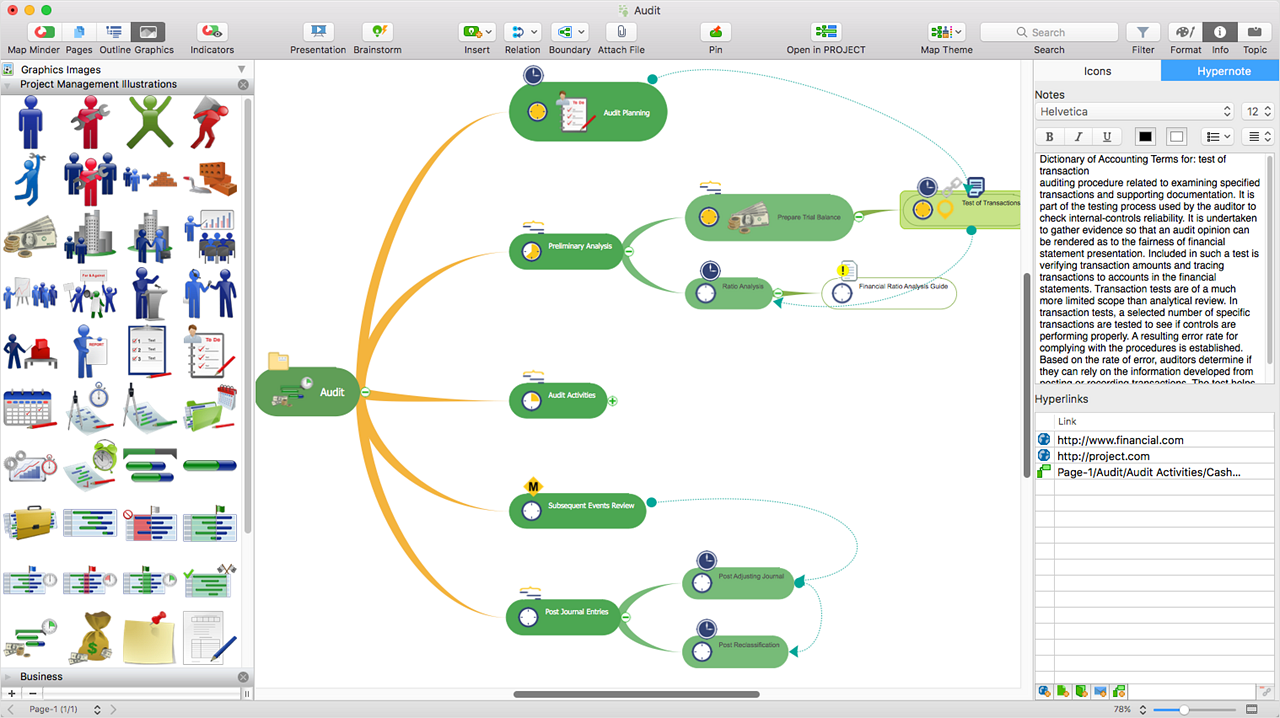
ConceptDraw MINDMAP is l mind mapping software application that can also resolve tasks for project management. According to the vendor, multiple shortcuts help users create new topics, re-arrange them and highlight important points, and export to various file formats. Enrich your mind map with in-built visual…N/A
Pricing
AltonaLabConceptDraw MINDMAP
Editions & Modules
No answers on this topic
Offerings
Pricing Offerings
AltonaLabConceptDraw MINDMAP
Free Trial
YesYes
Free/Freemium Version
NoNo
Premium Consulting/Integration Services
NoNo
Entry-level Setup FeeNo setup fee$199 per seat
Additional DetailsPrice varies for Individual, Commercial, Academic, Nonprofit and Government
More Pricing Information
Community Pulse
AltonaLabConceptDraw MINDMAP
Considered Both Products
AltonaLab

No answer on this topic

ConceptDraw MINDMAP
Chose ConceptDraw MINDMAP
As we were already using PROJECT, it became obvious that ConceptDraw MINDMAP was the product to use. The integration between those two products is very convenient and useful. The fact that ConceptDraw MINDMAP solutions was usable on Mac OS was also a pre requisite for us. We …
Chose ConceptDraw MINDMAP
It stacks up well although the others are more user friendly (but this may just be down to repeated use)
Chose ConceptDraw MINDMAP
Best tool for brainstorming ideas and gathering requirements with an easy way to connect the information. The other software which we tried had limited options and were more time consuming. The pricing model of ConceptDraw MINDMAP is simple and straightforward. Apart from …
Best Alternatives
AltonaLabConceptDraw MINDMAP
Small Businesses
OmniGraffle
OmniGraffle
Score 9.8 out of 10
OmniGraffle
OmniGraffle
Score 9.8 out of 10
Medium-sized Companies
OmniGraffle
OmniGraffle
Score 9.8 out of 10
OmniGraffle
OmniGraffle
Score 9.8 out of 10
Enterprises
OmniGraffle
OmniGraffle
Score 9.8 out of 10
OmniGraffle
OmniGraffle
Score 9.8 out of 10
All AlternativesView all alternativesView all alternatives
User Ratings
AltonaLabConceptDraw MINDMAP
Likelihood to Recommend
-
(0 ratings)
8.7
(0 ratings)
Support Rating
-
(0 ratings)
8.6
(0 ratings)
User Testimonials
AltonaLabConceptDraw MINDMAP
Likelihood to Recommend
No answers on this topic
MINDMAP is very focused on brainstorming and branching hierarchies of ideas and planning. Outside of those uses a more general diagramming software package like ConceptDraw DIAGRAM is a better option.
Read full review
Pros
No answers on this topic
  • For an idea, put whatever comes to your mind and organize with ConceptDraw MINDMAP.
  • Easily create slideshows for a business presentation of your idea without going for any other tool.
  • Easily export the work to PDF, PowerPoint and any image format for quick share.
  • Best note taking application which we can connect to our existing work.
Read full review
Cons
No answers on this topic
  • Having a ConceptDraw Mindmap app running on the iPad would be fantastic.
Read full review
Support Rating
No answers on this topic
The sales team is very responsive and willing to help out with questions, however the community of users is not as large as some other products so it can be difficult to find answers to more complex problems
Read full review
Alternatives Considered
No answers on this topic
As we were already using PROJECT, it became obvious that ConceptDraw MINDMAP was the product to use. The integration between those two products is very convenient and useful. The fact that ConceptDraw MINDMAP solutions was usable on Mac OS was also a pre requisite for us. We did not use any other Mind Map software.
Read full review
Return on Investment
No answers on this topic
  • It allows collaborative working for colleagues working remotely
Read full review
ScreenShots

ConceptDraw MINDMAP Screenshots

Screenshot of ConceptDraw MIDMAP v10 is perfect for brainstorming, project planning, meeting management, note taking, and much more.Screenshot of Data ExchangeScreenshot of Presentation ModeScreenshot of ConceptDraw OFFICE IntegrationScreenshot of In-built GraphicsScreenshot of Hypernotes