Amazon CloudWatch vs. VMware Tanzu CloudHealth

Overview
ProductRatingMost Used ByProduct SummaryStarting Price
Amazon CloudWatch
Score 7.9 out of 10
N/A
Amazon CloudWatch is a native AWS monitoring tool for AWS programs. It provides data collection and resource monitoring capabilities.
$0
per canary run
VMware Tanzu CloudHealth
Score 7.9 out of 10
N/A
Tanzu CloudHealth (formerly VMware Aria Cost Powered by CloudHealth) simplifies financial management, streamlines operations, and improves organizational collaboration across your multi-cloud environment.N/A
Pricing
Amazon CloudWatchVMware Tanzu CloudHealth
Editions & Modules
Canaries
$0.0012
per canary run
Logs - Analyze (Logs Insights queries)
$0.005
per GB of data scanned
Over 1,000,000 Metrics
$0.02
per month
Contributor Insights - Matched Log Events
$0.02
per month per one million log events that match the rule
Logs - Store (Archival)
$0.03
per GB
Next 750,000 Metrics
$0.05
per month
Next 240,000 Metrics
$0.10
per month
Alarm - Standard Resolution (60 Sec)
$0.10
per month per alarm metric
First 10,000 Metrics
$0.30
per month
Alarm - High Resolution (10 Sec)
$0.30
per month per alarm metric
Alarm - Composite
$0.50
per month per alarm
Logs - Collect (Data Ingestion)
$0.50
per GB
Contributor Insights
$0.50
per month per rule
Events - Custom
$1.00
per million events
Events - Cross-account
$1.00
per million events
CloudWatch RUM
$1
per 100k events
Dashboard
$3.00
per month per dashboard
CloudWatch Evidently - Events
$5
per 1 million events
CloudWatch Evidently - Analysis Units
$7.50
per 1 million analysis units
No answers on this topic
Offerings
Pricing Offerings
Amazon CloudWatchVMware Tanzu CloudHealth
Free Trial
YesYes
Free/Freemium Version
YesYes
Premium Consulting/Integration Services
YesYes
Entry-level Setup FeeNo setup feeNo setup fee
Additional DetailsWith Amazon CloudWatch, there is no up-front commitment or minimum fee; you simply pay for what you use. You will be charged at the end of the month for your usage.
More Pricing Information
Community Pulse
Amazon CloudWatchVMware Tanzu CloudHealth
Best Alternatives
Amazon CloudWatchVMware Tanzu CloudHealth
Small Businesses
InfluxDB
InfluxDB
Score 8.8 out of 10
VMware Cloud Director
Score 8.6 out of 10
Medium-sized Companies
Sumo Logic
Sumo Logic
Score 9.3 out of 10
IBM Turbonomic
IBM Turbonomic
Score 9.0 out of 10
Enterprises
NetBrain Technologies
Score 9.2 out of 10
VMware Cloud Director
Score 8.6 out of 10
All AlternativesView all alternativesView all alternatives
User Ratings
Amazon CloudWatchVMware Tanzu CloudHealth
Likelihood to Recommend
7.7
(40 ratings)
-
(0 ratings)
Usability
7.0
(3 ratings)
-
(0 ratings)
Support Rating
8.4
(8 ratings)
-
(0 ratings)
User Testimonials
Amazon CloudWatchVMware Tanzu CloudHealth
Likelihood to Recommend
Amazon AWS
For out business we find that AWS Cloudwatch is good at providing real-time metrics for monitoring and analysing the performance and usage of our platform by customers. It is possible to create custom metrics from log events, such people adding items to a basket, checking out or abandoning their orders.
Read full review
VMware by Broadcom
No answers on this topic
Pros
Amazon AWS
  • It provides lot many out of the box dashboard to observe the health and usage of your cloud deployments. Few examples are CPU usage, Disk read/write, Network in/out etc.
  • It is possible to stream CloudWatch log data to Amazon Elasticsearch to process them almost real time.
  • If you have setup your code pipeline and wants to see the status, CloudWatch really helps. It can trigger lambda function when certain cloudWatch event happens and lambda can store the data to S3 or Athena which Quicksight can represent.
Read full review
VMware by Broadcom
No answers on this topic
Cons
Amazon AWS
  • Memory metrics on EC2 are not available on CloudWatch. Depending on workloads if we need visibility on memory metrics we use Solarwinds Orion with the agent installed. For scalable workloads, this involves customization of images being used.
  • Visualization out of the box. But this can easily be addressed with other solutions such as Grafana.
  • By design, this is only used for AWS workloads so depending on your environment cannot be used as an all in one solution for your monitoring.
Read full review
VMware by Broadcom
No answers on this topic
Usability
Amazon AWS
It's excellent at collecting logs. It's easy to set up. The viewing & querying part could be much better, though. The query syntax takes some time to get used to, & the examples are not helpful. Also, while being great, Log Insights requires manual picking of log streams to query across every time.
Read full review
VMware by Broadcom
No answers on this topic
Support Rating
Amazon AWS
Support is effective, and we were able to get any problems that we couldn't get solved through community discussion forums solved for us by the AWS support team. For example, we were assisted in one instance where we were not sure about the best metrics to use in order to optimize an auto-scaling group on EC2. The support team was able to look at our metrics and give a useful recommendation on which metrics to use.
Read full review
VMware by Broadcom
No answers on this topic
Alternatives Considered
Amazon AWS
Grafana is definitely a lot better and flexible in comparison with Amazon CloudWatch for visualisation, as it offers much more options and is versatile. VictoriaMetrics and Prometheus are time-series databases which can do almost everything cloudwatch can do in a better and cheaper way. Integrating Grafana with them will make it more capable Elasticsearch for log retention and querying will surpass cloudwatch log monitoring in both performance and speed
Read full review
VMware by Broadcom
No answers on this topic
Return on Investment
Amazon AWS
  • Positive for alarms and alert notifications once configured/customized.
  • Has upfront learning curve, and cost can increase as does the alarm activity and monitoring details you may require.
  • Cost-effective for any size organization keeping with AWS and utilizing its native tools is a savings in long-term ROI.
Read full review
VMware by Broadcom
No answers on this topic
ScreenShots

Amazon CloudWatch Screenshots

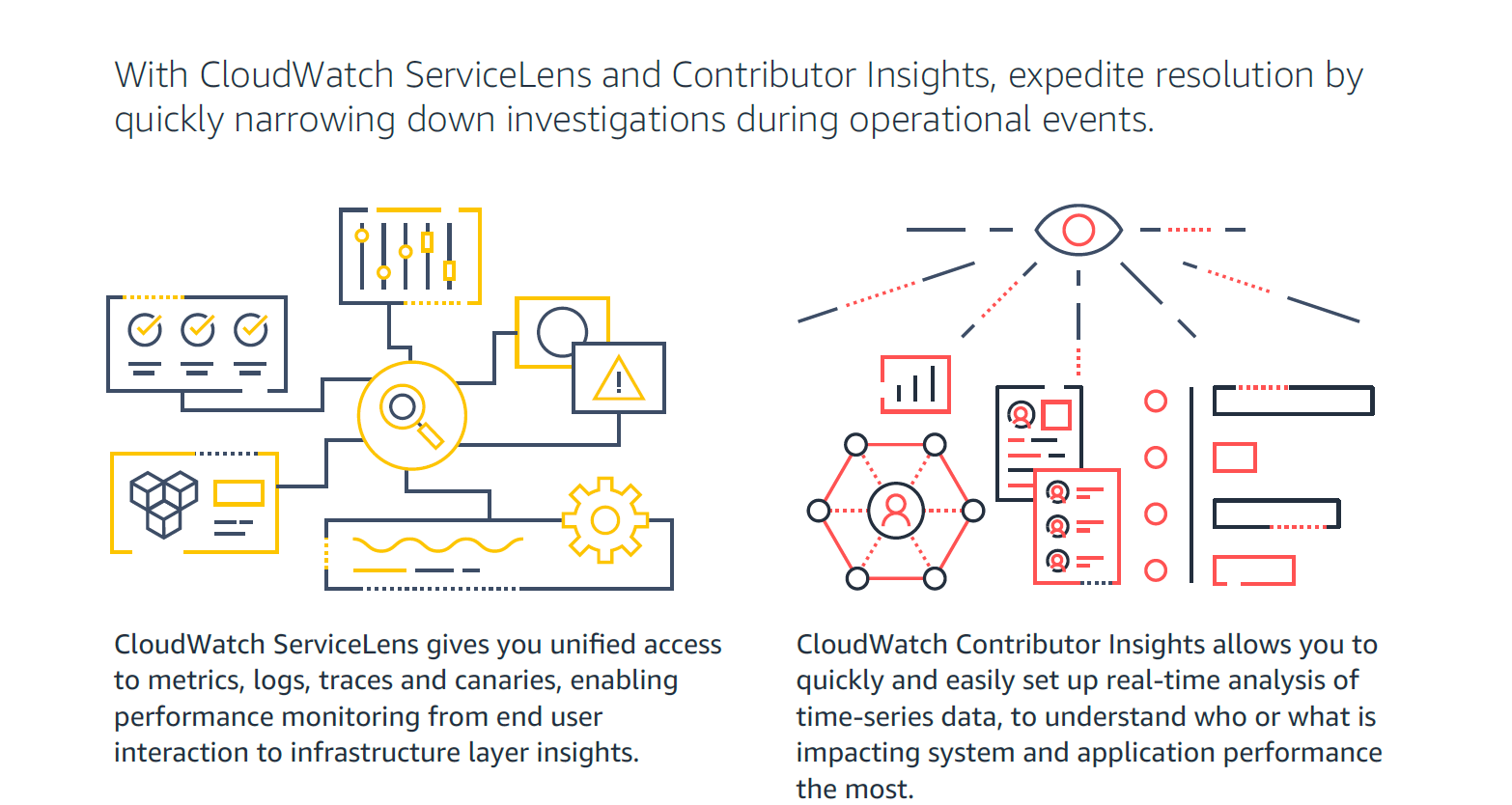
Screenshot of How Amazon CloudWatch works - high-level overviewScreenshot of CloudWatch Application MonitoringScreenshot of CloudWatch ServiceLens and Contributor Insights - expedite resolution timeScreenshot of Improve Observability with Amazon CloudWatchScreenshot of Visual overview of Amazon CloudWatch

VMware Tanzu CloudHealth Screenshots

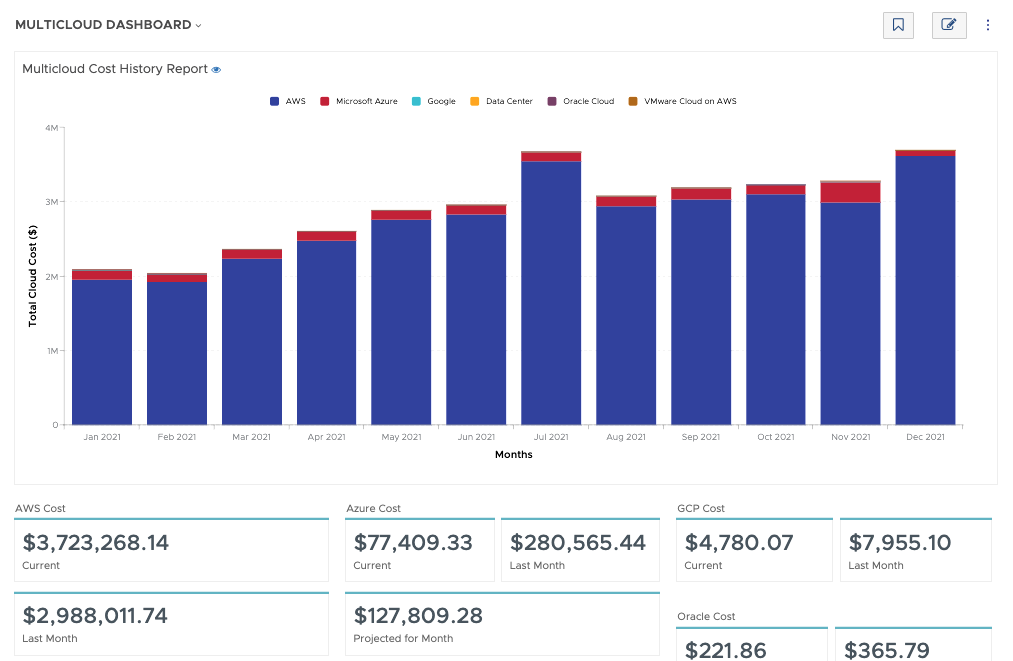
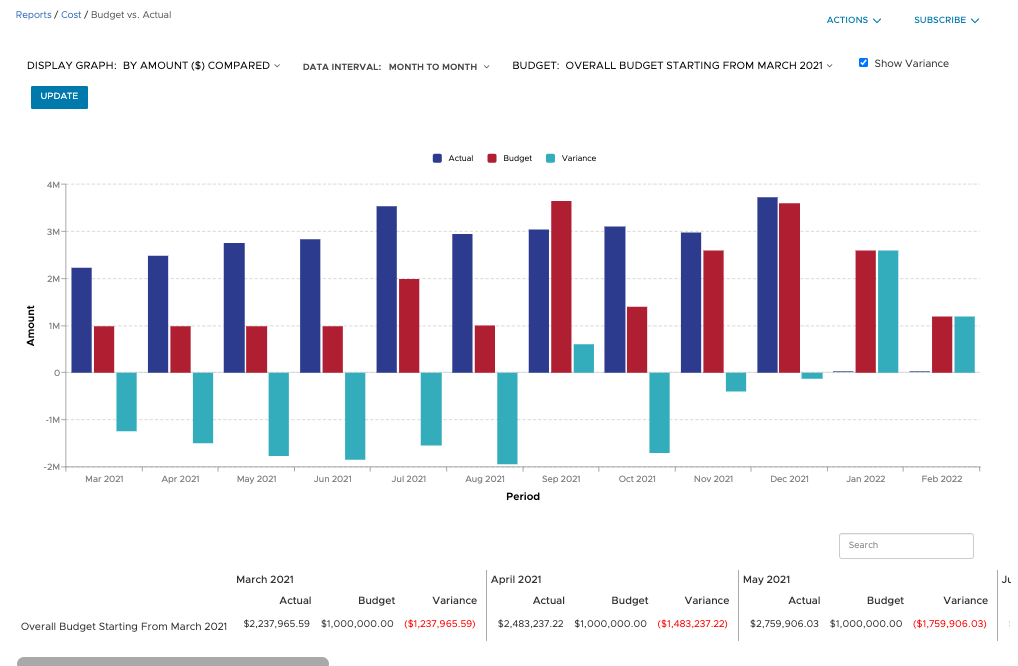
Screenshot of Filter and refine out-of-the-box graphical and tabular reports to correlate datasets for analysis against your business objectives. Create custom dashboards across clouds and easily build detailed reports from scratch, known as CloudHealth FlexReports, across various dimensions to perform more granular analysis on cost, usage, and asset data.Screenshot of Configure budgets to visualize your expected costs for the year in advance and compare it with actual spend as the year progresses. Create as many overall and categorized budgets as you need to run your business, aligned to your company’s fiscal year. Proactively alert stakeholders when costs are forecasted to exceed pre-defined budgets. Toggle on forecasting for reports to predict future values based on historical data for the interval you define.Screenshot of Use CloudHealth’s dynamic policy engine to drive consistent operations and continuously monitor your environment. Quickly identify opportunities to proactively reduce spend, remediate risks, and streamline configuration. Get alerted when conditions deviate from your desired state and enable automated actions to execute changes in your environment—stop, start, resize, or terminate infrastructure—all at the frequency you define.Screenshot of Align cloud data to your business with CloudHealth FlexOrgs and benefit from greater control over user access, sharing, and delegation across multiple levels of organizational hierarchy. Further fine tune the platform by dynamically allocating assets to business groups known as CloudHealth Perspectives. View and analyze your cloud environment by project, application, line of business, cost center, and more, to drive accountability for cost and usage.