AppsAnywhere vs. Cengage MindTap

Overview
ProductRatingMost Used ByProduct SummaryStarting Price
AppsAnywhere
Score 9.7 out of 10
Enterprise companies (1,001+ employees)
AppsAnywhere is a software delivery platform that gives students and staff access to the software they need to get their work done wherever they are, both on and off campus. Boasting more than 2 million students at over 200 universities and colleges worldwide, the vendor states AppsAnywhere improves student outcomes by making software available on any device, including BYOD, thanks to their unique approach to virtualization. Used by higher ed institutions, including University…N/A
MindTap
Score 9.0 out of 10
N/A
MindTap is an eLearning course management solution from Cengage, a digital learning content and technology provider. For educators, it includes pre-made interactive course materials (such as homework assignments, assessments, etc.), analytics around student engagement and performance, and the ability to customize courses. For students, MindTap offers a mobile app to access eBooks, flashcards, quizzes, grades, and due date reminders.N/A
Pricing
AppsAnywhereCengage MindTap
Editions & Modules
No answers on this topic
Offerings
Pricing Offerings
AppsAnywhereMindTap
Free Trial
YesNo
Free/Freemium Version
NoNo
Premium Consulting/Integration Services
YesNo
Entry-level Setup FeeRequiredNo setup fee
Additional Details
More Pricing Information
Community Pulse
AppsAnywhereCengage MindTap
Features
AppsAnywhereCengage MindTap
Application Virtualization
Comparison of Application Virtualization features of Product A and Product B
AppsAnywhere
7.1
6 Ratings
8% below category average
Cengage MindTap
-
Ratings
Application support7.66 Ratings00 Ratings
Device support6.66 Ratings00 Ratings
Ease of deployment7.36 Ratings00 Ratings
Application packaging6.96 Ratings00 Ratings
Security6.96 Ratings00 Ratings
Best Alternatives
AppsAnywhereCengage MindTap
Small Businesses
Parallels Desktop for Mac
Score 8.8 out of 10

No answers on this topic

Medium-sized Companies
Nutanix AHV
Nutanix AHV
Score 9.1 out of 10
Ellucian Banner
Ellucian Banner
Score 6.0 out of 10
Enterprises
Nutanix AHV
Nutanix AHV
Score 9.1 out of 10
PeopleAdmin Higher Ed Platform, from Powerschool
Score 7.0 out of 10
All AlternativesView all alternativesView all alternatives
User Ratings
AppsAnywhereCengage MindTap
Likelihood to Recommend
8.2
(6 ratings)
9.5
(8 ratings)
Likelihood to Renew
-
(0 ratings)
10.0
(2 ratings)
Usability
8.0
(1 ratings)
10.0
(1 ratings)
Support Rating
-
(0 ratings)
9.9
(3 ratings)
Implementation Rating
-
(0 ratings)
10.0
(1 ratings)
User Testimonials
AppsAnywhereCengage MindTap
Likelihood to Recommend
Software2
I have been monitoring the use of this app for the past year now and it has been incredibly useful in providing my team with easy access to the applications they need. It is well suited to organizations with a large variety of applications and users that need to access them from multiple devices. It has been very easy to deploy, manage and maintain, and I love the fact that users can easily find what they need without having to navigate complex menus. (search can still be abit better). Still a really good pick :)
Read full review
Cengage
We started using the application optimally at the beginning as a digital learning and consultation platform. In it we imported all kinds of bibliographic material so that students could access them with the ease of a tap. The application is perfect for those instructors who are not beginners in HTML. In that case, the application very practically allows them to create a complete course in the shortest possible time because it has a state-of-the-art instructional design. It was excellent for unifying all the basic course plans between teachers teaching the same subject, giving the advantage that all courses at the same level would have exactly the same information and nothing would be overlooked
Read full review
Pros
Software2
  • Shows end users a full list of every application that is actually available to them
  • Install a specialist application on any Windows machine on our network
  • launch the application for use
Read full review
Cengage
  • digital textbook platform with accessibility tools (read-aloud, note taking)
  • interactive exercises and practice tools
  • assessments including self-check quizzes and customizable exams
  • LTI integration to pass grade information to learning management system
  • excellent support for faculty
Read full review
Cons
Software2
  • They should improve with the reconnection time after internet connection lost.
  • They should improve with customer support team and quick reply.
  • They should work on mobile devices and operating system also.
  • When we launch AppsAnywhere it's take too much time to launch.
Read full review
Cengage
  • The biggest issue our first-time users have with Mindtap is that ad/pop-up blockers often stop the tool from opening. (Mindtap typically opens in a new window vs inside the LMS) This leads to a lot of initial frustration amongst the students early in the course.
  • MindTap lacks a really strong set of roles outside of Instructor and Student. There is no Teaching Assistant role or and IT/Course Builder role. Additionally setting up students workers as TAs in one course while they may be a student in another concurrently has been more than a little cumbersome.
  • The UI is a bit dated and it doesn't implement many responsive web design features, though this can typically be worked around by downloading the free app.
  • The mobile app experience is not as strong for Instructors as it is for students.
Read full review
Likelihood to Renew
Software2
No answers on this topic
Cengage
It's hard to imagine not renewing it as the professors would not want to go back to the way their courses were previously populated. The only thing that would cause us to change would be in the textbook changed and the new company offered a better tool
Read full review
Usability
Software2
Almost everyone you tell to use it to access a specialist application can find the software they need and install it. However, surprisingly many have difficulties finding AppsAnywhere under the start menu or on the task bar - it is not a icon or name they recognise, and they really want to lunch the target specialist software (Zbrush or whatever). Once you find it, many people ignore the search function which is probably the fastest method, and browse the long list alphabetically, because the standard filters do not help much. Favouriting is rarely used as it is too burdensome and not an issue for users when they are looking for the applicationt hey need.
Read full review
Cengage
Very easy to use.
Read full review
Support Rating
Software2
No answers on this topic
Cengage
The effort from them always feels strong - I'd just recommend they be more prepared for OS (mac) and LMS (blackboard) upgrades
Read full review
Implementation Rating
Software2
No answers on this topic
Cengage
It worked seamlessly with Blackboard
Read full review
Alternatives Considered
Software2
The AppsAnywhere team is very quick in setting up things and also having everything in a single place. The bundle of the apps can be easily configured as the documentation is also very straightforward while setting up things and also having the team to work accordingly customize as per the needs
Read full review
Cengage
MindTap is the only learning software I currently use, but in the past I have used Pearson and McGraw Hill learning content. All of these companies are progresses at a similar rate and making great improvements to their educational materials. MindTap, in my opinion has the best customer service support and representatives in the business. Our rep. has been very responsive.
Read full review
Return on Investment
Software2
  • It has been incredibly easy to use, saving us time and money while also streamlining workflow processes.
  • We where able to quickly launch new applications, allowing us to keep up with users needs.
  • The reporting tools have also been very helpful in tracking usage and understanding how our users interact with our applications.
Read full review
Cengage
  • The positive impact is to help students practice statistics to solve business problems.
  • The negative side is that the pricing might be too high compared to other free options available, even though the free options might not have the same features MindTap has.
Read full review
ScreenShots

AppsAnywhere Screenshots

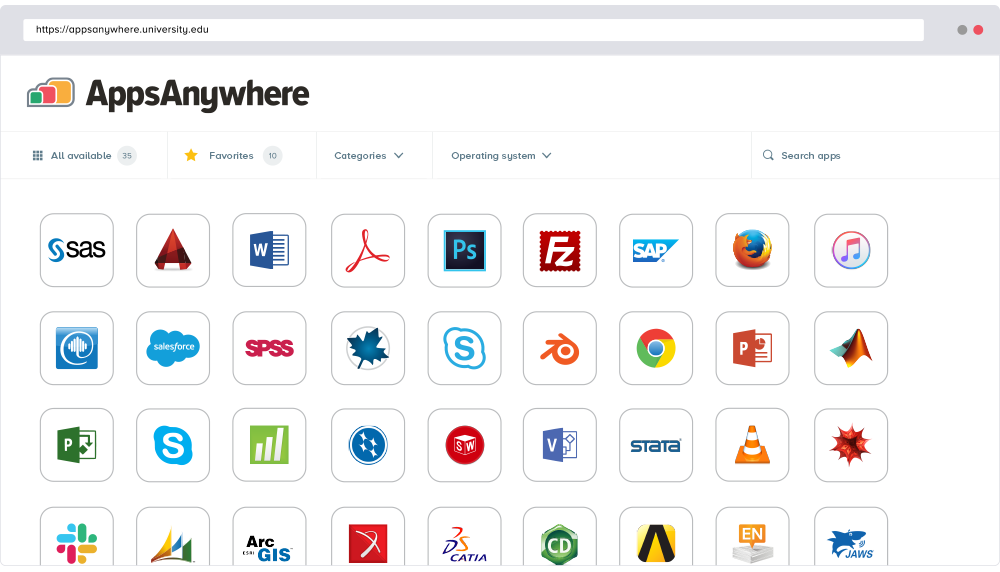
Screenshot of AppsAnywhere brings together all university or college software apps into a single app store platform, on any device.