TrustRadius: an HG Insights company

Save this comparison

Save this comparison

Add Product

Recommended Comparisons

    Overview
    ProductRatingMost Used ByProduct SummaryStarting Price

    Arctera Backup Exec

    Score5.4 out of 10
    N/AArctera Backup Exec is a backup and disaster recovery solution. It works in virtual, physical, and multi-cloud environments and integrates with several third-party software releases and applications.N/A

    Zmanda

    Score8 out of 10
    N/AZmanda is an enterprise backup and recovery solution that enables users to back up to cloud, NAS, and disk. Zmanda supports advanced features, such as ransomware protection with air gap, client-side deduplication, forever incremental backups, and zero trust. It can be deployed as a container, VM, or Zmanda-hosted instance. Zmanda is open-source based with OpenAPI V3 standard APIs. It is packaged in all major Enterprise Linux distros, including Red Hat, Ubuntu, Debian, Rocky Linux, and…

    $499

    per year Per usage

    Pricing
    Arctera Backup ExecZmanda
    Editions & Modules
    Veritas Backup Exec
    Contact sales team
    Business
    $499
    per year Per usage
    Business Plus
    $978
    per year Per usage
    Offerings
    Pricing Offerings
    Arctera Backup ExecZmanda
    Free Trial
    YesYes
    Free/Freemium Version
    NoNo
    Premium Consulting/Integration Services
    NoYes
    Entry-level Setup FeeNo setup feeOptional
    Additional Details
    More Pricing Information
    Community Pulse
    Arctera Backup ExecZmanda
    Considered Both Products
    Cloud Software Group
    No answer on this topic
    BETSOL
    No answer on this topic
    Key User Insights
    Would buy again
    56%
    Would buy again
    5 Answers
    No answers on this topic
    Delivers good value for the price
    56%
    Delivers good value for the price
    5 Answers
    No answers on this topic
    Happy with the feature set
    89%
    Happy with the feature set
    8 Answers
    No answers on this topic
    Lived up to sales and marketing promises
    75%
    Lived up to sales and marketing promises
    6 Answers
    No answers on this topic
    Implementation went as expected
    78%
    Implementation went as expected
    7 Answers
    No answers on this topic
    Features
    Arctera Backup ExecZmanda
    Data Center Backup
    Comparison of Data Center Backup features of Arctera Backup Exec and Zmanda
    Feature
    Arctera Backup Exec
    8.6
    22 Ratings
    2% above category average
    Zmanda
    -
    Ratings
    Universal recovery10.018 Ratings00 Ratings
    Instant recovery7.517 Ratings00 Ratings
    Recovery verification7.920 Ratings00 Ratings
    Business application protection10.017 Ratings00 Ratings
    Multiple backup destinations6.421 Ratings00 Ratings
    Incremental backup identification7.922 Ratings00 Ratings
    Backup to the cloud10.013 Ratings00 Ratings
    Deduplication and file compression7.416 Ratings00 Ratings
    Snapshots8.416 Ratings00 Ratings
    Flexible deployment9.017 Ratings00 Ratings
    Management dashboard9.020 Ratings00 Ratings
    Platform support8.519 Ratings00 Ratings
    Retention options8.418 Ratings00 Ratings
    Encryption10.012 Ratings00 Ratings
    Best Alternatives
    Arctera Backup ExecZmanda
    Small Businesses
    BDRShield
    Score6.5 out of 10
    Acronis Cyber Protect
    Score8.7 out of 10
    Medium-sized Companies
    Bacula Enterprise
    Score8.6 out of 10
    Carbonite by OpenText
    Score7.1 out of 10
    Enterprises
    Bacula Enterprise
    Score8.6 out of 10
    Druva Security Cloud
    Score9.4 out of 10
    All AlternativesView all alternativesView all alternatives
    User Ratings
    Arctera Backup ExecZmanda
    Likelihood to Recommend
    8.3
    (25 ratings)
    -
    (0 ratings)
    Likelihood to Renew
    1.0
    (3 ratings)
    -
    (0 ratings)
    Usability
    1.0
    (1 ratings)
    -
    (0 ratings)
    Availability
    4.0
    (1 ratings)
    -
    (0 ratings)
    Performance
    8.0
    (1 ratings)
    -
    (0 ratings)
    Support Rating
    5.0
    (4 ratings)
    -
    (0 ratings)
    Implementation Rating
    3.0
    (1 ratings)
    -
    (0 ratings)
    Product Scalability
    7.0
    (1 ratings)
    -
    (0 ratings)
    User Testimonials
    Arctera Backup ExecZmanda
    Likelihood to Recommend
    Cloud Software Group
    Backup Exec works well generally in most environments or situations. The licensing can potentially be a nightmare, but manageable if you have a decent reseller. Backing up and restoring from physical tapes which is not all that common is not as reliable as when backing up and restoring from datastores that reside on hard drives or digital media. It does a good job with large or small backup jobs. Backing up and managing SQL backups requires additional licenses and be a bit clunky. If you are very careful (which you should be anyway) and document as you build these backups you will get better at managing them. Regarding a virtual environment, I have limited experience in that arena, but have done it. Backup Exec can backup VMware environments, but honestly we moved to Unitrends to backup our VM's and are much happier with the backup process. However, restoring a VM in Unitrends can be tedious compared to Backup Exec.
    Incentivized
    Read full review
    BETSOL
    No answers on this topic
    Pros
    Cloud Software Group
    • Manage agent based backups - It is easy to schedule and monitor backups. Verifying backups is done for all jobs. Backup performance is excellent.
    • Provide a wide ranging contingent of backup options - Despite providing a dizzying array of backup options, it is easy to schedule individual or recurring jobs.
    • Integrates well with our Active Directory - Restoring even individual Active Directory objects is possible.
    Incentivized
    Read full review
    BETSOL
    No answers on this topic
    Cons
    Cloud Software Group
    • Could provide better license management from an inventory perspective. How many licenses do I have?.. etc.
    • When Backup Exec backs up itself it should not select iSCSI backup targets by default. The result is recursive data backup ending in the loss of storage capacity.
    • I'm struggling to come up with another con.
    Incentivized
    Read full review
    BETSOL
    No answers on this topic
    Likelihood to Renew
    Cloud Software Group
    This software is a mess in my brutally honest opinion. I've spent more time babysitting this software while backing up 20 servers than I did with Veeam backing up 600+. I've had multiple jobs run fine for weeks at a time that just randomly fail out of the blue for seemingly no reason whatsoever. There's no intuitive way to chain jobs, so automation becomes somewhat more problematic if certain jobs depend on other jobs. The forever incremental feature feels tacked on since the merge operation merges all your incremental jobs into the most recent backup and doesn't have the option set a limit on how long to keep your point in time restores.
    Read full review
    BETSOL
    No answers on this topic
    Usability
    Cloud Software Group
    It can do a lot of things on paper and sounds terrific, but in practice it doesn't do any of them well. It can easily be sold to non-technical minds and C-levels, but of all the backup solutions I've used in the last 15 years of my career, Backup Exec is easily the least fault tolerant. Unless this software is a sunk cost and you're on a shoestring budget, I recommend almost anything else. Jobs fail often with obscure error codes and the KB articles in the Veritas support portal are a mess. Within 30 days of a fresh deployment I've logged more tickets with their support than I did in 3 years with Veeam.
    Read full review
    BETSOL
    No answers on this topic
    Reliability and Availability
    Cloud Software Group
    The weekly error on save needs a manual reload from me. The SDR can't restore the virtual machine of hyperV during a test.
    Incentivized
    Read full review
    BETSOL
    No answers on this topic
    Performance
    Cloud Software Group
    No problem for this point it is in the average.
    Incentivized
    Read full review
    BETSOL
    No answers on this topic
    Support Rating
    Cloud Software Group
    In the few instances of having to contact support, our overall outcome was always good. They would have received a better score if the wait time was less, but I attribute this to the timing of support calls - it was during the previous owner's time. We have not had to open a support ticket since Veritas Backup Exec took the product back over.
    Incentivized
    Read full review
    BETSOL
    No answers on this topic
    Implementation Rating
    Cloud Software Group
    It was pretty straightforward.
    Read full review
    BETSOL
    No answers on this topic
    Alternatives Considered
    Cloud Software Group
    If your company is looking at changing solutions or currently does not have any, Veritas Backup Exec is the way to go. Do yourself a favor and try the 60 day trial, you won't be disappointed! Very simple to use and has a great GUI, much better than what the competition has to offer.
    Incentivized
    Read full review
    BETSOL
    No answers on this topic
    Scalability
    Cloud Software Group
    We only use it on the on-premise version on a single site.
    Incentivized
    Read full review
    BETSOL
    No answers on this topic
    Return on Investment
    Cloud Software Group
    • Backups by their very nature are difficult to quantify when it comes to ROI. Any monies spent should be seen more as insurance . If you never have to claim on it then that is the best outcome. Backup Exec gives you comfort that you can meet any downtime recovery targets set by your business and this is how to benchmark your solution.
    • Conduct regular DR tests and your this will be your ROI.
    Incentivized
    Read full review
    BETSOL
    No answers on this topic
    ScreenShots

    Zmanda Screenshots

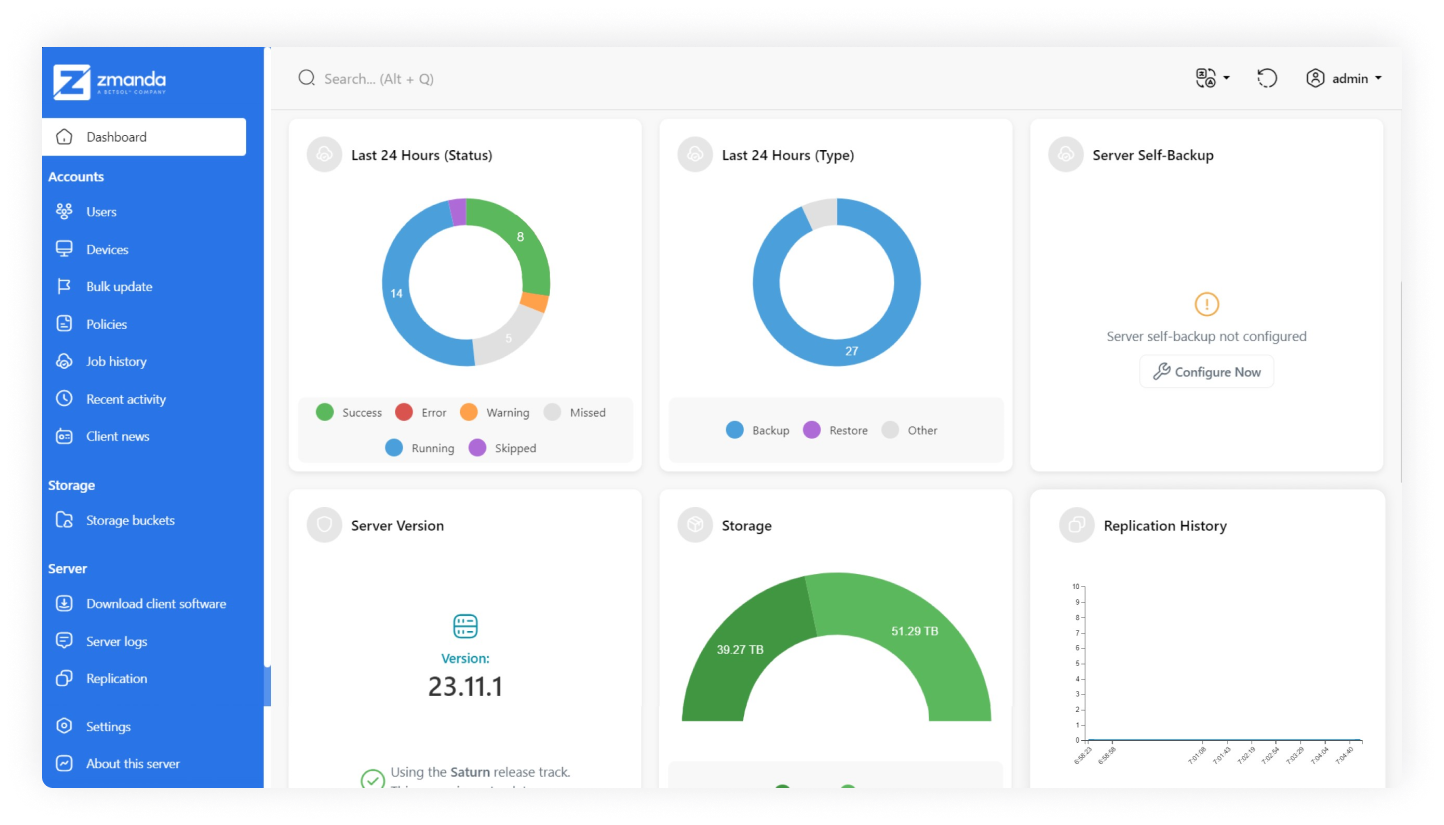
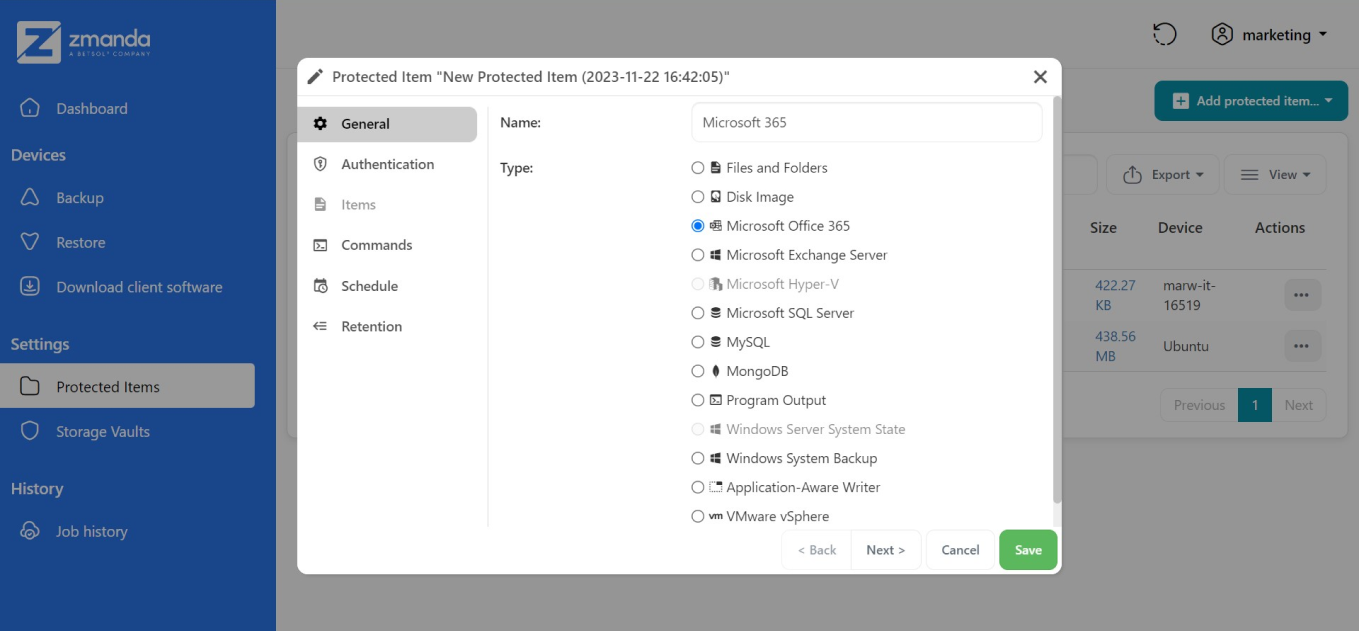
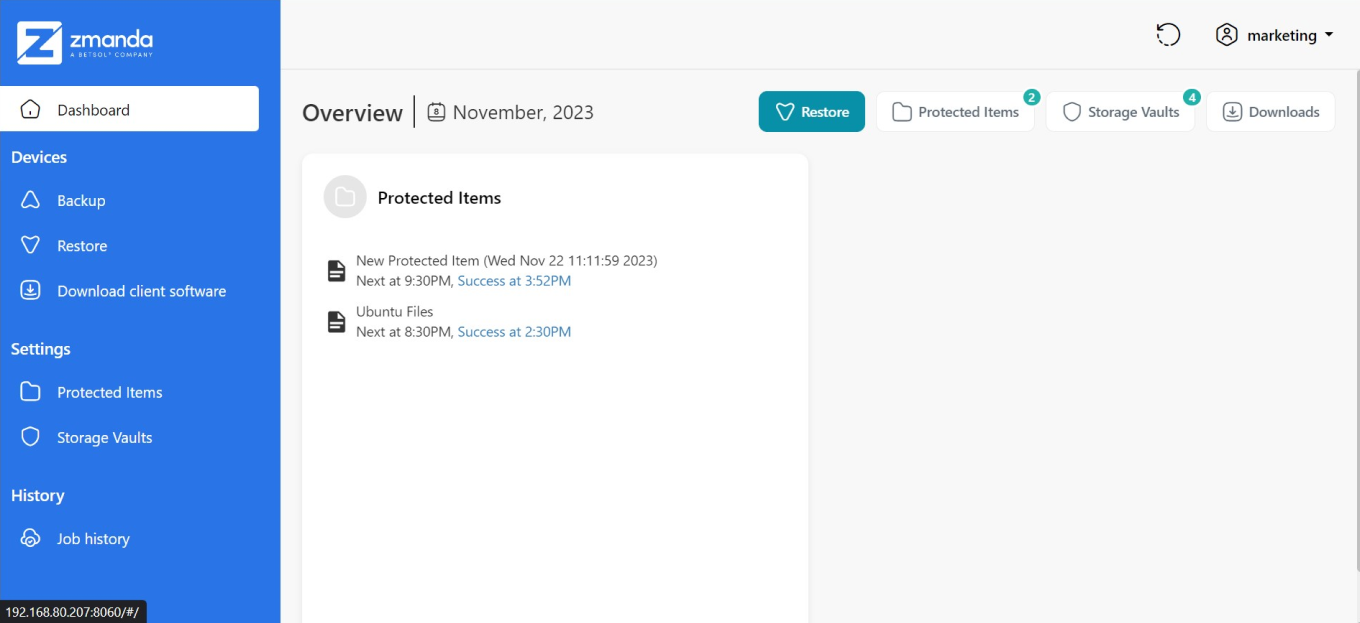
    Screenshot of Zmanda's dashboard, which provides an overview of backup status, storage usage, server version, and replication history.Screenshot of the process for setting up a new protected item with Zmanda. Select from various data types, including Microsoft Office 365, or SQL Server.Screenshot of the view that illustrates the restore process for protected items, including new backup tasks and Ubuntu files, with recent successful restoration times. The interface also provides access to backup functions, client software downloads, and storage vault settings.