TrustRadius: an HG Insights company

Save this comparison

Save this comparison

Add Product

Recommended Comparisons

    Overview
    ProductRatingMost Used ByProduct SummaryStarting Price

    Azure Batch

    Score8.8 out of 10
    N/AAzure Batch is cloud-scale job scheduling and compute management.N/A

    BrauMo

    N/AN/ABrauMo is brewery management software built specifically for kombucha producers. It brings culture and liquid-starter management, first and second fermentation, HACCP records, inventory and purchasing, and invoicing into one application. BrauMo is self-hosted: it runs on a Mac or Windows computer at the brewery, and the brewery's records stay in a single database file on that machine. Who it is for Nano and micro kombucha breweries,…

    $49

    per month per brewery (billed annually)

    Pricing
    Azure BatchBrauMo
    Editions & Modules
    No answers on this topic
    BrauMo
    $49
    per month per brewery (billed annually)
    Offerings
    Pricing Offerings
    Azure BatchBrauMo
    Free Trial
    NoYes
    Free/Freemium Version
    NoNo
    Premium Consulting/Integration Services
    NoNo
    Entry-level Setup FeeNo setup fee$420 one-time fee
    Additional Details—One flat price per brewery, with unlimited users and every feature included. The price is set by the billing country: $49 per month billed annually in the USA, UK, Canada, Australia, Japan and most other countries; EUR 59 per month billed annually in the EU; $29 per month billed annually in Latin America, South and Southeast Asia and Africa. Monthly billing is available. Prices exclude VAT, and BrauMo is sold to businesses only. There is no setup fee for the software. An optional one-off spreadsheet migration service costs $420 (EUR 390 in the EU). After cancelling, the brewery keeps read-only access and can export every record.
    More Pricing Information
    User Ratings
    Azure BatchBrauMo
    Likelihood to Recommend
    8.5
    (2 ratings)
    -
    (0 ratings)
    User Testimonials
    Azure BatchBrauMo
    Likelihood to Recommend
    Microsoft
    To better serve their consumers, businesses that often interact with those clients who rely on Microsoft's software products may consider migrating to Azure. This program would be useful in any installation of a Microsoft product or suite that necessitates a test of the target environment. It is simple to maintain and implement, making it an ideal IT backbone. If a client doesn't have any use for this particular instrument, it's not going to be of any benefit to them.
    Incentivized
    Read full review
    BrauMo
    No answers on this topic
    Pros
    Microsoft
    • Managing the users
    • Having multiple environments
    • Creating multiple groups
    Incentivized
    Read full review
    BrauMo
    No answers on this topic
    Cons
    Microsoft
    • The user interface, in my opinion, might need further clarification.
    • Any situation where a user's password has to be reset would benefit from this feature.
    • Any accounts that were accidentally established more than once may be transferred over quickly and easily.
    Incentivized
    Read full review
    BrauMo
    No answers on this topic
    Alternatives Considered
    Microsoft
    They both are great tools and provide the services they have implemented. They are two competing companies that have different cultures and forward mission agendas. I would say Azure is a little easier to support through their user interface for the IT support side of things. Both tools are useful and have their own strength and weakness. If you're a dynamic company with a multitude of customers then both are a required tool to have.
    Incentivized
    Read full review
    BrauMo
    No answers on this topic
    Return on Investment
    Microsoft
    • After initial setup, we now have significantly less time spent processing data.
    • The automation of data formatting and display after processing is exciting because it frees us to focus on the data itself.
    • Since using Batch, we have significantly decreased the number of items we previously utilized.
    Incentivized
    Read full review
    BrauMo
    No answers on this topic
    ScreenShots

    BrauMo Screenshots

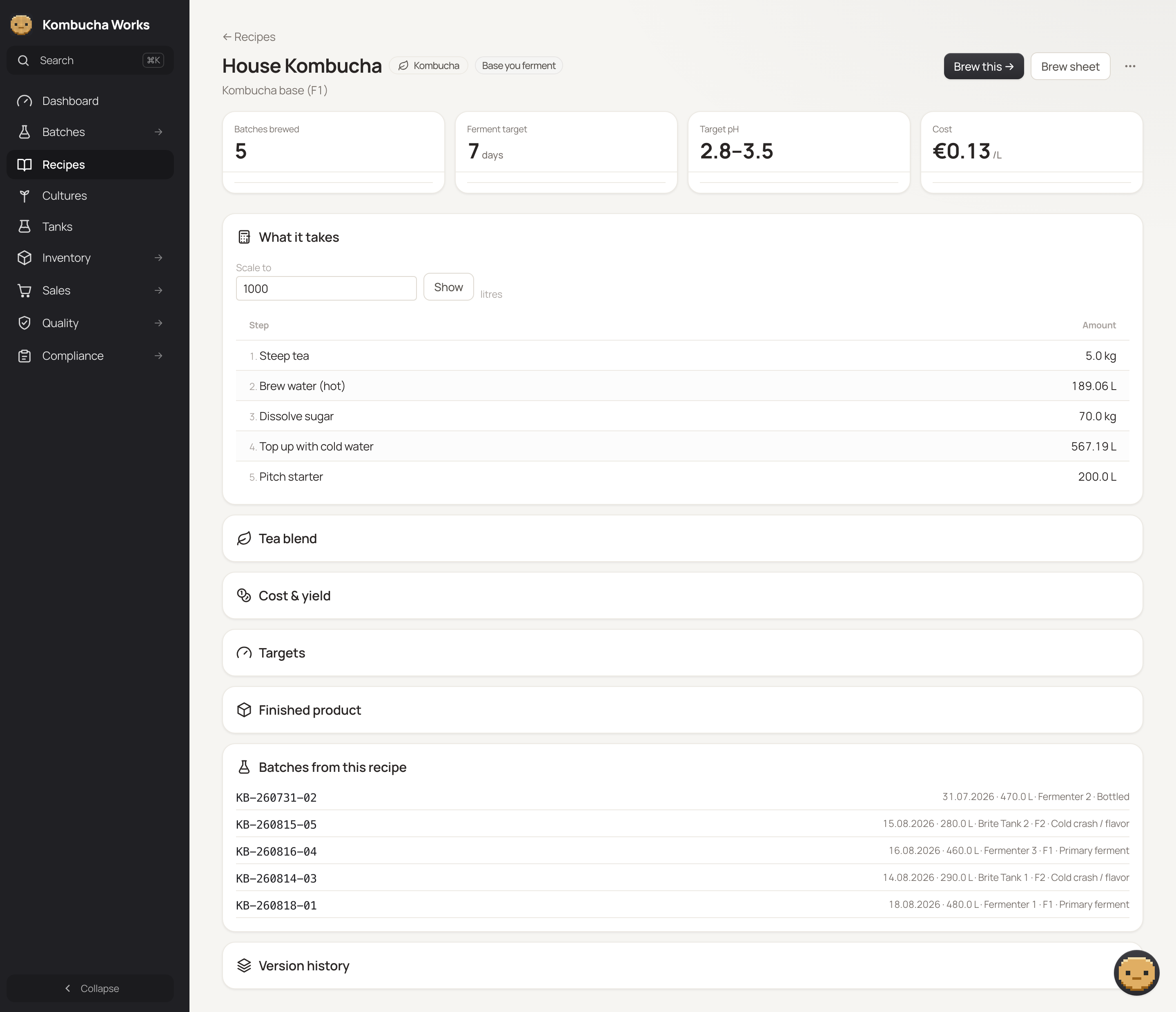
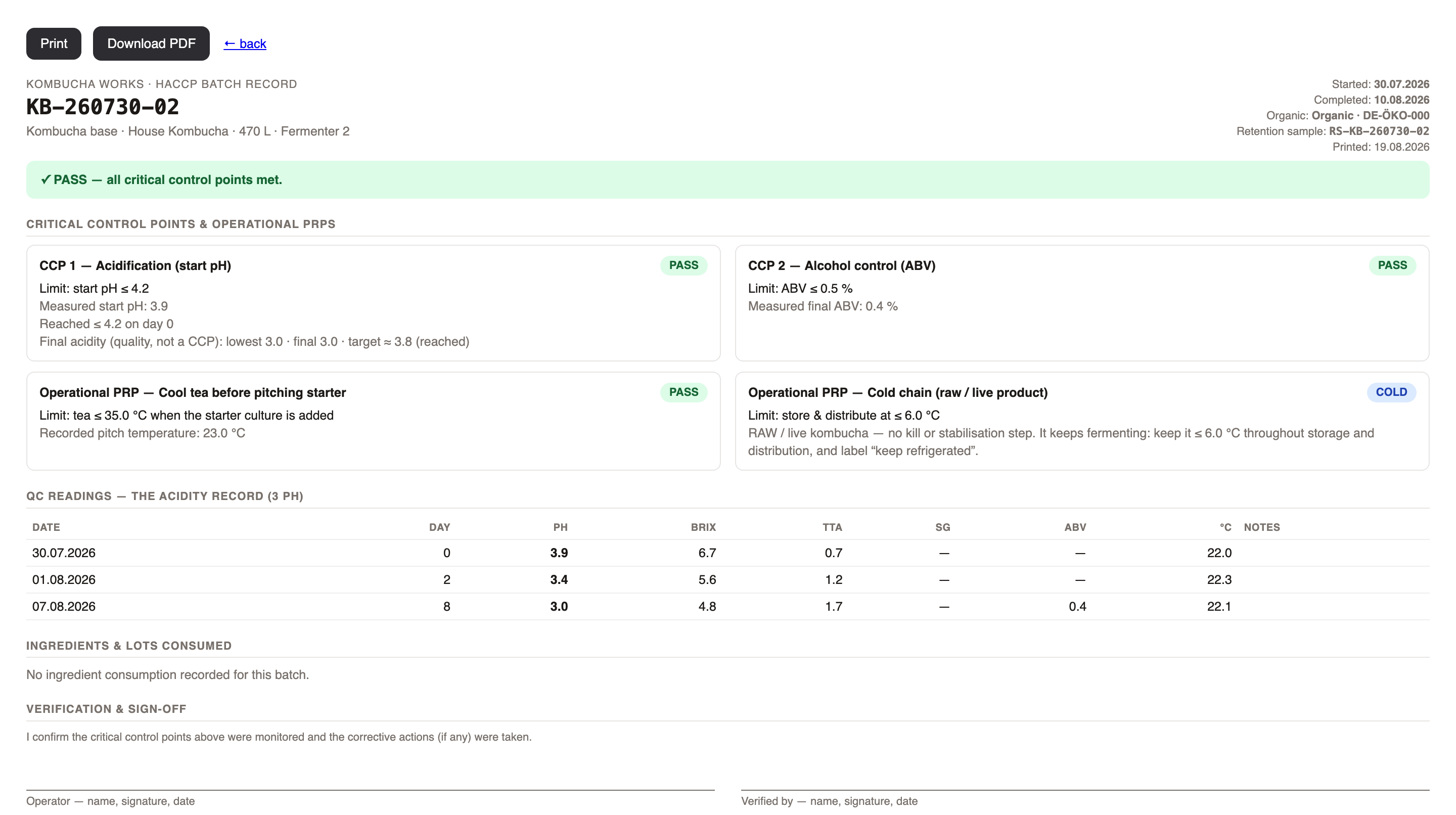
    Screenshot of Brewery dashboard: active batches, fermenter volume, readings due, open invoices and low-stock alerts on one screen, with a card for every tank.Screenshot of Batch page for an F1 base ferment: readings, a fermentation forecast against the target pH, draw-offs, lab analyses and the next step to send it to F2.Screenshot of Tank board: what is in each vessel, how full it is, when it comes free and how long since it was cleaned.Screenshot of Recipe page: scale a recipe to any volume, with cost per litre, target pH and every batch brewed from it.Screenshot of HACCP batch record with acidification and alcohol as critical control points, ready to print or save as a PDF.Screenshot of Inventory: stock value, reorder levels and stock for finished product, tea, sugar and packaging, with lots and material planning.