Banuba Face AR SDK vs. Vuforia Studio

Overview
ProductRatingMost Used ByProduct SummaryStarting Price
Face Filters SDK
Score 9.0 out of 10
N/A
Augmented Reality SDK with 3D face tracking to bring face filters, 3D lens, AR beauty, avatars and virtual try-on apps in iOS, Android, Windows & Unity. The biggest face filter library and Effect Constructor & Viewer tools to create custom filters.N/A
Vuforia Studio
Score 9.6 out of 10
N/A
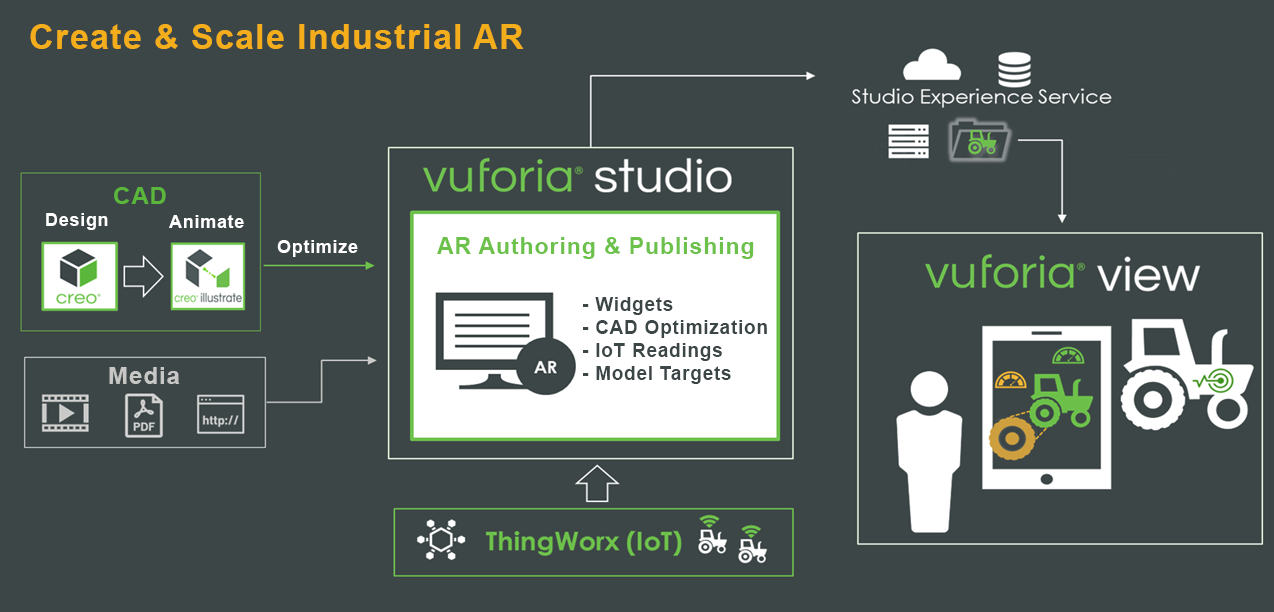
Vuforia Studio allows users to author and publish scalable AR experiences that transform manufacturing, service and training processes without the need for extensive programming or costly custom designers. The vendor states that Studio is the only drag-and-drop authoring environment that enables industrial content creators to: Accelerate content creation —…N/A
Pricing
Banuba Face AR SDKVuforia Studio
Editions & Modules
No answers on this topic
Offerings
Pricing Offerings
Face Filters SDKVuforia Studio
Free Trial
NoNo
Free/Freemium Version
NoNo
Premium Consulting/Integration Services
NoNo
Entry-level Setup FeeNo setup feeNo setup fee
Additional Details
More Pricing Information
Community Pulse
Banuba Face AR SDKVuforia Studio
User Ratings
Banuba Face AR SDKVuforia Studio
Likelihood to Recommend
9.0
(1 ratings)
9.0
(1 ratings)
User Testimonials
Banuba Face AR SDKVuforia Studio
Likelihood to Recommend
Banuba
I would recommend using this cool SDK to try out different Face Filter which also allows you to create your own interactive filters. As it provides a free trial for organizations, that one should try it once.
Read full review
PTC
Vuforia is free but there is a watermark on the output of it. So if you want to remove it then you have to purchase it. It's easy to use and some features like multiple targeting in images and object and surface tracking help you to achieve what you want.
Read full review
Pros
Banuba
  • Create an engaging and customized AR experiences
  • Enables high quality filter
  • Enables us to create 3D animation and modeling
  • Enables 2D and 3D asset creation with rich asset store
  • Accurate Face tracking with skin beautification
Read full review
PTC
  • Object tracking
  • Surface tracking
  • Camera supports
Read full review
Cons
Banuba
  • Training documentation may be provided, to use it effectively
  • Some improvement needed for Android SDK, as you need minimum requirement.
Read full review
PTC
  • Sometimes take time to load render object
  • Sometimes, it took more time to recognize an object in the dark
  • Slow support for new features
Read full review
Alternatives Considered
Banuba
Read full review
PTC
Vuforia studio is well suited in cases like you wants to track objects and surface in the plane. Image recognization at multiple targets is one of the very good functionalities of EasyAR. And if you want to render 3d objects in your mobile application then it's well suited. It is free too so you can create applications at minimal costs.
Read full review
Return on Investment
Banuba
  • Engages the users through its creative designing
  • Enables 2x increase on user engagement
Read full review
PTC
  • Easy to use so we achieve deadline on time
  • Its free to use so we created app on low cost
Read full review
ScreenShots

Face Filters SDK Screenshots

Screenshot of Banuba Face Filters .Screenshot of Banuba Face Filters

Vuforia Studio Screenshots

Screenshot of Create and scale industrial AR with Vuforia Studio