
OnStyle vs. Litera Draft
OnStyle vs. Litera Draft
| Product | Rating | Most Used By | Product Summary | Starting Price |
|---|---|---|---|---|
 OnStyle | N/A | OnStyle is a Microsoft Word add-in that automates formatting validation and enforces document standards using predefined and configurable rule sets. It is designed for organizations that rely on structured templates, strict brand guidelines, or regulated documentation requirements. The software evaluates documents against defined formatting and structural rules. It checks heading hierarchies, numbering logic, spacing, table formatting, captions, cross-references,… | $45 per month per user | |
 Litera Draft | N/A | Litera Desktop is a single toolbar designed to include everything a lawyer needs to draft documents and create an integrated, seamless experience that ensures user adoption and consolidates vendors. | N/A |
| OnStyle | Litera Draft | |||||||||||||||
|---|---|---|---|---|---|---|---|---|---|---|---|---|---|---|---|---|
| Editions & Modules | No answers on this topic | No answers on this topic | ||||||||||||||
| Offerings |
| |||||||||||||||
| Entry-level Setup Fee | No setup fee | No setup fee | ||||||||||||||
| Additional Details | — | — | ||||||||||||||
| More Pricing Information | ||||||||||||||||
| OnStyle | Litera Draft | |
|---|---|---|
| Small Businesses |  Jasper Score 7.8 out of 10 | Jasper Score 7.8 out of 10 |
| Medium-sized Companies |  Grammarly Score 9.1 out of 10 | Grammarly Score 9.1 out of 10 |
| Enterprises |  ProWritingAid Score 9.0 out of 10 | ProWritingAid Score 9.0 out of 10 |
| All Alternatives | View all alternatives | View all alternatives |
| OnStyle | Litera Draft | |
|---|---|---|
| Likelihood to Recommend | - (0 ratings) | 10.0 (5 ratings) |
| Usability | - (0 ratings) | 10.0 (1 ratings) |
| Performance | - (0 ratings) | 10.0 (1 ratings) |
| Ease of integration | - (0 ratings) | 10.0 (1 ratings) |
| OnStyle | Litera Draft | |
|---|---|---|
| Likelihood to Recommend | DACHS Computing & Biosciences No answers on this topic |  Litera
 Shanna Kostopulos Paralegal |
| Pros | DACHS Computing & Biosciences No answers on this topic | Litera
|
| Cons | DACHS Computing & Biosciences No answers on this topic | Litera
 Mauren Fridman specialist in Commercial Operations |
| Usability | DACHS Computing & Biosciences No answers on this topic | Litera
|
| Performance | DACHS Computing & Biosciences No answers on this topic | Litera
|
| Alternatives Considered | DACHS Computing & Biosciences No answers on this topic | Litera
 J. Eduardo Medina Corona Researcher and student |
| Return on Investment | DACHS Computing & Biosciences No answers on this topic | Litera
 Robert Roseman Owner |
| ScreenShots | OnStyle Screenshots  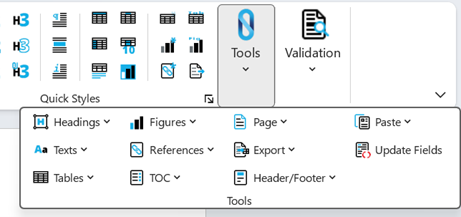  |