TrustRadius: an HG Insights company

Save this comparison

Save this comparison

Add Product

Recommended Comparisons

    Overview
    ProductRatingMost Used ByProduct SummaryStarting Price

    FulFillor

    N/A
    Small Businesses (1-50 employees)
    Fulfillor is a cloud-based warehouse management system (WMS) designed for third-party logistics (3PL) providers and fulfillment centers that manage high-volume ecommerce operations. The platform centralizes inventory management, order processing, shipping workflows, and client billing in a single system built for multi-client warehouses. Fulfillor integrates with major ecommerce and shipping platforms including Shopify, Amazon, UPS, and FedEx, enabling automatic…

    $399

    per month

    Wasp Inventory

    Score9.7 out of 10
    N/AWasp Inventory is an asset tracking and warehouse management software offering from Wasp Barcode Technologies,. It includes features such as inventory control software made easy to eliminate costly write-offs.N/A
    Pricing
    FulFillorWasp Inventory
    Editions & Modules
    Starter
    $399
    per month
    Medium
    $599
    per month
    Large
    $799
    per month
    No answers on this topic
    Offerings
    Pricing Offerings
    FulFillorWasp Inventory
    Free Trial
    NoNo
    Free/Freemium Version
    NoNo
    Premium Consulting/Integration Services
    YesNo
    Entry-level Setup FeeNo setup feeNo setup fee
    Additional Details——
    More Pricing Information
    User Ratings
    FulFillorWasp Inventory
    Likelihood to Recommend
    -
    (0 ratings)
    5.0
    (4 ratings)
    User Testimonials
    FulFillorWasp Inventory
    Likelihood to Recommend
    FulFillor
    No answers on this topic
    Wasp Barcode Technologies
    Now that they have changed to a yearly subscription-based model, the cost to purchase Wasp Inventory software is much more expensive. So, I would have to say you'd need to be a mid-sized school or business to find the cost offset by the usability and functionality of the software. If budgetary issues aren't a concern - then this would be a perfect solution to anyone looking for a full suite for Inventory Control
    Incentivized
    Read full review
    Pros
    FulFillor
    No answers on this topic
    Wasp Barcode Technologies
    • Inventory Tracking
    • Product Costing
    • User Management
    Incentivized
    Read full review
    Cons
    FulFillor
    No answers on this topic
    Wasp Barcode Technologies
    • Better communication during updates.
    • I don't really have any other issues.
    Incentivized
    Read full review
    Alternatives Considered
    FulFillor
    No answers on this topic
    Wasp Barcode Technologies
    Wasp is a standalone asset tracking application whereas IssueTrak's asset tracking was a module available in their helpdesk ticketing platform. It's not an apples to apples comparison at this point. Wasp I feel is more robust in the feature set available but IssueTrak has a more modern interface and intuitive GUI
    Incentivized
    Read full review
    Return on Investment
    FulFillor
    No answers on this topic
    Wasp Barcode Technologies
    • We have relied on this software for the last 10 years that I have been with the company - and it has been perfect. But their change in purchasing model may have us looking elsewhere for a new inventory software.
    • I have saved countless hours of manually importing items by simply "duplicating" objects so that all hardware information, computer model. etc are retained - while new serial numbers can be input to create unique inventory items.
    Incentivized
    Read full review
    ScreenShots

    FulFillor Screenshots

    Screenshot of a real-time snapshot of warehouse operations, showing order status, sales channels, shipments, and trends. Visual insights help 3PLs track performance and streamline fulfillment.

    Wasp Inventory Screenshots

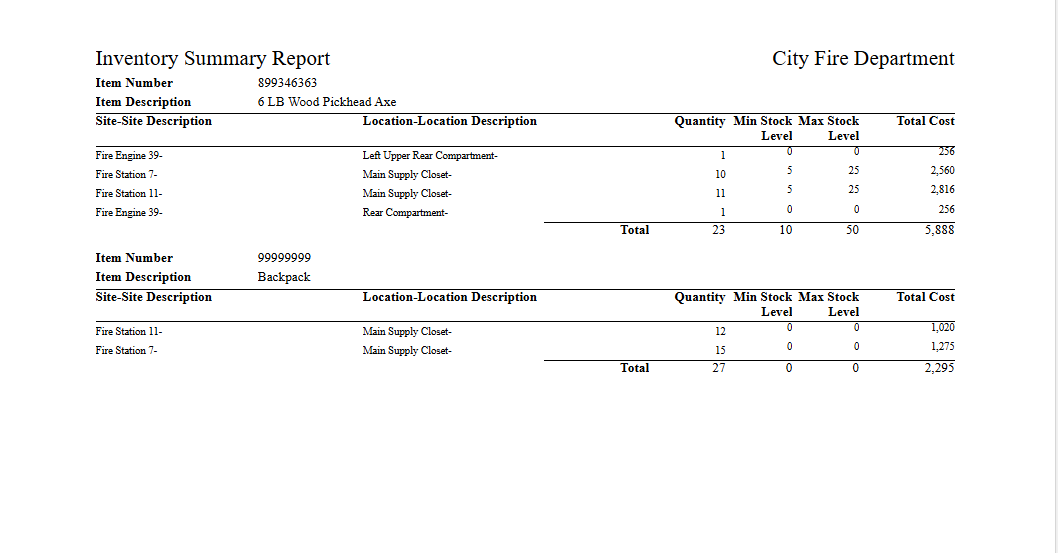
    Screenshot of the customizable grid to view inventory, with photos, quantities available, on order, and committed. Filter columns, group by any field, save custom views, and export to Excel.Screenshot of where each item record shows in-house, available, checked-out, committed, and on-order quantities at a glance. Track by serial, lot, or date code, set checkout lengths, and manage vendors, prices, locations, and history from one screen.Screenshot of the interface to create and track purchase orders with vendor, shipping, and payment details. Overdue orders are flagged, line items show ordered vs. received quantities, and Reorder Low Stock adds items that need replenishing.Screenshot of a print-ready inventory summary report, that breaks down each item’s quantity by site and location, with min and max stock levels and total cost.Screenshot of where to import existing inventory data with a guided Upload, Map, and Review workflow. Drag and drop an Excel file (.xlsx or .xls) or start from a downloadable template to get up and running quickly.