TrustRadius: an HG Insights company

Save this comparison

Save this comparison

Add Product

Recommended Comparisons

    Overview
    ProductRatingMost Used ByProduct SummaryStarting Price

    Homebase

    Score7.5 out of 10
    N/AHomebase in San Francisco offers restaurants, hotels, hospitals, and retailers their employee scheduling and time tracking tools with scheduling optimization and team messaging for coordinating shifts; service includes a free time tracking app.

    $14

    per month

    Teamsly

    N/AN/ATeamsly is a cloud-based workforce management platform for hourly, shift-based, deskless, frontline, and field teams. Available on the web, iOS, and Android, Teamsly brings employee scheduling, job and crew scheduling, time and attendance, GPS time tracking, timesheets, team communication, task management, digital forms, audits, employee training, paid time off, labor-cost management, and workforce reporting into one connected system. The platform is designed to…

    $29

    per month per Location

    Pricing
    HomebaseTeamsly
    Editions & Modules
    Essentials
    $14
    per month
    Plus
    $35
    per month
    All-in-one
    $70
    per month
    Basic
    Free
    Free
    $0
    per month Per Location
    Basic
    $29
    per month Per Location
    All-In-One
    $59
    per month Per Location
    Offerings
    Pricing Offerings
    HomebaseTeamsly
    Free Trial
    YesYes
    Free/Freemium Version
    YesYes
    Premium Consulting/Integration Services
    NoNo
    Entry-level Setup FeeNo setup feeNo setup fee
    Additional Details—Teamsly uses flat per-location pricing rather than per-employee pricing. The Free plan supports one location with up to 10 employees. Basic and All-In-One paid plans include unlimited employees, helping businesses maintain predictable costs as their teams grow. Basic costs $29 per location per month with monthly billing or $24 per location per month when billed annually. All-In-One costs $59 per location per month with monthly billing or $49 per location per month when billed annually. Both paid plans include a 30-day free trial with no credit card required. Teamsly does not charge setup fees or require a locked-in contract, and customers can upgrade, downgrade, or change plans as their operational needs evolve.
    More Pricing Information
    Best Alternatives
    HomebaseTeamsly
    Small Businesses
    When I Work
    Score6.5 out of 10
    Deputy
    Score8.6 out of 10
    Medium-sized Companies
    When I Work
    Score6.5 out of 10
    Harri
    Score6 out of 10
    Enterprises
    No answers on this topic
    Enterprise eTIME, by ADP (discontinued)
    Score10 out of 10
    All AlternativesView all alternativesView all alternatives
    User Ratings
    HomebaseTeamsly
    Likelihood to Recommend
    8.0
    (3 ratings)
    -
    (0 ratings)
    Usability
    8.0
    (1 ratings)
    -
    (0 ratings)
    User Testimonials
    HomebaseTeamsly
    Likelihood to Recommend
    Homebase
    Homebase is a very cost-effective program that does a good job tracking employee hours as well as what employees are working on. It is extremely easy to use and has a lot of self-service features, which give employees information at their fingertips. Homebase integrates well with our payroll provider.
    Incentivized
    Read full review
    Teamsly
    No answers on this topic
    Pros
    Homebase
    • It is very easy to use!
    • It remembers the days employees ask for off when making future schedules.
    • Is amazing at keeping track of employees schedules! Especially in a restaurant/bar setting!
    • The reminders an hour before to remember to go to work are helpful!
    Incentivized
    Read full review
    Teamsly
    No answers on this topic
    Cons
    Homebase
    • The messaging features in Homebase are not consistent across the platform. In the app you can mass message everyone, however using the website you cannot, at least not at the price point that we are using.
    • The roles for employees and how to navigate them can be confusing especially when trying to schedule one employee in two different departments.
    • The separation of departments is a bit rigid and makes it difficult for universal employees to be scheduled easily.
    Incentivized
    Read full review
    Teamsly
    No answers on this topic
    Usability
    Homebase
    Homebase is very easy to use. Not a lot of training or direction is needed to get it going. Easy feature to track employee hours. Able to use centrally located tablets for employees to clock in and out. A very cost-effective system that also saves time when processing payroll. Employees love its features.
    Incentivized
    Read full review
    Teamsly
    No answers on this topic
    Alternatives Considered
    Homebase
    Homebase is simpler to use. Easier to navigate and is much cheaper than other alternatives! We had trouble when I worked as they were harder to reach our ROI. Deputy was too expensive and it was the reason we decided on Homebase! Employees also find it easy to use on their end!
    Incentivized
    Read full review
    Teamsly
    No answers on this topic
    Return on Investment
    Homebase
    • Homebase has made the day to day management of employees easier, freeing up time for management to work on other things that help secure customer satisfaction.
    • It has also made payroll easier since it's implementation and allowed for fewer mistakes than the previous manual method, leading to less monetary mistakes and happier employees.
    • Homebase has made monitoring hours and overtime, as well as completion of internship and volunteer hours, much easier to monitor, leading to less confusion and more satisfied volunteers, interns, and payroll managers
    Incentivized
    Read full review
    Teamsly
    No answers on this topic
    ScreenShots

    Teamsly Screenshots

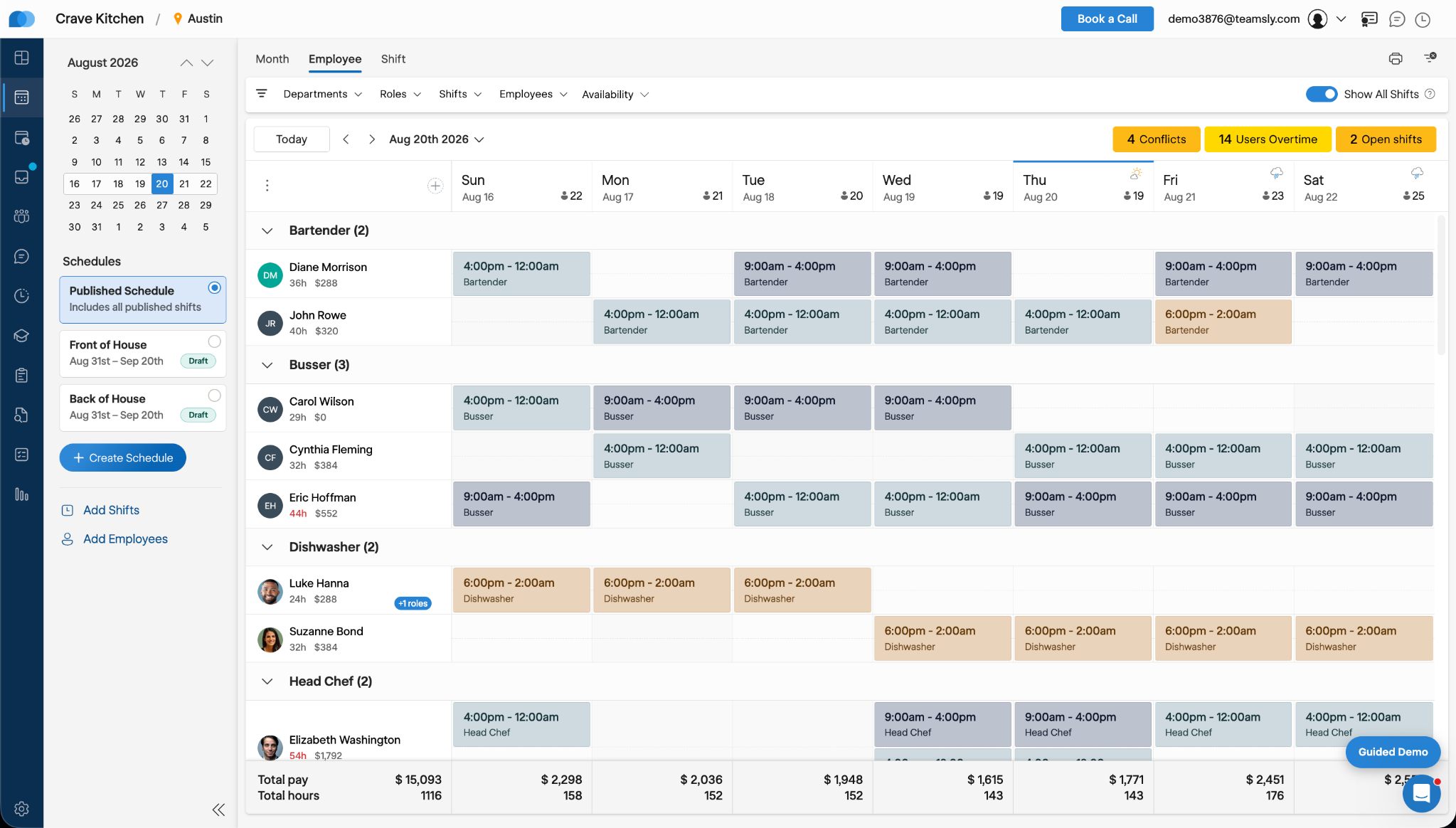
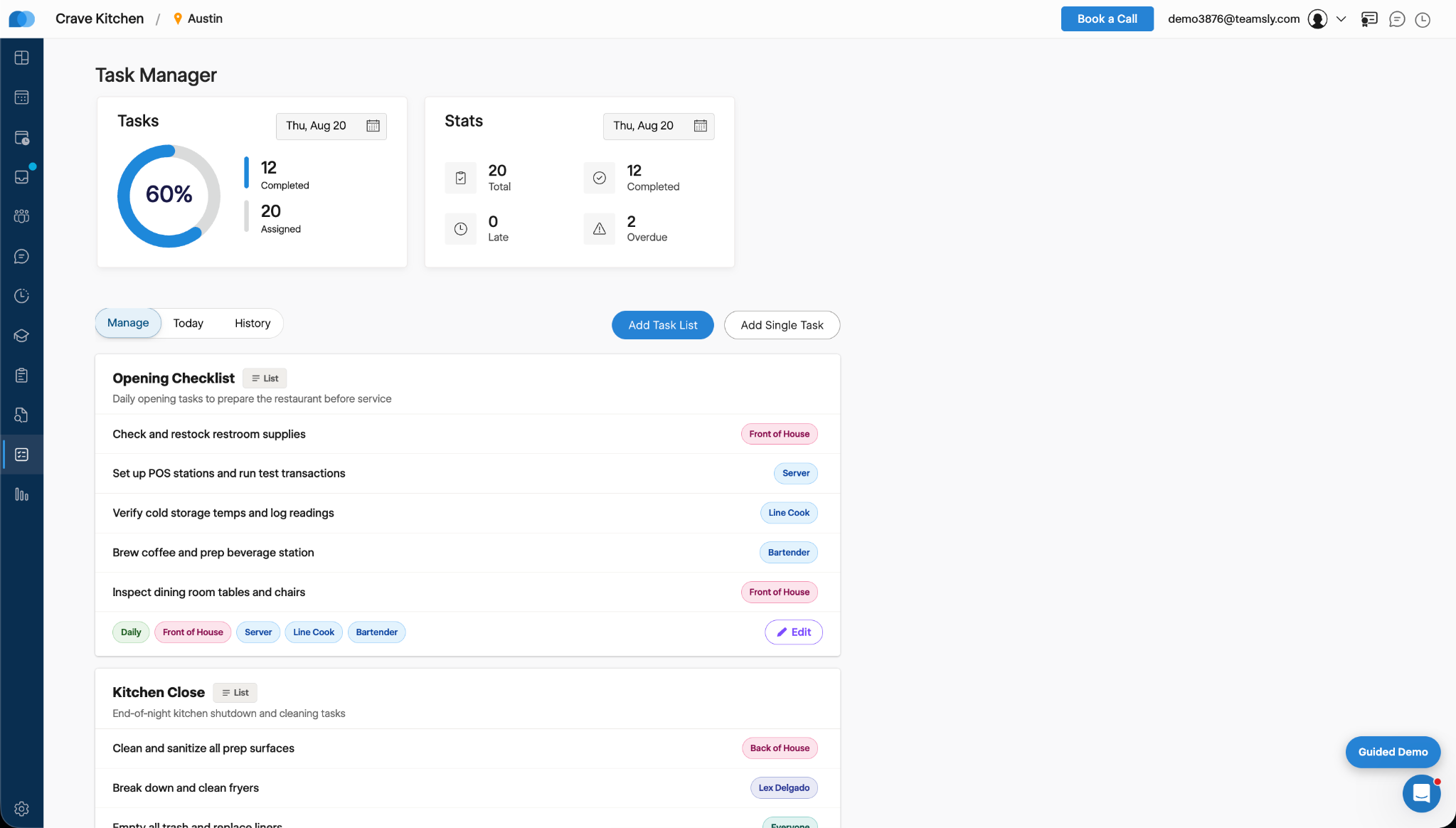
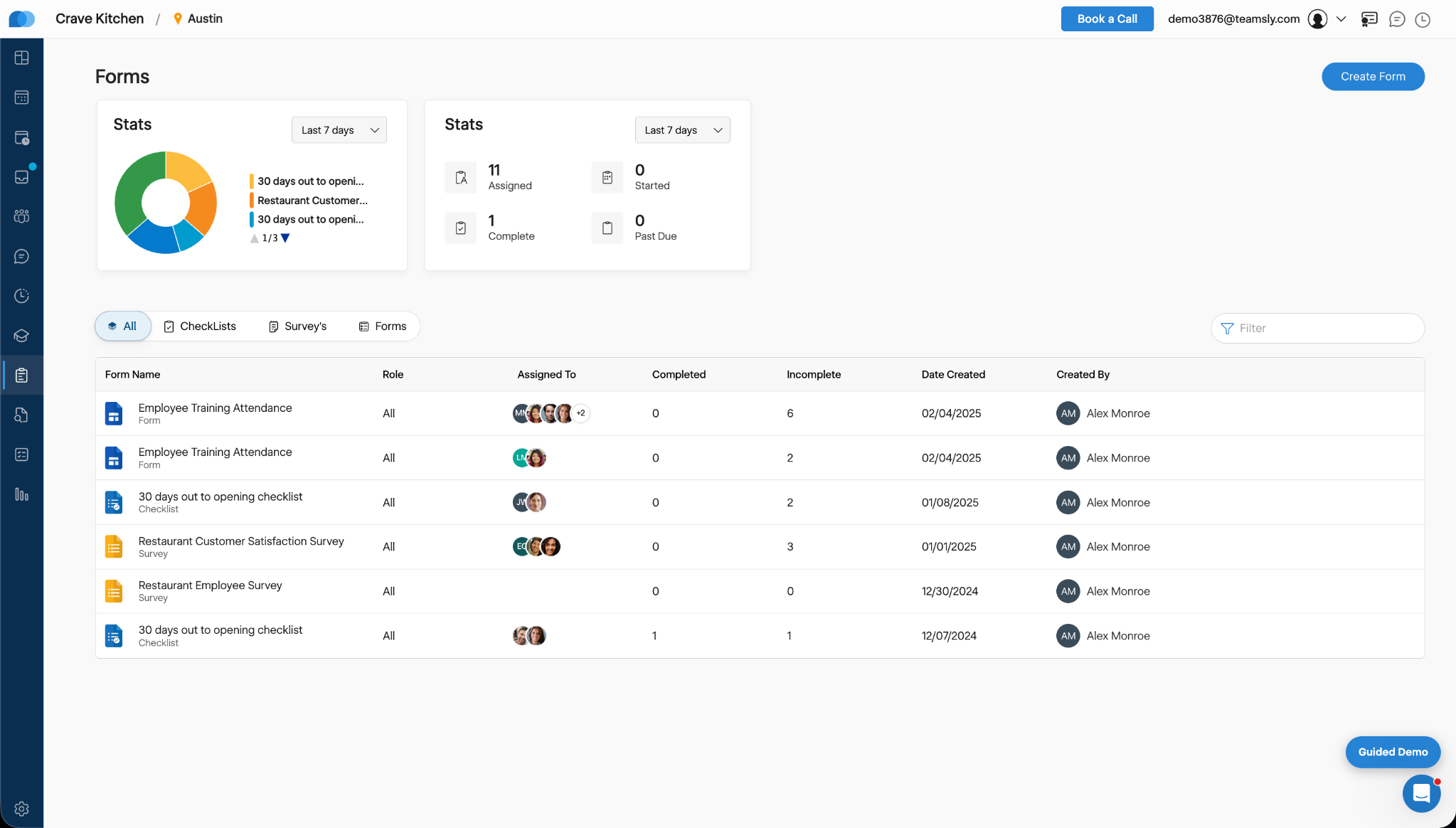
    Screenshot of Teamsly’s employee scheduling software, which gives managers a role-based weekly view of every employee and shift. Managers can create separate draft and published schedules, filter by department, role, shift, employee, or availability, identify scheduling conflicts, projected overtime, and open shifts, and review scheduled hours and estimated labor costs before publishing changes to the team.Screenshot of Teamsly’s workforce management dashboard. This brings daily staffing and operational data into one centralized view. Managers can monitor open shifts, shift swaps, employee requests, availability requests, scheduled coverage by role, paid hours, overtime, estimated pay, paid breaks, training quiz completion, and a visual shift timeline—making urgent staffing and workforce priorities easier to identify.Screenshot of Teamsly’s employee timesheet and time tracking software, which organizes timecards, paid hours, regular hours, overtime, paid and unpaid breaks, and estimated pay. Managers can compare scheduled hours with actual hours, spot timecard issues, review attendance data by employee and date range, add missing timecards, and download detailed reports for payroll preparation.Screenshot of Teamsly’s task management software, which helps managers create one-time tasks and recurring operational checklists, assign work by employee or role, and monitor completion from one dashboard. Status metrics show assigned, completed, late, and overdue work, while Today and History views strengthen accountability across opening, closing, cleaning, food preparation, and other repeatable team workflows.Screenshot of where Teamsly centralizes digital forms, checklists, and surveys for frontline and deskless teams. Managers can create and assign workflows such as employee training attendance forms, new-location opening checklists, customer satisfaction surveys, and employee surveys, then track assigned, started, completed, incomplete, and past-due submissions from a filterable reporting dashboard.Screenshot of Teamsly’s audit management software, which standardizes inspections and evaluations for employees, external participants, locations, equipment, and other operational subjects. Managers can assign audits, set scoring goals, monitor average scores, track completed and incomplete work, and identify past-due audits across food safety, employee hygiene, equipment maintenance, storage, workplace cleanliness, training, and knowledge.