HyperOffice Enterprise Collaboration Suite vs. KROCK

Overview
ProductRatingMost Used ByProduct SummaryStarting Price
HyperOffice Enterprise Collaboration Suite
Score 7.7 out of 10
N/A
HyperOffice delivers a collaboration software built around functionalities such as document and database management, a social network platform, and online collaborative calendarsN/A
KROCK
Score 10.0 out of 10
N/A
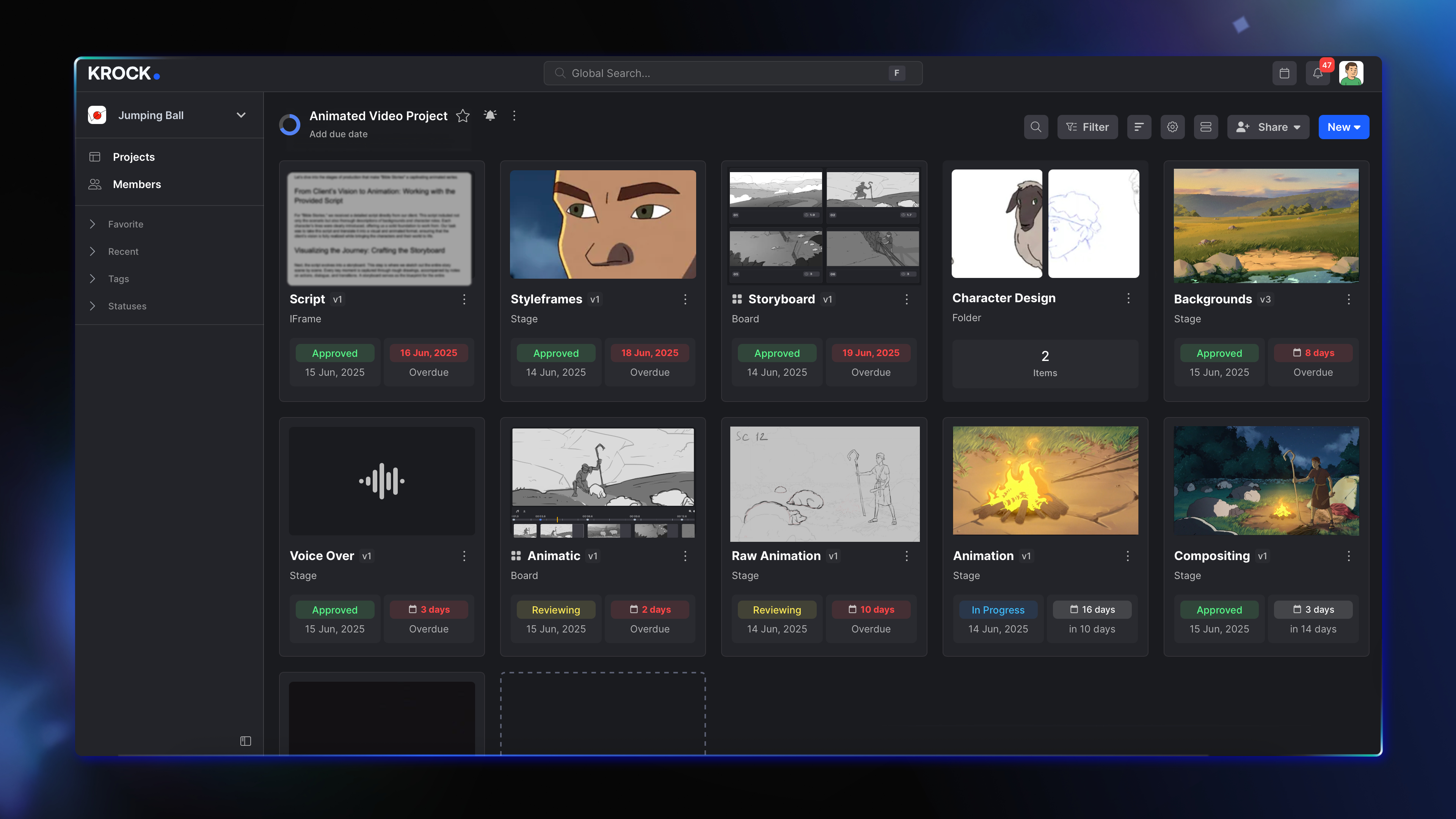
Krock.io is a video review software and creative collaboration platform built for video production teams, animation studios, and creative agencies. It centralizes the entire review-and-approval workflow — from pre-production through final delivery — in a single workspace. Key capabilities include: Frame-accurate video feedback — Leave time-coded comments, visual drawings, and file attachments directly on video and audio files, eliminating ambiguous revision…
$10
per month per user
Pricing
HyperOffice Enterprise Collaboration SuiteKROCK
Editions & Modules
No answers on this topic
Pro
$10
per month per user
Enterprise
$400
per month
Enterprise
Custom
per month per user
Enterprise
Custom
per team
Offerings
Pricing Offerings
HyperOffice Enterprise Collaboration SuiteKROCK
Free Trial
NoYes
Free/Freemium Version
NoYes
Premium Consulting/Integration Services
NoNo
Entry-level Setup FeeNo setup feeNo setup fee
Additional Details20% discount for annual billing.
More Pricing Information
Community Pulse
HyperOffice Enterprise Collaboration SuiteKROCK
Features
HyperOffice Enterprise Collaboration SuiteKROCK
Project Management
Comparison of Project Management features of Product A and Product B
HyperOffice Enterprise Collaboration Suite
7.1
1 Ratings
9% below category average
KROCK
-
Ratings
Task Management7.01 Ratings00 Ratings
Gantt Charts7.01 Ratings00 Ratings
Scheduling8.01 Ratings00 Ratings
Workflow Automation6.01 Ratings00 Ratings
Mobile Access7.01 Ratings00 Ratings
Search8.01 Ratings00 Ratings
Visual planning tools7.01 Ratings00 Ratings
Communication
Comparison of Communication features of Product A and Product B
HyperOffice Enterprise Collaboration Suite
7.0
1 Ratings
13% below category average
KROCK
-
Ratings
Chat7.01 Ratings00 Ratings
Notifications7.01 Ratings00 Ratings
Discussions6.01 Ratings00 Ratings
Surveys8.01 Ratings00 Ratings
Internal knowledgebase8.01 Ratings00 Ratings
Integrates with GoToMeeting6.01 Ratings00 Ratings
Integrates with Gmail and Google Hangouts7.01 Ratings00 Ratings
Integrates with Outlook7.01 Ratings00 Ratings
File Sharing & Management
Comparison of File Sharing & Management features of Product A and Product B
HyperOffice Enterprise Collaboration Suite
7.5
1 Ratings
7% below category average
KROCK
-
Ratings
Versioning7.01 Ratings00 Ratings
Video files6.01 Ratings00 Ratings
Audio files6.01 Ratings00 Ratings
Document collaboration8.01 Ratings00 Ratings
Access control8.01 Ratings00 Ratings
Advanced security features9.01 Ratings00 Ratings
Integrates with Google Drive8.01 Ratings00 Ratings
Device sync8.01 Ratings00 Ratings
Best Alternatives
HyperOffice Enterprise Collaboration SuiteKROCK
Small Businesses
Stackby
Stackby
Score 8.9 out of 10
Frame.io
Frame.io
Score 9.0 out of 10
Medium-sized Companies
Troop Messenger
Troop Messenger
Score 9.8 out of 10
Asana
Asana
Score 8.5 out of 10
Enterprises
HCL Connections
HCL Connections
Score 9.0 out of 10
Wrike
Wrike
Score 8.6 out of 10
All AlternativesView all alternativesView all alternatives
User Ratings
HyperOffice Enterprise Collaboration SuiteKROCK
Likelihood to Recommend
7.0
(1 ratings)
10.0
(1 ratings)
Support Rating
7.0
(1 ratings)
10.0
(1 ratings)
User Testimonials
HyperOffice Enterprise Collaboration SuiteKROCK
Likelihood to Recommend
HyperOffice
It is well suited for the medium to large companies, where you are managing a large amount of data and files. Least suited for the small companies or startups.
Read full review
KROCK
I would recommend KROCK to those in the creative industry who struggle with keeping client communication neat, missing deadlines, and spending too much time on project management rather than focusing on their result. KROCK is a good backend system for the creative process.
Read full review
Pros
HyperOffice
  • Simple interface which makes it easy to operate.
  • Great Features to facilitate the needs.
Read full review
KROCK
  • Good usability--for clients, the team, and freelancers
  • The feedback feature is useful--it reduced client communication errors substantially
  • Provides transparency and insight into the work process for my clients
  • Ability to create different versions and present each of them to the clients
  • Relevant step sequence and project dashboard
Read full review
Cons
HyperOffice
  • Takes time to learn the functionalities.
  • A bit pricey for small companies.
  • Extra help required to learn.
Read full review
KROCK
No answers on this topic
Support Rating
HyperOffice
I've heard good things about the customer support team of HyperOffice but never had any experience myself.
Read full review
KROCK
There is an online support chat available. And the KROCK team reached out to me for detailed feedback on the platform and suggestions for improvements, which is truly considerate of them. They are always very kind, positive, and easy to ask for help, which is a pleasure.
Read full review
Alternatives Considered
HyperOffice
The platform is easy-to-use and helpful in managing projects. Additionally, email-based communication and updates are great.
Read full review
KROCK
Easier to use for our clients, which is important, as many of our clients only use the application for a short time and don't care to invest too much time or energy to learn the features. It has a clean and reliable dashboard and overall user interface.
Read full review
Return on Investment
HyperOffice
  • Definitely. Got more features than expected for the price plan. Props to the team for that.
Read full review
KROCK
  • Saves a lot of time in communication, documentation, and project management
Read full review
ScreenShots

KROCK Screenshots

Screenshot of Screenshot of