TrustRadius: an HG Insights company

IBM Netcool Network Management vs. SolarWinds Kiwi CatTools

Save this comparison

Save this comparison

Add Product

Recommended Comparisons

    Overview
    ProductRatingMost Used ByProduct SummaryStarting Price

    IBM Netcool Network Management

    Score7 out of 10
    N/ANetcool Network Management integrates the IBM Tivoli Network Manager IP Edition, Tivoli Netcool/OMNIbus and Netcool Configuration Manager products into a unified solution that consolidates the management of networks.N/A

    SolarWinds Kiwi CatTools

    Score8.6 out of 10
    N/ASolarWinds® Kiwi CatTools® is network automation tool designed to manage configurations on network devices such as routers, switches, and firewalls. It helps users work more efficiently by scheduling automatic backup activities and rolling out configuration changes to multiple devices at the same time. With native support for devices from dozens of manufacturers, Kiwi CatTools is designed to simplify network administration, configuration change alerting, and backup management.

    $852

    Per Instance

    Pricing
    IBM Netcool Network ManagementSolarWinds Kiwi CatTools
    Editions & Modules
    No answers on this topic
    One Time Price
    $852
    Per Instance
    Offerings
    Pricing Offerings
    IBM Netcool Network ManagementSolarWinds Kiwi CatTools
    Free Trial
    NoYes
    Free/Freemium Version
    NoNo
    Premium Consulting/Integration Services
    NoNo
    Entry-level Setup FeeNo setup feeNo setup fee
    Additional Details——
    More Pricing Information
    Features
    IBM Netcool Network ManagementSolarWinds Kiwi CatTools
    Configuration Management
    Comparison of Configuration Management features of IBM Netcool Network Management and SolarWinds Kiwi CatTools
    Feature
    IBM Netcool Network Management
    -
    Ratings
    SolarWinds Kiwi CatTools
    7.2
    1 Ratings
    2% below category average
    Infrastructure Automation00 Ratings6.01 Ratings
    Automated Provisioning00 Ratings9.01 Ratings
    Parallel Execution00 Ratings5.01 Ratings
    Node Management00 Ratings7.01 Ratings
    Reporting & Logging00 Ratings8.01 Ratings
    Version Control00 Ratings8.01 Ratings
    Best Alternatives
    IBM Netcool Network ManagementSolarWinds Kiwi CatTools
    Small Businesses
    No answers on this topic
    No answers on this topic
    Medium-sized Companies
    Cisco Meraki Dashboard
    Score9 out of 10
    SolarWinds Engineer's Toolset
    Score7.6 out of 10
    Enterprises
    Cisco Prime LAN Management (discontinued)
    Score7.7 out of 10
    SolarWinds Engineer's Toolset
    Score7.6 out of 10
    All AlternativesView all alternativesView all alternatives
    User Ratings
    IBM Netcool Network ManagementSolarWinds Kiwi CatTools
    Likelihood to Recommend
    9.0
    (1 ratings)
    8.0
    (2 ratings)
    Usability
    -
    (0 ratings)
    7.0
    (2 ratings)
    Support Rating
    -
    (0 ratings)
    10.0
    (1 ratings)
    User Testimonials
    IBM Netcool Network ManagementSolarWinds Kiwi CatTools
    Likelihood to Recommend
    IBM
    This tool was integrated with Control-M, so whenever we receive any job failure, long-running job, job not started yet, etc, we receive an alert against it. This tool is also integrated with Maximo where we receive the incidents as well for it. Alert's color was as per the criticality of the job and that makes it very easy for an associate to act on it to resolve. We have the SLAs for the jobs as per the urgency of the jobs.
    Incentivized
    Read full review
    SolarWinds
    Large-Scale Networks with Thousands of Devices that permit our enterprise with thousands of devices across multiple locations need a highly scalable solution, and A security-focused organization requires real-time monitoring of device configurations to detect and alert on unauthorized changes. and CatTools is lightweight and easy to set up, making it ideal for managing and resetting device configurations in a lab setting.
    Incentivized
    Read full review
    Pros
    IBM
    • This is one of the best monitoring tools.
    • Very simple to user.
    • Color code makes it very simple as per severity.
    • We receive the heartbeat alert every hour that shows the system is running up and fine.
    • We have black, red, yellow, and orange color alerts that show the critical, urgent, major, and minor incidents.
    Incentivized
    Read full review
    SolarWinds
    • Network device backups.
    • Identify configuration changes from prior backup.
    • Automated email notifications.
    Incentivized
    Read full review
    Cons
    IBM
    • Sometimes color differences of the incidents as per the criticality .
    • We don't receive the heartbeat alerts sometimes.
    • If the tool is down and we don't receive the alerts on the console we wait for the heartbeat alert and it makes some extra delay in resolving things.
    Incentivized
    Read full review
    SolarWinds
    • Enhanced Reporting Capabilities.
    • More Intuitive User Interface.
    • Scalability for Large Networks.
    Incentivized
    Read full review
    Usability
    IBM
    No answers on this topic
    SolarWinds
    CatTools is simple to set up and administer. Anyone who can install a Windows application can quickly set up an automated backup of one or more devices. It does what it was designed to do.
    Incentivized
    Read full review
    Support Rating
    IBM
    No answers on this topic
    SolarWinds
    The software is easy enough to set up and configure that even after using the product for years, we never had to contact support. We used some open source products before utilizing CatTools and could have used a speed dial to try and figure out the intricacies of the products.
    Incentivized
    Read full review
    Alternatives Considered
    IBM
    This is one of the essential tools for monitoring. This tool was integrated with Maximo and Control-M in my organization. So whenever any job failed in Control-M, we receive an alert against it in the IBM Netcool/OMNIbus. We receive the alerts in different colors as per the criticality. Black for critical ones(Sev1), red for urgent (Sev2), yellow for major(Sev3), and orange for minor(Sev4). So it makes an easy to operate and act on the alerts as per the severity. This tool is very user-friendly and easy to use. No additional training is required for the tool to operate, just a simple KT is enough.
    Incentivized
    Read full review
    SolarWinds
    Strengths:Cost-Effectiveness: CatTools is significantly more affordable than enterprise-grade tools like SolarWinds Network Configuration Manager (NCM) or Infoblox NetMRI. It is ideal for small to medium-sized businesses with tight budgets. Ease of Deployment: Kiwi CatTools is lightweight and easier to set up, while enterprise solutions often require substantial infrastructure and longer deployment times. Focus on Essentials: CatTools excels in its core functions, such as automated configuration backups, scheduled tasks, and essential compliance checks.
    Incentivized
    Read full review
    Return on Investment
    IBM
    • Color feature of the alerts as per the criticality is the amazing feature.
    • Heartbeat alert is also an unique feature.
    • No additional training is required to use this tool. just a simple KT is enough.
    Incentivized
    Read full review
    SolarWinds
    • Compliance and Risk Reduction.
    • Reduced Downtime.
    • Ease of Deployment and Low Licensing Costs.
    Incentivized
    Read full review
    ScreenShots

    SolarWinds Kiwi CatTools Screenshots

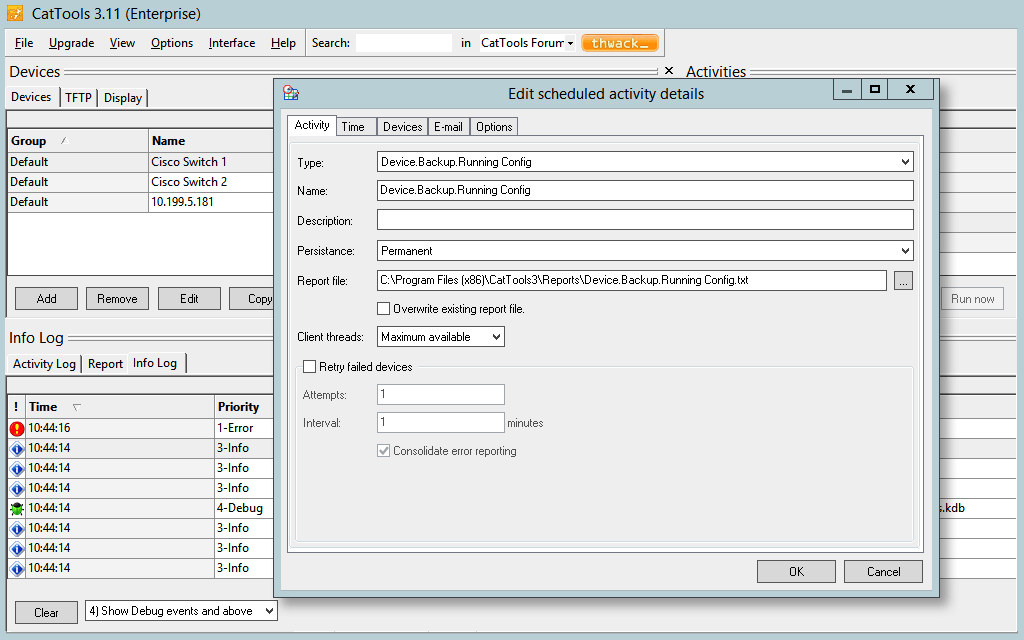
    Screenshot of Schedule automated backups of network device configuration from routers, switches, firewalls, etc.Screenshot of Simultaneously perform or schedule configuration changes across multiple network devices with great ease.Screenshot of Receive real-time alerts when unauthorized configuration changes occur on network devices.Screenshot of Maintain a complete configuration history, and facilitate rollbacks to the last good configuration.Screenshot of Generate configuration and device information reports related to port, MAC, ARP, version details, and more.Screenshot of Get out-of-the-box support for both IPv4 and IPv6 devices from vendors, such as Cisco, HP, Huawei, 3Com and more.