TrustRadius: an HG Insights company

Save this comparison

Save this comparison

Add Product

Recommended Comparisons

    Overview
    ProductRatingMost Used ByProduct SummaryStarting Price

    Incorta

    Score8 out of 10
    N/AIncorta is a business intelligence software offering from Incorta.N/A

    Lightning Tools Data Viewer

    Score9.1 out of 10
    Mid-Size Companies (51-1,000 employees)
    The Data Viewer provides data visualization in the form of reports or charts that can be created and customized to suit a business's needs. Silos of data exist in most organizations and yet contain valuable insights into how well the organization is performing and where action is needed. Those silos often include Microsoft Excel workbooks, Microsoft SQL Azure databases, On-Premises data sources accessible through OData or Business Connectivity Services and even SharePoint Lists. These data…

    $2,200

    per year per installation

    Pricing
    IncortaLightning Tools Data Viewer
    Editions & Modules
    No answers on this topic
    Data Viewer OnPrem
    $1,000
    per year Per installation, 1 x WFE
    Data Viewer Online
    $2,200
    per year per installation
    Data Viewer OnPrem Enterprise Edition
    POA
    per year Per installation, 4+ WFE
    Data Viewer Online Enterprise Edition
    POA
    per year per installation
    Offerings
    Pricing Offerings
    IncortaLightning Tools Data Viewer
    Free Trial
    YesYes
    Free/Freemium Version
    NoNo
    Premium Consulting/Integration Services
    NoYes
    Entry-level Setup FeeNo setup feeNo setup fee
    Additional Details—Prices stated are minimum per installation for "stock" products. $2.20 per user / year on top of base price. Enterprise editions can be amended to suit business needs if deemed necessary, additional costs incurred and TBD. All packages include free technical support. Free upgrades available to latest versions of tool as they are released. (online version)
    More Pricing Information
    Features
    IncortaLightning Tools Data Viewer
    BI Standard Reporting
    Comparison of BI Standard Reporting features of Incorta and Lightning Tools Data Viewer
    Feature
    Incorta
    10.0
    1 Ratings
    20% above category average
    Lightning Tools Data Viewer
    9.1
    1 Ratings
    12% above category average
    Customizable dashboards10.01 Ratings9.11 Ratings
    Report Formatting Templates00 Ratings9.11 Ratings
    Ad-hoc Reporting
    Comparison of Ad-hoc Reporting features of Incorta and Lightning Tools Data Viewer
    Feature
    Incorta
    7.5
    1 Ratings
    6% below category average
    Lightning Tools Data Viewer
    8.2
    1 Ratings
    5% above category average
    Drill-down analysis10.01 Ratings6.41 Ratings
    Formatting capabilities5.01 Ratings9.11 Ratings
    Integration with R or other statistical packages5.01 Ratings00 Ratings
    Report sharing and collaboration10.01 Ratings9.11 Ratings
    Report Output and Scheduling
    Comparison of Report Output and Scheduling features of Incorta and Lightning Tools Data Viewer
    Feature
    Incorta
    10.0
    1 Ratings
    20% above category average
    Lightning Tools Data Viewer
    -
    Ratings
    Publish to Web10.01 Ratings00 Ratings
    Publish to PDF10.01 Ratings00 Ratings
    Report Delivery Scheduling10.01 Ratings00 Ratings
    Delivery to Remote Servers10.01 Ratings00 Ratings
    Data Discovery and Visualization
    Comparison of Data Discovery and Visualization features of Incorta and Lightning Tools Data Viewer
    Feature
    Incorta
    10.0
    1 Ratings
    22% above category average
    Lightning Tools Data Viewer
    3.6
    1 Ratings
    73% below category average
    Pre-built visualization formats (heatmaps, scatter plots etc.)10.01 Ratings3.61 Ratings
    Location Analytics / Geographic Visualization10.01 Ratings00 Ratings
    Access Control and Security
    Comparison of Access Control and Security features of Incorta and Lightning Tools Data Viewer
    Feature
    Incorta
    10.0
    1 Ratings
    16% above category average
    Lightning Tools Data Viewer
    -
    Ratings
    Multi-User Support (named login)10.01 Ratings00 Ratings
    Role-Based Security Model10.01 Ratings00 Ratings
    Multiple Access Permission Levels (Create, Read, Delete)10.01 Ratings00 Ratings
    Single Sign-On (SSO)10.01 Ratings00 Ratings
    Mobile Capabilities
    Comparison of Mobile Capabilities features of Incorta and Lightning Tools Data Viewer
    Feature
    Incorta
    10.0
    1 Ratings
    25% above category average
    Lightning Tools Data Viewer
    -
    Ratings
    Responsive Design for Web Access10.01 Ratings00 Ratings
    Dashboard / Report / Visualization Interactivity on Mobile10.01 Ratings00 Ratings
    Application Program Interfaces (APIs) / Embedding
    Comparison of Application Program Interfaces (APIs) / Embedding features of Incorta and Lightning Tools Data Viewer
    Feature
    Incorta
    5.0
    1 Ratings
    43% below category average
    Lightning Tools Data Viewer
    -
    Ratings
    Themeable User Interface (UI)5.01 Ratings00 Ratings
    Best Alternatives
    IncortaLightning Tools Data Viewer
    Small Businesses
    Cyfe
    Score4 out of 10
    Chartio (discontinued)
    Score7.5 out of 10
    Medium-sized Companies
    Qlik Cloud Analytics (Qlik Sense)
    Score8.1 out of 10
    Jet Reports
    Score9.5 out of 10
    Enterprises
    Sisense
    Score6.9 out of 10
    Kibana
    Score8.4 out of 10
    All AlternativesView all alternativesView all alternatives
    User Ratings
    IncortaLightning Tools Data Viewer
    Likelihood to Recommend
    10.0
    (1 ratings)
    9.1
    (1 ratings)
    Usability
    8.0
    (1 ratings)
    -
    (0 ratings)
    Support Rating
    10.0
    (1 ratings)
    -
    (0 ratings)
    User Testimonials
    IncortaLightning Tools Data Viewer
    Likelihood to Recommend
    Incorta
    The best aspect of Incorta is the ability to retain fidelity to raw data sources. Incorta does not require an ETL process or pre-aggregation to get results. Another great feature is the Business Schema. The ability to present data in localized business language is key to citizen development. The solution is a complete platform from ingestion to presentation. There is no need for additional products to provide high-performing dashboards. It is worth repeating that no ETL is required. If you need high-speed ingestion and presentation of millions of rows of data while retaining access to the raw data, Incorta is the right platform.
    Incentivized
    Read full review
    Lightning Tools
    Lightning Tools Data Viewer is well suited for re-surfacing data and customizing its look and feel.
    Read full review
    Pros
    Incorta
    • Speed - ingestion and delivery of data
    • Customization
    • Support
    • Training
    Incentivized
    Read full review
    Lightning Tools
    • Shows Lists created on different sites to be seen and controlled on another site in a Tenant
    • Allows selection of layouts and coloring way beyond what other programs do.
    • Easy to learn and very functional.
    Read full review
    Cons
    Incorta
    • Broader use of formula columns in insights
    • Formula enhancements to all commenting
    • Greater formatting of Insights
    Incentivized
    Read full review
    Lightning Tools
    • Data Viewer has a graph feature that is old school flat design. We loved the In House real 3D graph Lightning Tools program.
    Read full review
    Usability
    Incorta
    There are improvements to the formula area that would make this rating go higher. Formatting is also in need of enhancement.
    Incentivized
    Read full review
    Lightning Tools
    No answers on this topic
    Support Rating
    Incorta
    I have interacted with support on many occasions. They are professional and knowledgeable and have solved every issue and asked every question or directed me to the appropriate resource who can.
    Incentivized
    Read full review
    Lightning Tools
    No answers on this topic
    Alternatives Considered
    Incorta
    Each of the other solutions required an ETL to prepare data for ingestion and presentation. Our requirements were for no ELT. Attempting to use raw data sources with both of the other solutions did not provide the performance required (or in the case of Tableau, never finished.) Incorta provides the capability to utilize citizen developers. The other solutions required technical skills beyond the average citizen developer.
    Incentivized
    Read full review
    Lightning Tools
    Lightning Tools Data Viewer is much easier and more powerful than Infowise similar viewer in their lineup. In this case, we use Data Viewer over the one offered by Infowise.
    Read full review
    Return on Investment
    Incorta
    • Visibility to daily operations and pacing
    • Visibility on daily ACH return facilitating action per client
    • Client reporting accepted very well
    Incentivized
    Read full review
    Lightning Tools
    • It allows us to do things that would take a great deal more time to duplicate in SharePoint
    • It cuts down on ugly looking built in SP list layouts
    • Users find it easy to access, thus this product is more productive
    Read full review
    ScreenShots

    Incorta Screenshots

    Screenshot of Data source integrations.

    Lightning Tools Data Viewer Screenshots
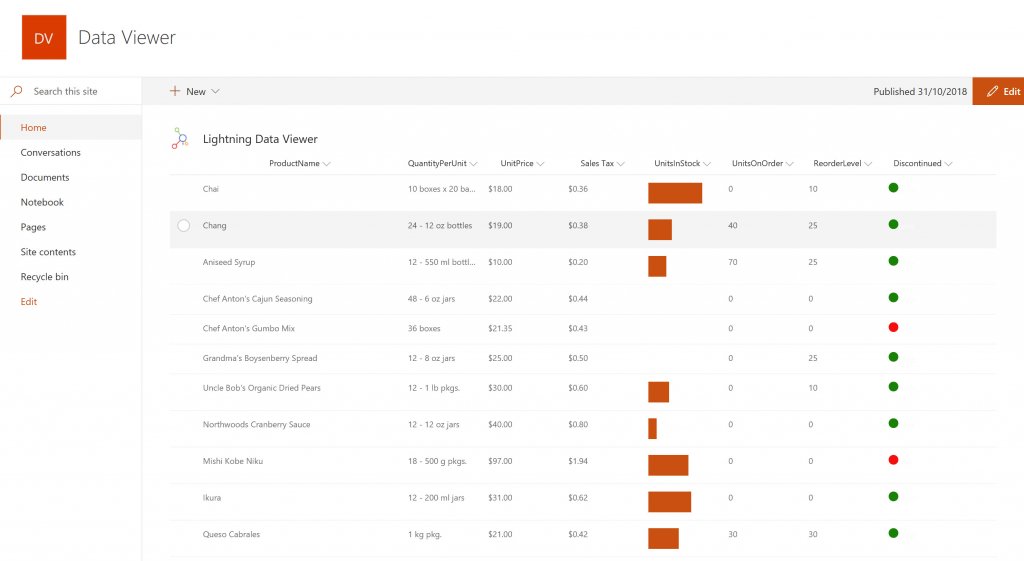
    Screenshot of DISPLAYING EXTERNAL DATA WITHIN SHAREPOINT OR MICROSOFT TEAMS
The Data Viewer Client Side Web Part can be configured by Business Users within a few minutes to display Line of Business Data from Data Sources such as Excel,  SQL Azure, Business Connectivity Services, OData and SharePoint Lists.  Connections to an organizations data such as Customer Relationship Management Systems, Accounting Systems, or Custom Databases can be connected, giving business users a live up-to-date view of business information within the context of their SharePoint Team Sites or Microsoft Teams Tabs.Screenshot of HIGHLIGHTING KEY BUSINESS DATA (NO CODE)
Conditional formatting can be used to highlight key business data. Overdue Tasks, Low Stock, Currency Exchange Rates, Sales Revenue are examples of data to highlight visually allowing for a quick reaction time. Key Financial Indicators and Key Performance Indicators can be configured with a simple dialog and no need to write any code. Choose colours, icons or data bars to highlight key data.Screenshot of SELECTING AND STYLING ICONS
Icons can be chosen as part of the conditional formatting to make data stand out. The Office 365 Fabric icons can be selected and styled and applied to cell values. Pepper pots, Smileys, Envelopes and more icons are available. There are hundreds of options to choose from to highlight data that needs to be acted upon.Screenshot of DATA VIEWER CAN BE A GRID OF DATA OR A CHART IN SHAREPOINT OR MICROSOFT TEAMS
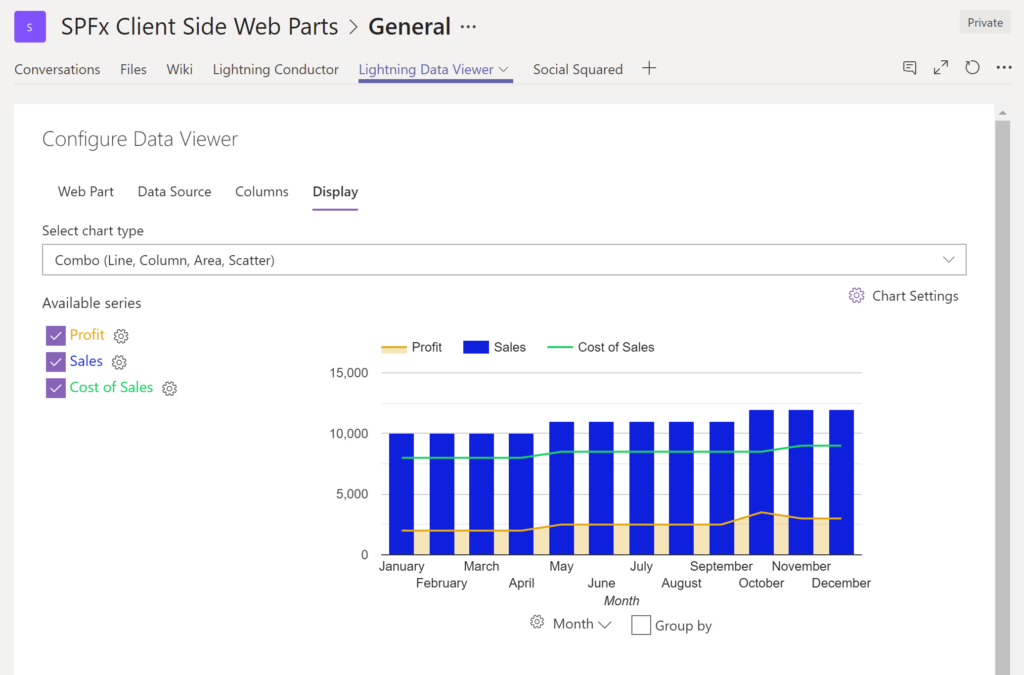
The Data Viewer can be used within Microsoft SharePoint Modern Sites or Microsoft Teams Tabs as a Grid of Data with styling or as a Chart which can be configured. The Charting Feature allows for Pie, Donut, Column, Line, Area, and Scatter Charts which can all be configured and displayed in 2D or 3D.Screenshot of TREEMAPS
summary information can be displayed within a TreeMap next to the detail. Users will be able to see trends, and how the business is performing  using the TreeMap view of data.Screenshot of CHARTS AND GAUGES
The Data Viewer is used to represent data in multiple ways using Gauges, TreeMaps, Multiple Series Charts, and Pie Charts.