TrustRadius: an HG Insights company

InetSoft Style Intelligence vs. Lightning Tools Data Viewer

Save this comparison

Save this comparison

Add Product

Recommended Comparisons

    Overview
    ProductRatingMost Used ByProduct SummaryStarting Price

    InetSoft Style Intelligence

    Score8.6 out of 10
    N/AInetSoft Technologies headquartered in Piscataway offers their Style Intelligence visualization and analytics solution, delivering mashup driven dashboards & reports with machine learning Intelligence.N/A

    Lightning Tools Data Viewer

    Score9.1 out of 10
    Mid-Size Companies (51-1,000 employees)
    The Data Viewer provides data visualization in the form of reports or charts that can be created and customized to suit a business's needs. Silos of data exist in most organizations and yet contain valuable insights into how well the organization is performing and where action is needed. Those silos often include Microsoft Excel workbooks, Microsoft SQL Azure databases, On-Premises data sources accessible through OData or Business Connectivity Services and even SharePoint Lists. These data…

    $2,200

    per year per installation

    Pricing
    InetSoft Style IntelligenceLightning Tools Data Viewer
    Editions & Modules
    No answers on this topic
    Data Viewer OnPrem
    $1,000
    per year Per installation, 1 x WFE
    Data Viewer Online
    $2,200
    per year per installation
    Data Viewer OnPrem Enterprise Edition
    POA
    per year Per installation, 4+ WFE
    Data Viewer Online Enterprise Edition
    POA
    per year per installation
    Offerings
    Pricing Offerings
    InetSoft Style IntelligenceLightning Tools Data Viewer
    Free Trial
    NoYes
    Free/Freemium Version
    NoNo
    Premium Consulting/Integration Services
    NoYes
    Entry-level Setup FeeNo setup feeNo setup fee
    Additional Details—Prices stated are minimum per installation for "stock" products. $2.20 per user / year on top of base price. Enterprise editions can be amended to suit business needs if deemed necessary, additional costs incurred and TBD. All packages include free technical support. Free upgrades available to latest versions of tool as they are released. (online version)
    More Pricing Information
    Features
    InetSoft Style IntelligenceLightning Tools Data Viewer
    BI Standard Reporting
    Comparison of BI Standard Reporting features of InetSoft Style Intelligence and Lightning Tools Data Viewer
    Feature
    InetSoft Style Intelligence
    8.5
    2 Ratings
    5% above category average
    Lightning Tools Data Viewer
    9.1
    1 Ratings
    12% above category average
    Pixel Perfect reports8.02 Ratings00 Ratings
    Customizable dashboards8.52 Ratings9.11 Ratings
    Report Formatting Templates9.02 Ratings9.11 Ratings
    Ad-hoc Reporting
    Comparison of Ad-hoc Reporting features of InetSoft Style Intelligence and Lightning Tools Data Viewer
    Feature
    InetSoft Style Intelligence
    8.6
    2 Ratings
    9% above category average
    Lightning Tools Data Viewer
    8.2
    1 Ratings
    5% above category average
    Drill-down analysis9.02 Ratings6.41 Ratings
    Formatting capabilities9.02 Ratings9.11 Ratings
    Integration with R or other statistical packages8.02 Ratings00 Ratings
    Report sharing and collaboration8.52 Ratings9.11 Ratings
    Report Output and Scheduling
    Comparison of Report Output and Scheduling features of InetSoft Style Intelligence and Lightning Tools Data Viewer
    Feature
    InetSoft Style Intelligence
    9.2
    2 Ratings
    12% above category average
    Lightning Tools Data Viewer
    -
    Ratings
    Publish to Web9.02 Ratings00 Ratings
    Publish to PDF9.52 Ratings00 Ratings
    Report Versioning9.52 Ratings00 Ratings
    Report Delivery Scheduling9.52 Ratings00 Ratings
    Delivery to Remote Servers8.52 Ratings00 Ratings
    Data Discovery and Visualization
    Comparison of Data Discovery and Visualization features of InetSoft Style Intelligence and Lightning Tools Data Viewer
    Feature
    InetSoft Style Intelligence
    8.5
    2 Ratings
    9% above category average
    Lightning Tools Data Viewer
    3.6
    1 Ratings
    73% below category average
    Pre-built visualization formats (heatmaps, scatter plots etc.)9.02 Ratings3.61 Ratings
    Location Analytics / Geographic Visualization8.52 Ratings00 Ratings
    Predictive Analytics8.02 Ratings00 Ratings
    Best Alternatives
    InetSoft Style IntelligenceLightning Tools Data Viewer
    Small Businesses
    Chartio (discontinued)
    Score7.5 out of 10
    Chartio (discontinued)
    Score7.5 out of 10
    Medium-sized Companies
    Jet Reports
    Score9.5 out of 10
    Jet Reports
    Score9.5 out of 10
    Enterprises
    Kibana
    Score8.4 out of 10
    Kibana
    Score8.4 out of 10
    All AlternativesView all alternativesView all alternatives
    User Ratings
    InetSoft Style IntelligenceLightning Tools Data Viewer
    Likelihood to Recommend
    8.5
    (2 ratings)
    9.1
    (1 ratings)
    User Testimonials
    InetSoft Style IntelligenceLightning Tools Data Viewer
    Likelihood to Recommend
    InetSoft Technologies
    It's great for the accumulation and assimilation of various data formats to be channeled into a single end-point, whether that be a table or a report. It reminds me so much of SPLUNK in that regard. The application is also very easy to use and has been configured in such a way that it is appealing and productive for both novice and expert users. I was able to pick up the basis after a solitary day's training. We've mainly used it to create bespoke dashboards and visuals, thereby allowing for effective report writing. This was a major consideration from Senior Management before the application was purchased. There haven't been any real drawbacks with the software thus far.
    Incentivized
    Read full review
    Lightning Tools
    Lightning Tools Data Viewer is well suited for re-surfacing data and customizing its look and feel.
    Read full review
    Pros
    InetSoft Technologies
    • Easy to use with a very user-friendly interface, making onboarding with the tool a lot easier.
    • Able to mash up/integrate data from different sources and file types which helps a lot with consolidation.
    • Good customer service/support that makes solving problems/issues a lot faster.
    Incentivized
    Read full review
    Lightning Tools
    • Shows Lists created on different sites to be seen and controlled on another site in a Tenant
    • Allows selection of layouts and coloring way beyond what other programs do.
    • Easy to learn and very functional.
    Read full review
    Cons
    InetSoft Technologies
    • I think the user interface is in need of an upgrade, as its starting to show it's age a little. It looks like it needs a rehaul in the department.
    • Hopefully, the company can grow and then have more frequent interactions with their customers.
    • I am slightly wary that support may not have the same proficiency at the very highest level, as my company reaches the expert user level.
    Incentivized
    Read full review
    Lightning Tools
    • Data Viewer has a graph feature that is old school flat design. We loved the In House real 3D graph Lightning Tools program.
    Read full review
    Alternatives Considered
    InetSoft Technologies
    InetSoft is a more cost-effective option that offers the same functionality, features, and usability. It is a great option, especially for SMEs. It also has top-notch customer service/support which is a key factor in selecting any agency or tool. I recommend using InetSoft especially for small businesses
    Incentivized
    Read full review
    Lightning Tools
    Lightning Tools Data Viewer is much easier and more powerful than Infowise similar viewer in their lineup. In this case, we use Data Viewer over the one offered by Infowise.
    Read full review
    Return on Investment
    InetSoft Technologies
    • Reduction in excessive space for data storage repositories
    • Faster time to analyse data and metadata. Quicker to reach objective analysis
    • Conclusive informational reporting
    Incentivized
    Read full review
    Lightning Tools
    • It allows us to do things that would take a great deal more time to duplicate in SharePoint
    • It cuts down on ugly looking built in SP list layouts
    • Users find it easy to access, thus this product is more productive
    Read full review
    ScreenShots

    Lightning Tools Data Viewer Screenshots
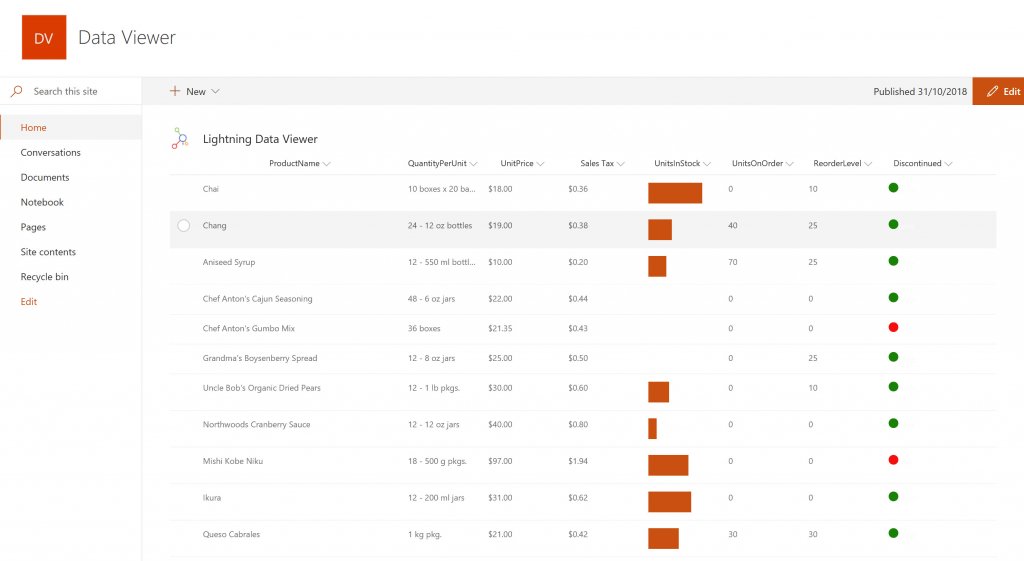
    Screenshot of DISPLAYING EXTERNAL DATA WITHIN SHAREPOINT OR MICROSOFT TEAMS
The Data Viewer Client Side Web Part can be configured by Business Users within a few minutes to display Line of Business Data from Data Sources such as Excel,  SQL Azure, Business Connectivity Services, OData and SharePoint Lists.  Connections to an organizations data such as Customer Relationship Management Systems, Accounting Systems, or Custom Databases can be connected, giving business users a live up-to-date view of business information within the context of their SharePoint Team Sites or Microsoft Teams Tabs.Screenshot of HIGHLIGHTING KEY BUSINESS DATA (NO CODE)
Conditional formatting can be used to highlight key business data. Overdue Tasks, Low Stock, Currency Exchange Rates, Sales Revenue are examples of data to highlight visually allowing for a quick reaction time. Key Financial Indicators and Key Performance Indicators can be configured with a simple dialog and no need to write any code. Choose colours, icons or data bars to highlight key data.Screenshot of SELECTING AND STYLING ICONS
Icons can be chosen as part of the conditional formatting to make data stand out. The Office 365 Fabric icons can be selected and styled and applied to cell values. Pepper pots, Smileys, Envelopes and more icons are available. There are hundreds of options to choose from to highlight data that needs to be acted upon.Screenshot of DATA VIEWER CAN BE A GRID OF DATA OR A CHART IN SHAREPOINT OR MICROSOFT TEAMS
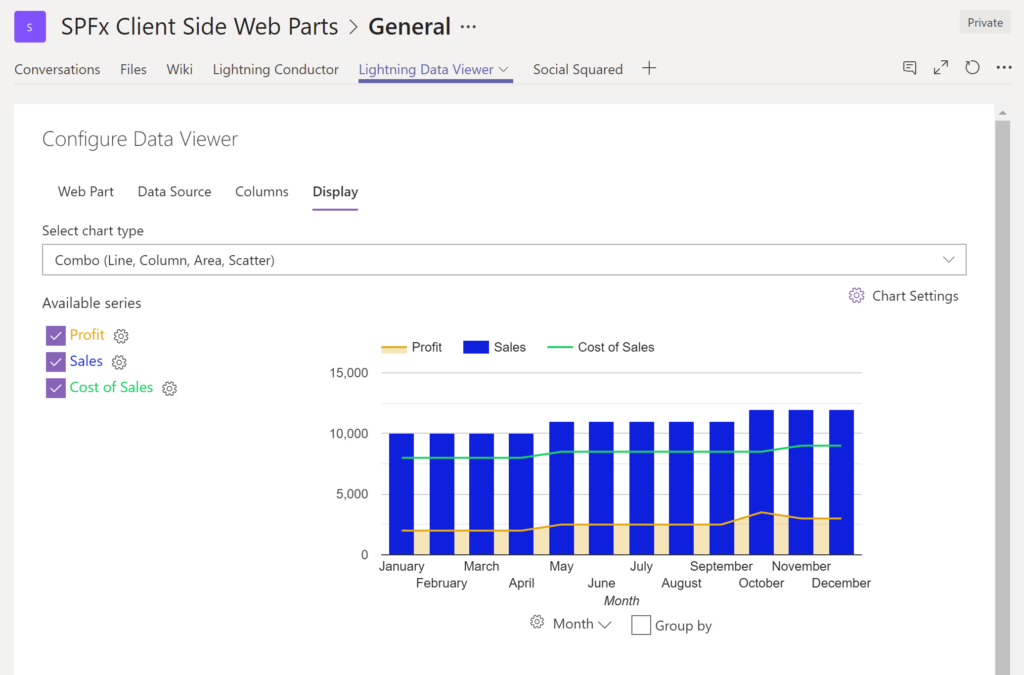
The Data Viewer can be used within Microsoft SharePoint Modern Sites or Microsoft Teams Tabs as a Grid of Data with styling or as a Chart which can be configured. The Charting Feature allows for Pie, Donut, Column, Line, Area, and Scatter Charts which can all be configured and displayed in 2D or 3D.Screenshot of TREEMAPS
summary information can be displayed within a TreeMap next to the detail. Users will be able to see trends, and how the business is performing  using the TreeMap view of data.Screenshot of CHARTS AND GAUGES
The Data Viewer is used to represent data in multiple ways using Gauges, TreeMaps, Multiple Series Charts, and Pie Charts.