Lightning Tools DeliverPoint vs. Oracle Identity Governance

Overview
ProductRatingMost Used ByProduct SummaryStarting Price
Lightning Tools DeliverPoint
Score 8.2 out of 10
Enterprise companies (1,001+ employees)
DeliverPoint supports reporting and managing SharePoint permissions. Site Owners, Site Collection Administrators, and SharePoint Administrators can run permission reports that reflect the permissions of every user. Site collections, Teams Channels, Hub Sites, SharePoint Sites, OneDrive, Lists, Folders and Items can all be reported on individually or in bulk. Permissions can be modified, transferred, copied or deleted between accounts as staff changes occur.
$2,500
per year per installation
Oracle Identity Governance
Score 6.0 out of 10
N/A
Oracle Identity Governance (OIG) -formerly Oracle Identity Manager or OIM- is an enterprise identity management system that automatically manages users' access privileges within enterprise IT resources.
$3,600
Pricing
Lightning Tools DeliverPointOracle Identity Governance
Editions & Modules
DeliverPoint OnPrem
From $1950
per year per installation
DeliverPoint OnPrem Enterprise Edition
POA
per year per installation
DeliverPoint Online
From $2500
per year per installation
DeliverPoint Online Enterprise Edition (>10,000 users)
POA
per year per installation
Processor - Minimum
$1
Named User Plus - Software Update License & Support
$792
Named User Plus - Price
$3,600
Processor - Software Update License & Support
39,600.00
Processor - Price
180,000
Named User Plus - Minimum
N/A
Offerings
Pricing Offerings
Lightning Tools DeliverPointOracle Identity Governance
Free Trial
YesYes
Free/Freemium Version
NoYes
Premium Consulting/Integration Services
YesNo
Entry-level Setup FeeNo setup feeNo setup fee
Additional DetailsPrices listed are starting prices for "stock" product. $2.50 per user/year on top of base price Enterprise product is designed for 10,000+ users, and can be customised if required to meet business needs. Prices are based on 12 month contract from 1st purchase month. Installation included in price. Full technical support available. Online versions will have access to free product updates during contract period.
More Pricing Information
Community Pulse
Lightning Tools DeliverPointOracle Identity Governance
Features
Lightning Tools DeliverPointOracle Identity Governance
Identity Management
Comparison of Identity Management features of Product A and Product B
Lightning Tools DeliverPoint
7.7
1 Ratings
7% below category average
Oracle Identity Governance
5.6
2 Ratings
38% below category average
ID-Management Access Control7.31 Ratings6.62 Ratings
Account Provisioning and De-provisioning8.21 Ratings9.02 Ratings
ID Management Single-Sign On (SSO)00 Ratings6.12 Ratings
Multi-Factor Authentication00 Ratings3.02 Ratings
Password Management00 Ratings7.32 Ratings
ID Management Workflow Automation00 Ratings4.62 Ratings
ID Risk Management00 Ratings2.32 Ratings
Best Alternatives
Lightning Tools DeliverPointOracle Identity Governance
Small Businesses
Dashlane Password Manager
Score 9.0 out of 10
Dashlane Password Manager
Score 9.0 out of 10
Medium-sized Companies
OneLogin by One Identity
Score 9.6 out of 10
OneLogin by One Identity
Score 9.6 out of 10
Enterprises
OneLogin by One Identity
Score 9.6 out of 10
OneLogin by One Identity
Score 9.6 out of 10
All AlternativesView all alternativesView all alternatives
User Ratings
Lightning Tools DeliverPointOracle Identity Governance
Likelihood to Recommend
8.2
(1 ratings)
8.0
(5 ratings)
Usability
-
(0 ratings)
7.3
(1 ratings)
User Testimonials
Lightning Tools DeliverPointOracle Identity Governance
Likelihood to Recommend
Lightning Tools
Copy user permissions through the whole sites of SharePoint farm
Read full review
Oracle
Well suited for: 1. Large and medium organisations who have the capacity to invest in IAM roadmap for long term. 2. Organisations with and existing oracle and partner applications ecosystem. 3. Scenario where the user base is on the higher side and organisations looking to scale up in near future. 4. Organisation with complex workflow need in identity management process. Not well suited for 1. Small organisations or even medium ones which have a lesser number of applications 2. Scenarios where custom connectors need to be developed but at the same time turnaround should be quick. 3. Scenarios when features you are looking for are missing, getting them added could take a lot of effort. 4. UI is not very user-friendly and needs to be customised. 5. Takes time to stablise post going live
Read full review
Pros
Lightning Tools
  • Discover Site Permisions
  • Sheduled reports of required lists, libraries, sites...
  • Compact set of commands which works with user permissions
Read full review
Oracle
  • It has a very well-defined and scalable framework (LDAP directory).
  • It scales particularly well, going from a basic platform to a complex one using customisation and extensions.
  • It integrates well with other components like SSO and Access Manager to provide comprehensive a one stop identity management solution.
Read full review
Cons
Lightning Tools
  • Linking basic information to the object selected in the left panel (site structure view)
Read full review
Oracle
  • The cost could be lower.
  • Support.
  • Identity.
Read full review
Usability
Lightning Tools
No answers on this topic
Oracle
Overall good product and somewhat reliable when used in a specific manner. However, there are cons like unending bugs and no well-defined upgrade path. The product could have been more flexible and lite in terms of organisational infra needs. OIM is a robust product but other vendors are almost on-par now.
Read full review
Alternatives Considered
Lightning Tools
No answers on this topic
Oracle
I was not involved in the purchasing decision, an enterprise architect who used Gartner as a source was influential
Read full review
Return on Investment
Lightning Tools
  • Speeds up the management of user permissions
  • Provides a comprehensive overview of permissions and settings of individual security levels across areas of company informations
Read full review
Oracle
  • It has a great impact from moving us from paper based to full EHR Compliance
  • It's easy to check and see how users get and lose access to the systems that are administered through OIM
  • It's also helping in tying down Policies and procedures within the Orgainization
Read full review
ScreenShots

Lightning Tools DeliverPoint Screenshots
Screenshot of CONTEXTUAL SHAREPOINT PERMISSION REPORTING
SharePoint Permissions are not just the responsibility of IT. Business Users (Content Owners) can create sites, lists, libraries and of course list and library content. The business user is capable of sharing the content with internal users, but perhaps also external users. Sharing such content can result in users gaining permissions to sites or content not intended to be shared. For example, if a site is shared, the user who the site is shared with becomes a member of the members group by default. That members group may have Edit permissions to other sites or content elsewhere within the site collection. DeliverPoint gives visibility of such permissions to support better SharePoint permission decisions from within the Site, List or Library itself.Screenshot of GRANULAR SHAREPOINT CONTENT PERMISSION REPORTS
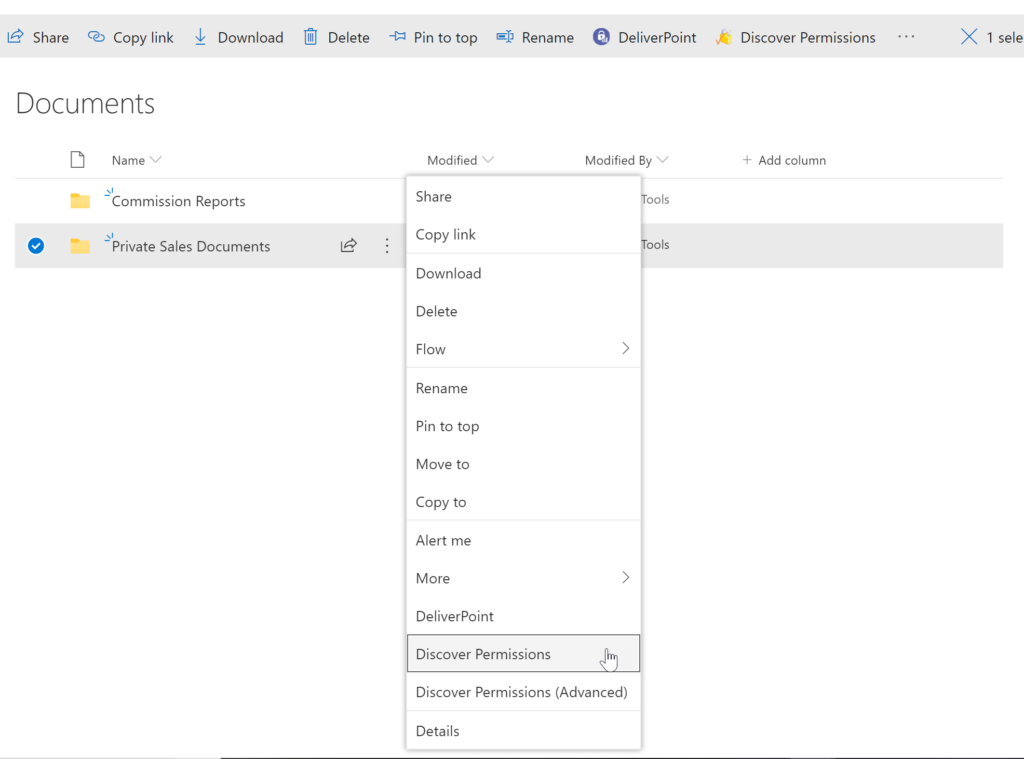
The DeliverPoint Discover Permissions report displays a full transparent report of all users that have permissions to the site, list/library or item. This displays what permissions each account has to the selected object, as well as how the permissions were assigned. Filter can be used for each user to check for duplicate permissions, filter by Permission Level to see which users are granted each permission level, and also filter by the ‘Permissioned Via’ column to see who has received permissions via a particular SharePoint, Microsoft 365 Group, or Azure AD Security group. The Discover Permissions report can be executed against multiple documents or items, lists and within the site or subsites.Screenshot of EXTERNAL SHARING LINKS REPORTING AND MANAGEMENT
Within SharePoint, users can share links with anyone, internal users and external users. DeliverPoint provides an External Sharing Links report that can be used within a site or across sites. The user can see who shared the link, when they shared the link, and optionally remove the link if it’s required.Screenshot of REPORT AND MANAGE PERMISSIONS FROM WITHIN MICROSOFT TEAMS
DeliverPoint is also available within Microsoft Teams. Team Owners can produce Microsoft Teams Permission reports within their Teams Channels and across Private Channels. The reports provide confidence and assurance that permissions are set correctly and that sharing isn’t out of control. Changes to permissions can be made contextually within a Team or centrally across multiple Teams should permissions need to be removed or managed.Screenshot of MANAGE SHAREPOINT PERMISSIONS
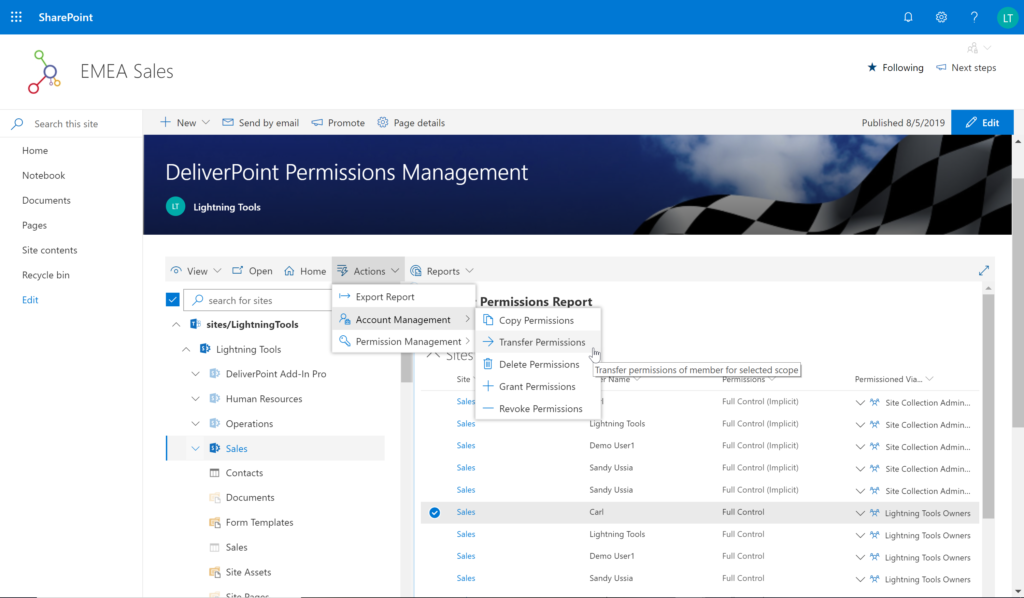
Using DeliverPoint, Site Owners, Site Collection Administrators and Tenant Administrators can manage permissions across the objects that they have Full Control to. Within organizations, users change roles, leave organizations, or join organizations. Making permission changes to accounts to reflect these changes is time consuming. DeliverPoint can be used to simply select the scope to change, and perform the change as one operation. The operations include Transfer, Delete, Copy or Revoke Permissions.Screenshot of UNIQUE PERMISSION REPORTING
The DeliverPoint Unique Permissions Report enables Site Collection Administrators or SharePoint Administrators to view the permissions assigned to a specific user account or group throughout site collections. The report includes all Microsoft 365 Groups, SharePoint Groups and Active Directory Security Groups that the user is a member of. A list of Site Permissions, List Permissions and Item Permissions that the user has been assigned permissions to are listed, allowing  the permissions to be removed or transferred if they are incorrect.