TrustRadius: an HG Insights company

Microsoft Project Server vs. Rillsoft Cloud

Save this comparison

Save this comparison

Add Product

Recommended Comparisons

    Overview
    ProductRatingMost Used ByProduct SummaryStarting Price

    Microsoft Project Server

    Score5.1 out of 10
    N/AMicrosoft Project Server is a project portfolio management option.N/A

    Rillsoft Cloud

    N/AN/ARillsoft Cloud is a project management and resource planning software solution that can be utilized both on-premises and in a hosted cloud environment. It integrates with Rillsoft Project, enhancing centralized control and synchronization of project data, resources, and schedules. This integration allows full utilization of Rillsoft Project's capabilities such as detailed resource planning and project controlling within a cloud infrastructure. Rillsoft Cloud caters primarily to businesses…

    $530

    per month per user

    Pricing
    Microsoft Project ServerRillsoft Cloud
    Editions & Modules
    No answers on this topic
    Standard
    5 $, from 30 user
    per month per user
    Starter
    7 $, from 10 user
    per month per user
    Offerings
    Pricing Offerings
    Microsoft Project ServerRillsoft Cloud
    Free Trial
    NoYes
    Free/Freemium Version
    NoNo
    Premium Consulting/Integration Services
    NoYes
    Entry-level Setup FeeNo setup fee$165 on demand on demand
    Additional DetailsRillsoft Cloud solution via a client application Rillsoft Project provides customer support for project management with the planning functions.
    More Pricing Information
    Best Alternatives
    Microsoft Project ServerRillsoft Cloud
    Small Businesses
    No answers on this topic
    Any.do
    Score8 out of 10
    Medium-sized Companies
    Planview PPM Pro
    Score8.9 out of 10
    KanbanFlow
    Score7.3 out of 10
    Enterprises
    Planview PPM Pro
    Score8.9 out of 10
    Microsoft To Do
    Score7.9 out of 10
    All AlternativesView all alternativesView all alternatives
    User Ratings
    Microsoft Project ServerRillsoft Cloud
    Likelihood to Recommend
    8.0
    (8 ratings)
    -
    (0 ratings)
    Usability
    10.0
    (1 ratings)
    -
    (0 ratings)
    Implementation Rating
    10.0
    (1 ratings)
    -
    (0 ratings)
    User Testimonials
    Microsoft Project ServerRillsoft Cloud
    Likelihood to Recommend
    Microsoft
    Microsoft Project Server I believe is best for any organization from small to large. As I mentioned, it is a little pricey so I would do research into alternative software and depending on your needs maybe look at all options, competing software. This is a tool with a learning curve and some may not be able to easily navigate this software. There isn't really great training, resources available for this tool however there are some free YouTube tutorial videos. This is great for cross company, department project management, sharing, managing of projects and timelines.
    Incentivized
    Read full review
    Rillsoft GmbH
    No answers on this topic
    Pros
    Microsoft
    • Project planning: tasks assignments, resources allocation, progress and cost tracking. The Server version is the natural extension of the Microsoft Project standalone.
    • Provides one place to manage all projects, accessible by everyone in the team. This opens the plan updates to team members as well(on their tasks), as opposed to being done only by the project manager.
    • Reporting and visualization - resources utilization, timeline etc
    • The integration with the Microsoft Project standalone: if you don't like the web version, you can download the latest and work locally. When done just sync it back to the server.
    Incentivized
    Read full review
    Rillsoft GmbH
    No answers on this topic
    Cons
    Microsoft
    • Resource loading and leveling extremely complicated within the tool
    • Software makes incorrect assumptions and changes without user knowledge
    • Inconsistencies within the tool make it hard to predict & troubleshoot
    Incentivized
    Read full review
    Rillsoft GmbH
    No answers on this topic
    Usability
    Microsoft
    We don't have to worry about maintenance, upgrades, or compatibility issues. All the capabilities we need are there, and are easily customizable.
    Read full review
    Rillsoft GmbH
    No answers on this topic
    Implementation Rating
    Microsoft
    Per Microsoft, Project Online provides more value long-term by reducing infrastructure cost and increase feature release cycle time
    Read full review
    Rillsoft GmbH
    No answers on this topic
    Alternatives Considered
    Microsoft
    One of the key advantages of Microsoft Project Server (MSPS) is its ecosystem. It gels very well with SharePoint, Office, Office 365. The support from Microsoft is also a key driver and they are very experienced and many ways to resolve issues. Also, Microsoft has bridged the gap of cloud offering from other competitors by providing Project Online. It is an offering through Office 365 which is very lean and low maintenance.
    Incentivized
    Read full review
    Rillsoft GmbH
    No answers on this topic
    Return on Investment
    Microsoft
    • We've been able to reduce the number of staff in our PMO by utilising the Project Server data in Power BI, reducing the need for manual reporting.
    • Being able to forecast utilization in the product allows us to accurately estimate resource needs to ensure optimum staff levels.
    Incentivized
    Read full review
    Rillsoft GmbH
    No answers on this topic
    ScreenShots

    Rillsoft Cloud Screenshots

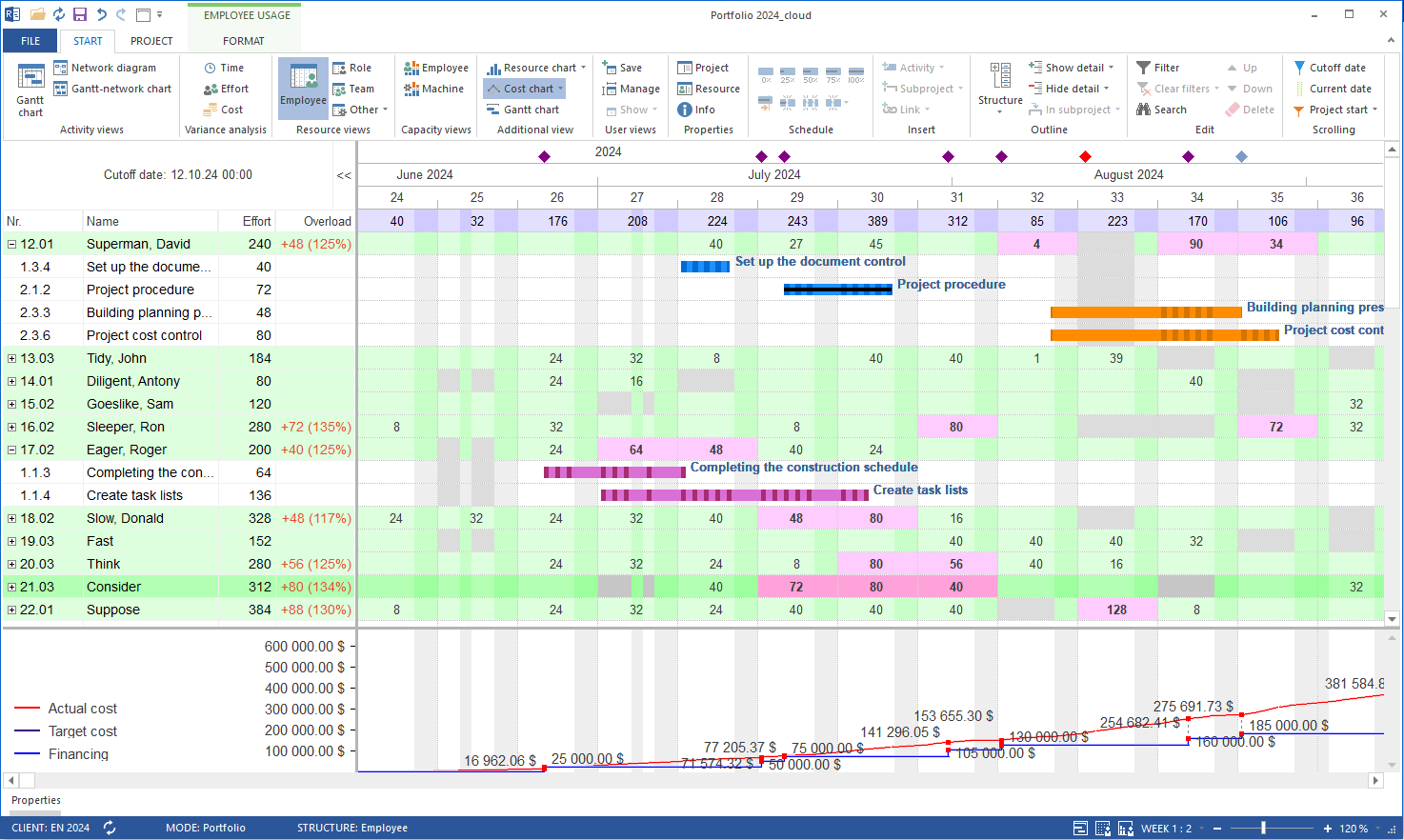
    Screenshot of Time scheduling in Rillsoft Project, which involves creating timelines for tasks and projects to ensure they are completed within the set deadlines. It includes defining task durations, dependencies, and constraints to develop a comprehensive project schedule. The software provides tools for tracking progress and making adjustments to the schedule as needed to account for delays or changes in project scope. The timeline module allows users to view tasks and schedules across multiple projects and portfolios, offering insights into task completion statuses. Rillsoft Cloud also features Gantt chart scheduling and additional views, giving users the flexibility to visualize and manage their projects in a format that best suits their needs.Screenshot of Capacity levelling in Rillsoft Cloud. This involves the optimization of resource allocation to ensure that resources are used efficiently without overloading them. It helps in adjusting the start and finish dates of tasks to match the resource availability, ensuring that resources are not over-allocated. The tool provides features to automatically adjust schedules and distribute workloads evenly across available resources, considering both current and future demands.Screenshot of Resource management. Rillsoft Cloud offers advanced personnel planning and resource management functionalities. It enables real-time tracking of employee assignments, automatically detecting and managing workload imbalances. Key features include support for vacation, training, and business trip schedules, skill-based employee assignments, and dynamic prioritization of projects. The platform provides visual insights into staff availability, project updates, and resource bottlenecks. It also facilitates effective communication through automatic notifications and email reminders, ensuring deadlines are met and personnel are optimally allocated.Screenshot of what it looks like to achieve the best resource utilization, with the project portfolio