TrustRadius: an HG Insights company

Web QMS Software by Mireaux vs. uniPoint

Save this comparison

Save this comparison

Add Product

Recommended Comparisons

    Overview
    ProductRatingMost Used ByProduct SummaryStarting Price

    Web QMS Software

    Score8.2 out of 10
    N/AWeb QMS is a cloud-based, all-encompassing management system software that helps organizations achieve, maintain and improve their ISO or API certifications; giving employees full access and visibility to their quality, environmental, occupational health & safety, or information security management systems. Web QMS software contains modules and dynamic applications that can be configured to meet the organization's needs and certification…N/A

    uniPoint

    Score7 out of 10
    N/AuniPoint is an ERP-integrated quality management platform.N/A
    Pricing
    Web QMS SoftwareuniPoint
    Editions & Modules
    No answers on this topic
    No answers on this topic
    Offerings
    Pricing Offerings
    Web QMS SoftwareuniPoint
    Free Trial
    NoNo
    Free/Freemium Version
    NoNo
    Premium Consulting/Integration Services
    NoNo
    Entry-level Setup FeeOptionalNo setup fee
    Additional Details
    More Pricing Information
    User Ratings
    Web QMS SoftwareuniPoint
    Likelihood to Recommend
    8.2
    (1 ratings)
    -
    (0 ratings)
    User Testimonials
    Web QMS SoftwareuniPoint
    Likelihood to Recommend
    Mireaux Management Solutions
    We appreciate the maintenance and calibration tracking.
    Read full review
    uniPoint Software Inc.
    No answers on this topic
    Pros
    Mireaux Management Solutions
    • Flexible--it can be adjusted to fit the way we do things
    • Support--we are a small company and Mireaux has been very helpful getting us started
    • Comprehensive--it covers all aspects of common management system standards
    Read full review
    uniPoint Software Inc.
    No answers on this topic
    Cons
    Mireaux Management Solutions
    • The delay and refresh screen after entering certain information
    Read full review
    uniPoint Software Inc.
    No answers on this topic
    ScreenShots

    Web QMS Software Screenshots

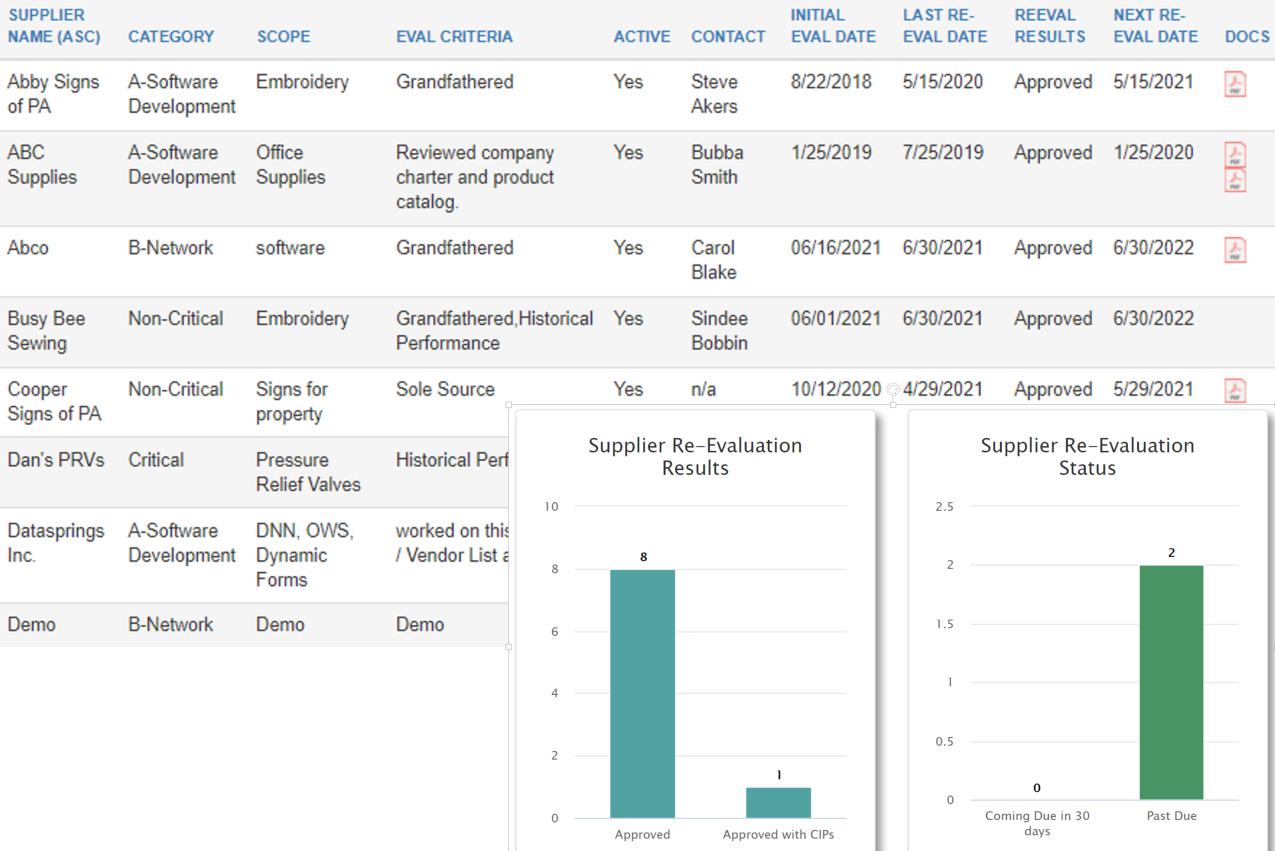
    Screenshot of The Dashboard displays tasks pending, such as Documents awaiting approval, Corrective Actions awaiting Root Cause Analysis, NCRs awaiting disposition, equipment in need of calibration, pending training, employee certifications requiring renewal, and more.Screenshot of Calibration app: Keep a register of equipment in need of calibration, with details such as accuracy, calibration intervals, tolerances, etc. Upload certificates or generate your own. Receive notifications for calibration past due or coming due.Screenshot of The Maintenance application uses automated email notifications that include color coded PM Reports to clearly show equipment that is overdue, due, or coming due for maintenance. The E-Learning application tracks course progress, so employees can easily see which training courses they have not completed.Screenshot of Risk Assessment app: Create risk events, add and analyze risks using your own predefined scale, ratings and attributes. Based on your risk appetite, the system will help evaluate risks, and discern significant risks which need to be controlled or treated.Screenshot of The Approved Supplier List (ASL) application helps maintain a register of approved suppliers along with the necessary documentation.  Automatic email notifications provide visibility of suppliers coming due or past due for reevaluation. KPIs available.Screenshot of Organize your electronic library of documents with the Master Documents app. In addition to making documents accessible in the format of choice, you are able to see important details, such as document number, revision, date, owner, and next review date.