Open LMS vs. Synap

Overview
ProductRatingMost Used ByProduct SummaryStarting Price
Open LMS
Score 5.0 out of 10
N/A
Open LMS (formerly Moodlerooms) is an open source learning management system for educational institutions, formerly supported by Blackboard, and now part of the Learning Technologies Group.
$999
per year
Synap
Score 0.0 out of 10
N/A
Synap is an online exam and assessment platform designed to provide a seamless experience for both administrators and candidates. It supports a range of assessment formats and offers customisable exam settings to meet the specific needs of educational institutions and organisations. Synap’s integrated proctoring tools help maintain academic integrity through configurable rules and monitoring options. Its analytics dashboards deliver real-time insights into learner…
$179
per month 30 active users
Pricing
Open LMSSynap
Editions & Modules
Innovator
$999
per year
Professional
4,599
per year
Enterprise
Contact for custom quote
Standard - per active user
starting at $179
per month 30 active users
Pro - per active user
starting at $455
per month 100 active users
Business - per active user
starting at $1000
per month 100 active users
Business - per assessment
starting at $9600
per year 1000 annual credits
Pro - per assessment
starting at $4200
per year 500 annual credits
Standard - per assessment
starting at $1440
per year 500 annual credits
Offerings
Pricing Offerings
Open LMSSynap
Free Trial
NoYes
Free/Freemium Version
NoNo
Premium Consulting/Integration Services
NoNo
Entry-level Setup FeeNo setup feeRequired
Additional Details
More Pricing Information
Community Pulse
Open LMSSynap
Features
Open LMSSynap
Learning Management
Comparison of Learning Management features of Product A and Product B
Open LMS
9.2
1 Ratings
11% above category average
Synap
-
Ratings
Course authoring10.01 Ratings00 Ratings
Course catalog or library10.01 Ratings00 Ratings
Player/Portal8.01 Ratings00 Ratings
Learning content10.01 Ratings00 Ratings
Mobile friendly10.01 Ratings00 Ratings
Progress tracking & certifications6.01 Ratings00 Ratings
Assignments10.01 Ratings00 Ratings
Compliance management8.01 Ratings00 Ratings
Learning administration10.01 Ratings00 Ratings
Learning reporting & analytics9.01 Ratings00 Ratings
Social learning10.01 Ratings00 Ratings
Best Alternatives
Open LMSSynap
Small Businesses
iSpring LMS
iSpring LMS
Score 8.9 out of 10
Renaissance Accelerated Reader
Score 9.9 out of 10
Medium-sized Companies
Schoology Learning
Schoology Learning
Score 9.6 out of 10
Renaissance Accelerated Reader
Score 9.9 out of 10
Enterprises
Schoology Learning
Schoology Learning
Score 9.6 out of 10
Renaissance Accelerated Reader
Score 9.9 out of 10
All AlternativesView all alternativesView all alternatives
User Ratings
Open LMSSynap
Likelihood to Recommend
10.0
(1 ratings)
-
(0 ratings)
User Testimonials
Open LMSSynap
Likelihood to Recommend
Moodlerooms
I currently use, talk about and promote all educators using Moodlerooms. The functionality that Moodlerooms provides is unmatched in most software. It is well suited in all educational realms. Teachers that teach all online electronic courses could use this to post assignments online, separate the classes and post a variety of assignments, tasks, and activities. Additionally, in blended situations where some students are face to face and sometimes working at home, the Moodlerooms makes it easy to education and be a hands-on teacher and a hands-on learner. Less appropriately, I find using Moodlerooms in some of the private sector industries could be tougher. Moodlerooms provides people and content management, and to use it in advertising or marketing and accounting, it could be difficult to find an easy use and function for it.
Read full review
Synap
No answers on this topic
Pros
Moodlerooms
  • Something that Moddlerooms does very well is that it allows teachers to structure their online classroom as one focused curriculum.
  • Moodlerooms also allows for customization of the layout. Being able to add and remove certain functions that Moodlerooms can perform definitely helps.
  • Moodlerooms is able to add different types of activities to the rooms for increased interaction.
  • Moodlerooms provides large chat opportunities to all students that are online at the same time.
Read full review
Synap
No answers on this topic
Cons
Moodlerooms
  • Easier to change permissions.
  • Adding the ability to tweet.
  • Decrease bandwidth to improve back end loading times.
Read full review
Synap
No answers on this topic
Alternatives Considered
Moodlerooms
I would select Moodlerooms over many competitors as a result of what it offers in terms of functionality and control. Google classrooms has a definite place in education; however, Moodlerooms provides significantly more control for authors. As the owner and manager of the content, and as someone familiar with technology, I can incorporate a lot more functions and create different layouts with functionality boxes
Read full review
Synap
No answers on this topic
Return on Investment
Moodlerooms
  • Moodlerooms has given classes of mine a positive ROI because it improves the educational experience for all students. It has helped all of our students, and with this, we can even help students who can not get to the classroom for some reason.
  • It helps to improve student scores, GPAs, and college attendance.
  • The positive impact can be directly correlated with the improvement of grades for students. Being able to access work in person and via Moodlerooms helps students to learn anywhere and any time. Grades have improved, and that is due to Moodlerooms.
Read full review
Synap
No answers on this topic
ScreenShots

Synap Screenshots

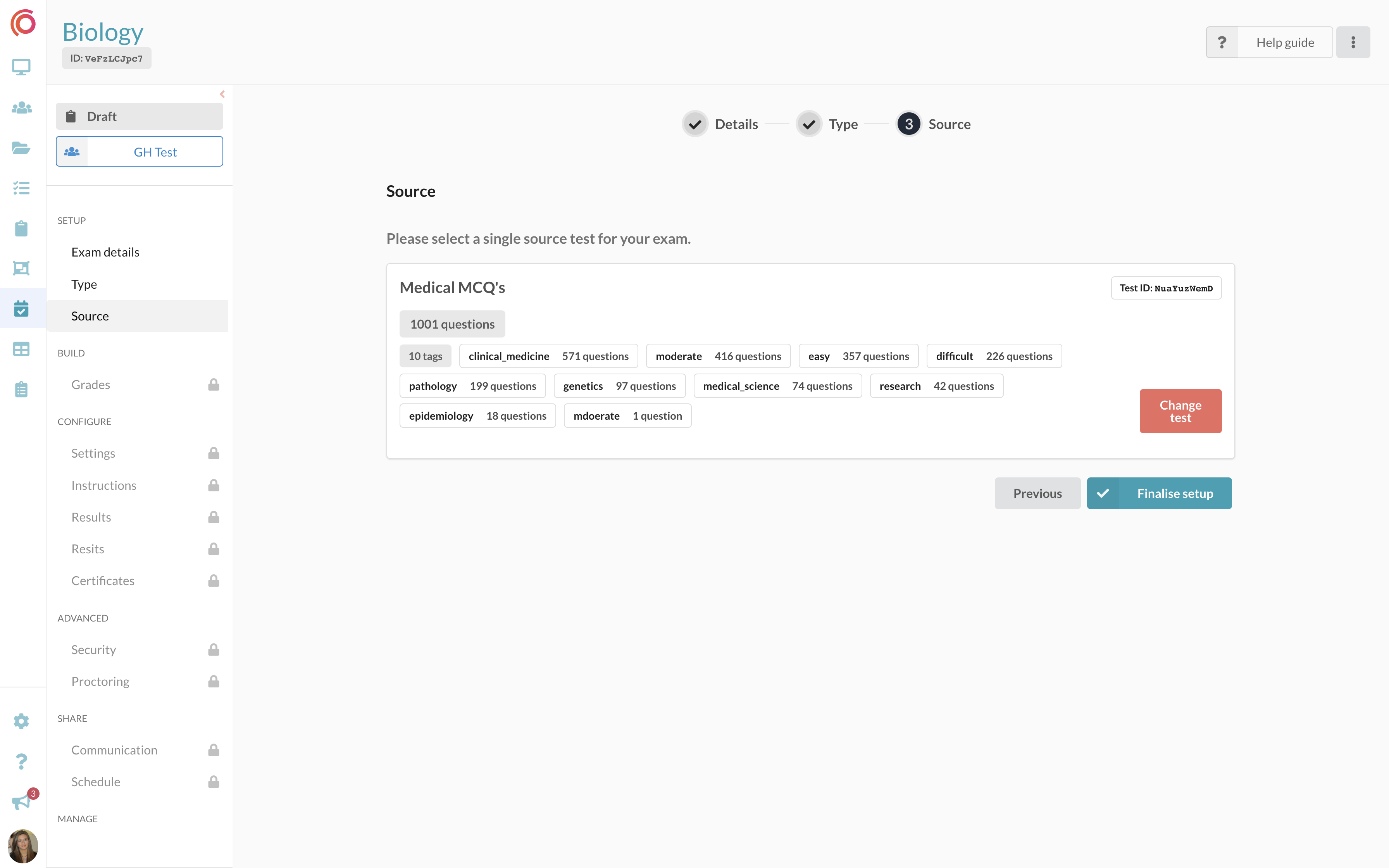
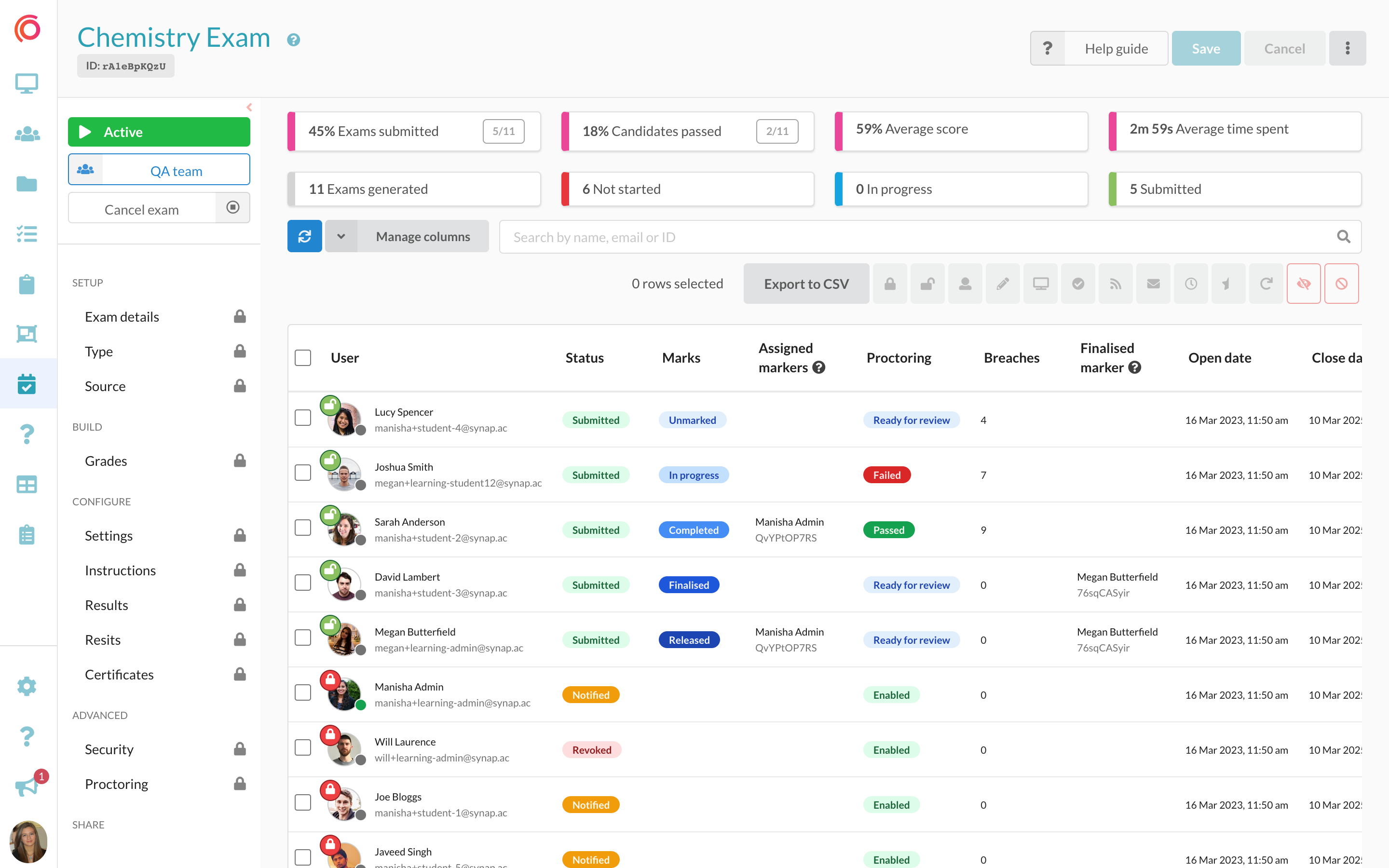
Screenshot of an interface for students taking an exam, featuring an image-based multiple-choice question (MCQ). The UI is designed to improve navigation and readability.Screenshot of question banks that can be imported along with their existing tags for dynamic exam creation. Tags enable users to customise exams based on specific themes or topics.Screenshot of the exam dashboard, where users create, schedule and monitor exam progress, and manage assessments.Screenshot of the exam users table, to manage user exam attempts. Administrators can lock/unlock attempts, assign markers, review proctoring footage, and access the on-platform marking modal.