TrustRadius: an HG Insights company

Save this comparison

Save this comparison

Add Product

Recommended Comparisons

    Overview
    ProductRatingMost Used ByProduct SummaryStarting Price

    Picsart

    Score7.8 out of 10
    N/AFor visuals and product listings, Picsart's photo editing tools offer solutions for a variety of businesses. While Picsart's capabilities are available through web or mobile, Picsart Enterprise offers photo and video editing APIs and SDKs, integrated through a variety of services (e.g. Zapier, Make, etc.) for a variety of additional use cases.

    $13

    per month

    VistaCreate

    Score8.1 out of 10
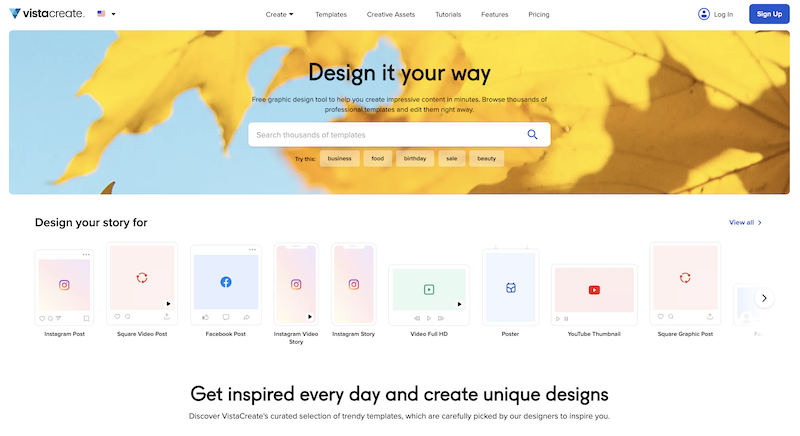
    N/AWhat is VistaCreate (ex-Crello)? VistaCreate is an online visual editing tool for creating videos, animations, graphic designs for social media, print, websites, or virtually any kind of static and animated design for commercial, business, or personal needs. On October 27, 2021 Crello joined the Vista group of companies and changed its brand name to VistaCreate. It includes 50,000 professionally designed templates that are already preformatted and…N/A
    Pricing
    PicsartVistaCreate
    Editions & Modules
    Picsart Plus
    $13
    per month
    Picsart Pro
    $15
    per month
    Picsart Enterprise - API Services
    $95
    per month 10k credits
    Picsart Enterprise - Print Solutions
    from $99
    per month 1000 credits included
    Picsart Enterprise - Marketing Solutions
    from $99
    per month 1000 credits included
    No answers on this topic
    Offerings
    Pricing Offerings
    PicsartVistaCreate
    Free Trial
    YesYes
    Free/Freemium Version
    YesYes
    Premium Consulting/Integration Services
    NoNo
    Entry-level Setup FeeNo setup feeNo setup fee
    Additional Details——
    More Pricing Information
    Community Pulse
    PicsartVistaCreate
    Considered Both Products
    Picsart, Inc
    No answer on this topic
    VistaCreate (ex- Crello)
    No answer on this topic
    Key User Insights
    Would buy again
    83%
    Would buy again
    10 Answers
    No answers on this topic
    Delivers good value for the price
    100%
    Delivers good value for the price
    9 Answers
    No answers on this topic
    Happy with the feature set
    100%
    Happy with the feature set
    12 Answers
    No answers on this topic
    Lived up to sales and marketing promises
    No answers on this topic
    No answers on this topic
    Implementation went as expected
    No answers on this topic
    No answers on this topic
    Best Alternatives
    PicsartVistaCreate
    Small Businesses
    No answers on this topic
    GIMP
    Score8 out of 10
    Medium-sized Companies
    No answers on this topic
    Adobe Illustrator
    Score9.4 out of 10
    Enterprises
    No answers on this topic
    Adobe PhotoShop
    Score9.2 out of 10
    All AlternativesView all alternativesView all alternatives
    User Ratings
    PicsartVistaCreate
    Likelihood to Recommend
    8.2
    (12 ratings)
    9.1
    (3 ratings)
    Usability
    -
    (0 ratings)
    9.0
    (1 ratings)
    User Testimonials
    PicsartVistaCreate
    Likelihood to Recommend
    Picsart, Inc
    In my experience, I have used PicsArt in lots of projects which helped me to complete the projects on time with satisfactory results. Mostly I use the Android app which is super easy to use. I have created multiple templates for my business. But I think it should remove the watermark on video editing also in the free version. It helped us to create unique pre-designed templates with step by step process. Apart from that, I have never faced any issues with this tool.
    Incentivized
    Read full review
    VistaCreate (ex- Crello)
    For creative and captivating presentation slides where you are pitching your ideas to the team, for quick and well-presented pamphlets for the event board, irrespective of university or workplace. I would definitely recommend using existing templates from VistaCreate instead of AI-generated images that are messy and crowded, so you connect with the audience better, and also, of course, people will take it seriously as well..
    Incentivized
    Read full review
    Pros
    Picsart, Inc
    • Basic Photo Editing - more robust than your basic iPhone photo editing tools, but much simpler (yet still powerful) and user-friendly than Adobe Photoshop and Lightroom.
    • Filters - a large variety of simple and complex photo filters with the ability to adjust the strength. A nice blend of filters can really enhance a photo without making it look heavily filtered.
    • User friendly - all across the board, this app is super easy to use and really powerful too. I can't imagine editing a photo on my phone without it.
    Incentivized
    Read full review
    VistaCreate (ex- Crello)
    • Certificate design
    • Social media communications
    • Conversion of designs into various file formats e.g. mp4, jpg, pdf
    • PowerPoint designs
    Incentivized
    Read full review
    Cons
    Picsart, Inc
    • There are a lot of features available to only paying subscribers, but all those features still appear for the nonpaying user, marked by the crown icon. Particularly with filters and stickers, it can be annoying to scroll through the majority of locked options to find the handful that is free. A filter option would be nice.
    • It would be nice to have access to previous projects where you could still go back and undo edits you've made. The draft feature seems to only be good for one project at a time.
    • Layers would be nice. That way when you use a sticker or add a photo on top and go on to make more edits, you could still move them around instead of just having to undo everything and re-add the stick or additional photo.
    Incentivized
    Read full review
    VistaCreate (ex- Crello)
    • Difficult to design content on mobile phone
    • Mobile designs do not sync with desktop app
    Incentivized
    Read full review
    Usability
    Picsart, Inc
    No answers on this topic
    VistaCreate (ex- Crello)
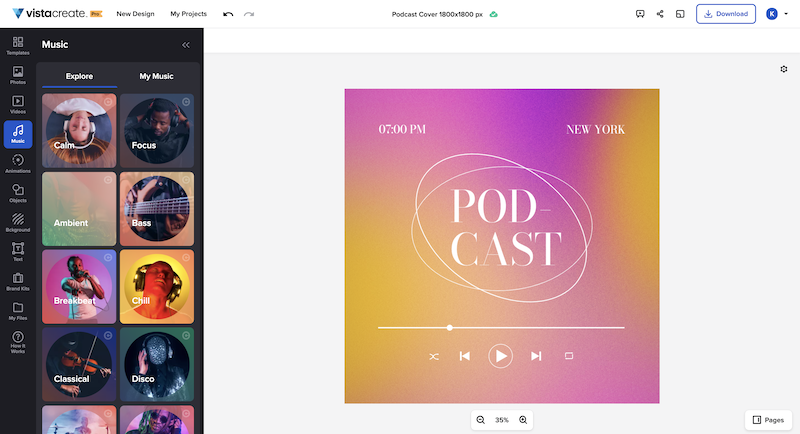
    It's a fantastic tool, be it the free or paid version. You can choose different templates from many listed categories and change styles with palettes, add music to your images, and choose from a variety of fonts. All these features are for free users. You unlock gold if you have a paid version of VistaCreate. Some additional useful features like background remover, AI writer, object remover, resize, and many varieties of templates are only for premium users. I give 9 because additional premium useful features are not available for free users
    Incentivized
    Read full review
    Alternatives Considered
    Picsart, Inc
    I used Lucidchart to develop architect-level integration flow diagrams to visualise integration flow. But Picsart has a user-friendly UI to develop and edit HQ pictures as per business requirements but some options are an enterprise where we need to pay and purchase those features and filters to use them while editing images.
    Incentivized
    Read full review
    VistaCreate (ex- Crello)
    I like to give a chance to other products and try them out. As far as my experience is concerned, I liked the feature of VistaCreate, with palettes, which totally changes the mood and tone of the image. That's something I didn't find in Canva. Additionally, the simplicity and user-friendliness of VistaCreate instead of being crowded with too many features. It's simply the best.
    Incentivized
    Read full review
    Return on Investment
    Picsart, Inc
    • It has a positive impact of decreasing time taken to create graphics for presentations
    • It has a positive impact of decreasing time taken to create annotated videos with text and sound
    • It lacks advanced editing features, hence has a somewhat negative impact by not facilitating imagination of users
    Read full review
    VistaCreate (ex- Crello)
    • Improved communication with staff
    • Improved brand presence on social media
    • Ability to appeal to all age groups
    • Improved staff morale
    Incentivized
    Read full review
    ScreenShots

    VistaCreate Screenshots

    Product screenshotProduct screenshotProduct screenshotProduct screenshot