TrustRadius: an HG Insights company

Save this comparison

Save this comparison

Add Product

Recommended Comparisons

    Overview
    ProductRatingMost Used ByProduct SummaryStarting Price

    Planview ProjectAdvantage

    Score8.9 out of 10
    N/APlanview ProjectAdvantage is a project and portfolio management (PPM) platform for mid-sized organizations and developing project management offices (PMOs). The platform centralizes project, program, resource, financial, and performance data through configurable workflows, dashboards, and AI-assisted planning tools. The vendor reports that organizations across IT, research and development, and product development use ProjectAdvantage to plan work, allocate…N/A

    SeaTable

    Score8.1 out of 10
    N/AWith SeaTable, teams can organize tasks, assets, projects and ideas. It looks like a spreadsheet but structures any type of information, in the cloud or on the user's own server. SeaTable is a web solution to design business processeses and workflows. SeaTable is designed to give teams the information that is currently needed. Individual views provide the freedom to organize work as it is needed. SeaTable can be linked with other business applications and…

    $0

    up to 3 users

    Pricing
    Planview ProjectAdvantageSeaTable
    Editions & Modules
    No answers on this topic
    Free Version
    $0
    up to 3 users
    Free Version
    $0
    per user, per year
    Plus - monthly
    $11
    per user, per month
    Enterprise - monthly
    $22
    per user, per month
    General license
    $84
    per user, per year
    Plus - yearly
    $101
    per user, per year
    Enterprise - yearly
    $203
    per user, per year
    Small Business Package #1
    $483
    for 10 users. per year
    Small Business Package #2
    $1,811
    for 25 users, per year
    Offerings
    Pricing Offerings
    Planview ProjectAdvantageSeaTable
    Free Trial
    YesNo
    Free/Freemium Version
    NoYes
    Premium Consulting/Integration Services
    YesYes
    Entry-level Setup FeeRequiredNo setup fee
    Additional Details——
    More Pricing Information
    Features
    Planview ProjectAdvantageSeaTable
    Project Management
    Comparison of Project Management features of Planview ProjectAdvantage and SeaTable
    Feature
    Planview ProjectAdvantage
    -
    Ratings
    SeaTable
    7.5
    3 Ratings
    2% below category average
    Task Management00 Ratings9.13 Ratings
    Resource Management00 Ratings9.13 Ratings
    Gantt Charts00 Ratings1.01 Ratings
    Scheduling00 Ratings4.73 Ratings
    Workflow Automation00 Ratings8.22 Ratings
    Team Collaboration00 Ratings9.13 Ratings
    Support for Agile Methodology00 Ratings6.01 Ratings
    Support for Waterfall Methodology00 Ratings6.01 Ratings
    Document Management00 Ratings9.12 Ratings
    Email integration00 Ratings7.32 Ratings
    Mobile Access00 Ratings8.01 Ratings
    Timesheet Tracking00 Ratings9.01 Ratings
    Change request and Case Management00 Ratings10.01 Ratings
    Budget and Expense Management00 Ratings8.22 Ratings
    Professional Services Automation
    Comparison of Professional Services Automation features of Planview ProjectAdvantage and SeaTable
    Feature
    Planview ProjectAdvantage
    -
    Ratings
    SeaTable
    7.3
    2 Ratings
    5% below category average
    Quotes/estimates00 Ratings8.01 Ratings
    Invoicing00 Ratings8.01 Ratings
    Project & financial reporting00 Ratings8.02 Ratings
    Integration with accounting software00 Ratings5.01 Ratings
    Best Alternatives
    Planview ProjectAdvantageSeaTable
    Small Businesses
    No answers on this topic
    Any.do
    Score8 out of 10
    Medium-sized Companies
    Microsoft Project Server
    Score5.1 out of 10
    KanbanFlow
    Score7.3 out of 10
    Enterprises
    Planview PPM Pro
    Score8.9 out of 10
    Microsoft To Do
    Score7.9 out of 10
    All AlternativesView all alternativesView all alternatives
    User Ratings
    Planview ProjectAdvantageSeaTable
    Likelihood to Recommend
    10.0
    (3 ratings)
    8.1
    (3 ratings)
    Usability
    -
    (0 ratings)
    9.0
    (1 ratings)
    Support Rating
    10.0
    (1 ratings)
    -
    (0 ratings)
    User Testimonials
    Planview ProjectAdvantageSeaTable
    Likelihood to Recommend
    Planview
    Yes, definitely. We wanted a flexible but robust software and Sciforma seemed to be the best fit
    Read full review
    SeaTable
    It does well as a CRM for a company to see all of their candidates or clients or whatever they are tracking. The sorting and grouping ability as well as the inclusion of many formula integrations is also helpful to organize content more meaningfully. If you don't have a lot of information that you need to track, this might have more than you require but it is still a great software to use.
    Incentivized
    Read full review
    Pros
    Planview
    • Scheduling tasks.
    • Assigning resources and cost items.
    • Managing a team.
    Incentivized
    Read full review
    SeaTable
    • Combination of spreadsheet and database
    • Feature rich but still easy to use
    • Uncomplicated installation and Maintenance
    Read full review
    Cons
    Planview
    • The largest con for me is the clunky UI. It's not very intuitive, and has a larger learning curve to become a proficient user.
    • Reports are functional, but could use some improvements.
    • It can be slow at times, and you have to wait to make sure your changes are saved before moving on.
    Incentivized
    Read full review
    SeaTable
    • SeaTable is a young company, and I have nothing to criticise, for now. - No solution will fit all use cases, in any event. --- I have found this one to be the most adaptable and complex on the European market. Due to the data location, I am reassured on the subject of GDPR compliance.
    Incentivized
    Read full review
    Usability
    Planview
    No answers on this topic
    SeaTable
    It is easy to use even with keyboard only. It has a good documentation and a perfect support.
    Read full review
    Support Rating
    Planview
    This software allows project and portfolio managers to analyze and prioritize projects based on resource allocation and available effort. It helps you compare the sorecast effort with resource availability. You can email, call or tweet them if you have concerns.
    Incentivized
    Read full review
    SeaTable
    No answers on this topic
    Alternatives Considered
    Planview
    We were looking at vendors but they didn't meet our expectations and weren't flexible enough.
    Read full review
    SeaTable
    For the value, you get much more with SeaTable including the statistics and the number of records that can be utilized on the free version. I also thoroughly enjoy the ease of adding formulas and having the reference right inside of the platform to ensure the selection of the correct formula to meet your needs.
    Incentivized
    Read full review
    Return on Investment
    Planview
    • Before Sciforma we were running projects out of Excel and emails. Using a cloud based application means that everyone is viewing information in real time.
    • Our executive leadership knows that they have one place to go for a real time status on all of our strategic projects.
    Incentivized
    Read full review
    SeaTable
    • Positive: Savings in administrative staffing needs.
    • Positive: Customisation allows for real-life workflow management
    • Positive: Automation is a goal that SeaTable supports very well.
    • Negative: Not many people are familiar with solutions like SeaTable. They are used to working with inflexible (and often not-fit for purpose) administrative systems. They are adept at finding ways to circumvent the issues by using secondary tools, or they wait passively for web developers to deliver the functionality they need. - It is quite difficult to convey the opportunities that SeaTable offers to people who have not used it before. SeaTable cannot be blamed for this, but it creates work in needing to convey this to the organisation's stakeholders. --- I would recommend one person to be assigned the role of SeaTable specialist in an organisation, so that any issues can be quickly resolved.
    Incentivized
    Read full review
    ScreenShots

    Planview ProjectAdvantage Screenshots

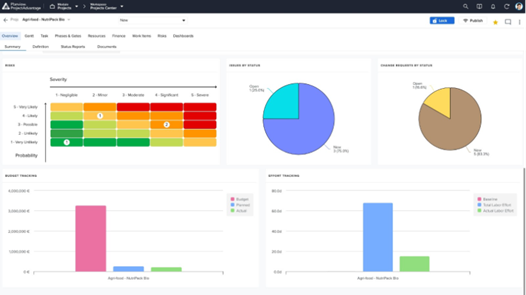
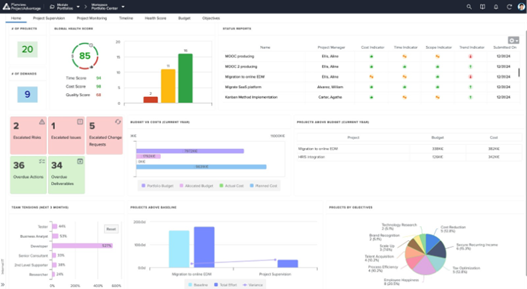
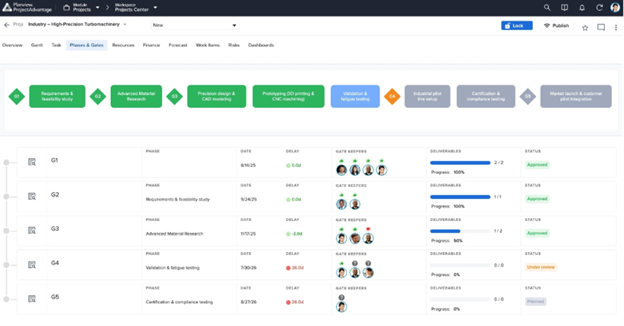
    Screenshot of Project Dashboard Summary View - A consolidated dashboard showing project health, status, and key metrics at a glance.Screenshot of Dashboard Summary View - A portfolio-level dashboard summarizing project performance, financials, and overall portfolio health.Screenshot of Resource Forecast and Capacity View - Visualize resource demand against available capacity to plan and allocate teams effectively.Screenshot of Phase Gate - Summary View Page - Track project progression through governance gates with clear milestone visibility.Screenshot of Demand / Idea Qualification - Capture, evaluate, and qualify incoming ideas and demands before they enter the pipeline.

    SeaTable Screenshots

    Screenshot of This is your starting overview page with all your bases. We provide you with predefined templates to help you get started with SeaTable as easily as possible.Screenshot of Always keep track of all your ideas, tasks or projects. So that everyone in the team knows exactly what needs to be done.Screenshot of In just a few clicks, you can add your team members to SeaTable, assign tasks, mark individual team members, set permissions and comment on the various tasks. This way, everyone in the team always stays informed and knows what needs to be done.Screenshot of SeaTable can be extended with individual plug-ins. In addition to the gallery, calendar, map view and timeline plug-in, you also have the option of developing your own desired functions.Screenshot of Bring your data to life with SeaTable! In addition to pie charts, bar charts and line charts, SeaTable has a variety of other options for efficiently preparing your data.Screenshot of Do you have to regularly record data from your employees or business partners? With SeaTable you can create online forms in no time at all, which you can send to the respective recipients via a link. The entered data ends up directly in SeaTable.