TrustRadius: an HG Insights company

Progress Test Studio vs. Tricentis Test Automation for ServiceNow (discontinued)

Save this comparison

Save this comparison

Add Product

Recommended Comparisons

    Overview
    ProductRatingMost Used ByProduct SummaryStarting Price

    Progress Test Studio

    Score9 out of 10
    N/AProgress Test Studio aims to be the easiest to use Web Automation tool on the market, widely used by Enterprise QA’s for testing, but easy enough for anyone. The product automates testing for WPF, Silverlight, Web, HTML, Angular, React, KUIB, iOS, Android, Mobile Web, and API’s. Test Studio is ideal for a no-code or low-code approach for: QA Test Automation, Application Monitoring, Performance and Load Testing, Web/Marketing Process Automation, and Mobile App Automation.N/A

    Tricentis Test Automation for ServiceNow (discontinued)

    Score7.9 out of 10
    N/ATricentis' solution for testing ServiceNow workflows, Tricentis Test Automation for ServiceNow, is a scoped application within the user's Now Platform, boasting a familiar interface equipped with a centralized dashboard to view test plans, suites, cases, and results.

    $1,200

    Pricing
    Progress Test StudioTricentis Test Automation for ServiceNow (discontinued)
    Editions & Modules
    No answers on this topic
    No answers on this topic
    Offerings
    Pricing Offerings
    Progress Test StudioTricentis Test Automation for ServiceNow (discontinued)
    Free Trial
    YesYes
    Free/Freemium Version
    NoNo
    Premium Consulting/Integration Services
    YesYes
    Entry-level Setup FeeOptionalNo setup fee
    Additional Details——
    More Pricing Information
    Features
    Progress Test StudioTricentis Test Automation for ServiceNow (discontinued)
    Automation Testing
    Comparison of Automation Testing features of Progress Test Studio and Tricentis Test Automation for ServiceNow (discontinued)
    Feature
    Progress Test Studio
    -
    Ratings
    Tricentis Test Automation for ServiceNow (discontinued)
    8.2
    1 Ratings
    3% below category average
    Record and Automate00 Ratings7.31 Ratings
    Multi-Browser Testing00 Ratings9.11 Ratings
    Mobile Testing00 Ratings6.41 Ratings
    Test Scheduling00 Ratings9.11 Ratings
    Test Management00 Ratings8.21 Ratings
    CI/CD Tool Integration00 Ratings6.41 Ratings
    Integrated Version Control00 Ratings8.21 Ratings
    Parallel Testing00 Ratings9.11 Ratings
    Object Recognition00 Ratings8.21 Ratings
    Data-Driven Testing00 Ratings9.11 Ratings
    Testing Collaboration00 Ratings9.11 Ratings
    Real Device Testing00 Ratings7.31 Ratings
    Testing Reports & Analytics00 Ratings9.11 Ratings
    Best Alternatives
    Progress Test StudioTricentis Test Automation for ServiceNow (discontinued)
    Small Businesses
    TestComplete
    Score8 out of 10
    BrowserStack
    Score8.5 out of 10
    Medium-sized Companies
    OpenText UFT One
    Score8 out of 10
    BlazeMeter
    Score8 out of 10
    Enterprises
    SoapUI Open Source
    Score8.3 out of 10
    Tricentis Tosca
    Score8.8 out of 10
    All AlternativesView all alternativesView all alternatives
    User Ratings
    Progress Test StudioTricentis Test Automation for ServiceNow (discontinued)
    Likelihood to Recommend
    9.0
    (6 ratings)
    7.3
    (1 ratings)
    User Testimonials
    Progress Test StudioTricentis Test Automation for ServiceNow (discontinued)
    Likelihood to Recommend
    Progress Software
    It is very good for testers who have little coding experience but are willing to learn. It is very good for regression testing and really helps us identify issues that could have been a detriment to our end users. It is also great to keep track of the performance of pages across time.
    Incentivized
    Read full review
    Discontinued Products
    If anyone need an automation and testing tool, Tricentis Test Automation for ServiceNow is one of best application for this demand. It has user friendly interface. Also easy to use and even non technical colleagues can use it. It has support for some applications especially AI integration really exciting. And it can work cloudbased.
    Incentivized
    Read full review
    Pros
    Progress Software
    • Easy to configure.
    • Plugins can be integrated easily with visual studio.
    • Takes less time to run all the test scenarios, [and] also generates graphics report for all the tests.
    • Keeps bugs [out of] the production.
    Incentivized
    Read full review
    Discontinued Products
    • Easy to use
    • User friendly interface
    • Can work on cloudbased
    Incentivized
    Read full review
    Cons
    Progress Software
    • Client start-up time is a bit slow. Application is a bit sluggish, when there is a lot of tests open.
    • Automated scheduling environment is a bit challenging to maintain.
    Incentivized
    Read full review
    Discontinued Products
    • It should support more functions
    • Pricing should be less
    • Hard to set up
    Incentivized
    Read full review
    Alternatives Considered
    Progress Software
    Test Studios had a smaller foot print and allowed us to ease into deploying it in the company. The online help was a great benefit to getting started and the evaluation period allowed us to fully run though the product before purchasing it. Cost difference between the products was a big decision factor as well for the type of deployment we were looking for.
    Incentivized
    Read full review
    Discontinued Products
    No answers on this topic
    Return on Investment
    Progress Software
    • Excellent results, workloads for continuous regresssion testing has been decreased by more than 50 percent.
    • Time window needed for regression tests has decreased more than 50 percent.
    Incentivized
    Read full review
    Discontinued Products
    • Pros: Decrease our effort time to testing
    • Pros: Support many platforms on testing
    • Cons: It is really hard to set up
    Incentivized
    Read full review
    ScreenShots

    Progress Test Studio Screenshots

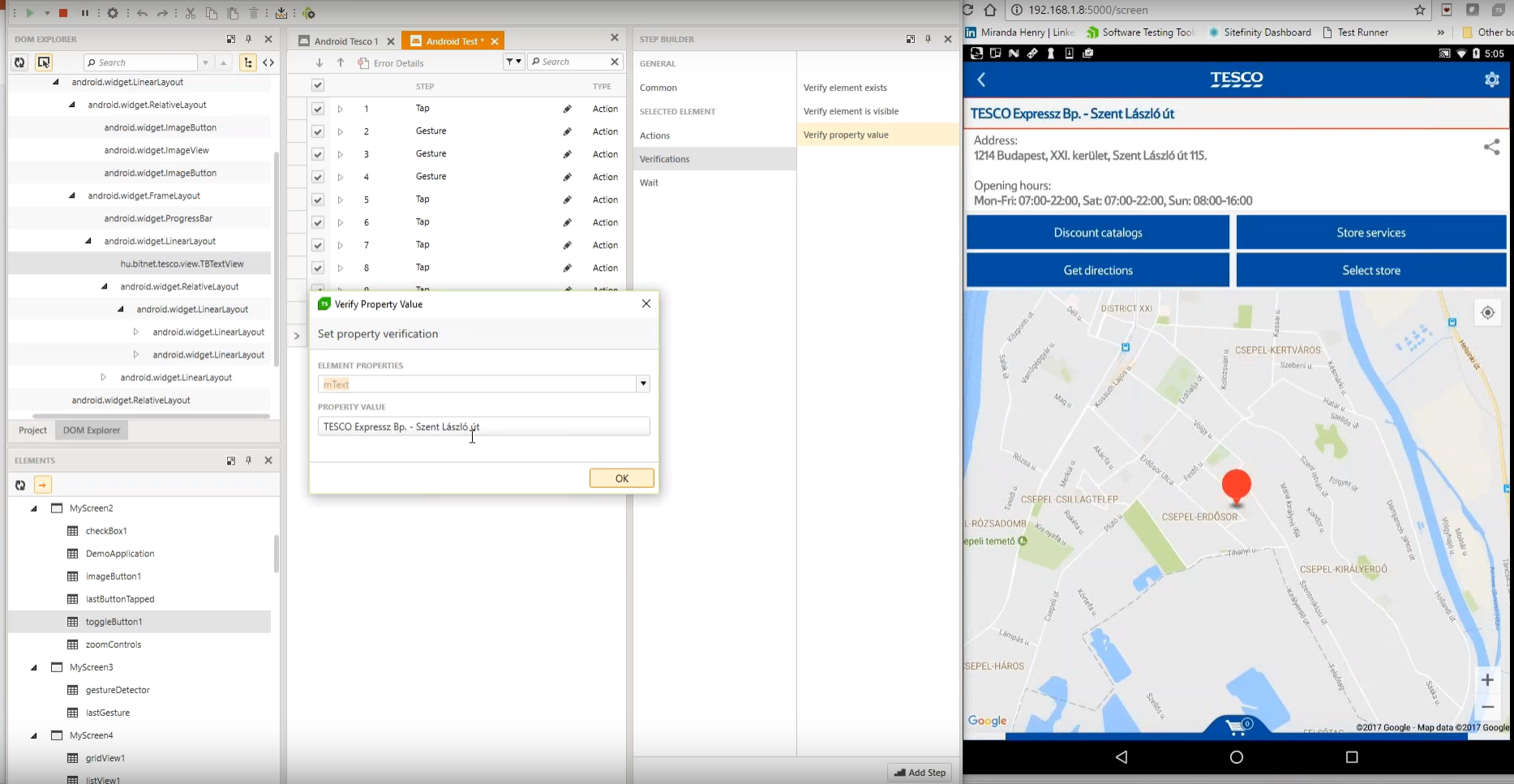
    Screenshot of Test Studio Mobile – Codeless Test Automation for iOS and Android: Native, Hybrid, and Mobile Web applications. Including sophisticated find logic for test re-use across multiple devices. The Android Instrumentation Wizard will get you testing in no time.  And codeless maintenance will empower your QA’s.Screenshot of Test Studio Ultimate - makes it easy to reuse your functional tests as Performance tests, and in Load tests. This saves you many hours of extra maintenance. The Test Studio Runtime and Full License include the Profiler for tracking windows performance counter data. Combined this data will help you pinpoint the bottlenecks in your application.Screenshot of Test Studio allows you to customize the element find logic to custom fit each application. With a focus on ease-of-use a tester can quickly record their manual test and execute it back as automation. The Test Studio Element Highlighter will help you quickly add Verifications on-the-fly as you record your test. There are 4 different ways to automate applications with Test Studio, and only 1 way requires code.Screenshot of Test Studio for API’s – Codelessly capture and assemble your api calls into intricate tests with GoTo conditional operations and verifications, and of course it integrates with Fiddler. You can easily integrate Test Studio into your Continuous Integration process as well.

    Tricentis Test Automation for ServiceNow (discontinued) Screenshots

    Screenshot of Tricentis Test Automation for ServiceNow is a scoped application within the Now Platform. It is equipped with a centralized dashboard to view test plans, suites, cases, and results. Reports with pass/fail, screenshots, and result files, to find what is needed in the ServiceNow environment.Screenshot of Tricentis Test Automation for ServiceNow’s test on demand. The developer’s console is used to playback tests in real time and locally on a desktop.Screenshot of The Case Creator generates test cases based off ServiceNow configuration changes. It generates cases for business rules, UI policies, UI actions, and tables. Case Creator can generate test cases for net new functionality, and be used to maintain existing test cases when there are changes to the configuration.Screenshot of The point-and-click Recorder is used to generate test cases from user actions. It’s also Service Portal compatible. The Recorder is used to translate test steps into lay terms.Screenshot of Tricentis Test Automation for ServiceNow includes a log, screenshot, and video capture with every execution. Line errors are defined for easier debugging. If a visual is preferred, a video recording of the execution can be viewed, to watch the behavior of the test execution.