TrustRadius: an HG Insights company

Save this comparison

Save this comparison

Add Product

Recommended Comparisons

    Overview
    ProductRatingMost Used ByProduct SummaryStarting Price

    SAP BPM

    Score7 out of 10
    N/ASAP NetWeaver Business Process Management is a business process management offering and application infrastructure. It supports joint modeling of processes, central process execution via a Java-based engine, provision of interfaces for users, and integration of business rules into processes.N/A

    Scifeon ELN & LIMS

    N/AN/AScifeon ELN & LIMS is a modular, low-code digital platform designed to manage research and quality-control data across biotech, pharma, and CDMO/CRO environments. It combines Electronic Lab Notebook (ELN) and Laboratory Information Management System (LIMS) capabilities in a single environment, enabling scientists to capture, analyze, and share data. Key Features Integrated ELN & LIMS: Unified data capture, sample management, and process…

    $180

    per month per user

    Pricing
    SAP BPMScifeon ELN & LIMS
    Editions & Modules
    No answers on this topic
    No answers on this topic
    Offerings
    Pricing Offerings
    SAP BPMScifeon ELN & LIMS
    Free Trial
    NoYes
    Free/Freemium Version
    NoNo
    Premium Consulting/Integration Services
    NoYes
    Entry-level Setup FeeNo setup feeOptional
    Additional Details——
    More Pricing Information
    Features
    SAP BPMScifeon ELN & LIMS
    Reporting & Analytics
    Comparison of Reporting & Analytics features of SAP NetWeaver BPM and Scifeon ELN & LIMS
    Feature
    SAP NetWeaver BPM
    10.0
    2 Ratings
    26% above category average
    Scifeon ELN & LIMS
    -
    Ratings
    Dashboards10.02 Ratings00 Ratings
    Standard reports10.02 Ratings00 Ratings
    Custom reports10.02 Ratings00 Ratings
    Process Engine
    Comparison of Process Engine features of SAP NetWeaver BPM and Scifeon ELN & LIMS
    Feature
    SAP NetWeaver BPM
    10.0
    2 Ratings
    18% above category average
    Scifeon ELN & LIMS
    -
    Ratings
    Process designer10.02 Ratings00 Ratings
    Process simulation10.02 Ratings00 Ratings
    Business rules engine10.02 Ratings00 Ratings
    SOA support10.02 Ratings00 Ratings
    Process player10.02 Ratings00 Ratings
    Support for modeling languages10.02 Ratings00 Ratings
    Form builder10.02 Ratings00 Ratings
    Model execution10.02 Ratings00 Ratings
    Collaboration
    Comparison of Collaboration features of SAP NetWeaver BPM and Scifeon ELN & LIMS
    Feature
    SAP NetWeaver BPM
    10.0
    2 Ratings
    18% above category average
    Scifeon ELN & LIMS
    -
    Ratings
    Social collaboration tools10.02 Ratings00 Ratings
    Content Management Capabilties
    Comparison of Content Management Capabilties features of SAP NetWeaver BPM and Scifeon ELN & LIMS
    Feature
    SAP NetWeaver BPM
    10.0
    2 Ratings
    21% above category average
    Scifeon ELN & LIMS
    -
    Ratings
    Content management10.02 Ratings00 Ratings
    Best Alternatives
    SAP BPMScifeon ELN & LIMS
    Small Businesses
    Process Street
    Score8.2 out of 10
    No answers on this topic
    Medium-sized Companies
    TIBCO BPM Enterprise
    Score8 out of 10
    No answers on this topic
    Enterprises
    IBM Blueworks Live
    Score9.2 out of 10
    No answers on this topic
    All AlternativesView all alternativesView all alternatives
    User Ratings
    SAP BPMScifeon ELN & LIMS
    Likelihood to Recommend
    10.0
    (3 ratings)
    -
    (0 ratings)
    Likelihood to Renew
    7.0
    (1 ratings)
    -
    (0 ratings)
    Support Rating
    5.0
    (1 ratings)
    -
    (0 ratings)
    User Testimonials
    SAP BPMScifeon ELN & LIMS
    Likelihood to Recommend
    SAP
    It is well suited when we need to integrate business processes with SAP ERP and SAP CRM - the solution can be integrated with business rules/procedures defined in SAP ERP/CRM and NetWeaver can be used to monitor the rules and flag off exceptions. When there are multiple workflows running, it tends to slow down running of these processes. Also, it entirely depends on SAP portal for it to run efficiently.
    Incentivized
    Read full review
    Scifeon
    No answers on this topic
    Pros
    SAP
    • Virtual paper trail. Iterations of process and current documentation are all stored as "artifacts", leaving a great trail.
    • Configuration of users. BPM somewhat magically determines which users will be impacted and automates rules.
    • A pro (that is also a con) is the design interface. If you know what you are doing, it is incredibly powerful and malleable.
    Read full review
    Scifeon
    No answers on this topic
    Cons
    SAP
    • Live readings would be nice.
    • Easier to maneuver
    • Work with all systems with the press of one keystroke
    Incentivized
    Read full review
    Scifeon
    No answers on this topic
    Likelihood to Renew
    SAP
    As a big fan of SAP in general, the BPM solution fits right in with all the other things SAP does well, and does it with incredible efficiency
    Read full review
    Scifeon
    No answers on this topic
    Support Rating
    SAP
    We have our own tech support for systems, I would say they probably could use more training on it, I don't really think it's anything regarding the SAP system, but more the knowledge they have on the system itself. It seems to take longer for them to fix any issues we may come across.
    Incentivized
    Read full review
    Scifeon
    No answers on this topic
    Alternatives Considered
    SAP
    I found the initial setup of NetWeaver is much simpler than other products especially in an SAP environment where we have SAP ERP/HRM/CRM as it can be well integrated with other SAP products. The only drawback is the need/dependency on SAP Portal. It is better suited in an environment where SAP ERP is running.
    Incentivized
    Read full review
    Scifeon
    No answers on this topic
    Return on Investment
    SAP
    • Helped us harness integrated benefit from having SAP ERP/CRM by leveraging NetWeaver to define business processes/rules and monitor exceptions
    • Did not have any negative experience except for the fact that at times when multiple rules run, it can be somewhat slow
    Incentivized
    Read full review
    Scifeon
    No answers on this topic
    ScreenShots

    Scifeon ELN & LIMS Screenshots

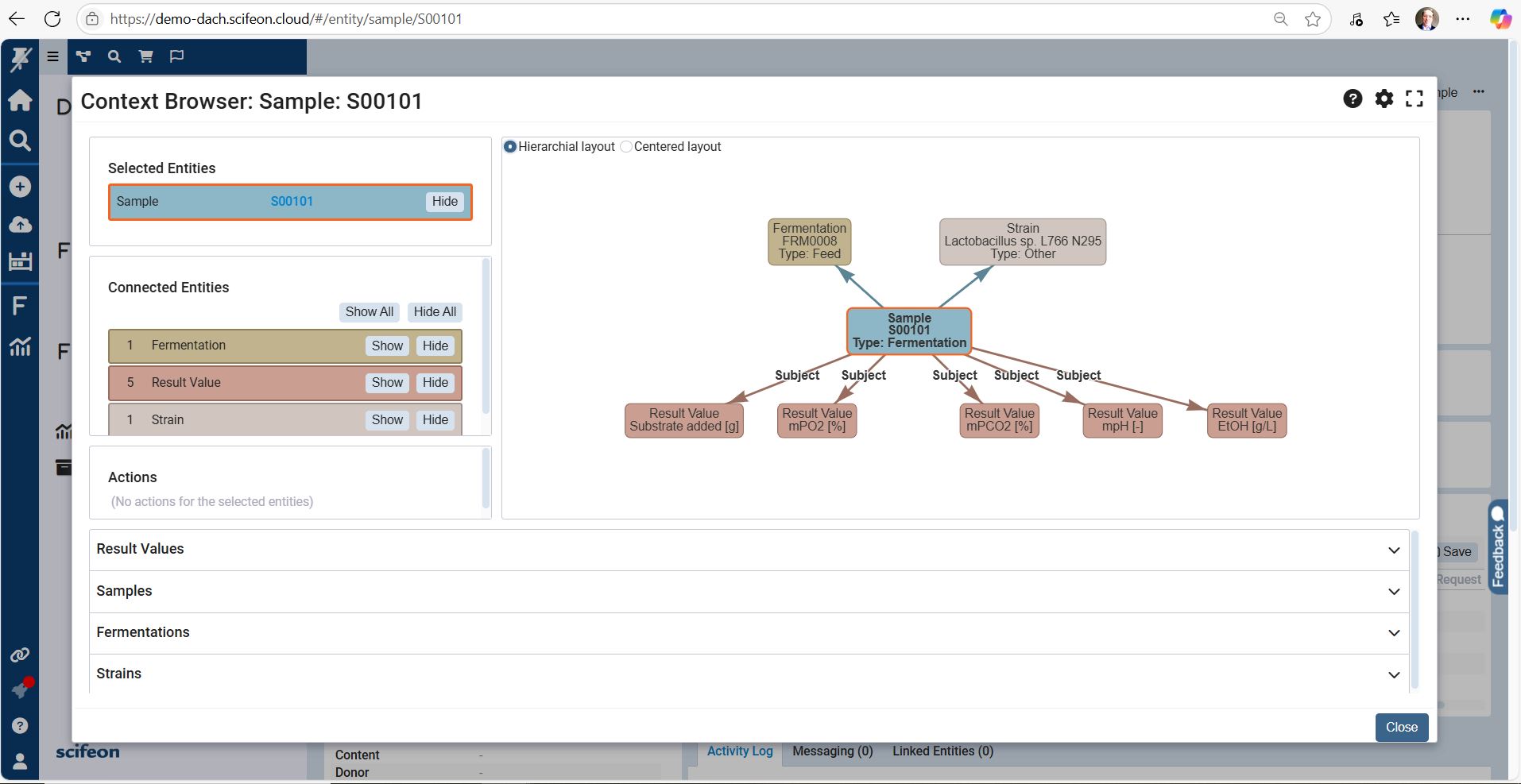
    Screenshot of the Context Browser, which gives scientists and QC teams a clear, structured view of all laboratory data. Projects, experiments, samples, and results are organized in a single, connected interface, making it easy to navigate across workflows without losing context.

From a top-level project, users can drill down into experiments, linked samples, and raw measurements. Metadata, attached files, and audit trails are displayed side by side, ensuring that all relevant information is accessible at a glance. Integrated search and filtering functions make it simple to find specific datasets, compare results, or trace dependencies between workflows.

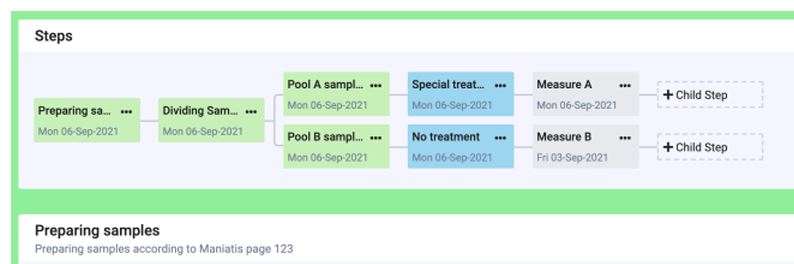
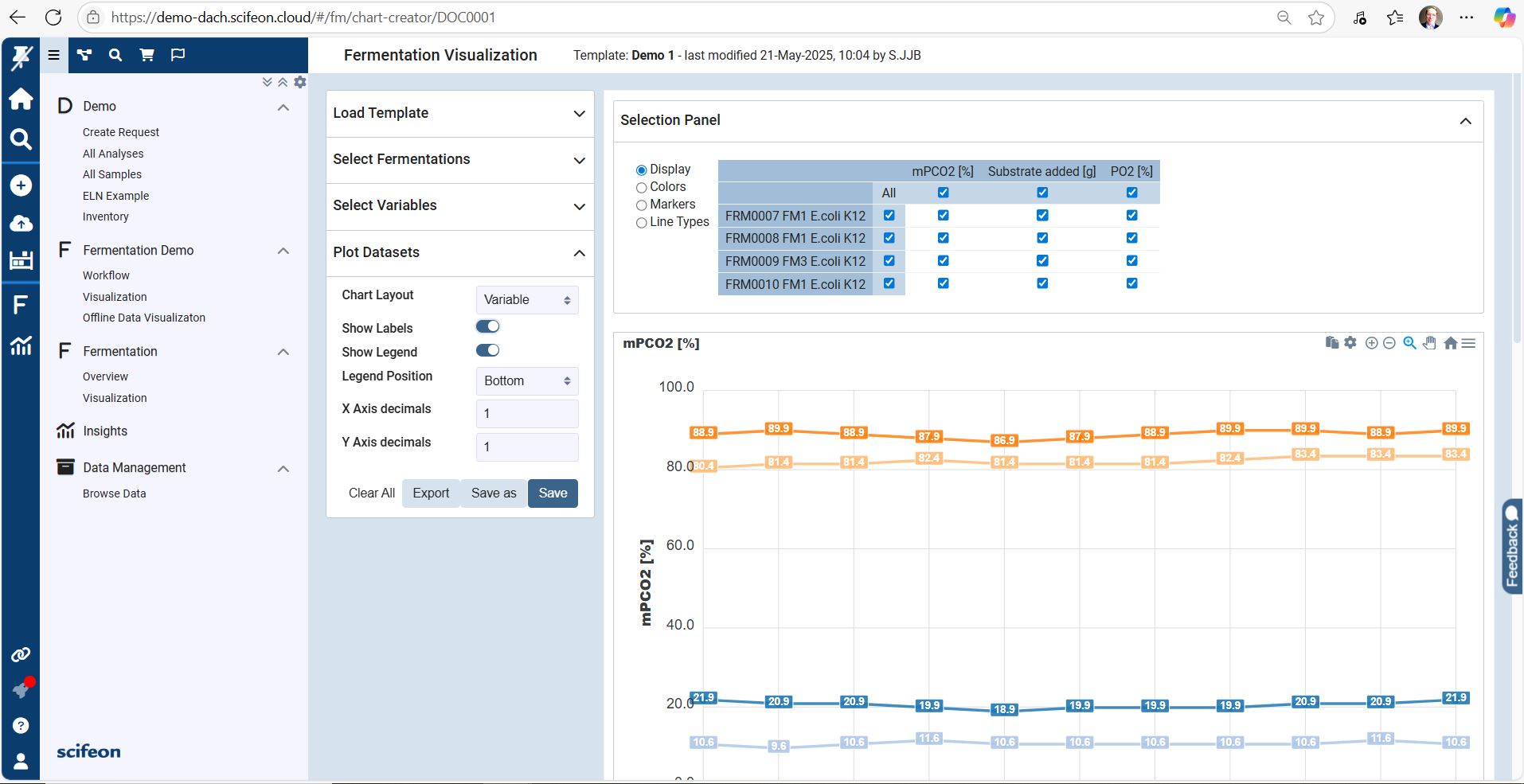
With the Context Browser, labs gain a transparent, FAIR-aligned data environment where relationships between experiments, samples, and results are visible and reusable — enabling faster decisions, smoother collaboration, and easier compliance.Screenshot of the Workflow Builder, a visual, drag-and-drop interface designed to configure laboratory workflows inside Scifeon without coding.Screenshot of the Fermentation Visualization Dashboard

The Fermentation Visualization Dashboard provides a real-time overview of upstream and downstream fermentation data in a single, interactive interface. Scientists and process engineers can monitor critical parameters such as temperature, pH, dissolved oxygen, agitation speed, and feed rates directly as the process runs.

Key features visible in the dashboard screenshot:

Dynamic Time-Series Charts
Multiple parameters are plotted in synchronized graphs, enabling users to spot trends, deviations, and correlations across batches instantly.

Batch Comparison Mode
Overlay data from multiple fermentation runs to compare yields, stability, and process performance at a glance.

Live Instrument Integration
Data streams directly from connected bioreactors, ensuring the dashboard reflects the latest in-process values without manual uploads.

Interactive Data Exploration
Zoom, filter, and highlight specific segments of the fermentation process to investigate anomalies or optimization opportunities.

Compliance & Traceability
Linked audit trails and sample metadata support GMP, GCLP, and 21 CFR Part 11 compliance requirements.

Functional Impression

The dashboard turns complex fermentation datasets into intuitive, actionable insights. It supports faster decision-making, improves process reproducibility, and enables data-driven optimization — without leaving Scifeon’s platform.Screenshot of the Scifeon Workflow Builder – Adding Steps to a Workflow

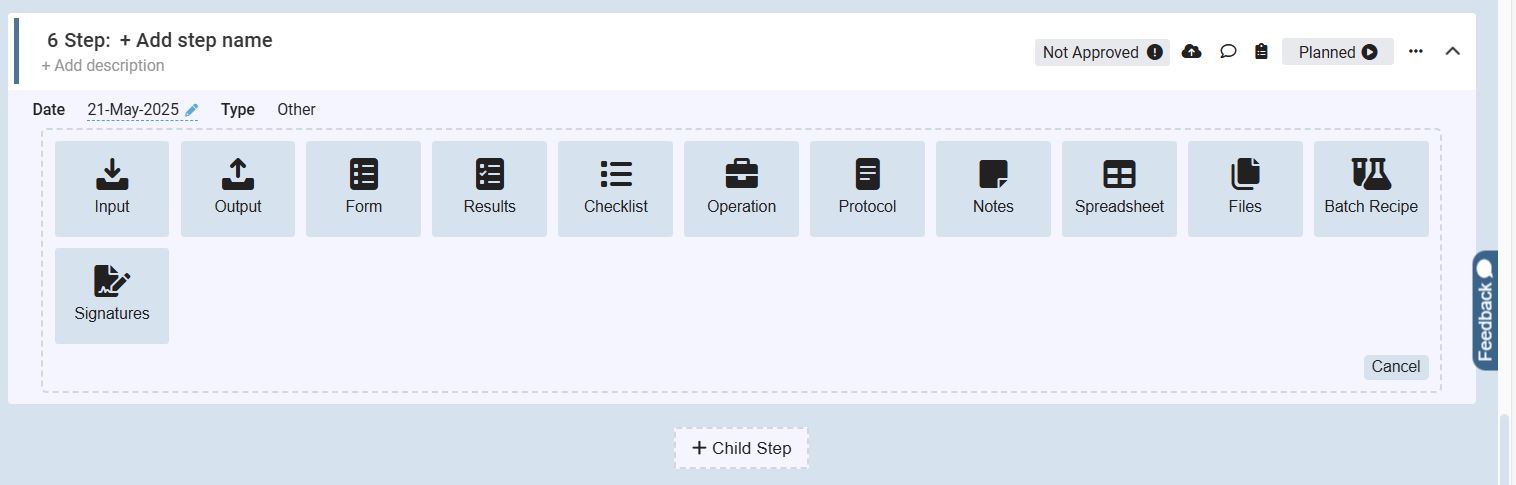
The screenshot shows the step configuration interface within Scifeon’s Workflow Builder, where users define and customize individual steps in a laboratory process.

At the top, the user can name the step and add an optional description. Below, a wide range of predefined step types is available to choose from, making workflows flexible and modular. The visible options include:

Input – Add incoming data, parameters, or metadata

Output – Define resulting data, files, or reports

Form – Include structured data-entry forms for users

Results – Capture and manage experiment results

Checklist – Enforce step-by-step task confirmation

Operation – Represent a laboratory or process operation

Protocol – Attach or link standard operating procedures (SOPs)

Notes – Add contextual annotations or explanations

Spreadsheet – Integrate structured tabular data directly

Files – Upload or attach supporting documents

Batch Recipe – Define recipe parameters for batch processes

Signatures – Insert digital approval and sign-off steps

At the bottom, a “+ Child Step” button allows users to create nested steps within a larger workflow, making complex laboratory processes easy to structure.

The interface also displays controls for status tracking (“Planned” vs. “Not Approved”), adding comments, and attaching files, ensuring each workflow step stays traceable and compliant.