TrustRadius: an HG Insights company

LabWare LIMS vs. Scifeon ELN & LIMS

Save this comparison

Save this comparison

Add Product

Recommended Comparisons

    Overview
    ProductRatingMost Used ByProduct SummaryStarting Price

    LabWare LIMS

    Score7 out of 10
    N/ALabWare LIMS from the company of the same name in Delaware is offered as an enterprise class laboratory information management system, touting feature breadth and its all-encompassing functionality.N/A

    Scifeon ELN & LIMS

    N/AN/AScifeon ELN & LIMS is a modular, low-code digital platform designed to manage research and quality-control data across biotech, pharma, and CDMO/CRO environments. It combines Electronic Lab Notebook (ELN) and Laboratory Information Management System (LIMS) capabilities in a single environment, enabling scientists to capture, analyze, and share data. Key Features Integrated ELN & LIMS: Unified data capture, sample management, and process…

    $180

    per month per user

    Pricing
    LabWare LIMSScifeon ELN & LIMS
    Editions & Modules
    No answers on this topic
    No answers on this topic
    Offerings
    Pricing Offerings
    LabWare LIMSScifeon ELN & LIMS
    Free Trial
    NoYes
    Free/Freemium Version
    NoNo
    Premium Consulting/Integration Services
    NoYes
    Entry-level Setup FeeNo setup feeOptional
    Additional Details——
    More Pricing Information
    User Ratings
    LabWare LIMSScifeon ELN & LIMS
    Likelihood to Recommend
    8.1
    (2 ratings)
    -
    (0 ratings)
    User Testimonials
    LabWare LIMSScifeon ELN & LIMS
    Likelihood to Recommend
    Labware
    Sample testing is great, communications (emails) out is so-so, depending on your need, you have to develop something. But that is not hard to do.
    Incentivized
    Read full review
    Scifeon
    No answers on this topic
    Pros
    Labware
    • One of the strengths of this program, as previously stated, is to track your sample through the entire testing process, from log-in to results reporting.
    • It is also handy to generate reports of sample results using the LabWare LIMS program.
    • LabWare LIMS provides a great way to preserve testing results electronically for future needs.
    Incentivized
    Read full review
    Scifeon
    No answers on this topic
    Cons
    Labware
    • The management of Event Triggers can stand to use some improvement. Especially when it comes to using the "DEFAULT" template event versus the specific template event.
    • Licenses are considered "concurrent". But LabWare does not have a feature that tells me (at any level) what my peak license usage is. For example ... if I own 100 licenses, LabWare will tell me at any given time how many licenses I am using. But it won't tell me at the end of the day, week, or month, what my peak usage was. So if I own 100 licenses, and I look at my usage right now, it might say I am using 50 licenses out of 100. Does this mean I have 50 too many licenses? Probably not. I just need a way of telling what my peak usage is so that if I want to roll LabWare out to another site, do I need to buy more licenses? Or will my 100 cover for it?
    • Importing data into static data tables is not well done in LabWare ... or even available. I can do it outside of LabWare with database management tools such as TOAD. But it is up to me to make sure all the tables and columns are populated correctly. It would be nice to have a feature within LabWare to do import data (from Excel spreadsheet for example) directly into some of the main tables.
    Incentivized
    Read full review
    Scifeon
    No answers on this topic
    Alternatives Considered
    Labware
    I have not used other LIMS systems.
    Incentivized
    Read full review
    Scifeon
    No answers on this topic
    Return on Investment
    Labware
    • Very positive. It allows the production units to increase volumes (and thus sampling) with minor impact on the lab.
    Incentivized
    Read full review
    Scifeon
    No answers on this topic
    ScreenShots

    Scifeon ELN & LIMS Screenshots

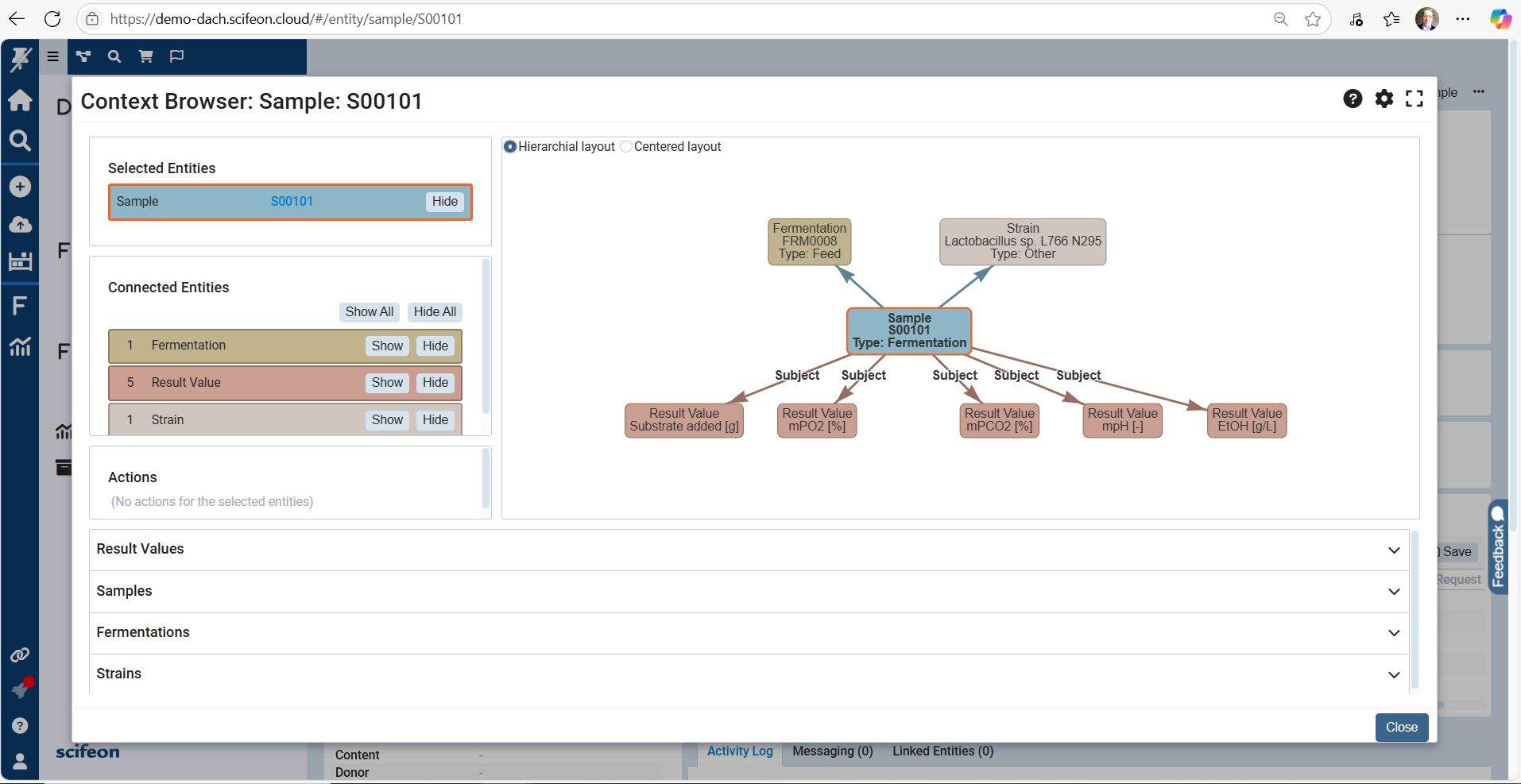
    Screenshot of the Context Browser, which gives scientists and QC teams a clear, structured view of all laboratory data. Projects, experiments, samples, and results are organized in a single, connected interface, making it easy to navigate across workflows without losing context.

From a top-level project, users can drill down into experiments, linked samples, and raw measurements. Metadata, attached files, and audit trails are displayed side by side, ensuring that all relevant information is accessible at a glance. Integrated search and filtering functions make it simple to find specific datasets, compare results, or trace dependencies between workflows.

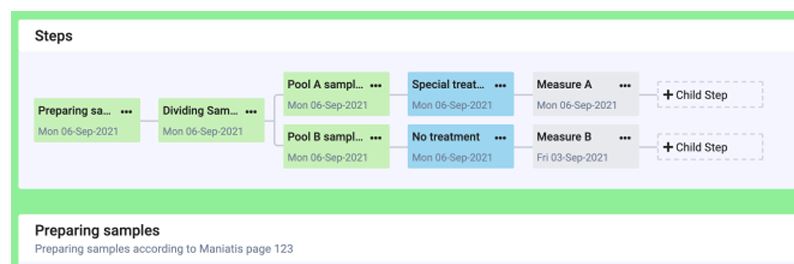
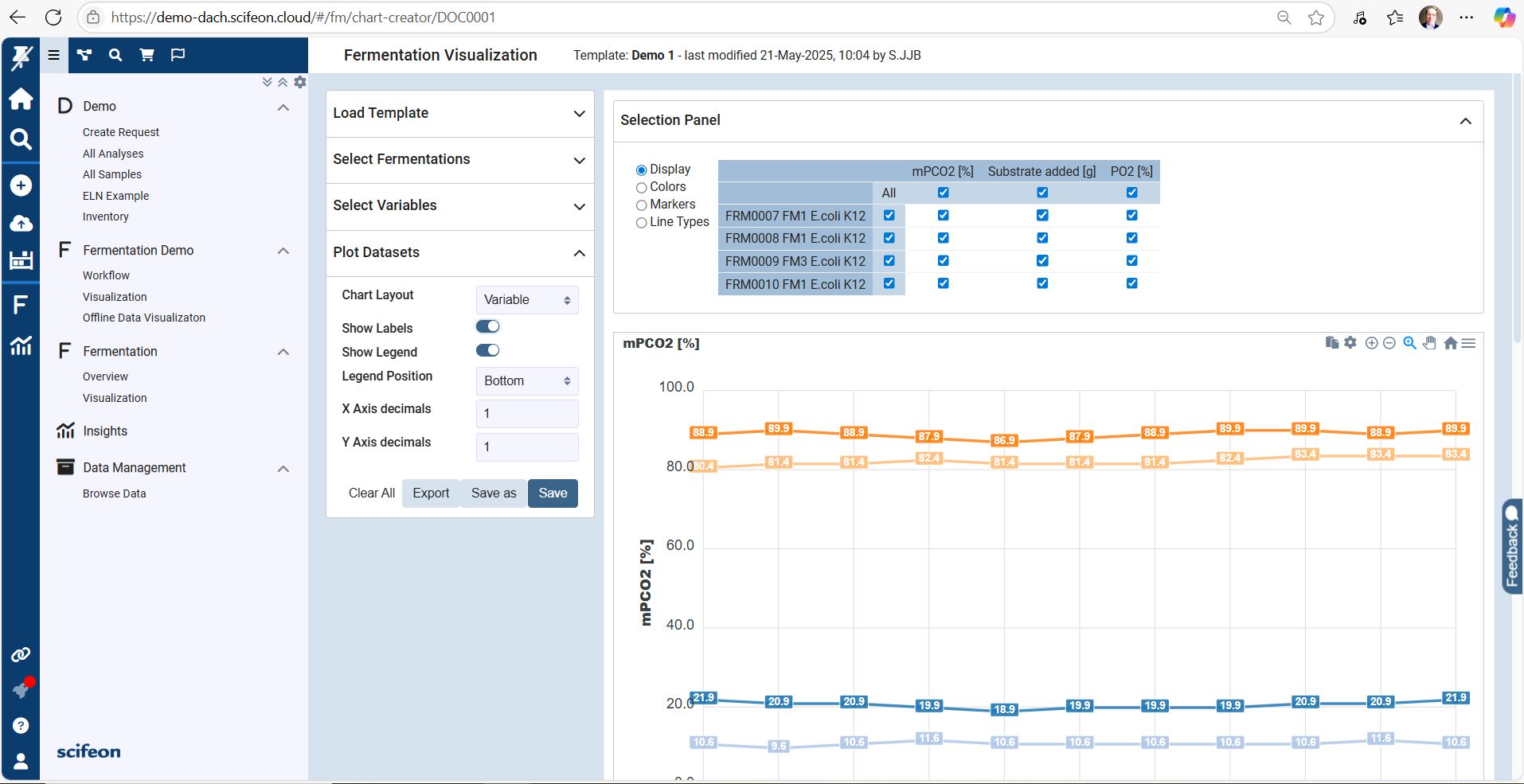
With the Context Browser, labs gain a transparent, FAIR-aligned data environment where relationships between experiments, samples, and results are visible and reusable — enabling faster decisions, smoother collaboration, and easier compliance.Screenshot of the Workflow Builder, a visual, drag-and-drop interface designed to configure laboratory workflows inside Scifeon without coding.Screenshot of the Fermentation Visualization Dashboard

The Fermentation Visualization Dashboard provides a real-time overview of upstream and downstream fermentation data in a single, interactive interface. Scientists and process engineers can monitor critical parameters such as temperature, pH, dissolved oxygen, agitation speed, and feed rates directly as the process runs.

Key features visible in the dashboard screenshot:

Dynamic Time-Series Charts
Multiple parameters are plotted in synchronized graphs, enabling users to spot trends, deviations, and correlations across batches instantly.

Batch Comparison Mode
Overlay data from multiple fermentation runs to compare yields, stability, and process performance at a glance.

Live Instrument Integration
Data streams directly from connected bioreactors, ensuring the dashboard reflects the latest in-process values without manual uploads.

Interactive Data Exploration
Zoom, filter, and highlight specific segments of the fermentation process to investigate anomalies or optimization opportunities.

Compliance & Traceability
Linked audit trails and sample metadata support GMP, GCLP, and 21 CFR Part 11 compliance requirements.

Functional Impression

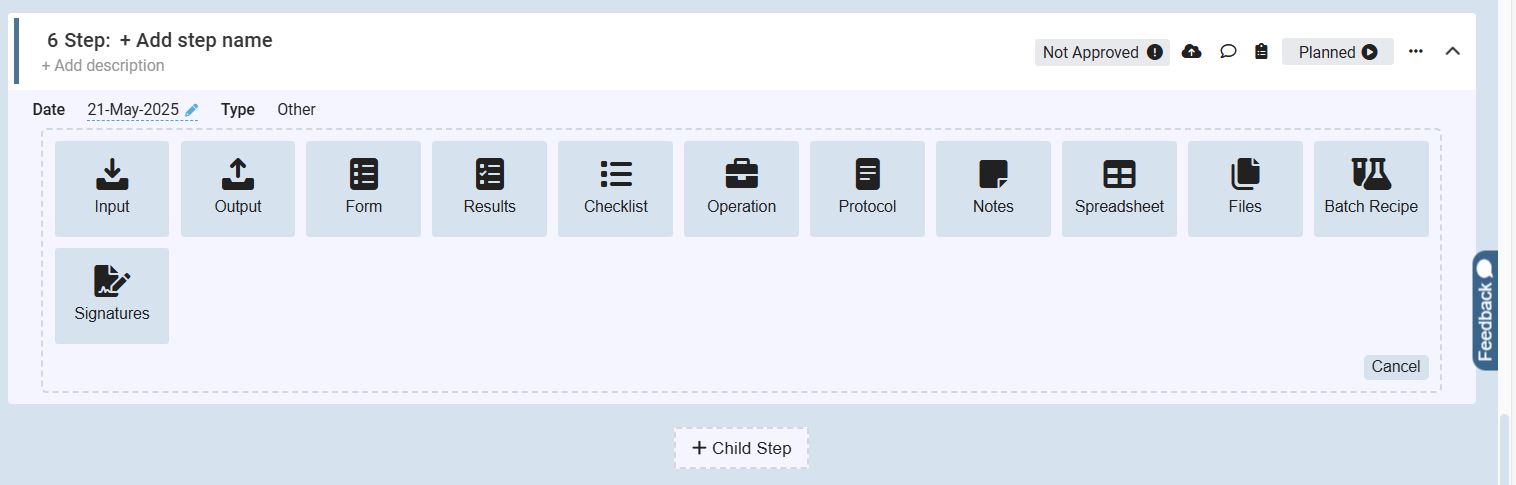
The dashboard turns complex fermentation datasets into intuitive, actionable insights. It supports faster decision-making, improves process reproducibility, and enables data-driven optimization — without leaving Scifeon’s platform.Screenshot of the Scifeon Workflow Builder – Adding Steps to a Workflow

The screenshot shows the step configuration interface within Scifeon’s Workflow Builder, where users define and customize individual steps in a laboratory process.

At the top, the user can name the step and add an optional description. Below, a wide range of predefined step types is available to choose from, making workflows flexible and modular. The visible options include:

Input – Add incoming data, parameters, or metadata

Output – Define resulting data, files, or reports

Form – Include structured data-entry forms for users

Results – Capture and manage experiment results

Checklist – Enforce step-by-step task confirmation

Operation – Represent a laboratory or process operation

Protocol – Attach or link standard operating procedures (SOPs)

Notes – Add contextual annotations or explanations

Spreadsheet – Integrate structured tabular data directly

Files – Upload or attach supporting documents

Batch Recipe – Define recipe parameters for batch processes

Signatures – Insert digital approval and sign-off steps

At the bottom, a “+ Child Step” button allows users to create nested steps within a larger workflow, making complex laboratory processes easy to structure.

The interface also displays controls for status tracking (“Planned” vs. “Not Approved”), adding comments, and attaching files, ensuring each workflow step stays traceable and compliant.