TrustRadius: an HG Insights company

Save this comparison

Save this comparison

Add Product

Recommended Comparisons

    Overview
    ProductRatingMost Used ByProduct SummaryStarting Price

    TestInvite

    Score10 out of 10
    Small Businesses (1-50 employees)
    TestInvite provides tools to design and deliver tailored online exams with security. TestInvite's library of pre-made hiring tests streamlines assessment creation, or users can bring their own tests. Systematic question randomization, customizable time limits, navigation restrictions, and secure screen-locking combat cheating behavior. Advanced anti-cheating features, including proctoring and webcam and screen monitoring, uphold exam integrity and ensure the…

    $450

    per year

    TrustExam.ai

    N/A
    Enterprise companies (1,001+ employees)
    TrustExam.ai is a proctoring and assessment management platform designed for national-scale examination systems and educational organizations. It provides secure, automated supervision for both online and offline tests, ensuring identity verification, browser lockdown, and advanced cheating detection through behavioral analytics. The platform integrates with learning management systems and testing environments, supporting multi-language exams and accessibility…N/A
    Pricing
    TestInviteTrustExam.ai
    Editions & Modules
    Pay as you go
    $450
    per year 2000 testing credits included
    Essential
    $948
    per year 2000 testing credits included
    Advanced
    $1908
    per year 2000 testing credits included
    Enterprise
    Contact Sales
    No answers on this topic
    Offerings
    Pricing Offerings
    TestInviteTrustExam.ai
    Free Trial
    YesNo
    Free/Freemium Version
    NoNo
    Premium Consulting/Integration Services
    YesYes
    Entry-level Setup Fee$1 per seatNo setup fee
    Additional DetailsTest Invite is an online exam software is built for organizations of any size. The "pay as you go" plan and credit system enable companies to use the system when they have just needed online exam processes without any recurring payment plans.—
    More Pricing Information
    Community Pulse
    TestInviteTrustExam.ai
    Considered Both Products
    TestInvite
    No answer on this topic
    TrustExam.ai
    No answer on this topic
    Key User Insights
    Would buy again
    100%
    Would buy again
    5 Answers
    No answers on this topic
    Delivers good value for the price
    100%
    Delivers good value for the price
    5 Answers
    No answers on this topic
    Happy with the feature set
    100%
    Happy with the feature set
    5 Answers
    No answers on this topic
    Lived up to sales and marketing promises
    No answers on this topic
    No answers on this topic
    Implementation went as expected
    100%
    Implementation went as expected
    5 Answers
    No answers on this topic
    Best Alternatives
    TestInviteTrustExam.ai
    Small Businesses
    Renaissance Accelerated Reader
    Score9.9 out of 10
    No answers on this topic
    Medium-sized Companies
    Renaissance Accelerated Reader
    Score9.9 out of 10
    No answers on this topic
    Enterprises
    Renaissance Accelerated Reader
    Score9.9 out of 10
    No answers on this topic
    All AlternativesView all alternativesView all alternatives
    User Ratings
    TestInviteTrustExam.ai
    Likelihood to Recommend
    10.0
    (5 ratings)
    -
    (0 ratings)
    Usability
    10.0
    (1 ratings)
    -
    (0 ratings)
    Support Rating
    9.1
    (1 ratings)
    -
    (0 ratings)
    User Testimonials
    TestInviteTrustExam.ai
    Likelihood to Recommend
    TestInvite
    Our needs are really well met by Test Invite. Of particular note is the fact that Test Invite provides contemporary methods to assess the knowledge and skills of the test takers. In our field, it is imperative to understand the oral language skills of potential students. With the use of video and audio recording supported questions, we can gain more insight into our students' needs so that we can tailor our services to them better. For language testing, Test Invite really allows the school to reliably collect, analyze and report on essential data needed from students. There are some usability issues with the platform, however, Test Invite has been working diligently to improve on these areas and add additional functionality.
    Read full review
    TrustExam.ai
    No answers on this topic
    Pros
    TestInvite
    • Cognitive aptitude assessments.
    • Providing assessment platform.
    • Providing support during assessment activities.
    • English proficiency testing.
    Read full review
    TrustExam.ai
    No answers on this topic
    Cons
    TestInvite
    • Some features like Live Proctoring can be included.
    Read full review
    TrustExam.ai
    No answers on this topic
    Usability
    TestInvite
    It's easy to use.
    Read full review
    TrustExam.ai
    No answers on this topic
    Support Rating
    TestInvite
    This is the most appreciated part of working with Test Invite over the last 2 years. Support was always timely, congenial, effective, and never challenging in terms of response rate or quality of reaction. Our counterpart on the Test Invite side has practically become a member of our team, as they are always extremely involved and ready to provide value while becoming very clear on our needs.
    Read full review
    TrustExam.ai
    No answers on this topic
    Alternatives Considered
    TestInvite
    I spend a LOT of time researching alternatives. Many required high upfront payments and did not have the functionality I needed. Test Invite was the first platform I tried and I was very happy with it!
    Incentivized
    Read full review
    TrustExam.ai
    No answers on this topic
    Return on Investment
    TestInvite
    • Students who complete a full placement test before starting their lessons are 80% more likely to continue with lessons after a trial lesson.
    • Students and parents have expressed extreme gratitude to our school for providing them with detailed and complete information about their English level.
    Read full review
    TrustExam.ai
    No answers on this topic
    ScreenShots

    TestInvite Screenshots

    Screenshot of Question bankScreenshot of real-time proctoringScreenshot of test creationScreenshot of test previewScreenshot of test previewScreenshot of personality inventory

    TrustExam.ai Screenshots

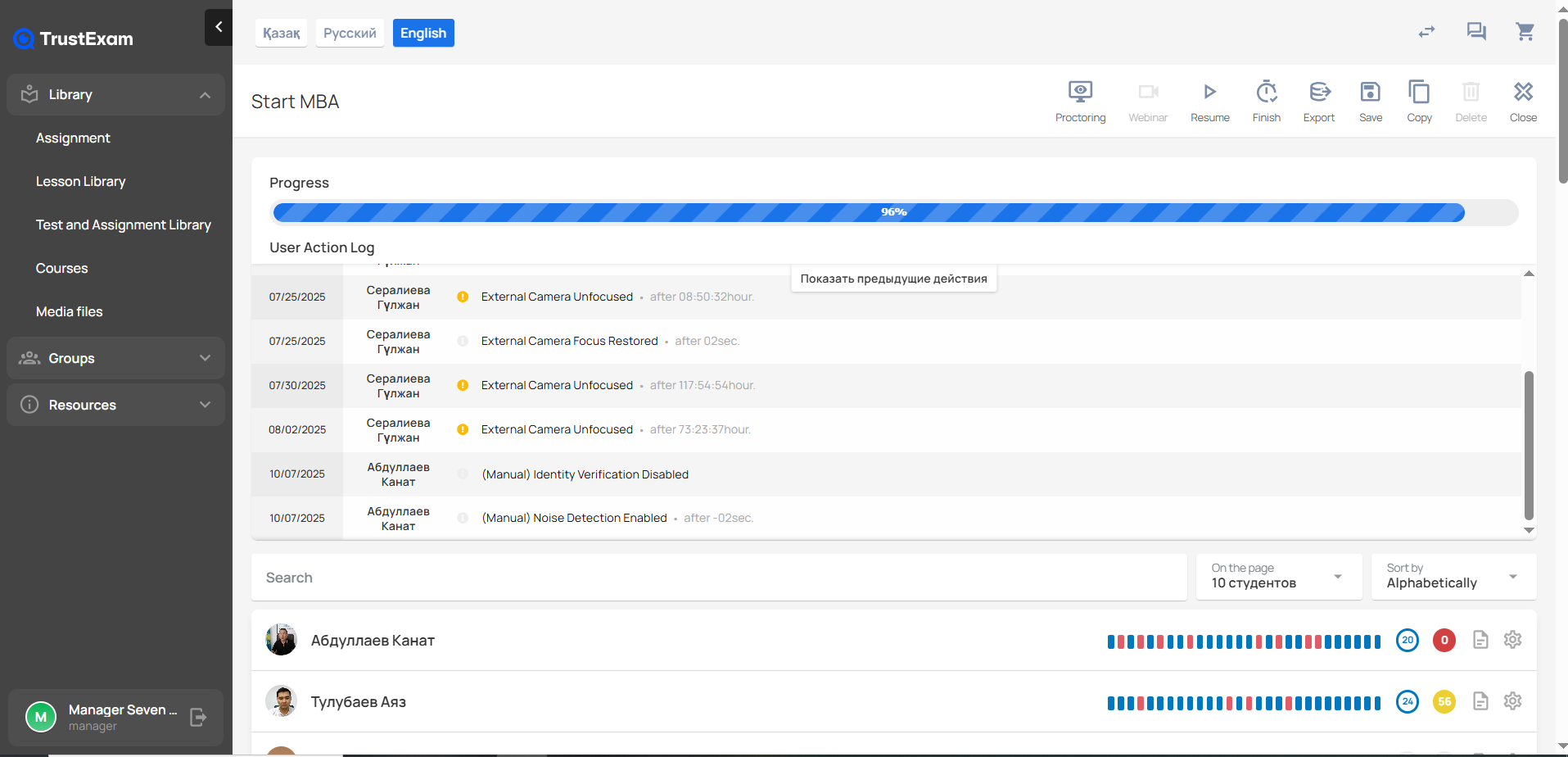
    Screenshot of the TrustExam administrator interface for monitoring the Start MBA course session. At the top, the system shows the overall Progress bar, which is nearly complete at 96%.

Below, the User Action Log lists recent proctoring-related events for multiple users. Each entry includes the date, the participant’s name, an event type, and additional details. Logged events include issues such as “External Camera Unfocused,” “External Camera Focus Restored,” and manual administrative actions like “Identity Verification Disabled” and “Noise Detection Enabled.” Each event also includes a timestamp indicating when it occurred relative to the session start.

On the right side of the top panel, quick-action buttons are shown for proctoring, webinar mode, resuming the session, finishing, exporting, saving, copying, deleting, and closing.

Further down, a searchable list of participants is displayed. Each participant card shows their profile photo, name, and a horizontal activity timeline composed of colored markers that represent different types of proctoring events or interactions. Next to each participant’s activity bar, numeric badges show counts of specific alerts or behaviors detected during the exam.

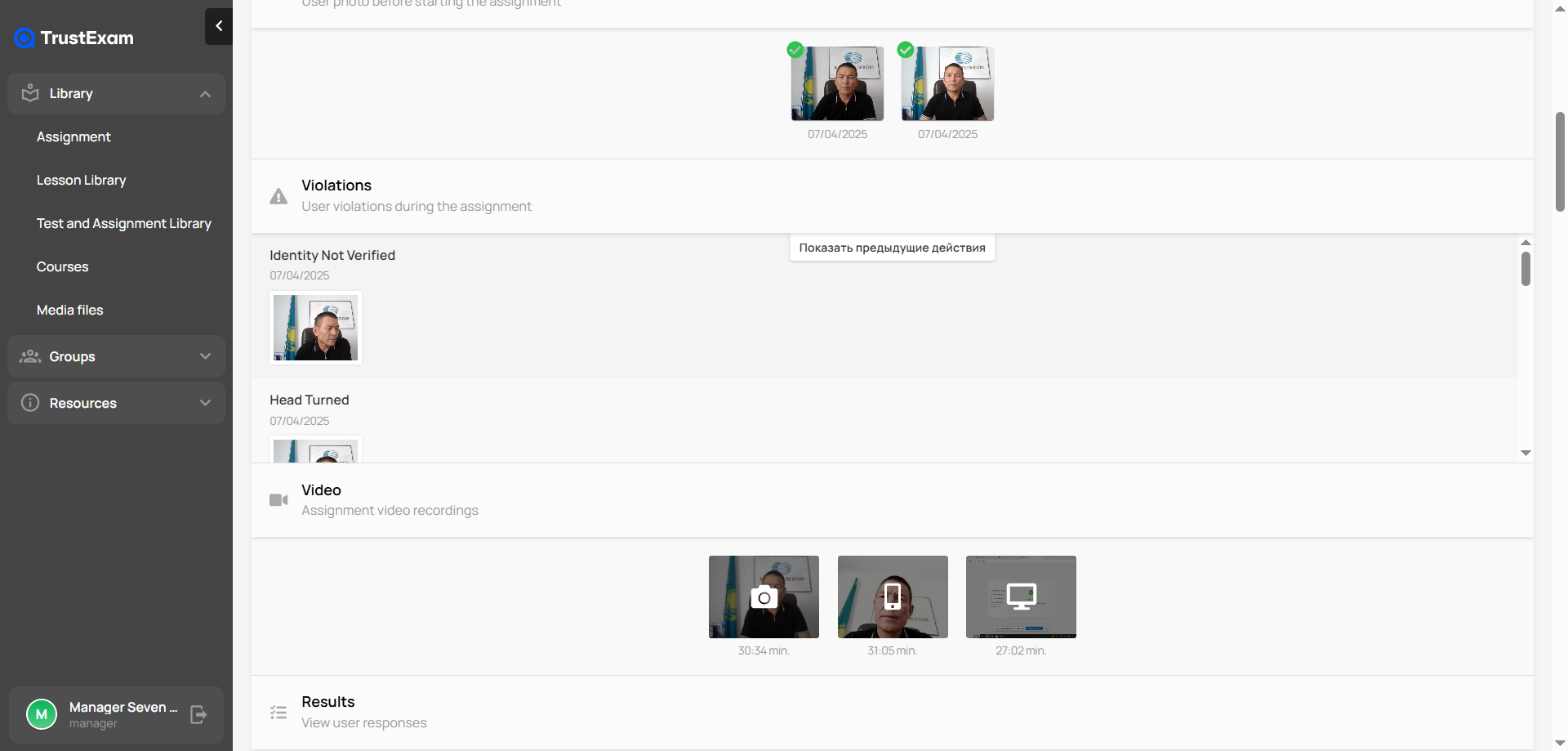
The left sidebar includes the main navigation menu with sections such as Library, Assignment, Lesson Library, Test and Assignment Library, Courses, Media files, Groups, and Resources.Screenshot of the TrustExam proctoring interface displaying a detailed record of a student’s exam session. At the top, the system shows the user’s verification photos taken before the assignment, both marked as successfully approved. Below, in the Violations section, the platform has flagged two events: “Identity Not Verified” and “Head Turned,” each with a timestamp and a corresponding captured frame.

Further down, the Video section contains the full recordings of the session, presented as thumbnails with timestamps indicating the duration of each clip. At the bottom, there is a Results section where the examiner can view the student’s recorded responses. The left side of the interface shows the main navigation menu with modules such as Library, Assignment, Courses, Media files, Groups, and Resources.