TrustRadius: an HG Insights company

Save this comparison

Save this comparison

Add Product

Recommended Comparisons

    Overview
    ProductRatingMost Used ByProduct SummaryStarting Price

    KwikTag

    Score7 out of 10
    N/AKwikTag is a document management software offering from ImageTag. It includes features such as allowing users to hack through repetitive, manual tasks and document clutter and automate document and data workflow. and Additionally, KwikTag allows users to intelligently organize paper and electronic documents to inform business decisions and deliver instant auditability from a web browser or within Microsoft Dynamics ERP..N/A

    Zetadocs Delivery

    N/AN/AZetadocs Delivery emails batches of personalized documents from within Microsoft Dynamics 365 Business Central or NAV, to save finance team time in sending documents such as orders, invoices and statements, using ready to go templates. Finance processes Zetadocs Delivery helps make more efficient include sales order processing, collections management and remittance advice.N/A
    Pricing
    KwikTagZetadocs Delivery
    Editions & Modules
    No answers on this topic
    No answers on this topic
    Offerings
    Pricing Offerings
    KwikTagZetadocs Delivery
    Free Trial
    NoNo
    Free/Freemium Version
    NoYes
    Premium Consulting/Integration Services
    NoYes
    Entry-level Setup FeeNo setup feeOptional
    Additional Details——
    More Pricing Information
    Best Alternatives
    KwikTagZetadocs Delivery
    Small Businesses
    M‑Files
    Score8.9 out of 10
    No answers on this topic
    Medium-sized Companies
    Esker
    Score7.4 out of 10
    No answers on this topic
    Enterprises
    Tungsten Capture
    Score9.5 out of 10
    No answers on this topic
    All AlternativesView all alternativesView all alternatives
    User Ratings
    KwikTagZetadocs Delivery
    Likelihood to Recommend
    9.0
    (1 ratings)
    -
    (0 ratings)
    User Testimonials
    KwikTagZetadocs Delivery
    Likelihood to Recommend
    ImageTag
    Works fine for accounting but we've found workflow capabilities are limited for those who aren't using our accounting system. License seats need to be concurrent instead of user specific.
    Incentivized
    Read full review
    Equisys
    No answers on this topic
    Pros
    ImageTag
    • Helps keep track of multiple vendors' receipts and invoices.
    • The integration with GP accounting is particularly helpful and it's why we chose the system.
    • Users find the system easy to understand.
    Incentivized
    Read full review
    Equisys
    No answers on this topic
    Cons
    ImageTag
    • It would be nice if we could automatically email invoices from KwikTag to responsible parties for approval.
    • Need to provide a web interface that doesn't use up a license seat so other members than KwikTag users can view documents that go with what's been charged to their budget.
    Incentivized
    Read full review
    Equisys
    No answers on this topic
    Alternatives Considered
    ImageTag
    We use Laserfiche for our legal and membership services departments. Laserfiche is a full blown workflow and document management system that runs on our own SQL server. Therefore we have much more control of how it's set up and we can customize it more easily.
    Incentivized
    Read full review
    Equisys
    No answers on this topic
    Return on Investment
    ImageTag
    • KwikTag has taken a large burden off our AP staff.
    • Documents are readily available for retrieval without having to scan through directories full of files or boxes of paper.
    • Would like to see the ability for others to at least search and view documents.
    Incentivized
    Read full review
    Equisys
    No answers on this topic
    ScreenShots

    Zetadocs Delivery Screenshots

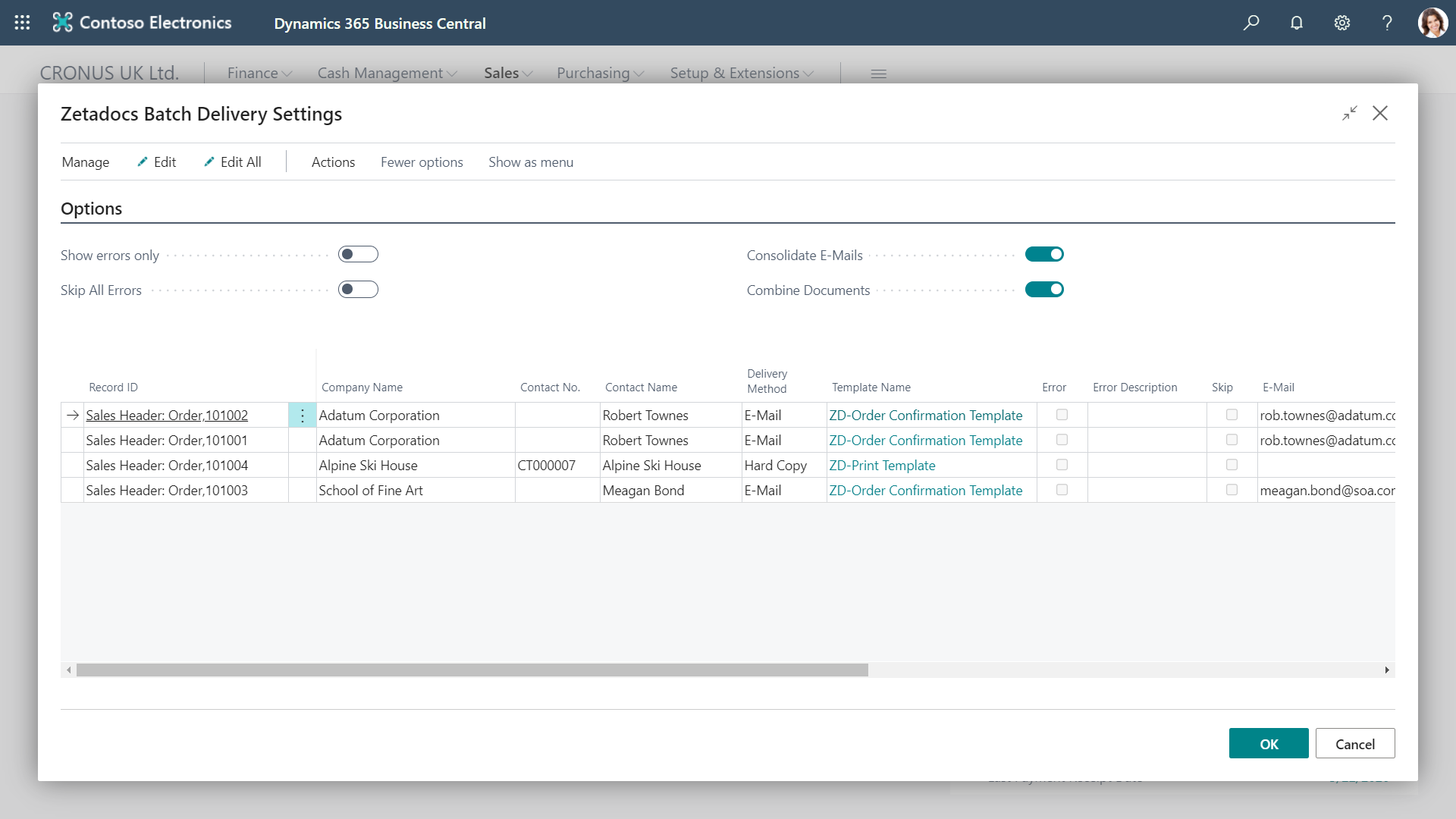
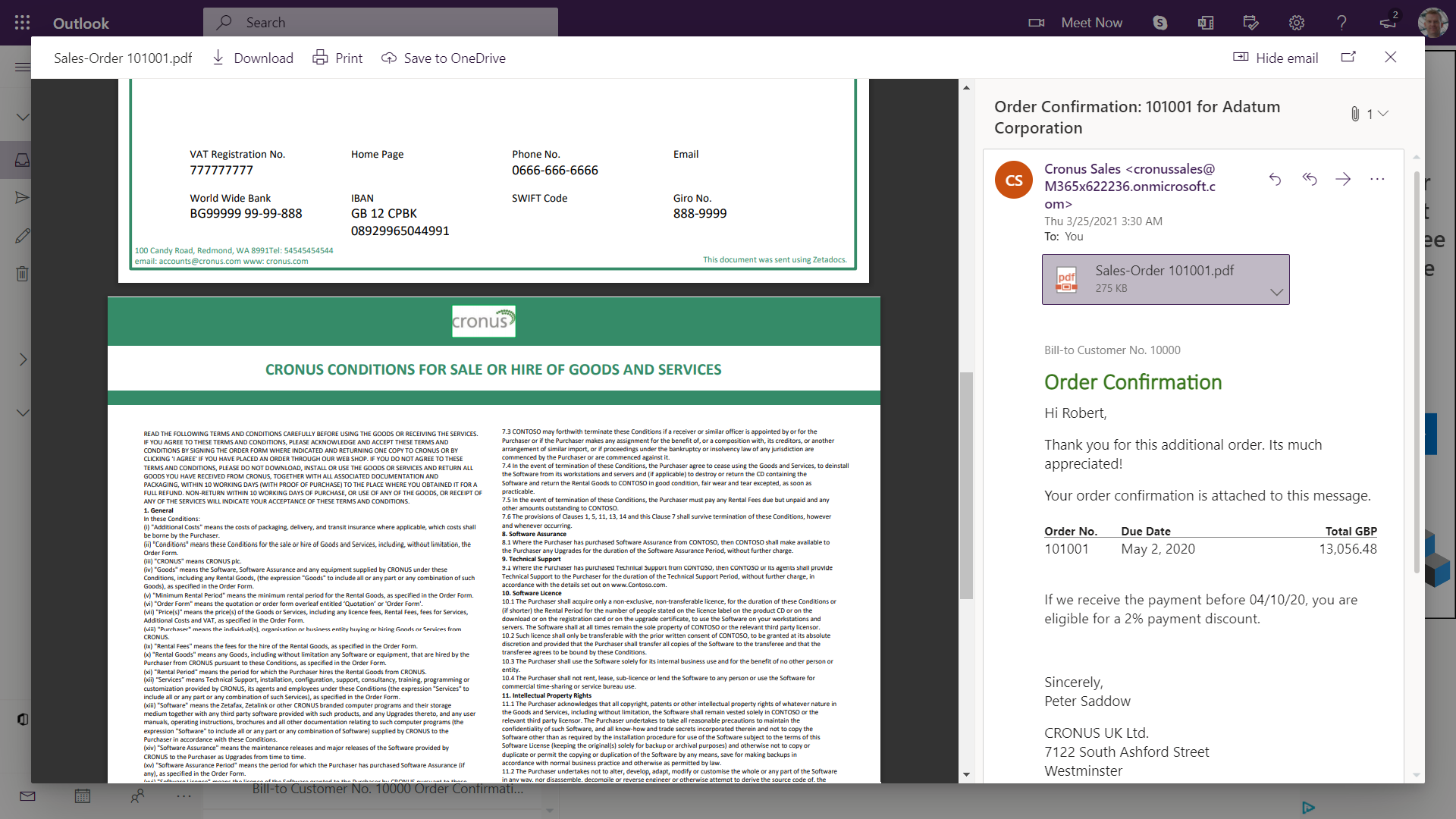
    Screenshot of Batch management: Send out documents in batches, setting the sending email address for replies, and including attachments such as standard terms & conditionsScreenshot of Edit before send: Each email is automatically prepared for its recipient using a template, then you can personalize it further at the preview stageScreenshot of Consolidated batches: Multiple emails in a batch to the same person can be combined into a single email to save overloading their inboxScreenshot of Combined attachments: Make your suppliers and customers' lives easier by combining all the attached documents into one, easy-to-consume PDF