TrustRadius: an HG Insights company

Gologin

Score8.8 out of 10

11 Reviews and Ratings

What is Gologin?

Gologin is a Browser platform for creating and managing isolated browser profiles. Each profile can use a separate browser fingerprint—the collection of browser and device attributes websites use to identify a session—so teams can separate authorized account-management, testing, and research workflows.

Key Capabilities

  • Isolated browser profiles with configurable fingerprint settings
  • Cloud Browser access for launching and managing profiles without local installation
  • Cloud Android profiles for testing and automating mobile-app workflows without physical devices
  • Profile management for multiple social-media, e-commerce, and marketing accounts
  • Web Scraping API for automated website data collection
  • Cloud infrastructure for scaling profile-based browser activity
  • Centralized profile access for teams managing separate browser environments

Audience & Use Cases

  • Audience: Marketing agencies, social-media teams, e-commerce operators, affiliate marketers, researchers, developers, testers, and organizations that manage multiple authorized browser profiles.
  • Use cases: Separating account-management environments, testing mobile applications, collecting website data through an API, researching web content, and managing profile-based browser operations across teams.

Technical Specifications

  • Browser Fingerprints: Configurable browser and device attributes assigned to individual profiles.
  • Cloud Browser: Browser-profile access without local software installation.
  • Cloud Android: Isolated Android environments for mobile application testing and automation.
  • Scraping API: Programmatic interface for automated web-data collection.
  • Profile Isolation: Separate browser environments for individual accounts and workflows.
  • Scalability: Cloud-hosted profile management for larger account volumes.

Categories & Use Cases

Media

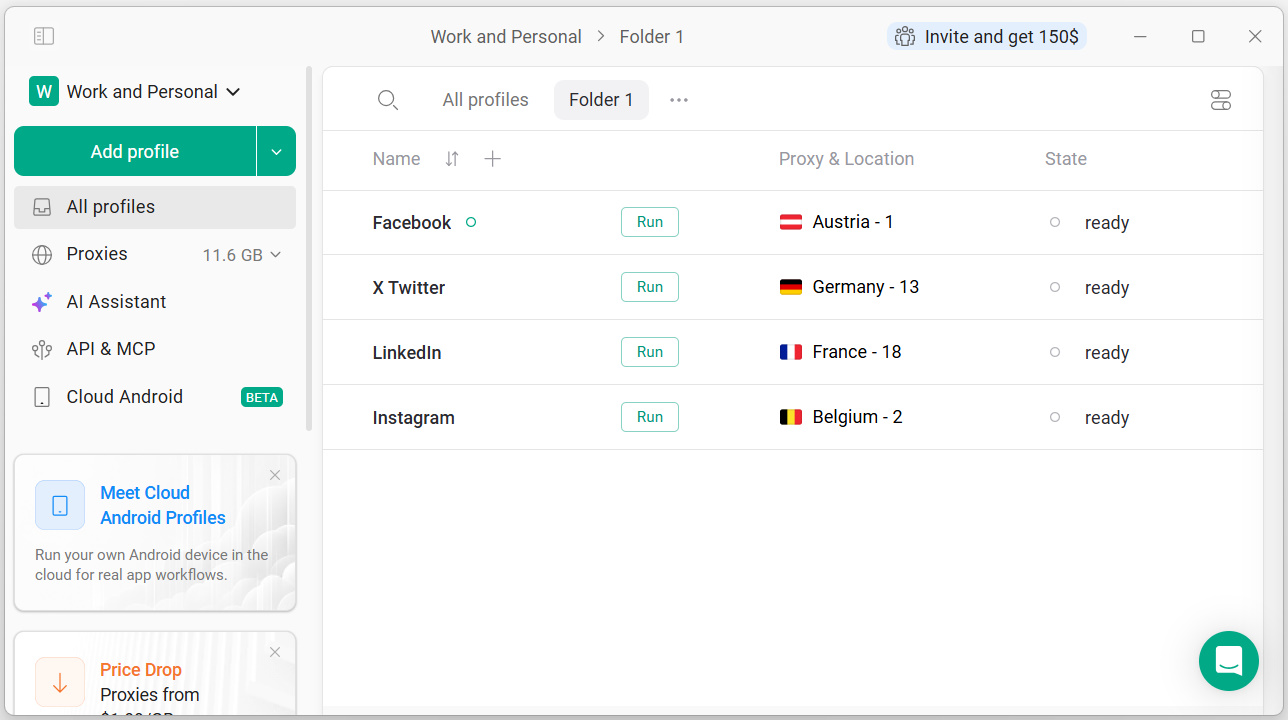
Screenshot of Gologin dashboard with organized browser profiles, proxies and locations. Sidebar gives quick access to Cloud Android, proxy management, and the built-in API — everything needed to manage multiple accounts safely.

Screenshot of Gologin dashboard with organized browser profiles, proxies and locations. Sidebar gives quick access to Cloud Android, proxy management, and the built-in API — everything needed to manage multiple accounts safely.

Pros

  • Efficient multi-account management for scaling operations
  • Seamless proxy server import and reliable performance
  • User-friendly interface and straightforward setup

Cons

  • Need for more robust proxy management resources
  • Difficulties with profile cloning and dynamic fingerprint randomization
  • Browser functionality issues, such as Orbita being flagged

SMM MARKETING AGENCY CEO - HONEST REVIEW

Use Cases and Deployment Scope

GoLogin has been amazing for my agency. For my digital media agency. We manage multiple online profiles for our marketing side of our agency and it has been able to scale us single-handedly from $10,000-$40,000 in only a months time. The UI is completely user-friendly, I’m not a big tech guy and it’s very straightforward as well as very effective and not buggy whatsoever. I’ve used other anti-tech browsers before and ran into many different issues but so far one month in using GoLogin no issues at all. Anybody that is thinking about using GoLogin the price is absolutely worth the service that they provide. Customer service was always timely. When trying to figure out different aspects of the platform, and responses were straightforward and easy to implement. By far 100% will be using this for the entirety of my business for years to come. At first I was skeptical about how much it would cost for my use case but all of that has been completely wiped away

Pros

  • the user interface is very easy to use and navigate. Haven’t had any issues with bugs or anything like that which is a major plus.
  • Proxy servers import very well haven’t had one fail. Each profile has a unique fingerprint so it’s the perfect central hub for working with multiple different profiles

Cons

  • you guys can improve in switching from orbita to Google Chrome. Orbit it gets flagged on some platforms.
  • When cloning profiles, it kind of sucks that those clones take up a number of profiles as well, even if they are operating on the same proxy. That’s the only thing I really don’t like.
  • Sometimes it’s hard when the browser profiles don’t open up in the same place every time that kind of just randomly open up in different spots on the screen

Return on Investment

  • positive since we’ve been running our systems on GoLogin we’ve jumped from 10 to 40k mrr in a months time
  • We’ve scaled social media products to be able to manage multiple account accounts

Usability

Alternatives Considered

Multilogin

Other Software Used

Dolphin Management, VMLogin Antidetect Browser

The perfect tool to manage multiple online profiles

Use Cases and Deployment Scope

I use GoLogin to manage multiple social media accounts for myself and my team members. GoLogin is great to avoid constantly having to do 2 factor authentication or using multiple devices to manage the accounts. You just set up the profiles and that's it. Saves me a lot of time and works perfectly.

The best thing is you can share profiles with other team members and everyone always picks up where the other left off.

Pros

  • Manage multiple profiles
  • Profile sharing with team members
  • Providing owned proxies or connecting with 3rd party providers

Cons

  • Auto-refresh would be a good idea so I can work with the latest profiles all the time
  • Pricing is messy — I feel like we're double paying for accounts when I invite team members to my dashboard
  • Would be great if GoLogin could auto-update in the background

Return on Investment

  • Saves me at least 3 hours a week
  • Saves my entire team 10 hours a week

Usability

Alternatives Considered

Multilogin and Windscribe

Highly recommend. Works perfectly.

Use Cases and Deployment Scope

We manage various client accounts on LinkedIn, so it's been crucial to our workflow. We've been able to manage multiple client accounts without any interruptions thanks to GoLogin.

Pros

  • Customer Service
  • Proxy Services
  • Data Management
  • Multi Accounting
  • API

Cons

  • General proxy knowledge resources for non proxy savvy people

Return on Investment

  • I've been able to manage client accounts effectively, resulting in a 20x ROI

Usability

Highly recommend GoLogin

Use Cases and Deployment Scope

I use GoLogin to manage numbers of social accounts across the world without using VPN.

Pros

  • choice of vpn locations
  • I can manage so many accounts at one place without worry about VPN issues.

Cons

  • If I donot have to buy proxy separately that would be great.

Return on Investment

  • Definitely positive

Usability

Alternatives Considered

NordVPN

Other Software Used

NordVPN

One of its kind. Great experienced

Use Cases and Deployment Scope

We used this to test seo optimization for our products on google along with automatic ai adjustment to our dynamic funnels to see how different users experience our sites and products and advertisings

Pros

  • Keeing everything in one place
  • Allowing multiple people to login together
  • Importing unique proxies

Cons

  • Better unique residential proxies
  • Checking for duplicate proxy use
  • Randomizing fingerprint and setting fixed parameters for new profiles

Return on Investment

  • Allowed us to test multiple approaches
  • Collaborate with multiple team members
  • Test various fingerprints

Usability