TrustRadius: an HG Insights company

What is Medrecords AI?

Medrecords AI is a medical records review and chronology platform built for IME physicians, legal nurse consultants, attorneys, third-party administrators (TPAs), and insurance carriers who need to turn large, disorganized record sets into accurate, citation-linked work product.

Read more details.

Categories & Use Cases

Media

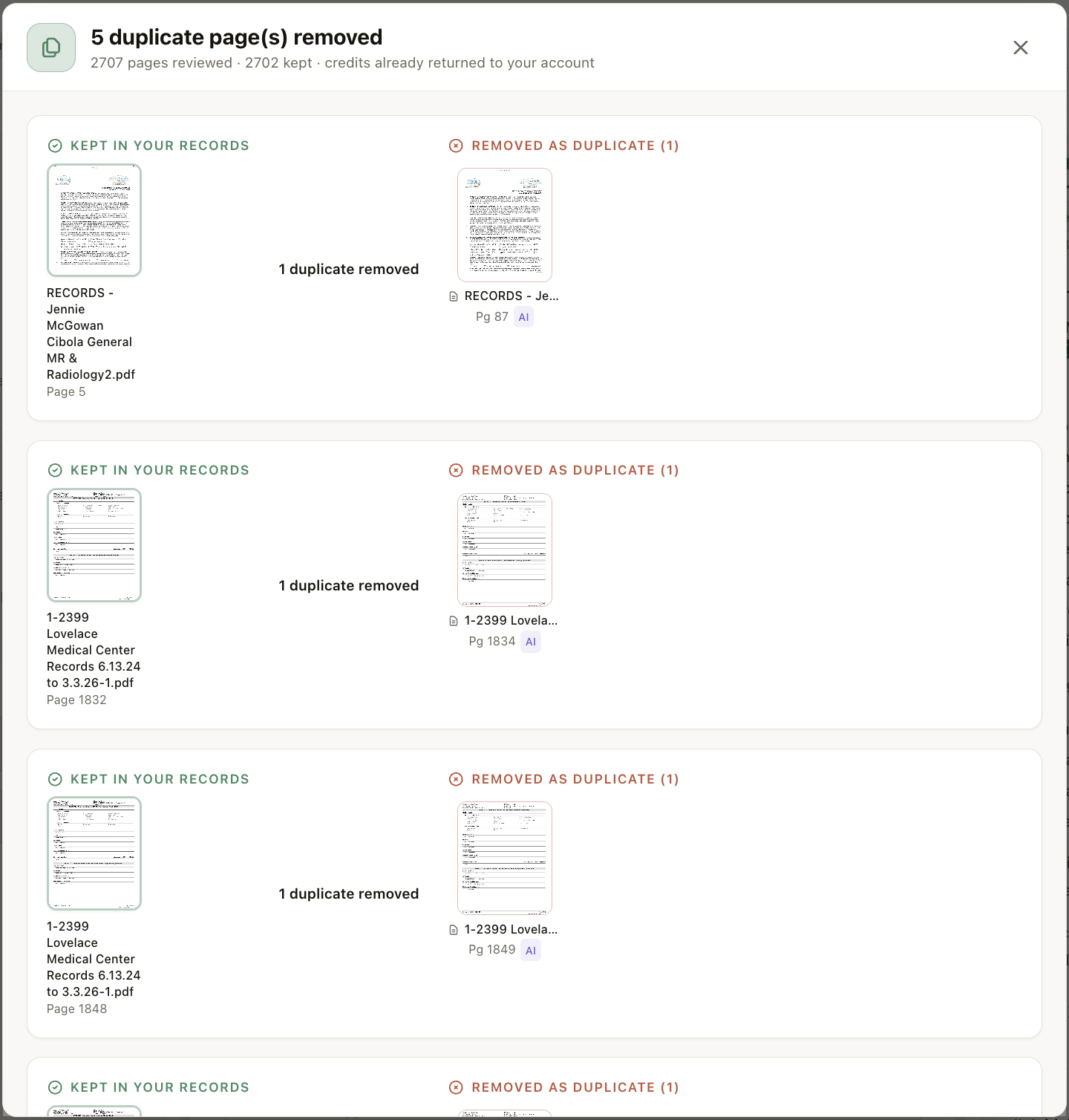
Screenshot of Duplicate Page Removal: Every page is compared against every other page in the case before processing. Exact and near-duplicates are removed, each removal shown side by side with the page that was kept, so you can verify the call yourself. Credits for removed pages are returned to your account automatically. In this case: 2,707 pages reviewed, 5 duplicates removed, 2,702 kept.

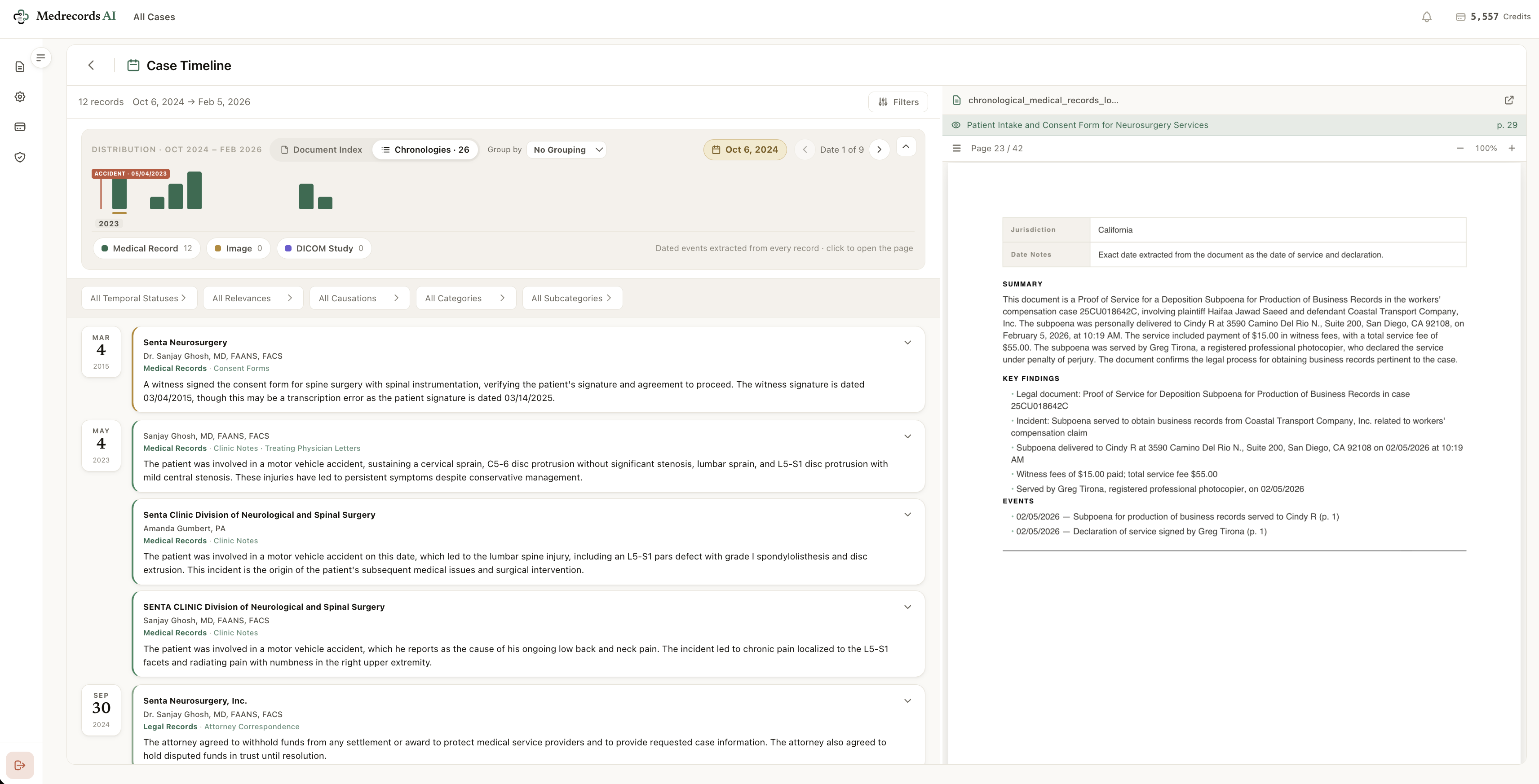
Screenshot of Case Timeline: Every dated event extracted from every record, plotted on a single timeline with the incident date pinned. Filter by temporal status, relevance, causation, category, and subcategory. Click any event and the source page opens beside it, with a structured summary, key findings, and page-cited events. The timeline is not a summary of the file. It is the file, reorganized by date.
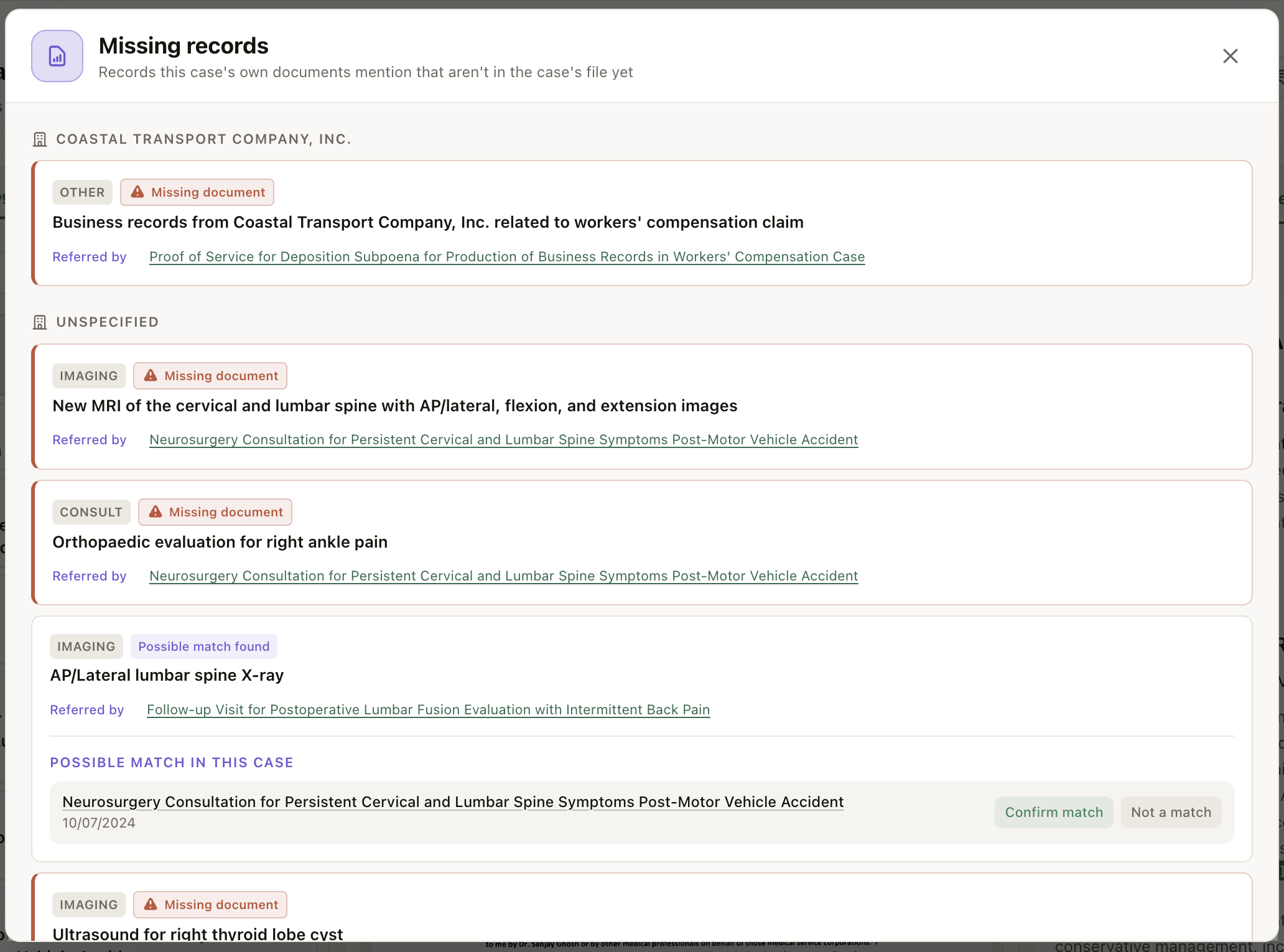
Screenshot of Missing Records Detection: The platform reads the case's own documents for references to records that are not in the file: an MRI a consult ordered, an orthopaedic evaluation a note mentions, business records a subpoena demands. Each gap is flagged with the exact document that referred to it. Where a possible match already exists in the case, it is surfaced for one-click confirmation instead of a false flag.
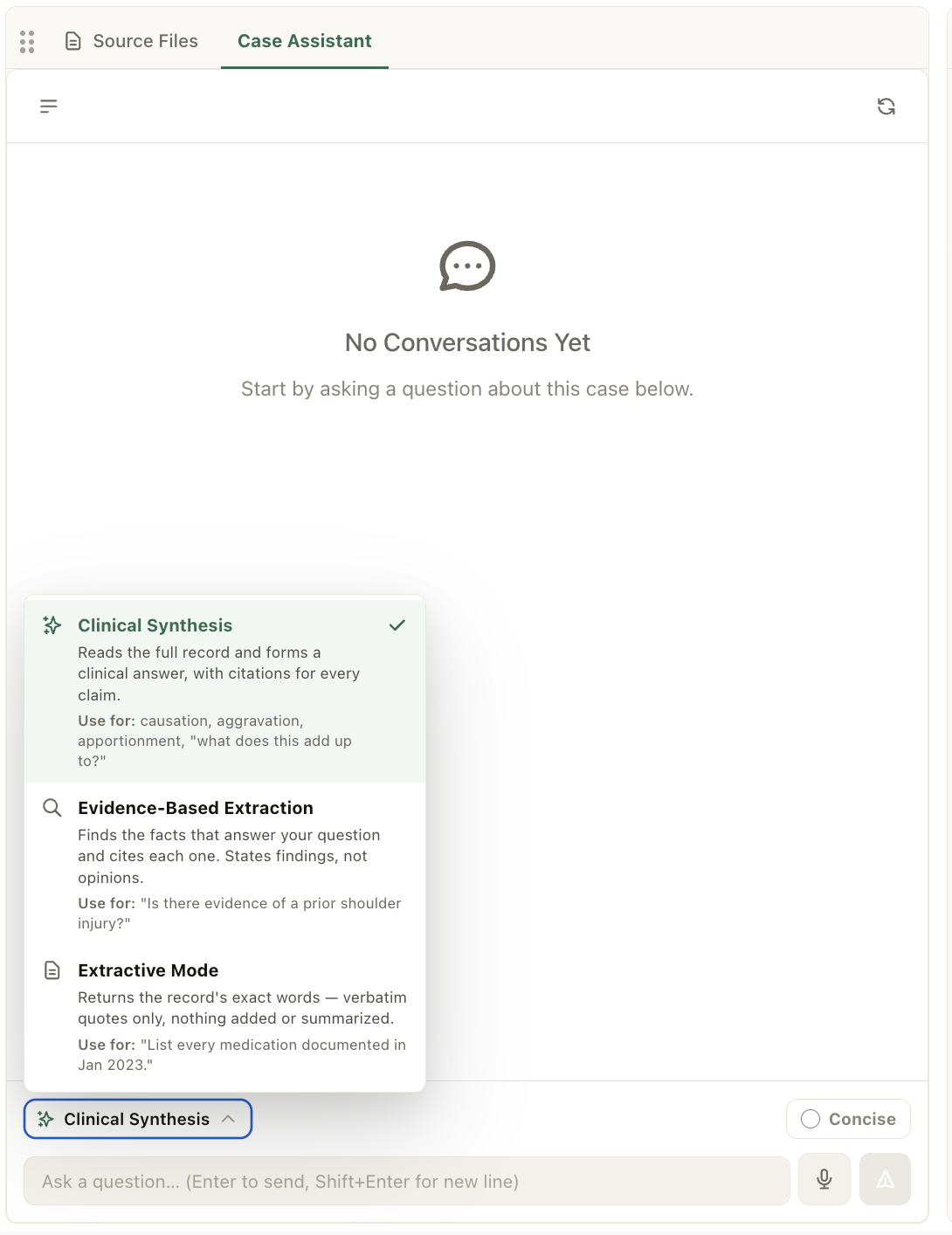
Screenshot of Case Assistant: Ask the case a question and choose how it answers. Clinical Synthesis reads the full record and forms a clinical answer, with citations for every claim: causation, aggravation, apportionment. Evidence-Based Extraction finds the facts that answer your question and cites each one, stating findings, not opinions. Extractive Mode returns the record's exact words, verbatim quotes only, nothing added. Three modes because a medical-legal question and a discovery question need different standards of answer.
Screenshot of 2-Pane Workspace: Chronology on the left, source document on the right. Click any event and the cited page opens instantly beside it. Filter 1,139 extracted events by date range, temporal status, relevance, causation, category, and chronology type (medical-legal or medical) without losing your place in the source.
Screenshot of 3-Pane Workspace with Report Studio: Chronologies, source viewer, and Report Studio side by side. Draft the report while the evidence stays on screen: no tab-switching between the claim you are writing and the page that supports it. Report generation runs through a staged review flow, so nothing is produced before case context is confirmed.
Screenshot of Document Index: Patient, diagnostic, functional, and cost details are extracted from the records automatically, then presented for confirmation before any report is built. Locality, ZIP code, cost date, cost sources (FAIR Health, GoodRx, Genworth), discount rate, and inflation index are pre-filled and editable. This review step is free: nothing is priced until you confirm.
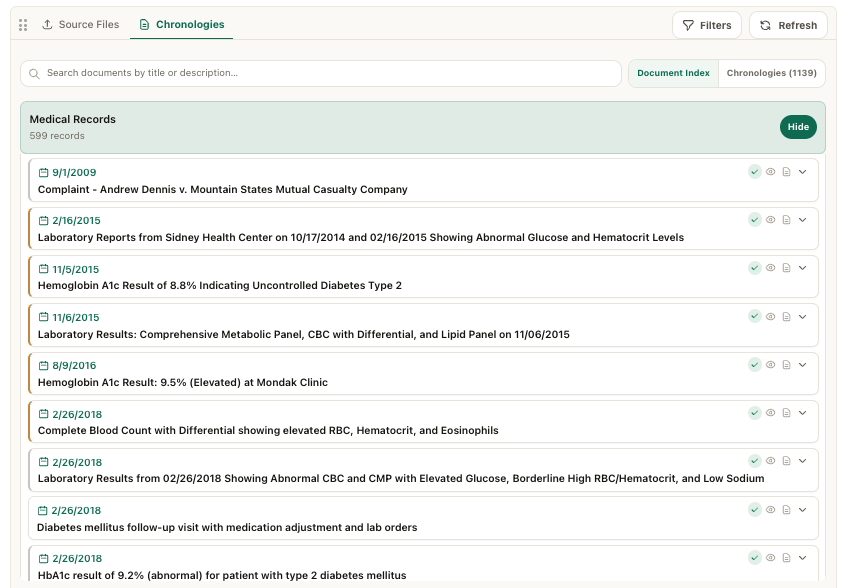
Screenshot of Dated Chronologies: Every extracted event carries its date, provider, author and credentials, record type, and a precise summary with the clinical values preserved (glucose 221 mg/dL, hematocrit 50.8%, RBC 6.15 M/uL). Legal records, external investigations, and medical records sit in one chronology, in strict date order, each line tied to its source.
Screenshot of Automated Case Intake with Metadata Review:  Patient, diagnostic, functional, and cost details are extracted from the records automatically, then presented for confirmation before any report is built. Locality, ZIP code, cost date, cost sources (FAIR Health, GoodRx, Genworth), discount rate, and inflation index are pre-filled and editable. This review step is free: nothing is priced until you confirm.
Screenshot of Custom Report Export: Build the exact chronological PDF you need. Toggle every section independently: cover page, branding, document index, chronologies index, narrative, document summaries, full event chronologies, and scanned source pages. Control fields, organization, date range, filters, and quality. One case, any deliverable.
Screenshot of Processing Status: A live, step-by-step view of everything the platform did to the case: summarization, missing-records checks, review against case focus, narrative generation, PDF assembly. Each step shows its timestamp, duration, and result, down to citation validation counts (2,830 pages from 69 documents, 2/2 citation issues auto-corrected). No black box. The audit trail of the processing is itself part of the work product.

1 / 11

Screenshot of Duplicate Page Removal: Every page is compared against every other page in the case before processing. Exact and near-duplicates are removed, each removal shown side by side with the page that was kept, so you can verify the call yourself. Credits for removed pages are returned to your account automatically. In this case: 2,707 pages reviewed, 5 duplicates removed, 2,702 kept.