

What is Menlo Secure Cloud Browser?
The Menlo Secure Cloud Browser transforms every browser into a secure enterprise browser. Menlo Secure Cloud Browser runs within an elastic and orchestrated cloud-native platform, creating a real time digital twin of a local desktop, executing content away from the endpoint and delivering only safe, reconstructed content to the user’s local browser. This allows for lower bandwidth consumption with zero latency allowing users to navigate freely and without fear. It doesn’t matter if the web content is good or bad, categorized or uncategorized, the Menlo Secure Cloud Browser treats all content as potentially malicious and handles it accordingly.
Menlo prevents zero day exploits and HEAT attacks because it analyzes data and information in the Secure Cloud Browser. This allows the use of cloud content inspection capabilities, and secure document and archive viewers to identify and block unknown threats or evasive malware that don’t have signatures or digital breadcrumbs to detect. By rendering the web page in the Secure Cloud Browser, Menlo is able to see exactly what’s happening on the webpage and prevent malicious, dynamic content or payloads, such as javascript or smuggled code, from executing locally on the endpoint. Notorious ransomware and threat actor groups are known for using these evasive techniques to evade traditional security controls. In fact, Menlo Security was the first to identify and block the threat actor group Evil Proxy from using reverse proxy methods on compromised web pages in an attempt to steal user login credentials and gain system access.
The Menlo Secure Cloud Browser makes it possible to identify evasive techniques by combining AI with advanced URL runtime analysis of the individual web page elements. Using Menlo Computer Vision, an object detection model, the Menlo Secure Cloud Browser can identify and locate images and identify logos within web content. The key innovation of the Menlo Computer Vision is its ability to perform logo detection in real-time, and then add the classification from this layered model to the larger platform, which makes decisions about how to protect users. The Menlo secure cloud document viewer and archive viewer also enables users to safely view password protected files without ever downloading them to the endpoint. This enables security teams to block evasive techniques used to evade traditional content inspection and close the window of exposure from zero-day exploits.
The Menlo Secure Cloud Browser gives administrators the ability to set acceptable use policies to block any malicious activity. Policies can be applied based on user, group, file type, website category, or cloud application to determine when content is blocked, rendered in read-only mode, or accessible in its original form. The Secure Cloud Browser scales globally to accommodate fluctuating workforce needs and traffic volume and can deliver a risk-free local-browsing experience for every user, every tab, and every web session regardless of which browser they choose. Users can continue using the browser they know, and Menlo Security can protect browsers from evasive threats and secure access to applications and data down to the last mile.
Secure Cloud Browser key capabilities:
Proactive protection against zero-day browser exploits
Zero-touch code protection
Complete end-to-end browser visibility
Inline AI-powered protection
Multi-layered content inspection
Secure cloud document & archive viewing
User/Group policy and authentication control
Integrated browser forensics
API integrations
The Secure Cloud Browser stops threats cold, protecting users from zero-day web exploits and browser-based attacks, including the tactics that legacy security tools cannot stop. Using a fundamentally different approach, Menlo Security shrinks the existing risk gap and brings modern protections to every single user, no matter where they work. The Menlo Secure Cloud Browser aims to deliver cloud security by providing a secure Zero Trust approach to preventing malicious attacks; by making security invisible to end users while they work online; and by removing the operational burden for security teams.
Categories & Use Cases
Videos
Screenshots
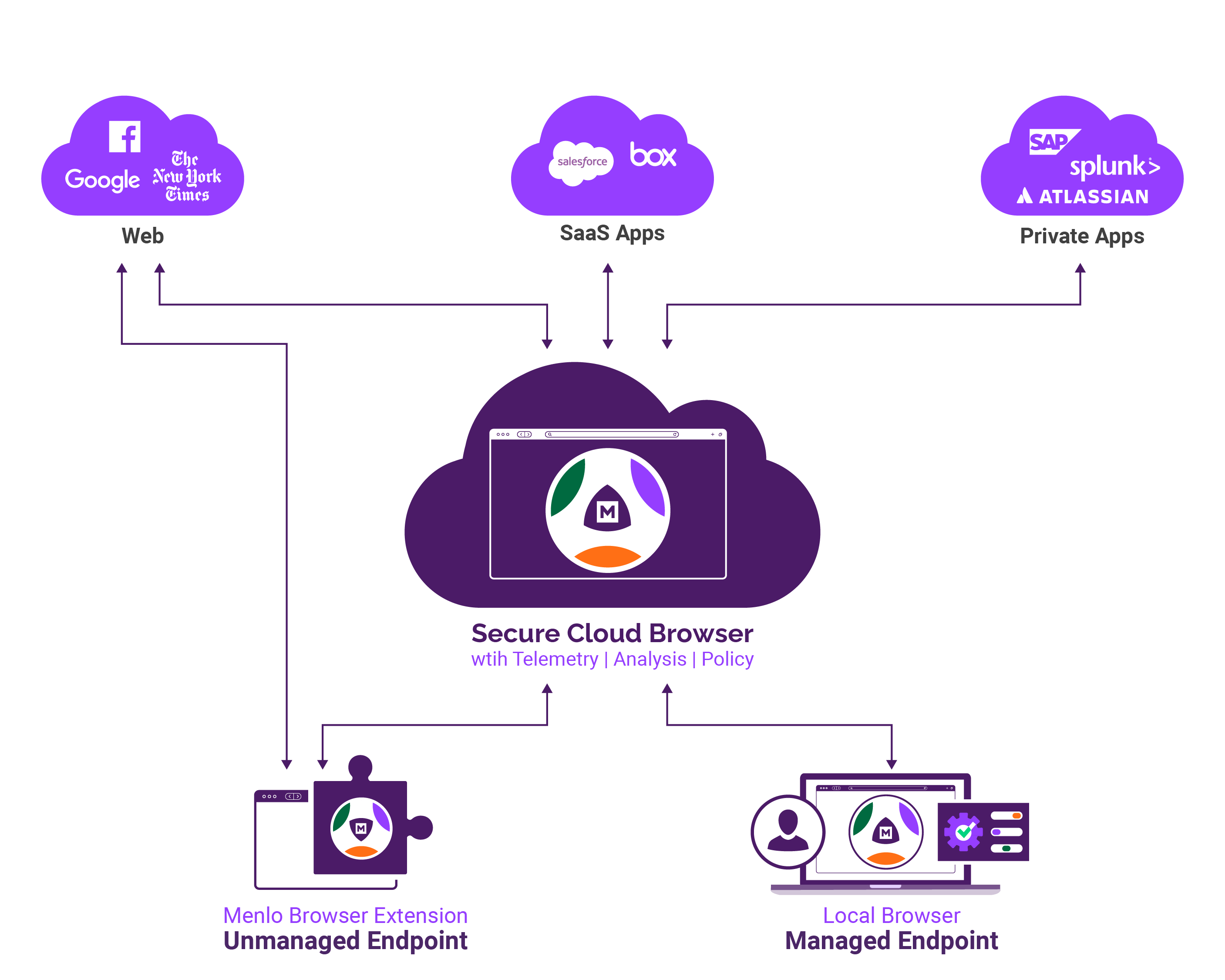
Screenshot of a Menlo Secure Cloud Browser Overview
Technical Details
| Deployment Types | On-Premise, SaaS |
|---|---|
| Operating Systems | Windows, Linux, Mac |
| Mobile Application | No |