TrustRadius: an HG Insights company

Able2Extract Professional vs. PDF Xchange Viewer and Editor

Save this comparison

Save this comparison

Add Product

Recommended Comparisons

    Overview
    ProductRatingMost Used ByProduct SummaryStarting Price

    Able2Extract Professional

    Score8.4 out of 10
    N/AAble2Extract Professional, is a PDF converter, editor, and creator - a PDF suite that aims to cut down on time spent dealing with PDFs and increase PDF productivity in the office. Able2Extract lets users convert scanned (multi-language OCR included) and native PDFs to more than 10 formats, such as MS Word, Excel, PowerPoint, Publisher, Text, AutoCAD, HTML, CSV, and image formats. It also comes with batch PDF conversion and creation that let users manage multiple PDFs in seconds.…

    $34.95

    30-day full version single-user license.

    PDF Xchange Viewer and Editor

    Score9.3 out of 10
    N/APDF Xchange Viewer and Editor is a pdf editing and conversion software offering from Tracker Software Products. It includes features such as create pdf and convert to pdf.N/A
    Pricing
    Able2Extract ProfessionalPDF Xchange Viewer and Editor
    Editions & Modules
    No answers on this topic
    No answers on this topic
    Offerings
    Pricing Offerings
    Able2Extract ProfessionalPDF Xchange Viewer and Editor
    Free Trial
    YesNo
    Free/Freemium Version
    NoNo
    Premium Consulting/Integration Services
    NoNo
    Entry-level Setup FeeNo setup feeNo setup fee
    Additional DetailsLifetime license: $149.95 / 30-Day License: $34.95 / Volume licensing available: Contact us
    More Pricing Information
    Features
    Able2Extract ProfessionalPDF Xchange Viewer and Editor
    PDF Editors
    Comparison of PDF Editors features of Able2Extract Professional and PDF Xchange Viewer and Editor
    Feature
    Able2Extract Professional
    -
    Ratings
    PDF Xchange Viewer and Editor
    9.0
    1 Ratings
    5% above category average
    Edit Text and Images00 Ratings9.01 Ratings
    Merge or Split PDFs00 Ratings9.01 Ratings
    Add Annotations00 Ratings9.01 Ratings
    Text Recognition (OCR)00 Ratings9.01 Ratings
    Page Management00 Ratings9.01 Ratings
    Form Creation and Editing00 Ratings9.01 Ratings
    Secure PDFs00 Ratings9.01 Ratings
    Convert to Different Formats00 Ratings8.01 Ratings
    Comment and Review Tools00 Ratings9.01 Ratings
    Undo and Redo Actions00 Ratings10.01 Ratings
    Best Alternatives
    Able2Extract ProfessionalPDF Xchange Viewer and Editor
    Small Businesses
    Tungsten Power PDF
    Score9.8 out of 10
    Tungsten Power PDF
    Score9.8 out of 10
    Medium-sized Companies
    PDF Xchange Viewer and Editor
    Score9.3 out of 10
    Nitro PDF Pro
    Score8.2 out of 10
    Enterprises
    Adobe Acrobat Reader
    Score8.6 out of 10
    Adobe Acrobat Reader
    Score8.6 out of 10
    All AlternativesView all alternativesView all alternatives
    User Ratings
    Able2Extract ProfessionalPDF Xchange Viewer and Editor
    Likelihood to Recommend
    10.0
    (2 ratings)
    8.0
    (4 ratings)
    Usability
    -
    (0 ratings)
    9.0
    (2 ratings)
    Performance
    -
    (0 ratings)
    10.0
    (1 ratings)
    Support Rating
    -
    (0 ratings)
    10.0
    (1 ratings)
    Ease of integration
    -
    (0 ratings)
    10.0
    (1 ratings)
    User Testimonials
    Able2Extract ProfessionalPDF Xchange Viewer and Editor
    Likelihood to Recommend
    Investintech.com Inc.
    Able2Extract is extremely helpful if you have a PDF with text that you want to manipulate. By converting it into another file format that is more conducive to text, you can correct spelling mistakes, copy paragraphs, and remove them or relocate them. Since I had to take spreadsheets and text from a PDF and insert them into a Word document, Able2Extract Professional was the exact tool I needed to avoid simply taking screenshots.
    Incentivized
    Read full review
    Tracker Software Products
    This software handles large PDF files and has not crashed for me, unlike some other PDF software. It does what I need very well, although it has a lot of features beyond what I need. It extracts and adds documents easily and certainly does well with its search function after applying optical character recognition.
    Incentivized
    Read full review
    Pros
    Investintech.com Inc.
    • Creates editable spreadsheets from Excel documents that have been scanned.
    • Allows certain segments of documents to be selected for editing.
    • Allows bulk conversion.
    Incentivized
    Read full review
    Tracker Software Products
    • Intuitive an easy to understand interface
    • Fast
    • Good value for the price
    Incentivized
    Read full review
    Cons
    Investintech.com Inc.
    • GUI can always improve, even if it's currently good
    • Better how-to instructions to address initial learning curve
    • Functionality could be inserted into Adobe Acrobat Pro, potentially merging products
    Incentivized
    Read full review
    Tracker Software Products
    • Have the ability to add a little more customization (like font sizes in Typewriter tool, etc).
    • Have the ability to export individual pages into separate PDFs.
    • Have the ability to easily resize.
    Incentivized
    Read full review
    Usability
    Investintech.com Inc.
    No answers on this topic
    Tracker Software Products
    It does everything I need, such as OCR, redaction, Bates stamping, bookmarking, and handling large PDF files without crashing. It also does well with the extraction and addition of documents.
    Incentivized
    Read full review
    Performance
    Investintech.com Inc.
    No answers on this topic
    Tracker Software Products
    Performance wise, PDF Xchange Viewer and Editor is flawless. It runs fast, and I haven't experienced any immediately crashing. The reports save quickly, and the document size is never an issue. It saves into a regular PDF, and we're able to open it on any other program or computer. All text boxes, features, and headers show up flawlessly on other programs.
    Incentivized
    Read full review
    Support Rating
    Investintech.com Inc.
    No answers on this topic
    Tracker Software Products
    The application had no issues (we did not contact support) and that's why I give a 10.
    Incentivized
    Read full review
    Alternatives Considered
    Investintech.com Inc.
    None, except for conversions in Acrobat.
    Incentivized
    Read full review
    Tracker Software Products
    PDF Xchange hits a sweet spot for me and my users. It is powerful, includes a full suite of creation, markup, and management tools. It is very affordable.
    Bluebeam is too much that isn't print and PDF related. It is EXPENSIVE ... more than $300 per person before almost mandatory additional training.
    PDF Creator is good for PDF creation. It doesn't include markup and management tools.
    Read full review
    Return on Investment
    Investintech.com Inc.
    • Able2Extract Professional allows me to compile annual reports without having to seek out creators of supplemental material and ask them to rerun their reports in a different file format
    • Our business objective of maintaining consistent branding is achievable through converting PDFs into file formats where we can alter text and swap out logos
    • Able2Extract Professional has the speed and ease of use we need to meet our reporting deadlines
    Incentivized
    Read full review
    Tracker Software Products
    • PDF XChange costs around $50-75 per person depending on the version.
    Read full review
    ScreenShots

    Able2Extract Professional Screenshots

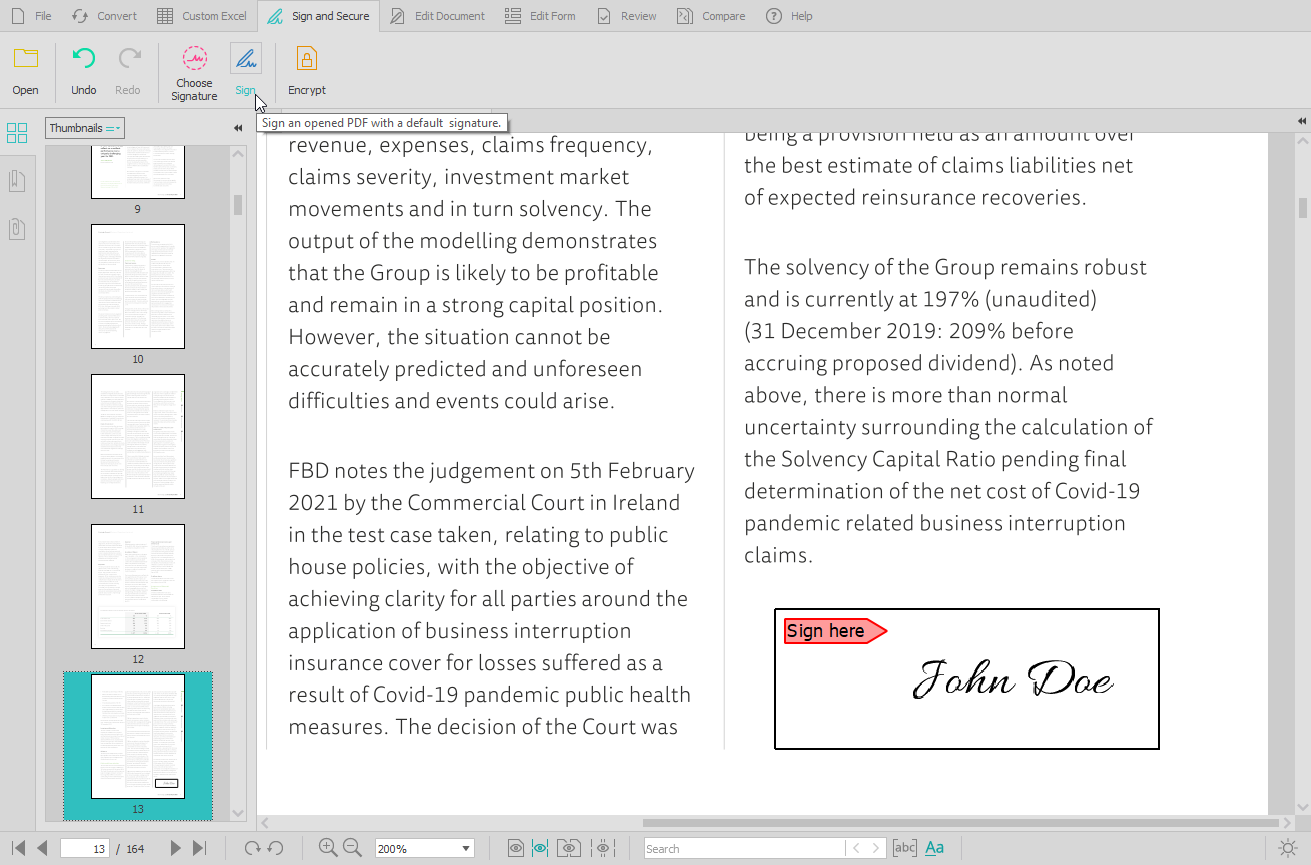
    Screenshot of the PDF conversion interface, that work with most popular formats and lets users extract all images from a PDF document in one click, extract PDF form data, and Batch convert hundreds of PDFs in one go.Screenshot of the Custom PDF to Excel feature, for the conversion of PDF tables to spreadsheet file formats. Users can manually designate columns and rows, preview results before conversion, or manage headers and footers.Screenshot of the PDF editing interface, used to modify or add text and graphics, redact content, merge and split documents, insert, delete, move, rotate, and resize PDF pages.Screenshot of the digital signature feature, secured with cryptographic certificates.Screenshot of the comparison of printable documents, that displays all differences in a handy side-by-side view.