AccessPatrol by CurrentWare vs. Microsoft Purview Data Loss Prevention

Overview
ProductRatingMost Used ByProduct SummaryStarting Price
AccessPatrol by CurrentWare
Score 6.0 out of 10
N/A
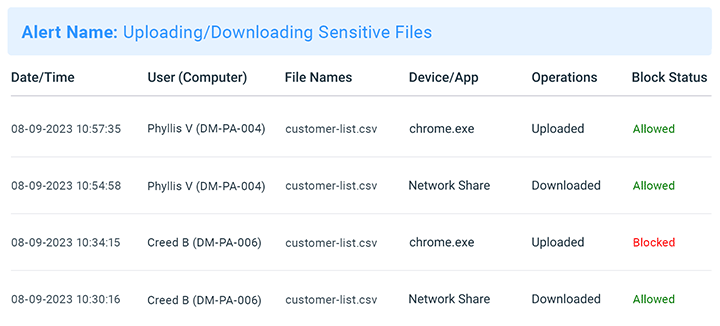
AccessPatrol by CurrentWare provides a solution for securing company endpoints against data breaches caused by illicit data transfers and rogue USB devices. AccessPatrol can be used to block flash drives, cell phones, tablets, Bluetooth, and more. File operations alerts and permissions can be configured to alert IT administrators to suspicious file operations and proactively prevent data transfers by unauthorized users.
$72
per year per user
Microsoft Purview Data Loss Prevention
Score 7.4 out of 10
N/A
Microsoft Purview Data Loss Prevention is used to provide intelligent detection and control of sensitive information across Office 365, OneDrive, SharePoint, Microsoft Teams, and on the endpoint. It also helps prevent data loss through identifying and preventing risky or inappropriate sharing, transfer, or use of sensitive data on endpoints, apps, and services.N/A
Pricing
AccessPatrol by CurrentWareMicrosoft Purview Data Loss Prevention
Editions & Modules
10-99 Users
$6
per month (billed annually) per user
100+ Users
Volume & prepurchase discounts available. Please contact sales for info.
Per User Per Month
No answers on this topic
Offerings
Pricing Offerings
AccessPatrol by CurrentWareMicrosoft Purview Data Loss Prevention
Free Trial
YesYes
Free/Freemium Version
NoNo
Premium Consulting/Integration Services
NoNo
Entry-level Setup FeeNo setup feeNo setup fee
Additional DetailsPricing is based on the volume of licenses purchased. There are additional discounts available for educational organizations, non-profits, managed services providers, and businesses that pre-purchase multiple-year plans.
More Pricing Information
Features
AccessPatrol by CurrentWareMicrosoft Purview Data Loss Prevention
Data Preparation
Comparison of Data Preparation features of Product A and Product B
AccessPatrol by CurrentWare
-
Ratings
Microsoft Purview Data Loss Prevention
8.7
8 Ratings
13% above category average
Data Encryption00 Ratings8.78 Ratings
Best Alternatives
AccessPatrol by CurrentWareMicrosoft Purview Data Loss Prevention
Small Businesses
Paubox Email Suite
Paubox Email Suite
Score 9.0 out of 10
Paubox Email Suite
Paubox Email Suite
Score 9.0 out of 10
Medium-sized Companies
Druva Security Cloud
Score 9.5 out of 10
Druva Security Cloud
Score 9.5 out of 10
Enterprises
Druva Security Cloud
Score 9.5 out of 10
Druva Security Cloud
Score 9.5 out of 10
All AlternativesView all alternativesView all alternatives
User Ratings
AccessPatrol by CurrentWareMicrosoft Purview Data Loss Prevention
Likelihood to Recommend
-
(0 ratings)
7.9
(14 ratings)
Usability
-
(0 ratings)
1.0
(1 ratings)
User Testimonials
AccessPatrol by CurrentWareMicrosoft Purview Data Loss Prevention
Likelihood to Recommend
CurrentWare Inc.
No answers on this topic
Microsoft
I would highly recommend Microsoft Purview Data Loss Prevention for companies that are utilizing Microsoft technologies based on the strong integrations. If a company is using other technologies (e.g Google Workspace), then Microsoft Purview Data Loss Prevention would not be a good fit and would be difficult to implement/manage.
Read full review
Pros
CurrentWare Inc.
No answers on this topic
Microsoft
  • Automatic labeling, once we've trained the naming conventions and things like that and we get the labels placed on things. One of the biggest problems that our clients face is the fact that they don't particularly know every single time exactly the data that they're trying to protect, how to identify it when it comes into the system or when they create it, right? So we're using Purview and we're using the abilities that Purview has to auto-label things based off of either taxonomy that you have produced or created or that have been automatically populated through AI. That makes it a lot easier and kind of thwarts possible user error that causes problems for organizations.
Read full review
Cons
CurrentWare Inc.
No answers on this topic
Microsoft
  • Overall, Microsoft DLP is not my number one choice because there's not much flexibility. There's a lot of restrictions and the way they set up rules a lot really restrictive. Thus it takes a lot more time for my team to build the rules and establish the controls as needed. So it's very clunky in that way and they have not improved it over the years, but I know they're trying to get a better, however it takes time because Microsoft, as we all knows, not a really security centric company.
Read full review
Usability
CurrentWare Inc.
No answers on this topic
Microsoft
Microsoft Purview Data Loss Prevention is super difficult.
Read full review
Alternatives Considered
CurrentWare Inc.
No answers on this topic
Microsoft
There are much more comprehensive and granular DLP solutions out there like Trellix and Sophos but ultimately they are expensive and require significant administrative oversight for implementation and deployment. For a company of our size, they are just not economically feasible. We purchased out 365 E5 tenant with Purview DLP integration from a reseller at a price that we couldn't compete with vs a standalone enterprise product.
Read full review
Return on Investment
CurrentWare Inc.
No answers on this topic
Microsoft
  • It has helped us to prevent data breaches and protect them from data loss.
  • It has strong visibility on the activities related to data copy to and from removable devices.
  • It can easily enforce the policies on group of users and also exclude some in the exclusions
Read full review
ScreenShots

AccessPatrol by CurrentWare Screenshots
Screenshot of AccessPatrol's web console. This password-protected console is accessible to designated operators using a desktop or laptop that is connected to the LAN that the CurrentWare console is installed on.

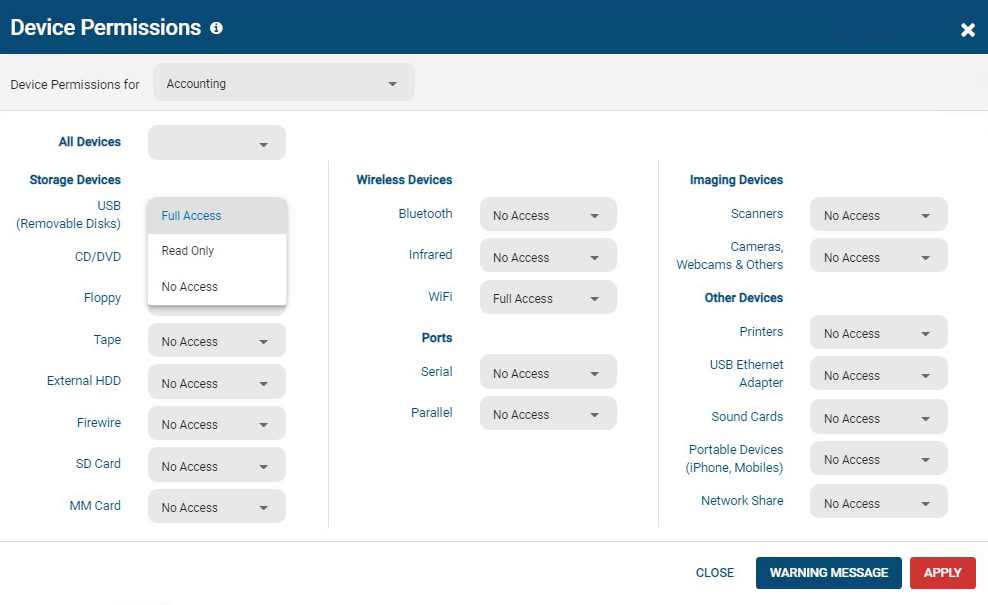
All users and computers with CurrentWare Clients installed can be managed from the console, including offsite/remote workers.Screenshot of AccessPatrol's device permissions window. This is the list of devices that can be blocked with AccessPatrol, including removable storage devices such as USB flash drives, optical media, and floppy disks. AccessPatrol can also block WiFi, Printers/Scanners, and other peripheral devices.

If specific USB devices need to be allowed that can be whitelisted using the Allowed List. By design AccessPatrol does not block USB-based HID devices such as keyboards and mice; blocking USBs will still allow these devices to function as normal.Screenshot of AccessPatrol's USB activity dashboards provide aggregated and granular USB activity data at a glance including file operations and blocked vs allowed devicesScreenshot of AccessPatrol's Block File Transfers window.  File transfers can be blocked based on extensions or specific file names.Screenshot of Screenshot of

Microsoft Purview Data Loss Prevention Screenshots

Screenshot of pre-built policy templates to easily get startedScreenshot of DLP analytics to help recommend new policies and fine tune existing onesScreenshot of the step that enables one policy to be applied to several locationsScreenshot of then next step, that enables policies to be scoped to specific users and user groupsScreenshot of composite conditions using groups of AND /OR and exceptions with NOTScreenshot of granular restrictions for different actions