Enterprise eTIME, by ADP (discontinued) vs. Out'n About! For Outlook

Overview
ProductRatingMost Used ByProduct SummaryStarting Price
Enterprise eTIME, by ADP (discontinued)
Score 10.0 out of 10
Enterprise companies (1,001+ employees)
Enterprise eTIME ® was a suite of apps from ADP, used to automate time and labor management, and provide employees and managers with tools to optimize schedules, attendance and leave. The product has been discontinued, and is no longer available for sale.N/A
Out'n About! For Outlook
Score 7.3 out of 10
Mid-Size Companies (51-1,000 employees)
Out’n About! for Outlook is a time tracking solution that is designed to replace an in/out status board. The vendor says their solution makes it easy for businesses to manage their workforce availability and timesheets. This solution enables businesses to use their existing Outlook environment, and employees can easily track their work hours. This solution is customizable and businesses can control what information is seen on the status board.  Custom reports are…
$349
per server
Pricing
Enterprise eTIME, by ADP (discontinued)Out'n About! For Outlook
Editions & Modules
ADP Vantage HCM Time
Call for details
ADP Global Time and Labor Management
Call for details
ADP Workforce Now Enhanced Time
Call for details
Out'n About! For Outlook
$349
per server
Offerings
Pricing Offerings
Enterprise eTIME, by ADP (discontinued)Out'n About! For Outlook
Free Trial
NoYes
Free/Freemium Version
NoYes
Premium Consulting/Integration Services
YesNo
Entry-level Setup FeeRequiredNo setup fee
Additional DetailsPricing is based on a per employee model. Billing is monthly, based on a subscription model.Free upgrades and free support. You can connect an unlimited number of clients to a single purchased server. No per-user fees.
More Pricing Information
Community Pulse
Enterprise eTIME, by ADP (discontinued)Out'n About! For Outlook
Best Alternatives
Enterprise eTIME, by ADP (discontinued)Out'n About! For Outlook
Small Businesses
When I Work
When I Work
Score 7.3 out of 10
Dayforce Powerpay
Dayforce Powerpay
Score 9.4 out of 10
Medium-sized Companies
Paypro Workforce Management
Score 9.2 out of 10
TimeClock Plus
TimeClock Plus
Score 9.5 out of 10
Enterprises
SAP Fieldglass
SAP Fieldglass
Score 8.5 out of 10
Zoho People
Zoho People
Score 8.9 out of 10
All AlternativesView all alternativesView all alternatives
User Ratings
Enterprise eTIME, by ADP (discontinued)Out'n About! For Outlook
Likelihood to Recommend
7.1
(17 ratings)
8.0
(1 ratings)
Likelihood to Renew
10.0
(1 ratings)
-
(0 ratings)
Usability
9.0
(2 ratings)
-
(0 ratings)
Support Rating
7.8
(4 ratings)
-
(0 ratings)
User Testimonials
Enterprise eTIME, by ADP (discontinued)Out'n About! For Outlook
Likelihood to Recommend
Discontinued Products
It is well suited for an Outsourcing business. This type of business has a lot of clients to serve and most of the time consultants serve multiple different clients, eTime suits this kind of setup since it can aid on the accuracy of billing clients for hours rendered by consultants to them.
Read full review
Intelligent Concepts
1,- If the organization have 365 I recomended the integration with Out'n About 2.- If your organization does not have 365 I not recomended the solution because the integration is not easy 3.- In Europe there are many legal requirements to comply with the GDPR with employees and the sharing of information. Express authorizations and many requirements, and one emplyee can say not to the authorization. 4.- Need best performance in big organizations 5.- Not work in MAC properly
Read full review
Pros
Discontinued Products
  • Ability to clock hours without a physical time clock/punchcard -- great for jobs like tutoring, which may not have a central meeting location
  • Ability to clock hours for multiple positions in different departments across an organization -- one paycheck, even though I had multiple supervisors and different pay rates
Read full review
Intelligent Concepts
  • Outlook Contact Synchronization automatically
  • Time sheet informs for the remote workers
  • Sensing presence for remote workers and local employeers
Read full review
Cons
Discontinued Products
  • The setup is difficult for administers.
  • Mapping the pay rules to the accrual profiles, pay codes, etc., is hard to administer as well.
  • The consultants at ADP do not know the system well in some cases so getting help with setup and issues can be difficult.
Read full review
Intelligent Concepts
  • Panel department it is not easy to implement
  • 365 compatibility need to improvement
  • Remote mobile commands many times not working
Read full review
Likelihood to Renew
Discontinued Products
Already using product and I have been happy with the results.
Read full review
Intelligent Concepts
No answers on this topic
Usability
Discontinued Products
In some ways, the flexibility of eTime makes it much more usable than some time card systems. I can log my own hours at my convenience (as long as it is during the pay period), and eTime sends me a reminder email 24 hours before the cut-off for each pay period. I can log hours for multiple positions using particular pay codes, although there is no way for me to save frequently used or "my" pay codes -- adding this feature would be a much-appreciated improvement to eTime's usability. Juggling multiple pay codes within the current system, however, is cumbersome. There can also be problems if an incorrect or overlapping hour is accidentally entered and saved -- certain fields turn red and are difficult to adjust, often requiring the help of a software administrator. Correcting other errors and entering historical hours is extremely difficult, and the software does not work well on some browsers (and it is unattractive when I have been able to get it to work)
Read full review
Intelligent Concepts
No answers on this topic
Support Rating
Discontinued Products
Based on my usage of the program is why I rated it a 7. I used for verifying attendance and employee time cards for accuracy and/or discrepancies.
Read full review
Intelligent Concepts
No answers on this topic
Alternatives Considered
Discontinued Products
I have not used similar workforce management platform though Enterprise eTIME, by ADP has never failed us in any day. It has given our teams the best guidance on effective implementation of projects and tasks. Close monitoring of our daily programs has lead to increased production. We have managed to implement our duties based on the set timelines.
Read full review
Intelligent Concepts
Sheqsy We evaluate for 2 months and does not working well with 365 and does not support in Europe. It is good for control remote workers, but not for a colaboration tool and integration in organizations with more than 500 users. It is good also because sale in SaaS mode but for the GDPR law in Europe not offers regulatory compliance guarantees regarding sensitive employee data. For the sales people in the field can be good, but is not easy to achieve good results
Read full review
Return on Investment
Discontinued Products
  • The system allows our employees to quickly record their time so that they can focus on their day-to-day jobs.
  • The system allows our managers to quickly approve time cards.
  • ADP Enterprise eTime does not have a sufficient query function to enable employers to easily create/schedule reports that the business needs. ADP charges high fees for custom reports.
Read full review
Intelligent Concepts
  • In this moment we expect to improve the control of remote workers in a 100%
  • The control of the remote worker can suppose to a 25 % more in the productivity
  • The investment is relatively low with the expected benefits
Read full review
ScreenShots

Enterprise eTIME, by ADP (discontinued) Screenshots

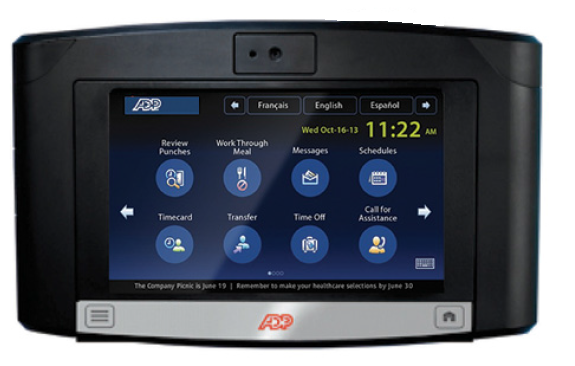
Screenshot of Analytics dashboard provide insights into important time and attendance data that can help you get a handle on your greatest controllable expense - labor costs.Screenshot of Provide convenient access to time and schedule information to employees on the go, and capture what's happening when it's happening.Screenshot of Equip your locations with feature-rich touchscreen timeclocks. Available badge, proximity and biometrics readers help to ensure the identify of employees using the system.Screenshot of Enjoy a unified HCM experience where frequently used time and attendance information sits along side the most requested pay and HR information.

Out'n About! For Outlook Screenshots

Screenshot of Main Screen Features
Your employees can connect to Out’n About! for Outlook via Microsoft Outlook.

A small Outlook addin adds all the Out’n About! In/Out Status Board features directly into the Outlook interface so you can continue to manage all of your information using a common interface.Screenshot of Presence Sensing

Out’n About! for Outlook contains a presence sensing feature that automatically alerts you when you use your computer and are currently Checked Out to ensure you have not forgotten to check In when returning to the office.Screenshot of Outlook Calendar Integration
Out’n About! for Outlook allows you to schedule future status events (e.g., meetings, travel, or vacation) based on Outlook Appointment items.

Department Panel
Organize your workforce into easy to use departments.

The Out’n About! Department Panel allows users to quickly select different departments for viewing. The panel also contains a filter dialog which allows users to filter users by different search criteria.