TrustRadius: an HG Insights company

Enterprise eTIME, by ADP (discontinued) vs. Teamsly

Save this comparison

Save this comparison

Add Product

Recommended Comparisons

    Overview
    ProductRatingMost Used ByProduct SummaryStarting Price

    Enterprise eTIME, by ADP (discontinued)

    Score10 out of 10
    Mid-Size Companies (51-1,000 employees)
    Enterprise eTIME ® was a suite of apps from ADP, used to automate time and labor management, and provide employees and managers with tools to optimize schedules, attendance and leave. The product has been discontinued, and is no longer available for sale.N/A

    Teamsly

    N/AN/ATeamsly is a cloud-based workforce management platform for hourly, shift-based, deskless, frontline, and field teams. Available on the web, iOS, and Android, Teamsly brings employee scheduling, job and crew scheduling, time and attendance, GPS time tracking, timesheets, team communication, task management, digital forms, audits, employee training, paid time off, labor-cost management, and workforce reporting into one connected system. The platform is designed to…

    $29

    per month per Location

    Pricing
    Enterprise eTIME, by ADP (discontinued)Teamsly
    Editions & Modules
    ADP Vantage HCM Time
    Call for details
    ADP Global Time and Labor Management
    Call for details
    ADP Workforce Now Enhanced Time
    Call for details
    Free
    $0
    per month Per Location
    Basic
    $29
    per month Per Location
    All-In-One
    $59
    per month Per Location
    Offerings
    Pricing Offerings
    Enterprise eTIME, by ADP (discontinued)Teamsly
    Free Trial
    NoYes
    Free/Freemium Version
    NoYes
    Premium Consulting/Integration Services
    YesNo
    Entry-level Setup FeeRequiredNo setup fee
    Additional DetailsPricing is based on a per employee model. Billing is monthly, based on a subscription model.Teamsly uses flat per-location pricing rather than per-employee pricing. The Free plan supports one location with up to 10 employees. Basic and All-In-One paid plans include unlimited employees, helping businesses maintain predictable costs as their teams grow. Basic costs $29 per location per month with monthly billing or $24 per location per month when billed annually. All-In-One costs $59 per location per month with monthly billing or $49 per location per month when billed annually. Both paid plans include a 30-day free trial with no credit card required. Teamsly does not charge setup fees or require a locked-in contract, and customers can upgrade, downgrade, or change plans as their operational needs evolve.
    More Pricing Information
    Community Pulse
    Enterprise eTIME, by ADP (discontinued)Teamsly
    Considered Both Products
    Discontinued Products
    No answer on this topic
    Teamsly
    No answer on this topic
    Key User Insights
    Would buy again
    100%
    Would buy again
    6 Answers
    No answers on this topic
    Delivers good value for the price
    100%
    Delivers good value for the price
    6 Answers
    No answers on this topic
    Happy with the feature set
    100%
    Happy with the feature set
    6 Answers
    No answers on this topic
    Lived up to sales and marketing promises
    100%
    Lived up to sales and marketing promises
    5 Answers
    No answers on this topic
    Implementation went as expected
    No answers on this topic
    No answers on this topic
    Best Alternatives
    Enterprise eTIME, by ADP (discontinued)Teamsly
    Small Businesses
    Deputy
    Score8.6 out of 10
    Deputy
    Score8.6 out of 10
    Medium-sized Companies
    Harri
    Score6 out of 10
    Harri
    Score6 out of 10
    Enterprises
    UKG Workforce Central (discontinued)
    Score5.1 out of 10
    Enterprise eTIME, by ADP (discontinued)
    Score10 out of 10
    All AlternativesView all alternativesView all alternatives
    User Ratings
    Enterprise eTIME, by ADP (discontinued)Teamsly
    Likelihood to Recommend
    7.1
    (17 ratings)
    -
    (0 ratings)
    Likelihood to Renew
    10.0
    (1 ratings)
    -
    (0 ratings)
    Usability
    9.0
    (2 ratings)
    -
    (0 ratings)
    Support Rating
    7.8
    (4 ratings)
    -
    (0 ratings)
    User Testimonials
    Enterprise eTIME, by ADP (discontinued)Teamsly
    Likelihood to Recommend
    Discontinued Products
    It is well suited for an Outsourcing business. This type of business has a lot of clients to serve and most of the time consultants serve multiple different clients, eTime suits this kind of setup since it can aid on the accuracy of billing clients for hours rendered by consultants to them.
    Incentivized
    Read full review
    Teamsly
    No answers on this topic
    Pros
    Discontinued Products
    • Ability to clock hours without a physical time clock/punchcard -- great for jobs like tutoring, which may not have a central meeting location
    • Ability to clock hours for multiple positions in different departments across an organization -- one paycheck, even though I had multiple supervisors and different pay rates
    Read full review
    Teamsly
    No answers on this topic
    Cons
    Discontinued Products
    • The setup is difficult for administers.
    • Mapping the pay rules to the accrual profiles, pay codes, etc., is hard to administer as well.
    • The consultants at ADP do not know the system well in some cases so getting help with setup and issues can be difficult.
    Incentivized
    Read full review
    Teamsly
    No answers on this topic
    Likelihood to Renew
    Discontinued Products
    Already using product and I have been happy with the results.
    Read full review
    Teamsly
    No answers on this topic
    Usability
    Discontinued Products
    In some ways, the flexibility of eTime makes it much more usable than some time card systems. I can log my own hours at my convenience (as long as it is during the pay period), and eTime sends me a reminder email 24 hours before the cut-off for each pay period. I can log hours for multiple positions using particular pay codes, although there is no way for me to save frequently used or "my" pay codes -- adding this feature would be a much-appreciated improvement to eTime's usability. Juggling multiple pay codes within the current system, however, is cumbersome. There can also be problems if an incorrect or overlapping hour is accidentally entered and saved -- certain fields turn red and are difficult to adjust, often requiring the help of a software administrator. Correcting other errors and entering historical hours is extremely difficult, and the software does not work well on some browsers (and it is unattractive when I have been able to get it to work)
    Read full review
    Teamsly
    No answers on this topic
    Support Rating
    Discontinued Products
    Based on my usage of the program is why I rated it a 7. I used for verifying attendance and employee time cards for accuracy and/or discrepancies.
    Incentivized
    Read full review
    Teamsly
    No answers on this topic
    Alternatives Considered
    Discontinued Products
    I have not used similar workforce management platform though Enterprise eTIME, by ADP has never failed us in any day. It has given our teams the best guidance on effective implementation of projects and tasks. Close monitoring of our daily programs has lead to increased production. We have managed to implement our duties based on the set timelines.
    Incentivized
    Read full review
    Teamsly
    No answers on this topic
    Return on Investment
    Discontinued Products
    • The system allows our employees to quickly record their time so that they can focus on their day-to-day jobs.
    • The system allows our managers to quickly approve time cards.
    • ADP Enterprise eTime does not have a sufficient query function to enable employers to easily create/schedule reports that the business needs. ADP charges high fees for custom reports.
    Incentivized
    Read full review
    Teamsly
    No answers on this topic
    ScreenShots

    Enterprise eTIME, by ADP (discontinued) Screenshots

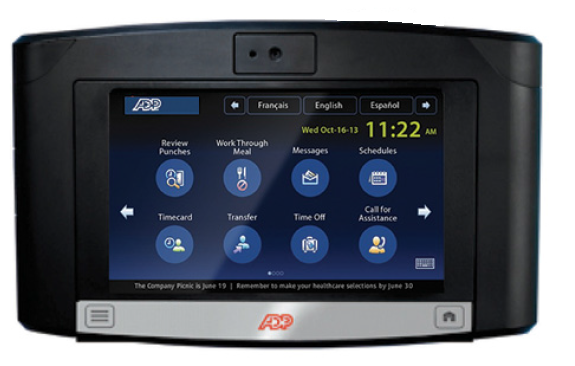
    Screenshot of Analytics dashboard provide insights into important time and attendance data that can help you get a handle on your greatest controllable expense - labor costs.Screenshot of Provide convenient access to time and schedule information to employees on the go, and capture what's happening when it's happening.Screenshot of Equip your locations with feature-rich touchscreen timeclocks. Available badge, proximity and biometrics readers help to ensure the identify of employees using the system.Screenshot of Enjoy a unified HCM experience where frequently used time and attendance information sits along side the most requested pay and HR information.

    Teamsly Screenshots

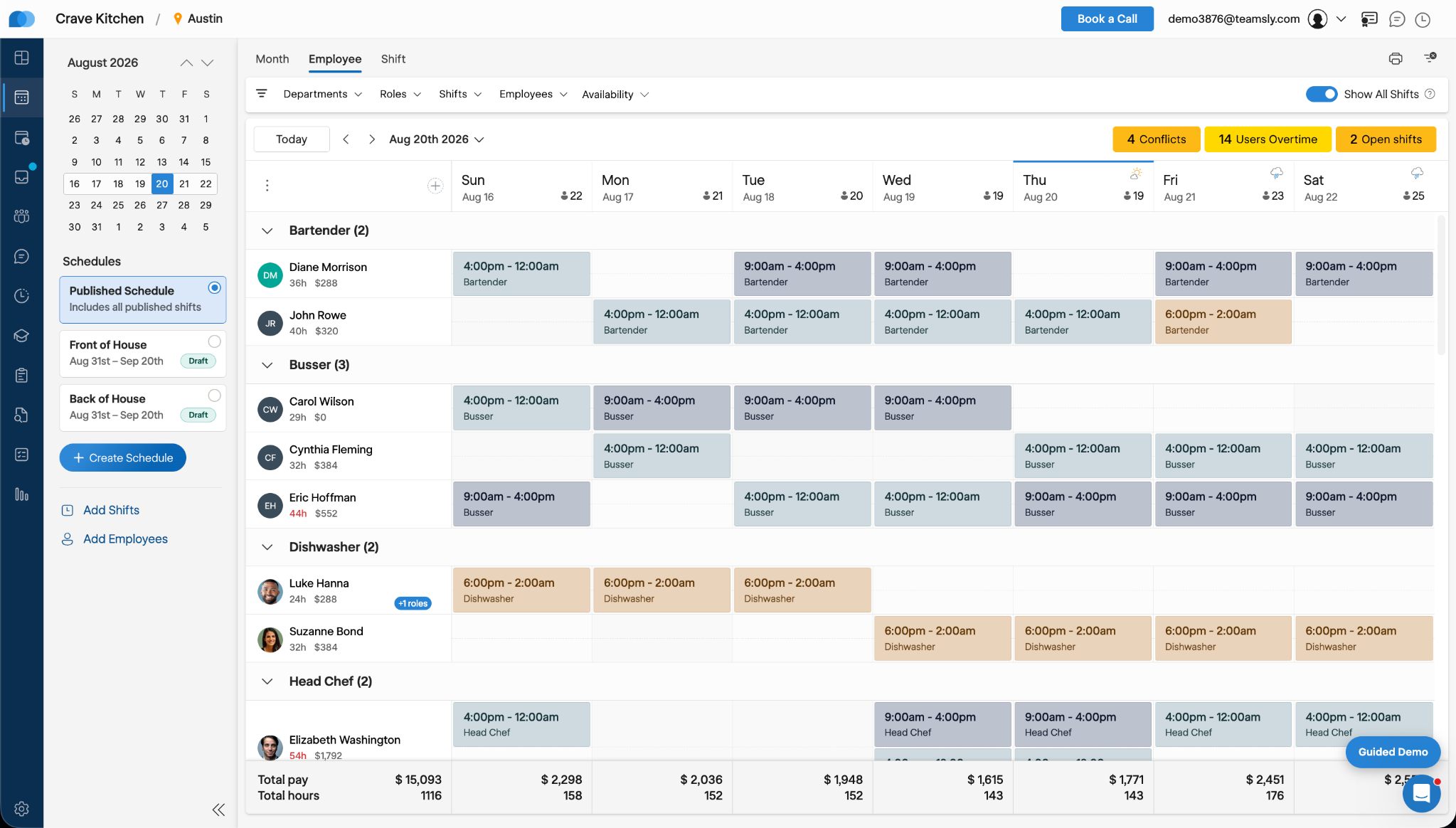
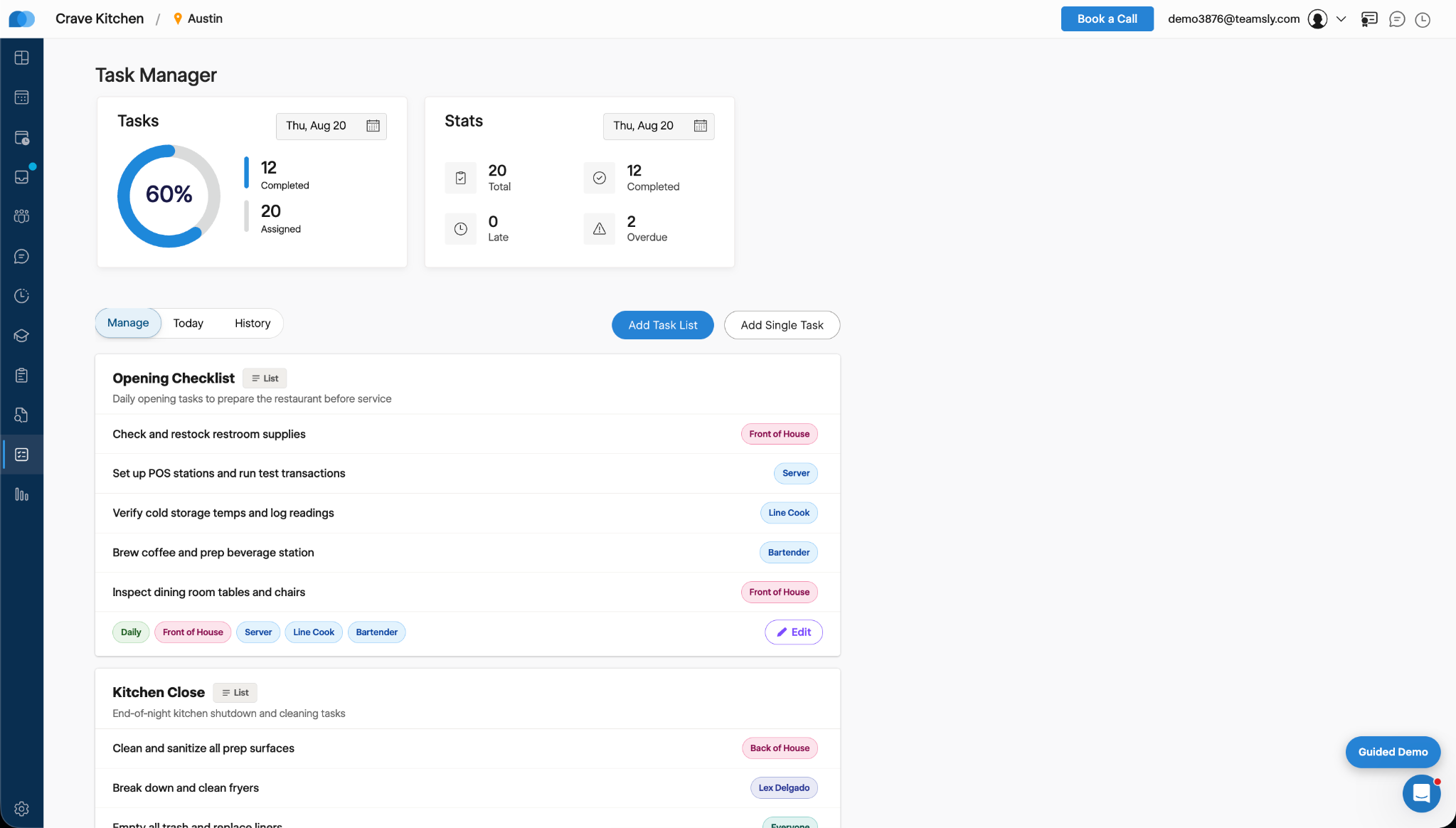
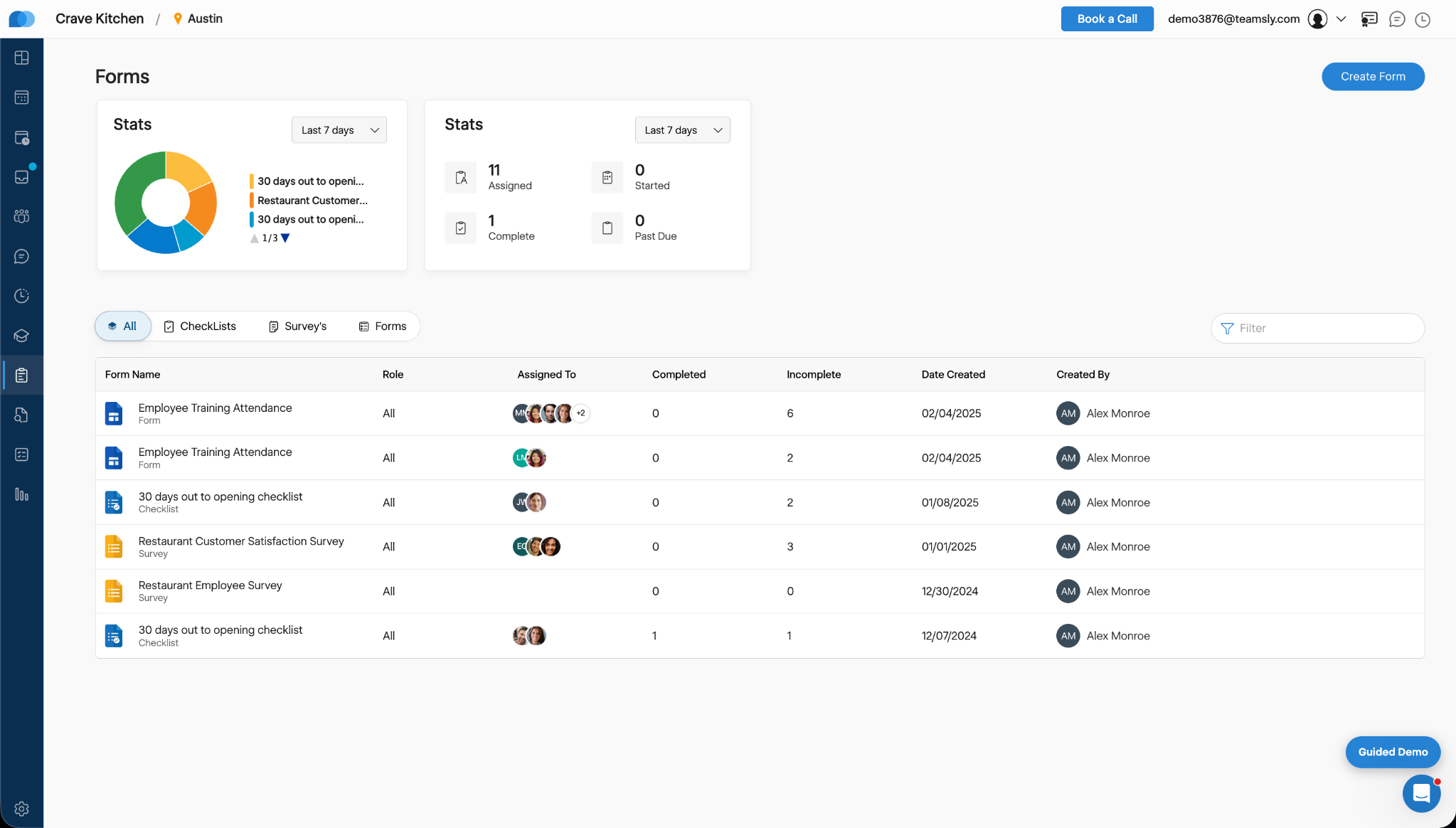
    Screenshot of Teamsly’s employee scheduling software, which gives managers a role-based weekly view of every employee and shift. Managers can create separate draft and published schedules, filter by department, role, shift, employee, or availability, identify scheduling conflicts, projected overtime, and open shifts, and review scheduled hours and estimated labor costs before publishing changes to the team.Screenshot of Teamsly’s workforce management dashboard. This brings daily staffing and operational data into one centralized view. Managers can monitor open shifts, shift swaps, employee requests, availability requests, scheduled coverage by role, paid hours, overtime, estimated pay, paid breaks, training quiz completion, and a visual shift timeline—making urgent staffing and workforce priorities easier to identify.Screenshot of Teamsly’s employee timesheet and time tracking software, which organizes timecards, paid hours, regular hours, overtime, paid and unpaid breaks, and estimated pay. Managers can compare scheduled hours with actual hours, spot timecard issues, review attendance data by employee and date range, add missing timecards, and download detailed reports for payroll preparation.Screenshot of Teamsly’s task management software, which helps managers create one-time tasks and recurring operational checklists, assign work by employee or role, and monitor completion from one dashboard. Status metrics show assigned, completed, late, and overdue work, while Today and History views strengthen accountability across opening, closing, cleaning, food preparation, and other repeatable team workflows.Screenshot of where Teamsly centralizes digital forms, checklists, and surveys for frontline and deskless teams. Managers can create and assign workflows such as employee training attendance forms, new-location opening checklists, customer satisfaction surveys, and employee surveys, then track assigned, started, completed, incomplete, and past-due submissions from a filterable reporting dashboard.Screenshot of Teamsly’s audit management software, which standardizes inspections and evaluations for employees, external participants, locations, equipment, and other operational subjects. Managers can assign audits, set scoring goals, monitor average scores, track completed and incomplete work, and identify past-due audits across food safety, employee hygiene, equipment maintenance, storage, workplace cleanliness, training, and knowledge.