AI SoloHR vs. Intapp Conflicts

Overview
ProductRatingMost Used ByProduct SummaryStarting Price
AI SoloHR
Score 0.0 out of 10
N/A
AI SoloHR is HR case management software for U.S. small businesses and lean HR teams that need a structured way to manage sensitive HR workflows. The product is designed for teams that handle HR in-house and need more than spreadsheets, inbox threads, and shared folders to track case activity. AI SoloHR helps users organize FMLA, ADA accommodation, employee relations, benefits renewal, leave-related, and other HR follow-up workflows in a case-based workspace. Each…
$79
per month per workspace
Intapp Conflicts
Score 10.0 out of 10
N/A
AI-assisted clearance, available with Intapp Conflicts, allows conflicts team to allocate their time more effectively by leveraging artificial intelligence to analyze firm data to group conflicts search results into groups that require no action versus those that pose potential conflicts or require manual review. The vendor states their system uses machine learning to continuously learn with use, facilitating constant improvement and accuracy.N/A
Pricing
AI SoloHRIntapp Conflicts
Editions & Modules
Starter
$79
per month Per workspace
Solo HR
$199
per month Per workspace
HR Ops Team
$399
per month Per workspace
Compliance Plus
$799
per month Per workspace
No answers on this topic
Offerings
Pricing Offerings
AI SoloHRIntapp Conflicts
Free Trial
YesNo
Free/Freemium Version
NoNo
Premium Consulting/Integration Services
NoNo
Entry-level Setup FeeNo setup feeNo setup fee
Additional DetailsAI SoloHR is sold as subscription SaaS with four monthly plan tiers. Starter begins at $79/month. Solo HR is $199/month, HR Ops Team is $399/month, and Compliance Plus is $799/month. Plans are based on workspace tier and operational limits such as active cases, people records, seats, AI drafts, intake links, outbound email, audit exports, and advanced controls. A 14-day free trial is available with no credit card required.
More Pricing Information
User Ratings
AI SoloHRIntapp Conflicts
Likelihood to Recommend
-
(0 ratings)
10.0
(1 ratings)
User Testimonials
AI SoloHRIntapp Conflicts
Likelihood to Recommend
DragonVerse Media Inc
No answers on this topic
Intapp
Intapp is great for storing your conflicts database and files associated with matters. I find that its user interface is really friendly. I have yet to see an analyst that does not quickly learn how it functions. Going through files can be a little bit more onerous because the way they are listed and naming conventions can vary, but overall I find it a very helpful tool for running conflicts
Read full review
Pros
DragonVerse Media Inc
No answers on this topic
Intapp
  • Allows for easy review of conflicts within the database
  • Has a very friendly user interface
  • Easy ability to communicate with downstream teams and local offices
  • Customizable searches with search parameters (default settings)
Read full review
Cons
DragonVerse Media Inc
No answers on this topic
Intapp
  • Dark Mode option would make for a friendlier user experience
  • Being able to paste outside information directly from copying (i.e., do not have to use a notepad to avoid formatting issues)
  • An easily accessible user guide (one click access)
Read full review
Alternatives Considered
DragonVerse Media Inc
No answers on this topic
Intapp
I have only ever used Intapp in the law firm setting. My only other experience is using legal and research search engines, which do not fit within the realm of Intapp per se.
Read full review
Return on Investment
DragonVerse Media Inc
No answers on this topic
Intapp
  • It helps reduce risk to our firm
  • It has allowed us to have the forms we use be interconnected, so we avoid wasting time on submission of separate forms
  • The report we have now also allows Partners to review conflicts on their own even without us providing a summary (helpful for afterhours for the Partners)
Read full review
ScreenShots

AI SoloHR Screenshots

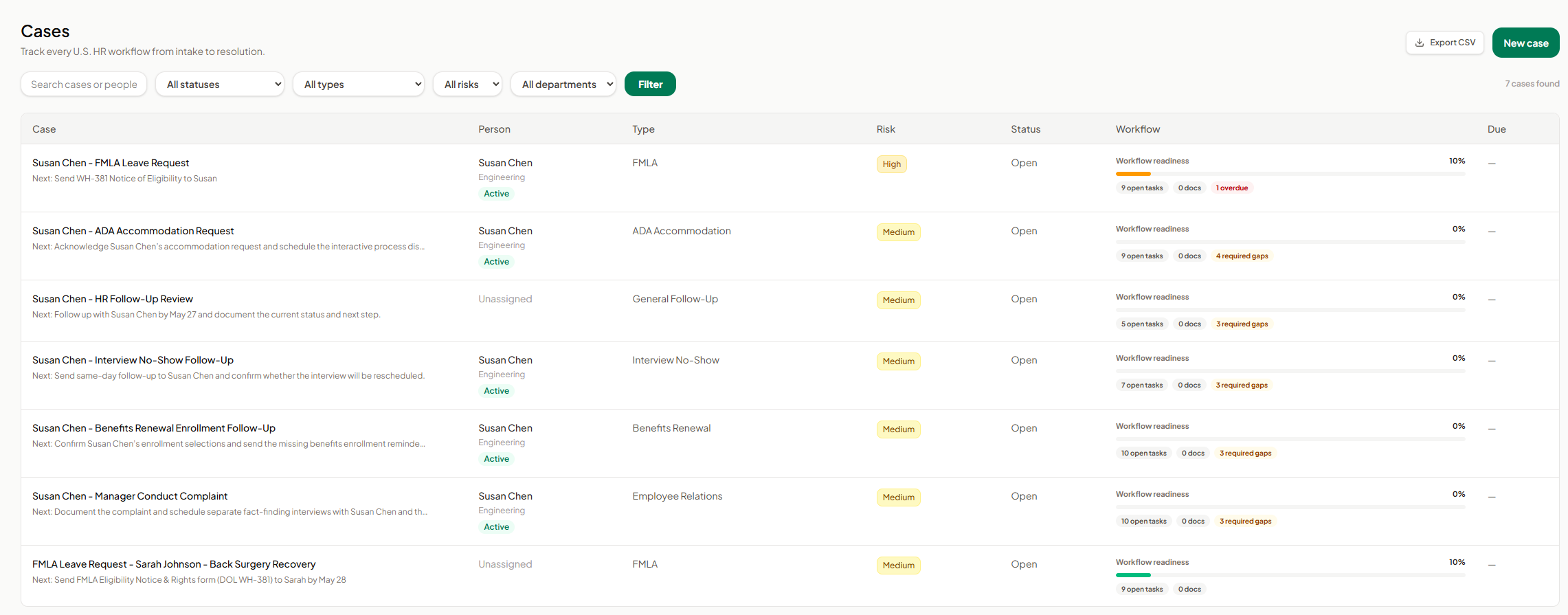
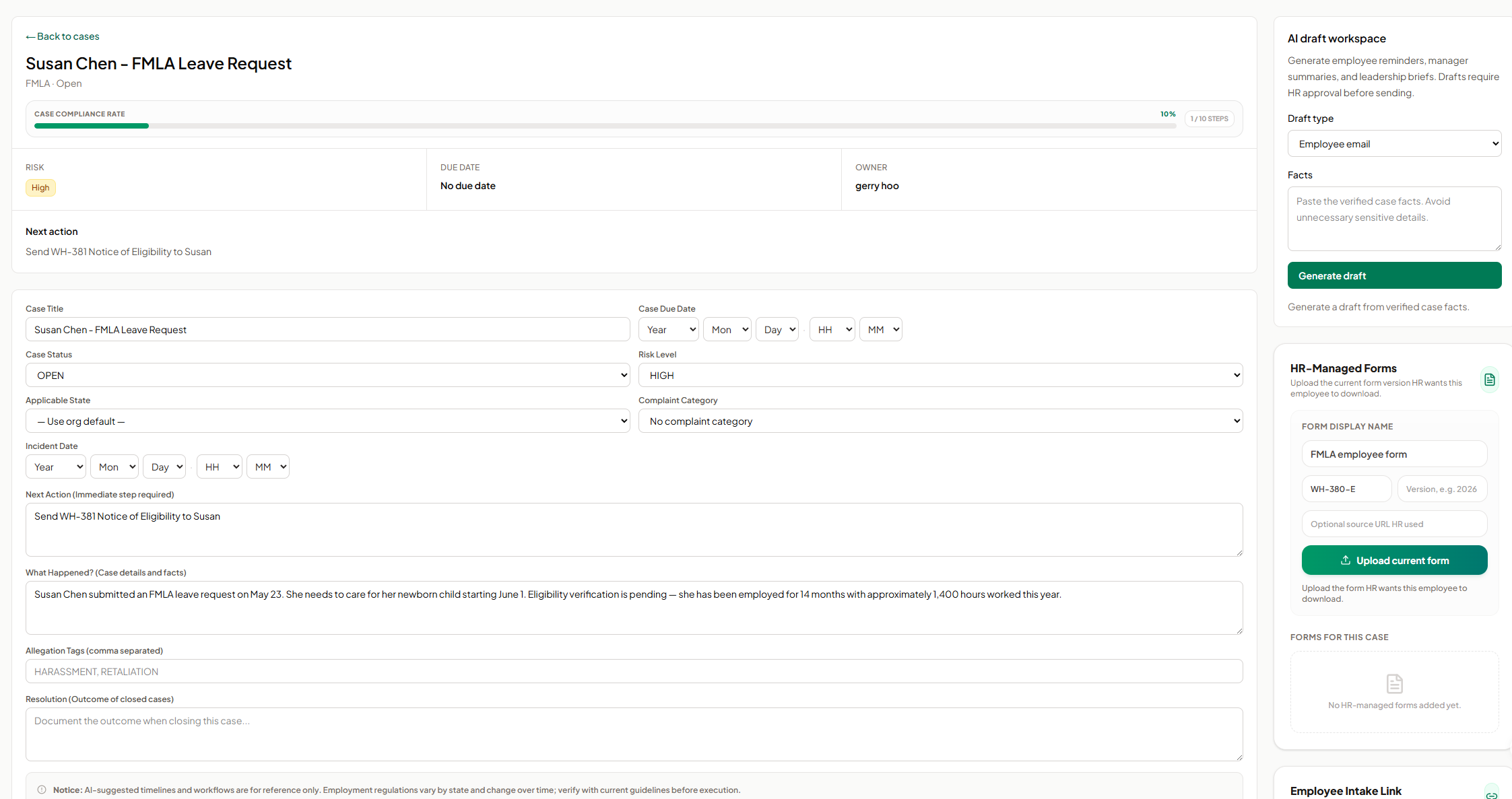
Screenshot of AI SoloHR FMLA workflow screen showing how HR teams can track leave request details, eligibility review, notice dates, certification deadlines, designation status, payroll or benefits status, and return-to-work readiness in one structured case workflow. The screen shows a case moving from intake through certification and designation, with workflow state, blocking reason, key dates, status fields, notes, and a save action for maintaining an organized FMLA case record.Screenshot of AI SoloHR HR-managed forms screen showing how HR can upload and organize the current form version for an employee case. The panel includes fields for form display name, form code, version, optional source URL, and an upload action, helping HR keep case-specific forms such as FMLA employee forms connected to the relevant case record.Screenshot of AI SoloHR AI draft workspace showing how HR can generate draft communications from verified case facts. The screen includes a draft type selector for employee emails, manager summaries, or leadership briefs, a case facts field, and a generate action, with drafts positioned for HR review before sending.Screenshot of AI SoloHR cases dashboard showing a centralized list of HR workflows from intake to resolution. The screen includes search, status, type, risk, and department filters, plus case rows for FMLA, ADA accommodation, interview no-show, benefits renewal, employee relations, and general follow-up workflows. Each row shows the related person, case type, risk level, status, workflow readiness, open tasks, document count, required gaps, overdue items, and export or new case actions.Screenshot of AI SoloHR case detail screen for an FMLA leave request, showing the case summary, compliance progress, risk level, owner, next action, due date, editable case fields, incident details, case facts, tags, and resolution notes. The screen also includes side panels for AI draft generation and HR-managed forms, helping HR keep case tracking, communication drafts, and required form uploads connected to the same employee case record.Screenshot of AI SoloHR new case screen showing how HR can create a structured HR case by capturing the minimum facts first. The form includes primary person, case title, workflow type, risk level, applicable state, next action, and case summary fields, with a disclaimer reminding users to verify AI-generated workflow guidance against current official requirements.