TrustRadius: an HG Insights company

Save this comparison

Save this comparison

Add Product

Recommended Comparisons

    Overview
    ProductRatingMost Used ByProduct SummaryStarting Price

    AI SoloHR

    N/AN/AAI SoloHR is HR case management software for U.S. small businesses and lean HR teams that need a structured way to manage sensitive HR workflows. The product is designed for teams that handle HR in-house and need more than spreadsheets, inbox threads, and shared folders to track case activity. AI SoloHR helps users organize FMLA, ADA accommodation, employee relations, benefits renewal, leave-related, and other HR follow-up workflows in a case-based workspace. Each…

    $79

    per month per workspace

    NeoCase

    Score8 out of 10
    N/ANeoCase, headquartered in France, offers HR case management, employee self-service system, and employee knowledgebase to enterprises.

    $100

    per month

    Pricing
    AI SoloHRNeoCase
    Editions & Modules
    Starter
    $79
    per month Per workspace
    Solo HR
    $199
    per month Per workspace
    HR Ops Team
    $399
    per month Per workspace
    Compliance Plus
    $799
    per month Per workspace
    Neocase
    $100.00
    per month
    Offerings
    Pricing Offerings
    AI SoloHRNeoCase
    Free Trial
    YesNo
    Free/Freemium Version
    NoNo
    Premium Consulting/Integration Services
    NoNo
    Entry-level Setup FeeNo setup feeNo setup fee
    Additional DetailsAI SoloHR is sold as subscription SaaS with four monthly plan tiers. Starter begins at $79/month. Solo HR is $199/month, HR Ops Team is $399/month, and Compliance Plus is $799/month. Plans are based on workspace tier and operational limits such as active cases, people records, seats, AI drafts, intake links, outbound email, audit exports, and advanced controls. A 14-day free trial is available with no credit card required.
    More Pricing Information
    Best Alternatives
    AI SoloHRNeoCase
    Small Businesses
    Bonterra Apricot
    Score9.2 out of 10
    Bonterra Apricot
    Score9.2 out of 10
    Medium-sized Companies
    Bonterra Apricot
    Score9.2 out of 10
    Bonterra Apricot
    Score9.2 out of 10
    Enterprises
    No answers on this topic
    No answers on this topic
    All AlternativesView all alternativesView all alternatives
    User Ratings
    AI SoloHRNeoCase
    Likelihood to Recommend
    -
    (0 ratings)
    8.0
    (1 ratings)
    User Testimonials
    AI SoloHRNeoCase
    Likelihood to Recommend
    DragonVerse Media Inc
    No answers on this topic
    NeoCase
    Works well as an employee self service solution as well as case management for report requests. Electronic forms and routing are limited but are somewhat effective, depending of the requirements.
    Incentivized
    Read full review
    Pros
    DragonVerse Media Inc
    No answers on this topic
    NeoCase
    • Neocase allows for case tracking and metrics reporting.
    • Neocase allows employees to search for answers in the knowledge base for quick resolutions to many of their needs.
    • Neocase significantly reduces the number of incoming phone calls and emails which disrupt our daily office routine.
    Incentivized
    Read full review
    Cons
    DragonVerse Media Inc
    No answers on this topic
    NeoCase
    • There is room for improvement in how Neocase manages form creation - this is an area that could be of great benefit - electronic forms as opposed to paper would benefit many companies looking for paperless solutions.
    • Routing capabilities could be improved to allow robust routing of electronic forms for approval purposes (those requiring multiple approvers
    Incentivized
    Read full review
    Return on Investment
    DragonVerse Media Inc
    No answers on this topic
    NeoCase
    • Transition to Shared Service environment for 32 entities
    • Streamlined request management
    • User satisfaction
    Incentivized
    Read full review
    ScreenShots

    AI SoloHR Screenshots

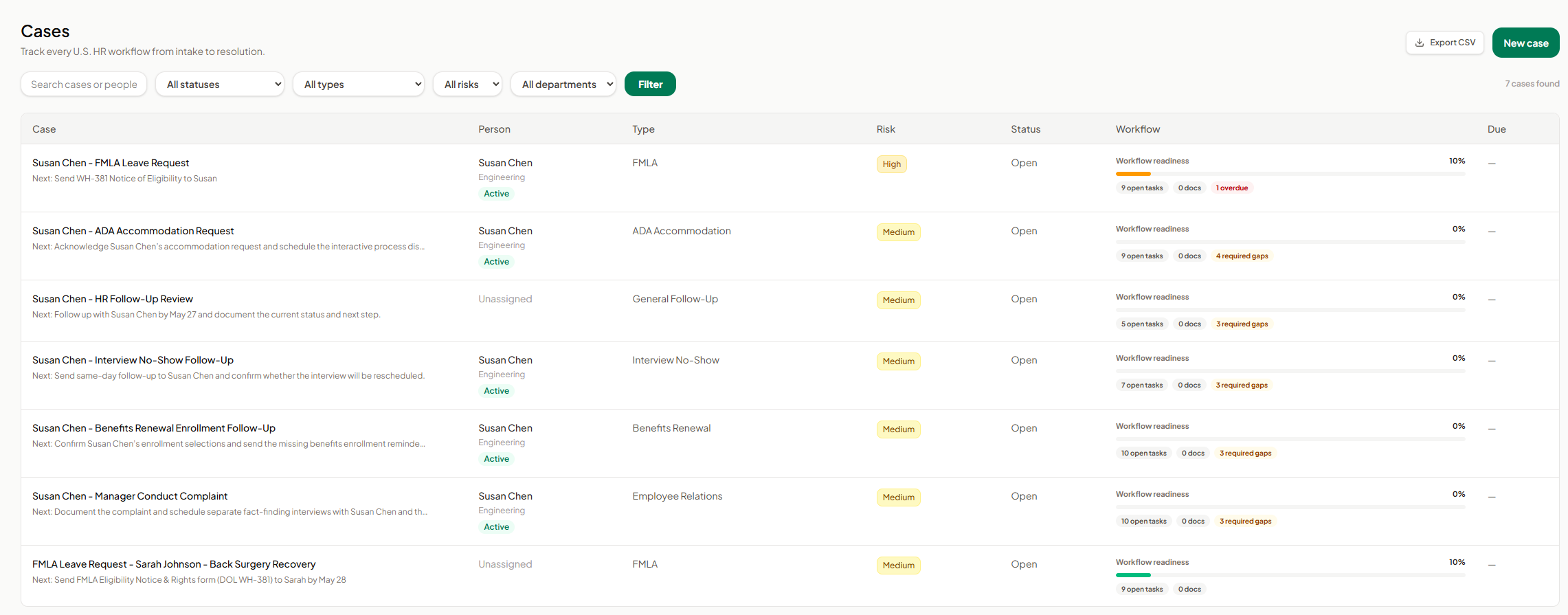
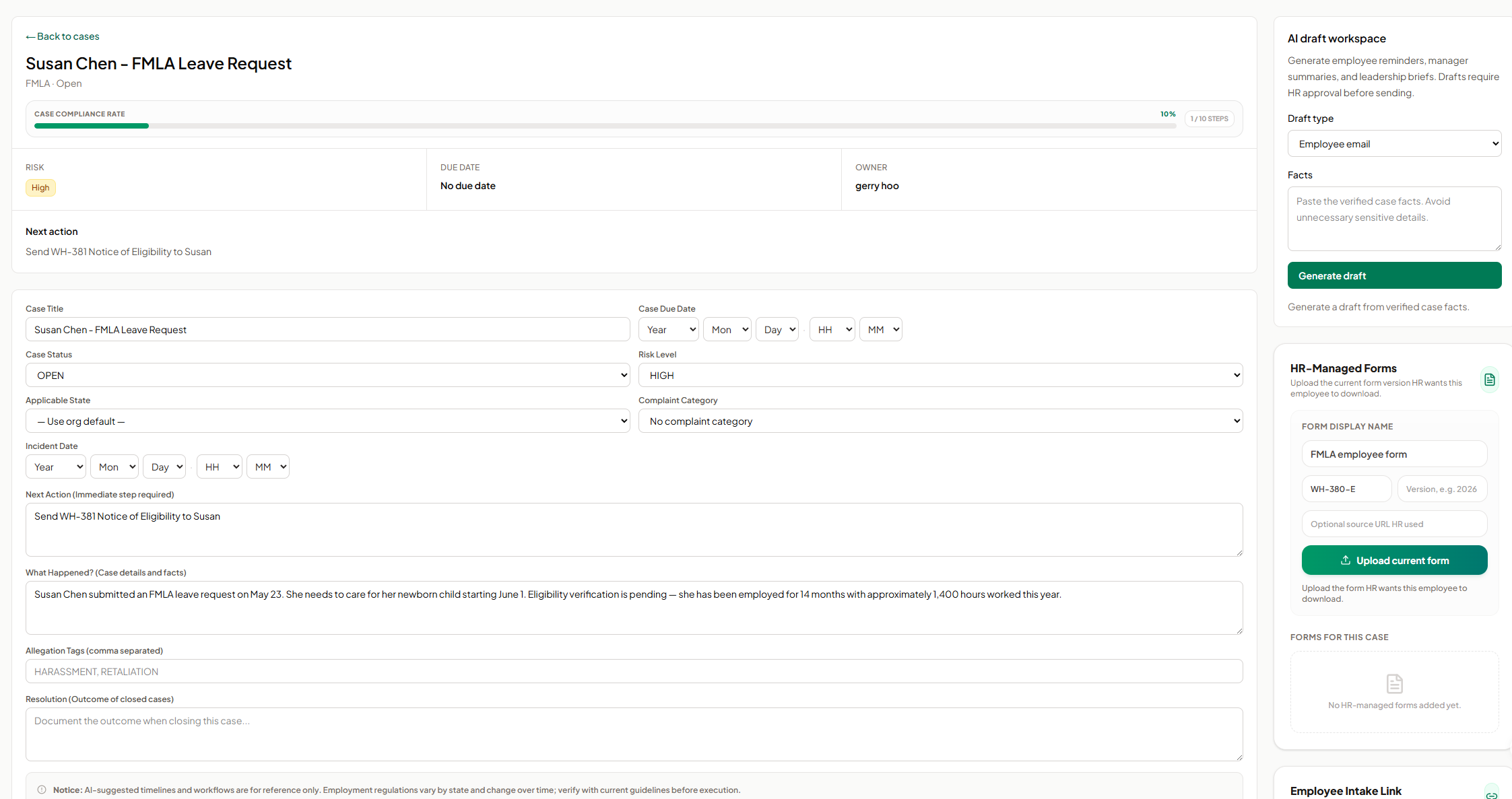
    Screenshot of AI SoloHR FMLA workflow screen showing how HR teams can track leave request details, eligibility review, notice dates, certification deadlines, designation status, payroll or benefits status, and return-to-work readiness in one structured case workflow. The screen shows a case moving from intake through certification and designation, with workflow state, blocking reason, key dates, status fields, notes, and a save action for maintaining an organized FMLA case record.Screenshot of AI SoloHR HR-managed forms screen showing how HR can upload and organize the current form version for an employee case. The panel includes fields for form display name, form code, version, optional source URL, and an upload action, helping HR keep case-specific forms such as FMLA employee forms connected to the relevant case record.Screenshot of AI SoloHR AI draft workspace showing how HR can generate draft communications from verified case facts. The screen includes a draft type selector for employee emails, manager summaries, or leadership briefs, a case facts field, and a generate action, with drafts positioned for HR review before sending.Screenshot of AI SoloHR cases dashboard showing a centralized list of HR workflows from intake to resolution. The screen includes search, status, type, risk, and department filters, plus case rows for FMLA, ADA accommodation, interview no-show, benefits renewal, employee relations, and general follow-up workflows. Each row shows the related person, case type, risk level, status, workflow readiness, open tasks, document count, required gaps, overdue items, and export or new case actions.Screenshot of AI SoloHR case detail screen for an FMLA leave request, showing the case summary, compliance progress, risk level, owner, next action, due date, editable case fields, incident details, case facts, tags, and resolution notes. The screen also includes side panels for AI draft generation and HR-managed forms, helping HR keep case tracking, communication drafts, and required form uploads connected to the same employee case record.Screenshot of AI SoloHR new case screen showing how HR can create a structured HR case by capturing the minimum facts first. The form includes primary person, case title, workflow type, risk level, applicable state, next action, and case summary fields, with a disclaimer reminding users to verify AI-generated workflow guidance against current official requirements.